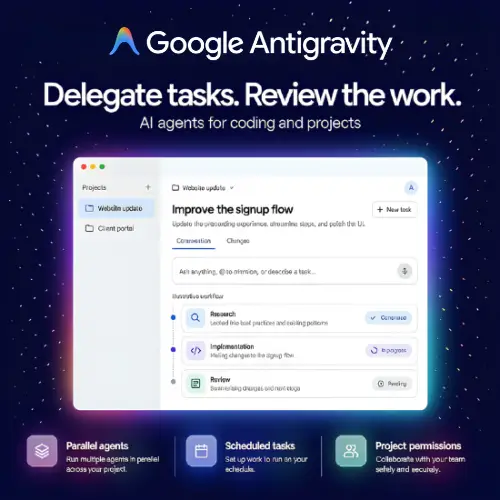
Imagine you have a big school project. You could do every part yourself, or you could ask a few helpful friends to handle different pieces while you keep an eye on everything. That is basically what Google Antigravity does, but for coding and software projects. Instead of friends, you get AI agents. You tell them what to do, give them access to your files, and then check the work they produce.
Google Antigravity is a desktop application made by Google. It runs on macOS, Windows, and Linux, so most people can use it regardless of what computer they have . The whole idea is simple: you describe a task, the AI agent works on it, and you review the results. It is built for people who want to hand off serious coding work to AI and then inspect what comes back, rather than typing every single line themselves.
What Makes Google Antigravity Different?
Most AI coding tools you may have heard of, like Cursor or GitHub Copilot, live inside a code editor. They help you write code faster while you are the one sitting at the keyboard. Google Antigravity flips that around. It is an agent-first application. The agent is the star of the show, and you act more like a manager or reviewer.
The app does not include a full code editor like a traditional IDE. That is intentional. Google made Antigravity 2.0 as a standalone agent application, separate from the original Antigravity IDE . The point is to give the agent room to work while you focus on giving clear instructions and checking the output. If you prefer a terminal, there is also the Antigravity CLI. If you want agent features inside your favorite editor, there are IDE extensions for supported editors.
Key Features That Make It Useful
Parallel subagents. This is one of the coolest parts. If you have a big task, one agent can investigate a bug while another looks at the related tests. Instead of waiting for one thing to finish before starting the next, the work gets divided into smaller jobs that run at the same time . Background task management means the app keeps working even when you are not actively watching every conversation.
Projects that span multiple folders. In Antigravity, work is grouped into projects, and a single project can include more than one folder. Each project has its own settings and permissions . This is handy if you are maintaining related repositories or if a small team wants to keep project documents next to the code. You are not locked into one folder per conversation.
Scheduled tasks. You can set up recurring instructions or one-time jobs. Maybe you want an agent to run a repository maintenance check every week, or you want it to revisit a task later in the day . Scheduled tasks are powerful, but you need to be careful. Before you let an agent work unattended, define the permitted scope clearly. You do not want an agent poking around in places it should not be.
Visual review of agent output. As the agent works, you can inspect the artifacts it generates. You can give feedback while the work is still in progress, which helps steer the agent toward what you actually want. It is much better than waiting until the end and discovering everything went in the wrong direction.
Permission and command controls. Antigravity includes project permissions and command approval controls. You decide what the agent is allowed to access and what commands it can run. This matters a lot. Before letting an agent touch production systems, check file access, command permissions, and the changes it has generated. Human review is still essential, no matter how smart the agent seems.
The Models Behind the Agents
Antigravity uses Gemini models, and the exact model you can access depends on your plan. The big one right now is Gemini 4 Argon. It is available in the Antigravity desktop app, the CLI, and supported IDE extensions for eligible subscribers. Argon was built for hard problems. Google has used it internally, with over 100,000 engineers using Argon in an internal version of Antigravity to tackle complex production issues across codebases .
Interestingly, Argon is not supported in the original Antigravity IDE. That is one of the quirks of the ecosystem. If you want Argon, you need the standalone Antigravity 2.0 app, the CLI, or supported extensions. Other model choices depend on your plan, so it is worth checking what is available before you commit.
Pricing: What Does It Cost?
Pricing is one of those things that can get confusing, so let us put it in a simple table.
| Plan | Price (Monthly) | What You Get |
|---|---|---|
| Free Individual | $0 | Usage limits apply, basic access to get started |
| Google AI Pro | $19.99 | Higher allowances, more model access, optional credit overages |
| Google AI Ultra | $99.99 – $100 | Five times the capacity of Pro, priority access to Antigravity |
| Business (via Google Cloud) | Pay-as-you-go | Organizational billing, admin options, $0 seat fee |
The free tier is a good way to try things out. You get usage limits, but for a student or someone curious about agentic coding, it is enough to see whether the workflow suits you. The paid tiers are really for people who use Antigravity heavily or need more model access. Business access through Google Cloud adds organizational controls, which matters if a company is paying the bill and needs oversight.
One thing to watch: Antigravity uses a credit system for usage beyond your plan’s baseline. If you turn on credit overages, you can keep working after your quota runs out, but you pay for those extra credits at consumption rates . It is not a flat subscription at that point. For heavy users, it is worth setting that toggle deliberately rather than leaving it on by accident.
Who Should Use Google Antigravity?
Antigravity makes sense when you want to delegate substantial work and inspect the results in a visual application. If you are the kind of person who likes describing a task and then reviewing what an agent produces, this is built for you. It suits developers maintaining related repositories, small teams keeping documents next to code, and anyone who wants to schedule recurring maintenance or investigation tasks.
It is less suitable if you want a traditional code editor with AI autocomplete. Antigravity 2.0 is not an IDE. It is an agent application. If you love typing code and want AI to assist you line by line, tools like Cursor or GitHub Copilot will feel more natural. Antigravity is for when you want the agent to do the work while you review.
It also still needs clear instructions and human review. An agent is not a replacement for understanding what your code does. If you give vague instructions, you will get vague results. If you give access to everything without checking permissions, you might get changes you did not want. The tool is powerful, but the responsibility is still yours.
Final Thoughts
Google Antigravity represents a shift in how we think about coding with AI. Instead of AI helping you type faster, it is AI doing the work while you manage and review. The desktop app, CLI, and IDE extensions give you options for how you want to interact with agents. Parallel subagents, scheduled tasks, and multi-folder projects make it feel more like managing a small team than using a fancy autocomplete tool. The pricing starts free, which is a fair way to let people try before paying. Just remember: clear instructions and careful review are not optional. The agent is there to help, not to take over your judgment.
Alternatives to Google Antigravity
Cursor
An AI code editor built for developers who want agent assistance alongside direct editing and code completion. It feels like a familiar IDE but with AI deeply integrated into the workflow.
OpenAI Codex
A coding agent designed for implementing features, investigating bugs, and reviewing repository changes. It works well for developers who want an agent that can handle repository-level tasks.
Claude Code
A terminal-first coding agent known for strong reasoning and task persistence. It suits developers who prefer command-line workflows and want an agent that can work through complex, multi-step problems.