Imagine you are working on a big software project. You have an AI coding agent helping you write code. It is doing a great job, but you realize you have three other things that need to be done. You want one AI to fix a login bug, another to write unit tests, and a third to update the documentation.
If you try to do this in a normal setup, things get messy fast. The AIs might try to edit the same files at the same time, causing huge errors. This is exactly the problem that Orca AI solves.
Orca is a free, open-source desktop application built for developers who want to run several terminal-based coding agents on the same project at the exact same time. It keeps everything organized, prevents file conflicts, and puts you in total control. Let us break down how it works and why it might be the perfect tool for your workflow.
What Exactly is Orca AI?
To understand Orca, you first need to know what it is not. Orca does not have its own AI brain or coding model. You cannot just download it and start typing prompts without setting anything up.
Instead, think of Orca as a master control center. You bring the AI coding agents and subscriptions you already use. Maybe you use Claude, GPT, or another terminal-based CLI tool. Orca simply manages their terminals, branches, files, and output from one single desktop screen. It works with almost any terminal-based agent and even includes ready-made presets for the most popular coding command-line tools.
The Magic of Git Worktrees
The biggest and most important feature of Orca is how it handles Git worktrees. If you are a 10th-grade student learning to code, here is a simple way to understand it.
Normally, a Git repository is just one folder on your computer. If two AI agents try to change the same file in that folder at the same time, they will crash into each other. This is called a merge conflict, and it wastes a lot of time.
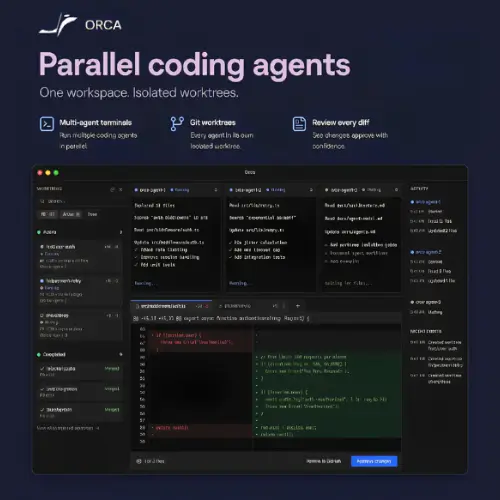
Orca fixes this by giving every single task its own “worktree.” A worktree is basically a separate, hidden copy of your project’s files. Because each AI agent gets its own isolated folder, Agent A can fix the login screen while Agent B writes tests, and they will never mess up each other’s work. Once they are both done, you can easily review their separate changes and merge them into the main project.
Key Features That Make Orca Stand Out
Orca is packed with features designed to make managing AI agents feel like a breeze. Here are the standout tools you get right out of the box.
A Complete Desktop Interface
You do not need to keep ten different terminal windows open. Orca combines an agent task board, split terminals, a built-in file editor, and source control into one clean screen. You can easily see what an agent changed, add notes to the code differences, make quick fixes, and commit the code without ever leaving the app.
GitHub and Linear Integration
When you are juggling multiple AI tasks, tracking them is hard. Orca lets you attach GitHub pull requests, issues, and checks directly to the specific agent worktree. If you use Linear for project management, you can attach those tasks too. This means you always know exactly which AI is working on which project ticket.
Embedded Browser for Visual Inspection
Sometimes code needs to be seen, not just read. Orca includes a built-in web browser with a visual inspection mode. If your AI agent is building a website or a web app, you can look at it right inside Orca. Even better, you can take a screenshot or send visual feedback directly back to the agent so it can fix UI bugs.
Mobile Companion App
We all need to step away from the computer sometimes. Orca has a mobile app for your phone. It is not meant to replace your desktop editor, but it is perfect for checking on your agents while you are eating lunch. You can see their progress and tap to approve things if an agent needs your permission to move forward.
Searchable Transcripts and Remote Dev
If an AI made a weird choice three hours ago, you can use the agent transcript search to find the exact command or message. Also, if your main computer is not powerful enough, Orca supports remote development over SSH, letting you connect to a stronger machine in the cloud.
Who Should Use Orca AI?
Orca is an amazing tool, but it is not for everyone.
If you are a beginner who just wants one AI to help you write a simple script, Orca is overkill. The concept of Git worktrees and parallel branches might be confusing if you are just starting out. A standard terminal and a basic Git client are all you need.
However, if you are an experienced developer who already gives a lot of heavy work to coding agents, Orca is a game-changer. Running parallel sessions can eat up your API usage limits very quickly, so you need to be comfortable with that. But if you are used to handling several branches, multiple repositories, and heavy agent runs at the same time, Orca will save you hours of frustration.
Pricing and Availability
One of the best things about Orca is its pricing model. Because it is an open-source project, the software itself will not cost you a dime.
Here is a simple breakdown of what you can expect to pay:
| Feature / Component | Cost | Details |
|---|---|---|
| Orca Desktop App | 100% Free | Open-source software released under the MIT license. |
| Account / Login | Free | No Orca login or account creation is required to use it. |
| Mobile Companion App | Free | Available for checking progress and approving tasks on the go. |
| AI Model Usage | Varies | You must pay your specific AI provider (like OpenAI or Anthropic) for API credits or subscriptions. |
| Platform Support | Free | Available for macOS, Windows, and Linux. |
As you can see, the tool itself is completely free. Your only real costs will be the API credits or monthly subscriptions you already pay to the AI model providers you choose to connect to Orca.
Final Thoughts
Orca AI is a brilliant piece of software for the modern developer. As AI coding agents become smarter and more common, the bottleneck is no longer the AI itself, but how we manage them. Orca takes the chaos out of running multiple agents by using smart Git worktrees and a beautiful, unified interface.
It is free, open-source, and respects your privacy by not requiring any logins. If you are ready to level up your AI-assisted coding workflow and want to run multiple agents without the headache of file conflicts, Orca is absolutely worth downloading.
Alternatives to Orca AI
If Orca does not quite fit your needs, here are some of the best alternative tools that offer similar features for AI-assisted coding:
Antigravity CLI
A terminal coding agent featuring parallel subagents, multi-step execution, sandboxing, and plugins. It also includes MCP support and seamless desktop handoff.
Buzz
An open-source workspace where developers and AI agents collaborate in channels. It allows teams to review code, run workflows, and retain signed activity records.
OpenAI Codex
Runs coding tasks in parallel cloud sandboxes, edits repositories, executes tests, and prepares pull requests for review. It is highly integrated with the GitHub ecosystem.
Cursor
A VS Code-based editor with codebase-aware chat, tab completion, and autonomous agents. It offers deep terminal access and integrated code review features.
Cline
An open-source coding agent for VS Code, JetBrains, and the command line. It edits files and runs commands directly, featuring strict approval controls for safety.