
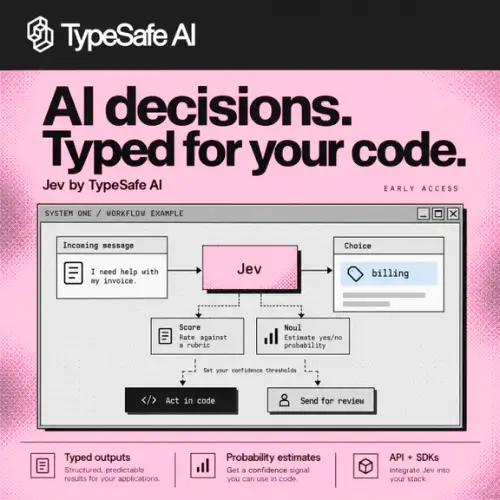
Most AI tools you know are built to talk to humans. You ask a question, and it writes a paragraph back. TypeSafe AI is doing something different. Its main product, called Jev, is an AI model built to talk to software, not people. It does not write stories, answer emails, or chat. Instead, it looks at information your app sends and makes a structured decision—like picking a category, giving a score, or saying whether something is probably true or false .
Think of it like this: a normal AI is like a friend who explains things to you. Jev is more like a very fast referee who blows the whistle and holds up a card. Your code decides what to do next based on that card.
What Jev Actually Does
Jev uses three simple “question types.” You send it some context (a message, a document, a request) and a typed question. It sends back a clean answer your code can use without any guessing .
The first type is Choice. You give Jev a list of options, and it picks the best one. For example, a support app could ask: “Which team should handle this?” with options like “Billing,” “Tech Support,” or “Returns.” Jev returns the chosen option plus a probability score.
The second type is Score. You give Jev a rule or a scale, and it rates the input. A store might ask: “How angry is this customer, from 1 to 5?” Jev gives back a number and a confidence level.
The third type is Noul (a made-up word for a simple yes-or-no probability). You give Jev a statement, and it tells you how likely that statement is to be true. It is not a hard yes or no—it is a probability between 0 and 1.
The clever part is that you can mix all three question types in a single API call. A support tool could ask three things at once: “Which team?” “How frustrated is the customer?” “Is this urgent?” Jev evaluates all three questions in parallel against the same context. Adding more questions barely slows it down .
Why This Matters for Developers
If you have ever tried to use a normal chatbot AI inside software, you know the pain. You ask it for a category, and it replies with a friendly sentence: “Sure! Based on what you said, I think this is probably a billing issue.” Now your code has to read that sentence and somehow figure out the actual answer. That is messy and breaks easily.
Jev skips all that. The answer is already structured. Your code can directly use it. There is no parsing, no guessing, no “sorry, I did not understand” loops.
Jev is also fast and cheap. Independent tests show it can make thousands of decisions in minutes for just pennies. One experiment ran 12,000 job-matching evaluations in about three minutes for roughly seventeen cents . The official price is $0.042 per million input tokens, and output tokens are free . That is cheaper than many popular AI models.
The Confidence Feature
One thing that makes Jev stand out is its focus on confidence. When it picks an option or gives a score, it also tells you how sure it is. Choice and Score questions return probability distributions and a confidence value .
Why does this matter? Because not every decision should be automatic. If Jev is 95% sure a message is spam, your code can delete it automatically. But if Jev is only 60% sure, your code might send it to a human instead. This lets developers build systems that are careful, not just fast.
What Jev Is Not Good At
Jev is not a general-purpose AI. It will not write your blog posts, summarize a long article in friendly language, or answer a customer’s chat message. It is built for narrow, specific judgments .
The makers of Jev say you should break big questions into smaller ones. Instead of asking “Is this a good job candidate?”, ask five separate questions: “Do they have the right education?” “Do they have enough experience?” “Do they live in the right city?” Then combine the answers in your code. This keeps each judgment simple and reliable.
Also, a structured answer does not always mean a correct answer. One independent test found that Jev sometimes mixed up job seniority levels—ranking a manager above an assistant manager for an assistant role . The lesson is simple: test Jev on your own data before letting it make important decisions.
Pricing at a Glance
A Word of Caution
In October 2026, a security research firm called HiddenLayer published a report saying Jev may be more vulnerable to certain text-based attacks than traditional large language models . The report said Jev’s simpler, faster design removes some of the safety checks that bigger chat models have.

TypeSafe did not publicly respond to the report. But the takeaway is not “do not use Jev.” The researchers themselves said Jev is useful and fast. The real lesson is the same one that applies to all AI: never let any model trigger serious actions without a backup check. If Jev is deciding whether to refund money or lock an account, have a human review step or a second rule-based check.
How to Try It
TypeSafe AI offers a browser playground, an HTTP API, and Python and JavaScript SDKs. There is also an integration skill for coding agents. Access is still developer-focused—you need to write code to use it, not just click around a dashboard.
The company is in early access with a waitlist on its website, though at least one report suggested the waitlist was being lifted in late September 2026 . If you are a developer building an app that needs to classify things, route requests, or score content, Jev is worth a look.
It is not magic. It is a tool. And like any tool, it works best when you understand what it is for—and what it is not.



