If you are a creator or a small business owner, you already know the struggle. You have good ideas, but sitting down to write posts for five different apps feels like a part-time job. You write something for LinkedIn, then realize you need a different version for Instagram, and maybe a short video for TikTok. By the time you finish posting everywhere, you are too tired to actually talk to your audience.
Hypefury is a tool built to fix that exact problem. It combines AI writing help with scheduling, so you can prepare a bunch of posts in one sitting and send them out everywhere without copy-pasting like a robot. In this article, I will walk you through what Hypefury does, who it is for, what it costs, and whether it is worth your time in 2026.
What Is Hypefury and Who Is It For?
Hypefury is a social media management tool designed mostly for creators, coaches, newsletter writers, and small business owners. Its main job is to help you show up consistently on social media without losing your mind .
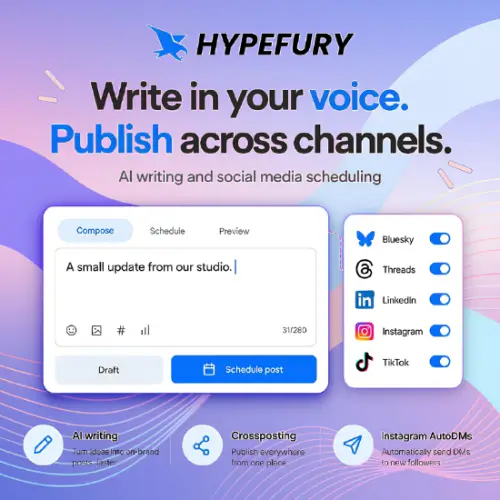
The platforms it supports are Bluesky, Threads, LinkedIn, Instagram, and TikTok. One important thing to know right away: Hypefury no longer supports X (Twitter). If X is your main platform, you will need to look elsewhere . But if you are focused on the newer networks like Bluesky and Threads, or you want to make LinkedIn and Instagram easier, Hypefury is built for you.
The tool is especially good for people who like to work in batches. Instead of posting something random every day, you can sit down once a week, write all your posts, and schedule them to go out at the right times. This is a much healthier way to use social media, and Hypefury makes it simple.
The AI Writing Assistant That Learns Your Voice
One of the scariest things about AI writing tools is that they often sound like robots. They use big words and weird phrases that no real person would ever say. Hypefury tries to solve this by learning from your existing posts.
When you use the AI writing assistant, it looks at how you already talk online. It picks up on your tone, your favorite phrases, and the way you structure your sentences. Then it generates drafts that sound like you, not like a machine . You can always edit these drafts before they go out, so you are still in control.
There is also an inspiration library. If you are staring at a blank screen and have no idea what to write, you can browse examples and writing prompts to get your brain moving. It is like having a friend say, “Hey, why don’t you try writing about this?”
Repurposing Content: One Post Becomes Five
This is where Hypefury really shines. You do not have to create separate content for every single platform. You can write one good text post, and then use Hypefury to turn it into different formats.
For example, you can take a written post and turn it into an Instagram image. You can repurpose your content into Reels or TikTok videos. You can also publish LinkedIn carousels without needing a separate design tool . Crossposting and scheduling mean you can send all these different versions out to the right platforms without manually uploading each one.
Think about how much time that saves. Instead of spending three hours making content for five platforms, you spend one hour writing and a few minutes repurposing. The rest of your day is free for actual work, or for replying to comments and messages.
Autoplugs and AutoDMs: The Promotional Helpers
Hypefury also has some clever features to help you promote your stuff without being annoying.
Autoplugs let you automatically add a first comment to your post. This comment can promote your newsletter, a product, or your website. It is a soft way to say, “Hey, if you liked this, here is more.” Because it is a comment and not the main post, it feels less pushy.
Instagram AutoDMs are even more interesting. You can set a keyword, like “GUIDE” or “FREE.” When someone replies to your post or Reel with that word, Hypefury automatically sends them a direct message with the link you chose . This is a fantastic way to grow your email list or deliver a free download without manually checking your DMs every five minutes.
It is important to note that these are publishing automations, not AI writing features. They do not write your posts for you, but they do handle the boring follow-up work.
Engagement and Analytics: Finding Your People
Growing on social media is not just about posting. You also need to talk to people. The engagement builder helps you find conversations worth joining. You can watch specific accounts, track keywords, and even import Bluesky lists to see what people are talking about .
The analytics section is simple but useful. You can see which posts got the most views, likes, and profile clicks. There is also a shared content history, so you can look back at what you posted last month and see what worked. This helps you learn from your own data instead of guessing.
Hypefury Pricing: What Does It Cost?
Hypefury has paid subscriptions only. There is a free trial, but there is no permanent free plan. The pricing is a little different from some other tools because you can choose between paying for just the channels you need or paying one price for everything.
Here is a simple breakdown of the plans based on the official information available:
| Plan Name | Price (Monthly) | What You Get |
|---|---|---|
| Flexible | $6 per channel / month | Pay only for the platforms you connect. Good if you only post on one or two places. |
| Full | $19 per month | All supported channels included. Better if you post on three or more platforms. |
Note: Prices and plan details can change. It is always best to check the Hypefury website for the most current information .
Both plans come with a 7-day free trial. You do not need a credit card to start, so you can test it out and see if it fits your workflow.
There are a couple of small things to remember. Direct publishing to Instagram requires you to have a business account. Personal Instagram accounts will not work with the scheduling feature. Also, the cheaper Flexible plan has some limits on things like Tweetshots, while the Full plan gives you more room to play .
Pros and Cons: The Honest Truth
No tool is perfect, and Hypefury is no exception. Here is a quick look at the good and the not-so-good.
What I like:
- Batch working is easy. The interface is clean and distraction-free, so you can write a week of content in one go.
- Repurposing saves hours. Turning a text post into an image or a video script is a huge time-saver.
- The AI actually sounds like you. Training it on your own posts makes a big difference.
- AutoDMs are a smart growth hack. They help you capture leads without manual work.
What to watch out for:
- No X/Twitter support. This is a dealbreaker for some people. If you are a Twitter-first creator, you need a different tool .
- No free plan. The trial is nice, but after seven days, you have to pay.
- Automations can feel risky. Some platforms do not love automation. Hypefury is careful, but you should always follow the rules of the platform you are using.
Final Thought: Is Hypefury Worth It?
If you are a creator who posts on LinkedIn, Instagram, TikTok, Bluesky, or Threads, and you are tired of spending your whole day copy-pasting, Hypefury is absolutely worth a try. The combination of voice-learning AI, easy repurposing, and promotional automations makes it a strong all-in-one tool for people who want to work smarter, not harder.
It is not for everyone. If you are a hardcore X user, or if you only post once a month, you might not need everything Hypefury offers. But for the busy creator who wants to stay consistent and still have a life outside of social media, it is a very solid choice. The seven-day trial is free, so you have nothing to lose by giving it a shot.
Alternatives to Hypefury
If Hypefury does not feel like the right fit, here are some other best tools you can look at. Each one has its own strengths.
Typefully
A clean, simple tool for writing and scheduling text-based posts. It is great for people who focus on writing and want a calm, distraction-free editor. It supports X, LinkedIn, Bluesky, and Threads.
SocialBee
A more advanced tool for managing multiple accounts. It focuses on content categories and recurring posts. It also has approval workflows, which is helpful if you work with a team or clients.
Lately
This tool is all about repurposing. It takes long articles, audio, and video and uses AI to chop them up into social posts. It is perfect if you already create long-form content and want to squeeze more value out of it.
Buffer
A classic, reliable scheduler that works with almost every platform. It is simple, affordable, and great for beginners who just want to schedule posts without a lot of extra features.
Metricool
A strong all-rounder that includes analytics, scheduling, and competitor tracking. It is a good choice if you want to study your numbers and see how you stack up against others in your niche.