If you love anime, you probably have a lot of ideas in your head. Maybe you want to design your own original character, create a profile picture, or make a short comic. In the past, you needed to know how to draw really well or hire an artist to bring those ideas to life. Today, AI tools have changed the game. One of the most interesting tools out there right now is AnimeArt Studio.
AnimeArt Studio is a browser-based AI anime generator. This means you do not need to download any heavy software or buy a super-expensive computer to run it. Everything happens right in your web browser. It gives you tools to create character illustrations, generate voiceovers, and even make short animated clips.
In this article, we will break down how AnimeArt Studio works, what it costs, and what you need to know about using your art for business. We will keep things simple and easy to understand.
How the Image Generator Works
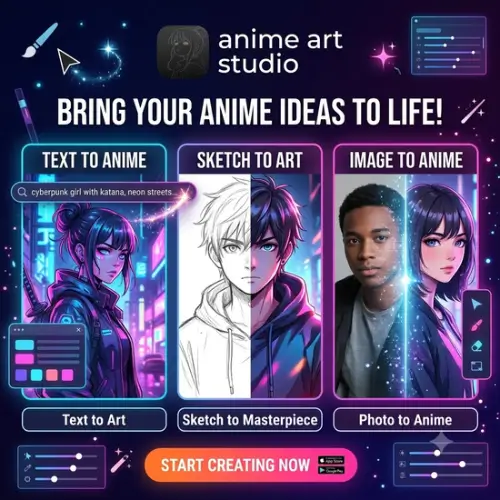
The core of AnimeArt Studio is its image generator. You can start by typing a written prompt. For example, you could type, “A cyberpunk schoolgirl with neon blue hair standing in the rain.” The AI will read your words and create an image.
You can also upload an existing image. This is super helpful if you have a rough sketch or a photo you want to turn into an anime-style picture.
One of the best features of this platform is the ability to try different AI models. Every AI model has its own unique art style. Some make very soft, pastel drawings, while others make sharp, dark, and action-packed art. You can run the exact same prompt across several different models to compare them. This is a lifesaver when you know exactly what your character should look like, but you just cannot decide on the final drawing style. You can just click through the options until you find the perfect fit.
Bringing Your Art to Life: Animation and Voice
Making a cool picture is great, but what if you want to make it move? AnimeArt Studio has an “Image to Video” tool. You start with an illustration you made on the site or one you uploaded. Then, you simply describe the movement you want. You can tell the AI to make the character blink, smile, or look around. You can even ask for specific camera angles. Once it is done, you can download the short video clip. This is a very practical tool if you want to add some motion to a character portrait for a social media post on Instagram or TikTok.
The platform also has a separate voice generator. If you want your character to speak, you just type in your script and pick a voice from their list. The tool supports 32 different languages, which is amazing if you are making content for a global audience.
However, there is one important thing to remember. These are individual creative tools. The website does not automatically combine your picture, your animation, and your voice into one finished movie. You will need to use a basic video editor on your phone or computer to put the voice and the video clip together yourself.
Who is this Tool For?
The image tools are perfect for original character concepts, profile pictures, and visual ideas for a story or a video game. If you are a writer who needs character references, or a game developer looking for quick concept art, this site saves you a lot of time. Because it is browser-based, students and hobbyists can use it on school Chromebooks or basic laptops without any issues.
AnimeArt Studio Pricing and Credits
AnimeArt Studio uses a paid credit plan. Generating AI images and videos takes a lot of computer power, so the site uses credits to keep track of what you use. You buy a monthly subscription, and that gives you a set allowance of credits.
A really nice feature is that your unused credits accumulate. If you do not use all your credits in January, they roll over to February. They do not just disappear at the end of the month. However, you should always check the cost of your chosen generation before starting a massive project, so you do not run out of credits halfway through.
Here is a simple breakdown of what the pricing plans generally look like:
| Plan Name | Monthly Cost | Credit Allowance | Best Features |
|---|---|---|---|
| Free Trial | $0.00 | 50 Credits | Basic models, standard resolution, watermarked downloads. |
| Starter | $9.99 | 500 Credits | All image models, basic voice tools, unused credits roll over. |
| Pro | $24.99 | 1,500 Credits | Image-to-video tools, priority generation, no watermarks. |
| Studio | $49.99 | 4,000 Credits | Max resolution, fastest processing, commercial use focus. |
(Note: Always check the official website for the most up-to-date pricing, as costs can change based on new feature updates.)
Commercial Use and Copyright Rules
This is the part where you need to pay close attention. If you want to use the art you make to make money, you need to understand the rules.
The product pages on the website advertise that you can use the images for commercial purposes. This means you can theoretically put them on t-shirts, use them in a game you are selling, or use them for client work.
But, the terms and conditions contain some restrictions on the commercial use of site materials. The rules do not always clearly separate between the site’s own materials and the AI-generated output. Because of this, it is highly recommended to get written confirmation from their support team before using the results in a big client project or a product you plan to sell. It is always better to be safe than sorry.
Also, a quick warning about copyright: generating a recognizable character from an existing anime franchise (like making a new picture of Goku or Naruto) does not give you the permission to use that character. The original creators still own those characters. You can make them for fun, but you cannot sell them. Stick to your own original characters for commercial projects.
Final Thoughts
AnimeArt Studio is a very solid, easy-to-use tool for anyone who loves anime art. The fact that it runs entirely in your browser makes it super accessible. Being able to test different art models on the same prompt is a brilliant feature that helps you find the exact vibe you want. The animation and voice tools are great bonuses, even if you have to stitch them together yourself. Just be smart about your credits, read the commercial terms carefully, and have fun creating!
Alternatives to AnimeArt Studio
AnimeGenius
Anime image and video generation with pose controls, photo conversion and image editing. It is highly focused on giving users strict control over character poses and final image composition.
NovelAI
Anime illustration tools with character prompts and composition controls, alongside fiction writing. It is a great all-in-one platform for storytellers who want to write their stories and generate the art at the same time.
PixNova AI
A broader image toolbox with photo to anime conversion, enhancement and video tools. It is perfect for users who want to turn their real-life selfies into anime art while also getting access to general video editing features.