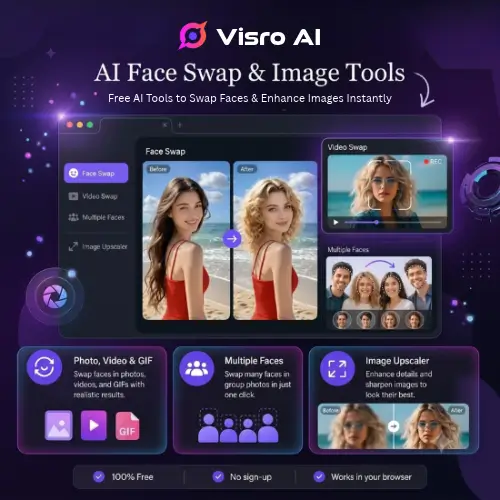
If you spend any time on social media, you have probably seen funny videos or photos where someone’s face is swapped with a celebrity or a friend. Making those used to require expensive software and a lot of technical skill. Today, things are much easier. Visro AI is a free, browser-based tool that lets you swap faces in photos, videos, and GIFs in just a few clicks.
You do not need to download any heavy software, and you do not even need to create an account. Whether you want to make a funny meme, create engaging content for your social media pages, or just fix up a low-quality picture, Visro AI gets the job done quickly. Let us take a simple look at what this tool can do, how to use it, and if it is worth your time.
What is Visro AI?
Visro AI is an online platform designed to make AI editing simple for everyone. Right now, it focuses mainly on two things: face swapping and image upscaling.
Because it runs entirely in your web browser, it works on almost any device with an internet connection. You do not need a powerful computer with a strong graphics card. The website handles all the heavy processing on their end. This makes it a great choice for students, casual users, and social media creators who just want quick results without dealing with complicated settings.
Who Should Use Visro AI?
This tool is built for everyday users. If you are a social media creator looking to make fun, engaging short videos or reels, Visro AI can help you add a creative twist to your content. It is also great for people who want to make custom memes for their friends.
Additionally, if you have old or blurry pictures on your phone, the built-in image upscaler can help bring them back to life. It is not meant for professional Hollywood-level video editing, but for quick, fun, and effective social media edits, it hits the mark.
How to Use the Face Swap Tool
Using Visro AI is very straightforward. The interface is clean, so you will not get lost in too many menus. Here is the basic step-by-step process:
- Upload Your Media: First, you upload the original photo, video, or GIF. The tool supports common formats like MP4, MOV, AVI, and GIF.
- Add the Replacement Face: Next, you upload the clear photo of the face you want to use as the replacement.
- Let it Process: Click the generate or process button. The AI will map the new face onto the original media.
- Download: Once it is done, you can download the result directly to your device. There are no annoying watermarks on your final file.
For group photos, the tool is smart enough to detect multiple faces. It will let you assign a different replacement face to each person in the picture separately.
Key Features to Know
Visro AI packs a lot of useful features into its simple design. Here is a breakdown of what you can do:
- Photo and Video Face Swapping: It handles both still images and short video clips smoothly.
- GIF Support: You can swap faces in animated GIFs, which is perfect for making reaction images for chats and social media.
- Group Photo Swaps: As mentioned, it can handle multiple faces in one frame, saving you from having to edit each person one by one.
- AI Image Upscaler: If your photo is blurry or low resolution, this feature sharpens it. It works with PNG, JPG, and HEIC files. It restores lost details and makes the picture look much clearer.
- No Watermarks: Unlike many free tools that ruin your picture with a giant logo, Visro lets you download clean files.
- Multiple Languages: The interface supports different languages, making it easy to use no matter where you are from.
Tips for the Best Results
AI face swap tools are smart, but they still need good input to give you a good output. If you want your swapped faces to look real and natural, keep these tips in mind:
- Use Clear Portraits: The replacement face photo should be clear, front-facing, and well-lit.
- Avoid Bad Angles: Side profiles or faces looking down at the ground will not work well. The AI needs to see the facial features clearly.
- Watch the Lighting: If the original video is very dark, the swap might look patchy. Try to use media with good, even lighting.
- No Obstructions: Make sure hands, hair, or other people are not covering the face in the original media. If the face is hidden, the AI will struggle to blend the new face properly.
Privacy and Security
When you use online tools, privacy is always a big concern. You are uploading personal photos, after all. Visro AI states that they take this seriously.
All uploaded files and the generated results are encrypted while on their servers. More importantly, they promise to delete your files within 24 hours. They also clearly state that they do not use your uploaded images to train their AI models. This gives you peace of mind that your personal pictures are not going to be used for something else.
Pricing and Plans
One of the biggest draws of Visro AI is that it is free to use. You do not need to enter your credit card details or sign up for a subscription just to try it out. However, because it is a free web tool, there are some limits. While the site mentions “unlimited access” in some places, heavy users might find that their face swap uses are limited by session to prevent server overload.
Here is a simple look at the pricing structure:
| Plan | Price | What You Get | Limitations |
|---|---|---|---|
| Free Tier | $0 | Face swap (photo/video/GIF), Image upscaler, No watermarks | Session limits on heavy use, no account needed |
| Premium/Pro | Not currently listed | N/A | Currently, the tool operates on a free, session-based model without a paid tier. |
Note: Since the tool is currently in a free access phase, pricing may change in the future if they introduce premium features.
What is Coming Soon?
If you look at the Visro AI home page, you will see mentions of a much wider image and video creation platform. They list an image generator, a video generator, a photo-to-anime converter, and an image-to-video tool.
However, it is important to know that these features are currently marked as “coming soon.” Right now, the platform is strictly focused on perfecting its face swapping and image enhancement tools. You cannot use it to generate a video from text just yet.
Final Thoughts
Visro AI is a highly practical, no-nonsense tool for quick media editing. It does exactly what it promises: it swaps faces in photos, videos, and GIFs, and it upscales blurry images. The fact that it requires no downloads, no sign-ups, and leaves no watermarks makes it incredibly convenient.
For social media creators and everyday users who want to make fun content or fix up old photos, it is a fantastic free resource. Just remember to use clear, well-lit photos for the best results, and keep an eye on session limits if you are doing a massive batch of edits. It is a simple tool that does its job very well.
Alternatives to Visro AI
If you want to explore other options that offer similar or expanded features, here are some of the best alternatives available right now:
A2E AI Videos
Combines traditional face swap and head swap features with talking avatars, lip sync, voice cloning, and image-to-video creation. This is the best choice if you want to create virtual presenters or talking head videos for your channels.
VidMage AI
Swaps faces in photos, videos, and GIFs, with additional tools for video upscaling, voice cloning, lip sync, and AI video generation. It is a great all-in-one suite if you need more than just basic face swapping.
Face Swap AI
A focused browser tool designed specifically for realistic face replacement in photos and videos. It is a close alternative for users who want a simple interface and do not need extra editing features.
PixNova AI
A free browser toolkit that goes beyond face swapping to include photo enhancement, upscaling, background removal, object removal, and AI image generation. Perfect for users who want a complete photo editing suite in their browser.
Magic Hour
A broader AI video platform that includes face swap alongside video-to-video transformation, animation, lip sync, and text-to-video generation. Ideal for creators looking to make highly stylized and animated social media content.