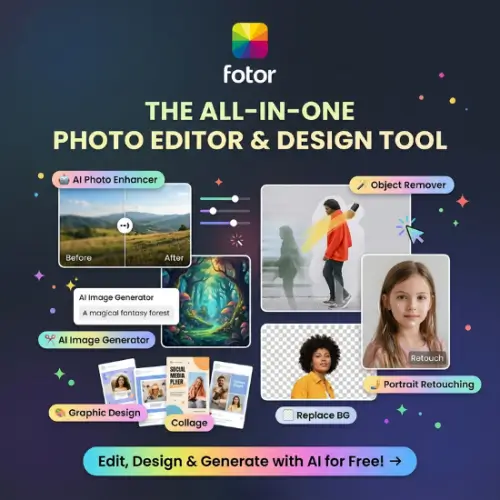
Fotor is an online photo editing and AI design platform that helps users edit pictures, create graphics, remove backgrounds, improve image quality, and generate new visuals. It combines traditional photo editing tools with modern AI features, making it useful for beginners, content creators, photographers, marketers, and small business owners.
One of the best things about Fotor is that you do not need advanced photo editing skills to use it. Most tools are simple, and many tasks can be completed with just a few clicks. You can upload an image, choose the editing option you need, and let Fotor do the work.
Whether you want to improve a product photo, create an Instagram post, remove unwanted objects, or generate an AI image, Fotor provides several tools in one place.
In this Fotor review, we will explore its main features, AI tools, pricing plans, advantages, disadvantages, and some of the best alternatives you can try.
What Is Fotor?
Fotor is an online photo editor and AI-powered creative platform. It provides tools for editing photos, designing graphics, creating collages, and generating images using artificial intelligence.
The platform started as a photo editing solution but has expanded into a larger creative platform with AI image generation, AI video creation, portrait editing, background removal, and other smart features.

Fotor is designed for people who want good-looking images without spending hours learning complicated editing software.
You can use it directly through your web browser or download its applications for Windows, Mac, Android, and iOS.
Another interesting feature is its AI assistant, called Sisi. Instead of manually using different editing tools, you can describe what you want to change and let the AI assistant help with the task.
Main Features of Fotor
Fotor offers a wide range of photo editing and AI features. Let’s look at some of its most useful tools.
1. Online Photo Editor
Fotor comes with a traditional photo editor that includes all the basic editing options most users need.
You can upload a picture and make different changes without installing complicated software.
Some of its editing options include:
- Crop and resize images.
- Adjust brightness and contrast.
- Change exposure and saturation.
- Apply filters and effects.
- Add text and frames.
- Adjust colours and sharpness.
- Retouch portraits.
- Rotate and straighten images.
These tools are helpful when you want to make small improvements to your pictures before sharing them online.
The editor is suitable for beginners because most options are easy to understand.
2. AI Background Remover
Removing backgrounds is one of the most useful features of Fotor.
Normally, removing a background requires selecting the subject carefully and working with editing layers. This can take time, especially for beginners.
Fotor uses AI to identify the main subject and separate it from the background automatically.
You can use this feature to:
- Remove backgrounds from product photos.
- Create transparent PNG images.
- Prepare product images for online stores.
- Create professional profile pictures.
- Replace unwanted backgrounds.
After removing the background, you can add a new colour or background image to make the picture look more attractive.
This feature can save time for ecommerce sellers, designers, and social media creators.
3. AI Photo Enhancer
Sometimes, pictures do not look as good as expected. They may be blurry, dark, or have poor image quality.
Fotor’s AI Photo Enhancer helps improve these images automatically.
It can adjust lighting, improve details, increase clarity, and make photos look better.
You can use it for old photographs, product images, portraits, and pictures taken in poor lighting.
It is especially useful when you have an image that you want to reuse but its quality is not good enough.
However, AI enhancement cannot always recover details that were never present in the original image.
4. AI Object Remover
Have you ever taken a beautiful picture but noticed an unwanted object in the background?
For example, there may be a stranger, unwanted item, wire, or other distraction.
Fotor’s AI Object Remover helps remove these unwanted elements.
You can select the area you want to remove, and the AI will try to fill it using surrounding image details.
This feature is useful for travel photography, product images, social media pictures, and personal photographs.
The final result depends on the complexity of the image. Simple objects are generally easier to remove than large objects covering important details.
5. AI Image Generator
Fotor also allows users to create images using text prompts.
You simply describe the image you want, and the AI generates a visual based on your instructions.
For example, you can enter a prompt such as:
“Create a professional product photograph of a luxury skincare bottle on a clean white marble table with soft studio lighting.”
The AI will generate an image based on your description.
This feature can help with:
- Blog featured images.
- Social media graphics.
- Marketing visuals.
- Creative concepts.
- Product image ideas.
- Website graphics.
It is useful for people who need original visuals but do not have the time or budget to arrange a professional photoshoot.
6. AI Replace and Image Expansion
Fotor includes AI tools that allow you to change parts of an existing image.
With AI Replace, you can select an object or area and describe what you want to see instead.
For example, you can replace a plain background with a beach, change an object, or give a photograph a different look.
The AI Image Expander is another useful feature.
It allows you to extend an image beyond its original borders. The AI generates additional background details to fill the expanded space.
This is helpful when you need to convert an image into a different size or aspect ratio.
For example, you may have a square photograph but need a wider image for a website banner.
Instead of stretching the original picture, you can use AI expansion to create additional space around it.
7. AI Portrait and Avatar Generator
Fotor also offers AI-powered portrait and avatar tools.
You can use these features to create different portrait styles, improve your profile pictures, and experiment with creative looks.
Some useful applications include:
- Professional-looking profile pictures.
- AI-generated portraits.
- Creative social media avatars.
- Artistic portrait effects.
- Beauty and face retouching.
- Different photo styles.
These features can be helpful for influencers, content creators, and people who want attractive profile pictures without arranging a professional photoshoot.
8. AI Video Generator
Fotor is not limited to static images. It also includes AI video generation tools.
You can use AI to create short video clips from text descriptions or existing images, depending on the available generation tools and models.
This can help creators turn their ideas into short visual content without using complicated video editing software.
It may be useful for:
- Social media videos.
- Creative advertisements.
- Product presentations.
- Animated photographs.
- Short promotional clips.
Keep in mind that video generation uses AI credits, and the number of credits required depends on the selected model, duration, and output quality.
9. AI Agent Sisi
Sisi is one of the interesting additions to the Fotor platform.
It is an AI assistant that allows users to describe their creative requirements using natural language.
Instead of manually searching through different editing options, you can explain what you want to achieve.
For example:
“Change the background of this product image to a modern studio setup.”
The AI assistant can understand your request and help perform the editing task.
Fotor also supports AI-assisted image and video creation through its agent-based workflow.
This feature is especially useful for beginners who do not know which editing tools they should use.
However, AI Agent usage has limits depending on your subscription plan.
10. Collage Maker and Design Templates
Fotor includes a collage maker that allows you to combine multiple pictures into one design.
You can choose from different layouts, add borders, adjust spacing, and customise the final result.
It also provides ready-made templates for different purposes.
Some common uses include:
- Instagram posts.
- Facebook graphics.
- YouTube thumbnails.
- Posters and flyers.
- Business promotions.
- Birthday cards.
- Marketing designs.
You can also add stickers, icons, stock images, fonts, and other design elements.
These resources make Fotor useful for people who regularly create visual content.
11. Batch Photo Editing
Editing pictures one by one can take a lot of time, especially when you have hundreds of product images.
Fotor’s batch editing feature helps process multiple images together.
Depending on the selected batch tool, you can perform tasks such as resizing, adjusting, changing formats, and background editing.
This can be useful for ecommerce sellers, photographers, and businesses that manage large numbers of images.
Batch editing is particularly valuable when you want multiple product photos to follow the same style.
How to Use Fotor?
Getting started with Fotor is simple. You do not need professional editing experience.
Follow these steps:
Step 1: Visit the Official Website
Open the Fotor Official website
You can access the online editor directly through your browser.
Step 2: Create an Account
Sign up for a Fotor account if required. You can explore the available free tools and features.
Step 3: Choose Your Tool
Select the feature you want to use.
For example, you can choose Photo Editor, Background Remover, AI Photo Enhancer, AI Image Generator, or Collage Maker.
Step 4: Upload Your Image
Upload the picture you want to edit. For image generation, you can enter a text prompt instead.
Step 5: Edit Your Image
Use the available editing options or AI features to make the required changes.
You can experiment with different effects and settings until you are happy with the result.
Step 6: Download Your Image
Once your editing is complete, download the final image.
Available export formats and quality options depend on your subscription and the selected feature.
Fotor Pricing and Plans
Fotor offers a free Basic plan along with three main paid subscription options: Pro, Pro+, and Max.
The free version is useful for testing the platform, while paid plans provide more AI credits, additional storage, premium editing features, and higher usage limits.
Here is a comparison of the available plans.
| Plan | Price | Main Features |
|---|---|---|
| Basic | Free | Basic editing, limited AI credits, 512MB storage, limited templates and effects |
| Pro | Paid | 100 AI credits/month, 2GB storage, premium editing tools, 10 concurrent generations |
| Pro+ | Paid | 300 AI credits/month, 100GB storage, batch editing, brand kits, 30 concurrent generations |
| Max | Paid | Higher credit allowances, up to 500GB storage, 50 concurrent generations, advanced AI usage |
Important Pricing Information:
- The Basic plan is free forever.
- Pro and Pro+ include monthly AI credit allowances.
- Max offers different credit packages, depending on the selected subscription.
- Paid plans provide HD and watermark-free exports.
- AI Agent Sisi has separate usage limits depending on your plan.
- Subscription credits can roll over for up to five months while the subscription remains active.
Fotor’s official pricing page displays subscription prices based on the selected billing period and available offer. The exact prices were not consistently exposed in the official pricing information available for this review.
Therefore, check the latest amount on the official pricing page before purchasing.
Who Should Use Fotor?
Fotor is designed for different types of users. Here are some people who may benefit from using it.
1. Content Creators
YouTubers, bloggers, and social media creators can use Fotor to create thumbnails, social media graphics, and attractive images.
2. Small Business Owners
Business owners can improve product photos, remove backgrounds, and create promotional graphics without hiring a designer for every small task.
3. Ecommerce Sellers
Online sellers can use background removal, image enhancement, and batch editing to prepare product images for their stores.
4. Photographers
Photographers can use Fotor for quick image adjustments, portrait retouching, enhancement, and batch processing.
5. Beginners
People who have never used professional editing software can start with Fotor because its interface and many AI tools are easy to understand.
Pros and Cons of Fotor
Before choosing any photo editing platform, it is important to understand both its advantages and limitations.
Pros
- Easy-to-use interface for beginners.
- Offers traditional and AI-powered editing tools.
- AI background removal saves time.
- Useful image enhancement and object removal features.
- Supports AI image and video generation.
- Includes templates, stickers, fonts, and stock assets.
- Batch editing helps process multiple images.
- Available on web, Windows, Mac, Android, and iOS.
- Free plan available for basic use.
Cons
- Many advanced features require a paid subscription.
- AI credits can run out quickly with frequent use.
- Some AI-generated images may need additional editing.
- Internet access is needed for browser-based AI features.
- Export quality and watermark restrictions depend on the plan.
- It does not offer the same level of manual editing control as professional software such as Photoshop.
Is Fotor Worth It?
Fotor is a useful platform for people who want an easy way to edit photos and create graphics.
Its biggest advantage is that it combines several creative tools in one place. You do not need separate applications for basic photo editing, background removal, image enhancement, collages, and AI image generation.
For beginners and small business owners, this can save both time and effort.
The AI features are particularly useful for people who regularly create social media content or manage product images.
However, Fotor may not be the best choice for everyone. Professional photographers who need detailed manual control may prefer more advanced editing software.
Also, if you plan to use AI generation frequently, check the monthly credit allowance before purchasing a subscription.
My recommendation is to start with the free Basic plan. Try the tools you need, understand their limitations, and upgrade only when you require more features or higher usage limits.
Final Thought
Fotor is a good all-in-one photo editing and AI design platform for beginners, creators, marketers, and small businesses.
It makes common editing tasks easier and provides several AI tools that can help users create better-looking images without spending hours learning professional software.
Features like AI Background Remover, AI Photo Enhancer, Object Remover, Image Generator, and AI Agent Sisi make it more than just a traditional photo editor.
Although its free version has some limitations, it is a good starting point for anyone who wants to explore AI-powered photo editing.
Overall, if you need a simple platform for everyday photo editing, graphic creation, and AI-powered visual content, Fotor is worth trying.
Alternatives to Fotor
If Fotor does not meet your requirements, there are several other photo editing and AI design platforms worth exploring.
1. Canva
Canva is an online graphic design platform with photo editing, background removal, AI image editing, templates, and social media design tools. It is a good choice for people who want to create professional-looking graphics and marketing content.
2. Pixlr
Pixlr is an online photo editing platform with AI image generation, background removal, object removal, filters, and advanced editing options. It is a strong alternative for users who want browser-based photo editing and AI tools.
3. Adobe Express
Adobe Express offers photo editing, background removal, AI-powered design features, templates, and social media graphics. It is useful for creators and businesses looking for an easy design solution.
4. Picsart
Picsart is a creative editing platform with AI image generation, background removal, object replacement, photo effects, collage creation, and design tools. It is particularly useful for social media creators and mobile users.
5. PhotoRoom
PhotoRoom focuses on product photography and background editing. It provides AI background removal, background generation, product image editing, and batch processing features. It is especially useful for ecommerce sellers.
6. Photopea
Photopea is a browser-based photo editor that offers layers, masks, selection tools, and support for popular image formats. It is a good choice for users who want more manual editing control without installing desktop software.
7. BeFunky
BeFunky is an online creative platform offering photo editing, collage making, graphic design, filters, and portrait retouching. It is suitable for beginners who want simple editing tools and ready-made design options.