
You know that feeling when you wrote something down weeks ago, and now you need it, but you have no idea where you put it? Maybe it was a meeting note, a random idea, or a link a friend sent. You search for a keyword, but nothing comes up because you don’t remember the exact words you used.
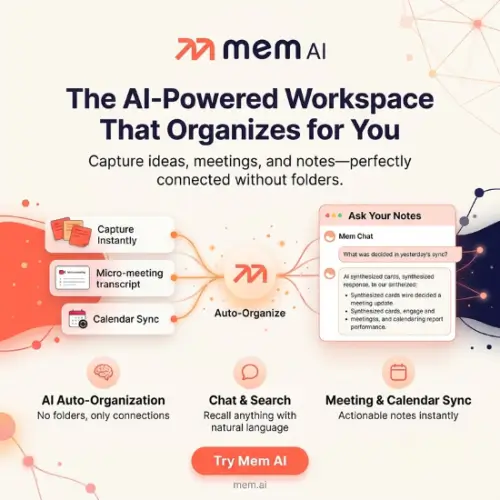
Mem AI is a note-taking app that tries to solve exactly that problem. Instead of making you build folders and tags and color-coded systems, Mem uses artificial intelligence to organize your notes for you and bring them back when you need them. The company calls it your “AI Thought Partner” .
This article breaks down what Mem does, how much it costs, who it is for, and what other options exist if Mem does not feel like the right fit.
What Is Mem?
Mem is an AI-powered note-taking application. At its core, it lets you capture notes, meeting recordings, web pages, and random thoughts. But the real magic is what happens after you save something. Mem reads your notes, understands what they are about, and connects them to other notes you have written .
The company behind Mem rebuilt the product from the ground up in 2025, calling it Mem 2.0. The new version works offline, runs faster, and focuses heavily on AI features that do the organizing work for you .
The simple idea is this: you should not have to spend energy deciding which folder a note belongs in. You should just write it down and trust that Mem will help you find it later.
How Mem Actually Works
Capture Without Thinking About It
Mem gives you several ways to save information, and none of them require you to stop and organize first.
Voice Mode lets you talk out loud and Mem turns your rambling into structured notes. You can record a meeting, a walk-and-talk brainstorm, or a quick reminder. Mem transcribes it and cleans it up into something readable .
The Chrome Extension saves any webpage as a formatted note with one click. No deciding where it goes. Just save it and move on .
Email Integration means you can forward anything to save@mem.ai and it becomes a note in your account .
Search That Understands Meaning
Most note apps search for exact words. If you type “budget” and your note says “money plan,” you get nothing. Mem’s Deep Search works differently. You can describe what you are looking for in plain language, like “that conversation about the Q3 money concerns,” and Mem will find it even if those exact words do not appear .
One reviewer described typing “What idea did I write about permaculture?” and getting the exact note instantly, without remembering the title or keywords .
Notes That Find You
A feature called Heads Up shows related notes on the side of your screen while you write. If you are typing a note about a client meeting, Mem might surface an old note where you wrote down that client’s preferences months ago. You did not search for it. It just appears .
This is probably the most “future-feeling” part of Mem. It treats your notes like a connected web instead of a pile of separate files.
Clean Up Messy Notes
If you paste a wall of text or dictate a messy brain dump, Mem has a Clean Up button. It adds headings, bullet points, and formatting. It shows you a preview first, with your original text in one color and Mem’s suggestions in another, so you can approve the changes before they happen .
Chat With Your Notes
Mem Chat is an AI assistant that knows what is in your notes. You can ask it to summarize a week of meetings, find a specific fact, or even create new notes based on what you have already written. It is not just a chatbot with no context. It uses your own saved information to answer questions .
Who Is Mem For?
Mem is clearly built for people who collect a lot of information and hate organizing it.
Founders and consultants who have notes from many different clients and meetings and need to recall details quickly .
Writers and researchers who save quotes, articles, and ideas and want them to connect without manual linking .
Anyone who has abandoned a note-taking system because maintaining it became more work than it was worth. Mem’s promise is that you do not maintain anything. You just capture and the AI handles the rest.
It is worth being honest about one thing: Mem works best after you have built up a decent amount of notes. In the first week, the AI has little to work with, so the “magic” moments are less frequent. It gets better with use .
Mem Pricing
Mem has a free plan and several paid tiers. The pricing below comes directly from Mem’s official pricing page . Prices are in US dollars per month.
| Plan | Price | Messages to Mem | New Notes per Month | Voice Mode Hours | Key Extras |
|---|---|---|---|---|---|
| Free | $0 | 25 | 25 | 3 | Basic task tracking |
| Mem Plus | $9 | 50 | 50 | 10 | More room for everyday use |
| Mem Pro | $29 | 100 | 100 | 25 | 1 custom routine, 1 external connection (Gmail, Slack, Todoist) |
| Mem Pro 2× | $49 | 200 | 200 | 50 | 2 routines, 2 connections |
| Mem Pro 5× | $99 | 500 | 500 | 125 | 5 routines, 5 connections |
| Mem Pro 10× | $149 | 1,000 | 1,000 | 250 | 10 routines, 10 connections |
A “message to Mem” can be a push-to-talk request, a chat message, or an email sent to Mem. A “connection” links Mem to an outside tool like Gmail or Slack so it can use that context .
The free plan is genuinely usable if you are curious, but the 25-note limit per month is tight. One reviewer noted that they would hit the limit eventually and would probably clear old notes rather than pay . The Pro plan at $29 per month is the sweet spot for regular users who want the proactive features like scheduled routines and external connections.
What Mem Does Well (and What It Does Not)
What works well: The search is genuinely impressive. The Heads Up feature saves time you did not know you were losing. Voice Mode is smarter than typical speech-to-text because it does not just transcribe; it organizes . The offline support means you can capture ideas on a plane and sync later .
Where it falls short: If you love folders and databases and total control over your structure, Mem will feel uncomfortable at first. Everything goes into one big stream, and you have to trust the AI to surface the right thing . Some users also report that the AI takes time to become truly useful because it needs a rich set of notes to draw connections from .
Mem is also not a full project management tool. It tracks tasks and projects from your notes, but it is not trying to replace something like Asana or Trello. It is a memory tool first.
Final Thought
Mem is one of the more interesting attempts to fix a problem we all have: we save things and then lose them. The idea that you can write without organizing and still find everything later is appealing, especially if you have tried and failed to maintain a perfect note system before.
The free plan is a low-risk way to see if the AI actually understands your notes. If you are the kind of person who captures a lot of information and hates filing it, Mem is worth trying. If you love structure and want to control every folder and tag, it might feel like the app is fighting you.
Either way, the direction Mem is pushing—notes that organize themselves and find you when you need them—feels like where note-taking is headed.
Alternatives to Mem AI
Notion
Notion is a flexible workspace that combines notes, databases, and project management. It is powerful and highly customizable, but you have to build your own organization system; it does not auto-organize like Mem.
Obsidian
Obsidian is a local-first note app that stores your files as plain text on your device. It is beloved by people who want full control and privacy, but connecting notes requires manual linking or community plugins.
Tana
Tana is a structured note-taking tool that uses “supertags” to turn notes into tasks, projects, or meetings. It has AI features and voice capture, and it sits somewhere between a notes app and a workflow builder.
Google Keep
Google Keep is a simple, free note-taking app for quick captures and lists. It syncs across devices and is easy to use, but it has no AI-powered search or automatic organization.
Apple Notes
Apple Notes comes free with Apple devices and is surprisingly capable for basic note-taking, scanning, and sharing. It is fast and reliable, but it does not connect ideas or search by meaning the way Mem does.



