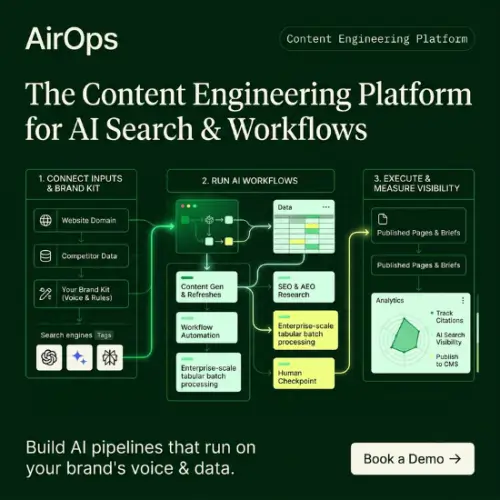
Most AI visibility tools are just fancy dashboards that tell you what you already know. AirOps is different. It actually tries to fix the problem. But that ambition comes with a heavy tax on your time and wallet. If you just want to know if ChatGPT mentions your brand, stop reading. Buy a cheaper tracker. If you have a team of content writers drowning in outdated blog posts and need a system to automate the refresh cycle, keep reading.
The Real Problem It Solves
Answer Engine Optimization (AEO) is the new buzzword. Everyone wants to rank in ChatGPT or Perplexity. The market is flooded with tools that scan AI responses and give you a pretty graph. That is nice. But a graph does not write the new article for you.
AirOps bridges that gap. It connects the dots between spotting a visibility drop and actually publishing a fix. You can build automated workflows. For example, if your brand drops in AI search results for a specific keyword, the system can trigger a draft update. It runs the text through your brand guidelines and pushes it to your CMS.
Honestly, that sounds like magic. In practice, it is just complex automation.

My Actual Test Workflow
I decided to test this on a real project. I connected a mid-sized SaaS blog with about 200 existing articles. My goal was simple. Find pages losing AI visibility and auto-generate refresh drafts.
The setup took three hours. Not thirty minutes. Three hours.
First, I had to build a “Brand Kit.” This is where you paste your tone of voice, forbidden words, and formatting rules. Then, I created a “Knowledge Base” by uploading our product documentation.
Next came the workflow builder. I set up a trigger to check AI visibility for 20 target keywords. If the rank drops, it pulls the existing URL. Then, it uses an AI agent to rewrite the H2 sections with new data. Finally, it sends the draft to a Slack channel for human review.
The result? The AI generated the drafts in about 15 minutes. But they were not perfect. The system used the right tone, but it hallucinated one minor product feature. I had to catch that manually.
So, it saved me maybe two hours of manual research and drafting. But it required me to babysit the initial setup and the final output. It is a tool for builders, not a magic wand.
I also tested the CMS integration with WordPress. The API handshake was fine. But mapping the custom fields took trial and error. I set up a “Grid” view to manage the content calendar. This part was actually useful. It felt like a simplified version of Notion mixed with a publishing dashboard.
I also tested the “Quill” feature for drafting. I asked it to rewrite a 1,500-word guide on project management software. It pulled from the Knowledge Base well. But it kept repeating the same transition phrases. I had to go into the Brand Kit and explicitly ban phrases like “in the modern world” or “it is important to note.” After that tweak, the second draft was much better. This proves the tool works, but only if you actively manage it.
Who Should Actually Buy This
This platform is built for mid-sized to large marketing teams. Specifically, teams that already have a dedicated content operations manager.
You need someone who understands how to map out a logical workflow. You need a team that publishes at least 20 to 30 pieces of content a month. At that scale, the time saved on repetitive drafting and formatting adds up quickly.
If your company treats content as a core revenue driver and you have the budget to support a dedicated tool, this fits. It handles the boring parts of content refreshes so your writers can focus on actual strategy.
Who Should Run Away
Solo creators, small agencies, and bootstrapped startups should avoid this.
The learning curve is steep. If you do not know what a CMS integration is or how to structure a logical workflow, you will get frustrated fast.
Also, the pricing jumps significantly once you need multi-engine tracking. If you are just trying to get your first 10 blog posts off the ground, this is like buying a semi-truck to deliver a single pizza. It is overkill.
If your content strategy is mostly reactive or news-based, the workflow automation will be too rigid. AirOps shines on evergreen content that needs periodic updating. It is terrible for breaking news.
Pros and Cons
Here is the raw breakdown of what works and what does not.
Pros
- Connects visibility tracking directly to content creation workflows.
- Brand Kits and Knowledge Bases keep AI output consistent with your voice.
- Integrates well with major CMS platforms like WordPress and Webflow.
- Saves real time on repetitive content refresh tasks once configured.
Cons
- Steep learning curve for the workflow builder.
- AI outputs still require heavy human editing and fact-checking.
- Limited native tracking for newer AI models compared to dedicated AEO trackers.
- Customer support can be slow for lower-tier plans.
Pricing and The Hidden Catches
AirOps does not make its pricing obvious. You have to dig for it. The system runs on a “task” model. Every time the AI completes an action, like generating a paragraph or scraping a page, it costs a task [[18]].
Here is the breakdown of the known pricing tiers based on recent data.
| Plan | Estimated Cost | Monthly Tasks | Best For |
|---|---|---|---|
| Free / Trial | $0 | 1,000 – 50,000 (trial) | Testing the workflow builder limits. |
| Solo | ~$200 / month | 20,000 – 35,000 | Individuals or very small projects. |
| Pro | ~$2,000 / month | 75,000 – 100,000 | Small teams needing multi-engine tracking. |
| Enterprise | Custom | Custom | Large organizations with complex needs. |
Pricing Catches
- The jump from Solo to Pro is massive. You go from ~$200 to ~$2,000 just to get multi-engine tracking and more seats [[21]].
- If you run out of tasks on the Solo plan, you get charged $0.025 per extra task [[20]]. This can add up fast if you have a poorly optimized workflow.
- Bringing your own API keys is possible, but the commercial terms for this are not clearly published on their site [[20]].
- The “Free Trial” gives you access to higher-tier features, but it ends abruptly when you hit the task limit, which can happen in a single afternoon of testing [[17]].
Final Thought
AirOps is a serious tool for serious content teams. It does exactly what it promises. It turns AI visibility data into actionable content workflows. But it is not a set-it-and-forget-it solution.
You will spend time building the machine. You will spend time checking its work. If you have the resources to manage that process, it will pay for itself in saved hours. If you do not, you will just be paying a high monthly fee for a complicated text generator.
Alternatives to AirOps
If AirOps feels too heavy or too expensive, here are some practical alternatives that might fit your needs better.
Profound
Better for pure AI visibility monitoring and enterprise-grade analytics.
It tracks more AI engines natively and focuses heavily on data rather than content generation workflows.
Dageno AI
A strong alternative for teams wanting a complete Generative Engine Optimization loop.
It offers deeper monitoring capabilities without the heavy content-operations focus of AirOps.
Byword
Excellent for pure AI content generation at massive scale.
If you already have your SEO data sorted and just need to produce hundreds of niche articles quickly, this is much cheaper.
n8n
A general-purpose workflow automation tool for technical builders.
You can build custom AI content pipelines connecting your CMS and AI models for a fraction of the cost.
Sightivo
Focuses heavily on external visibility and citation tracking in AI search.
It is a good pick if you care more about monitoring mentions than automatically rewriting your own blog posts.