
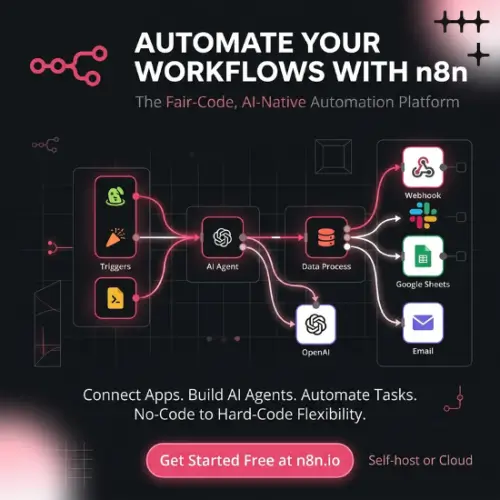
n8n—The Automation Tool That Lets You See Everything Happening Inside
Have you ever wished you could teach your computer to do boring tasks for you? Like moving information from one app to another without clicking a hundred buttons? That is exactly what n8n does. It is a workflow automation platform. In simple words, it is a tool that connects different apps and services together so they can talk to each other and get work done automatically.
The special thing about n8n is that it does not hide anything from you. You can see every step of what is happening. It is like watching a recipe being cooked step by step, instead of just getting a finished cake and having no idea what went into it.
What Makes n8n Different from Other Automation Tools?
Most automation tools are like a black box. You tell them what to do, and they do it, but you have no idea how. If something goes wrong, you are stuck guessing what happened. n8n is different. It shows you the entire journey of your automation.
You build your workflows on a visual canvas. Imagine a big blank board where you can drag and drop little blocks that represent actions. Each block does one thing, like “check my email” or “send a message to Slack.” You connect these blocks with lines, and that becomes your automation.
When you need to do something more complicated, you can drop into JavaScript or Python right inside a step. You do not need to be a programmer to use n8n, but if you know a little code, it becomes even more powerful. The platform runs on n8n Cloud or on your own servers, so you have choices about where your data lives.
Building AI Agents with Guardrails
Artificial intelligence is everywhere now, and n8n lets you build AI agents that are actually safe to use. An agent in n8n is simply a step inside a workflow. This means you can see exactly which tools the AI called and what it decided to do. Nothing happens in secret.
You can connect the AI model of your choice, whether that is from OpenAI, Google, or another provider. More importantly, you can add human approval before anything sensitive happens. For example, if you have an AI agent that processes refunds, you can set it up so that a real person has to say “yes” in Slack before the refund actually goes through. That is a guardrail, and it keeps you safe from mistakes.
Structured inputs and outputs also keep the agent’s actions predictable. The AI knows what kind of information it should receive and what kind it should give back, so it does not go off script. Workflows can act as MCP clients, or they can be exposed to other AI tools through an MCP server trigger, which makes n8n very flexible in how it connects with the wider AI world.
You Can Always Go Back and Fix Things
One of the most helpful features in n8n is that you can open any past run. Whether it is live right now or finished hours ago, you can look at exactly what happened. If something failed, you can re-run only the step that failed, instead of starting the whole thing over again. That saves a lot of time and frustration.
Version history is another lifesaver. It shows who changed what and when. If someone accidentally breaks a workflow, you can see exactly when it happened and what the change was. It is like having a time machine for your automations.
Running n8n on Your Own Server
The Community Edition of n8n can be self-hosted for free using Docker or on your own infrastructure. This is a big deal for teams that care about privacy. When you self-host, your data stays inside your own environment. It never leaves your servers. You are in full control.
The source code is on GitHub under n8n’s fair-code license. That means you can look at the code, learn from it, and even contribute to it. It is not completely open like some projects, but it is open enough that you can inspect what is happening under the hood.
How Much Does n8n Cost?
n8n uses a freemium model. The self-hosted Community Edition is completely free. Cloud plans are priced by workflow executions rather than steps or users. This is an important detail. If your workflow has fifty steps but runs once, it counts as one execution. You are not charged per step, which can save a lot of money compared to other tools.
Here is a simple breakdown of the plans based on what is publicly available:
| Plan | What You Get | Price (Approximate) |
|---|---|---|
| Community Edition (Self-Hosted) | Almost complete feature set, free forever, runs on your servers | Free |
| Registered Community | Adds folders, debug in editor, and custom execution data | Free (requires email registration) |
| Cloud Starter | 2.5k workflow executions, hosted by n8n | Around $20-$24 per month, billed annually |
| Cloud Pro | 10k executions, more collaboration features, up to 15 users | Around $50-$60 per month |
| Cloud Business | Higher execution limits, advanced features for teams | Custom pricing |
| Enterprise | Custom executions, SSO, environments, external secrets, full security features | Custom pricing |
Startups with fewer than twenty employees may qualify for a discount on the Business plan. The cloud trial does not require a credit card, which makes it easy to try before you commit.
One thing to note is that the paid plans unlock features that the free Community Edition does not have. These include SSO for single sign-on, log streaming for sending logs to external systems, and sharing so multiple people can access the same workflows and credentials. The Community Edition is meant for individuals or small teams who are comfortable managing their own setup.
What Do People Actually Use n8n For?
Teams use n8n for all kinds of jobs. Some of the most common ones include onboarding new hires across Slack and Jira, so a new person gets added to all the right channels and given the right tickets automatically. Others use it to investigate security alerts, triaging support requests so the urgent ones get handled first, and qualifying leads so the sales team only talks to people who are actually interested.
The AI agent capabilities make it useful for more advanced tasks too. You can build agents that look through data, make decisions based on rules you set, and ask for human help when they are unsure. Because everything is visible, you can always understand why the agent did what it did.
Is n8n Free?
The self-hosted Community Edition is free to use. That is not a trial or a limited version that stops working after thirty days. You can run it forever without paying anything. Cloud hosting and enterprise features come with paid plans, but the core tool is free.
For someone who is just learning automation or running a small project, the free version is more than enough. You get almost all the features, and you can upgrade later if you need the advanced security and collaboration tools.
A Few Things to Keep in Mind
n8n does assume some technical comfort. Setting up self-hosting requires knowing how to use Docker or manage a server. The visual editor is friendly, but connecting some apps can be tricky because you might need to go into Google Cloud Console or similar developer settings. It is not quite as plug-and-play as some simpler tools.
There have also been some security vulnerabilities reported in older versions of n8n. Like any software that holds credentials for many services, it is important to keep it updated and follow security best practices. The n8n team releases patches regularly, so staying current is the best defense.
Final Thought
n8n is a powerful tool for anyone who wants to automate work but does not want to lose visibility into what is happening. It is honest, transparent, and flexible. You can start small with the free version, learn as you go, and scale up when you are ready. The ability to see every step and fix only what broke is a game-changer for anyone who has ever felt lost in a complicated automation.
If you are tired of black-box automation and want something you can actually understand and control, n8n is worth a serious look.
Alternatives to n8n
Make – A visual automation platform with AI agents and a huge library of app integrations, all hosted in the cloud. It is easier for beginners but less transparent than n8n.
Activepieces – An open-source automation tool that is simpler to set up than n8n and very friendly for non-technical users. It is a good choice if you want self-hosting without the technical hassle.
Windmill – A code-first platform for developers who prefer writing scripts in Python, TypeScript, or Go instead of using a visual canvas. It offers strong reliability features but assumes programming knowledge.
Zapier – The most well-known automation tool, with thousands of app connections and a very simple interface. It is great for basic tasks but becomes expensive at scale and does not offer self-hosting.
Temporal – A serious tool for engineers who need bulletproof workflows that never lose track of where they are. It is not for beginners, but for mission-critical systems, it is very reliable.



