

Most people who try AI content hit the same wall. The first video looks great. The second one looks like a different person. By the fifth post, your “creator” has a new nose, a new jawline and somehow a sixth finger. Followers notice. Brands notice faster.
avii is built to fix that specific problem. Instead of giving you a one-off avatar clip, it lets you create a single virtual character and then keep producing content around that same face, again and again.
Here’s a plain look at what it does, where it still needs a human eye, and who should actually pay for it.
What is avii?
avii is a tool for creating a consistent AI influencer and generating social content for that character.
You build the persona once. After that, you can generate photos of her or him, turn those into short videos, copy trending formats, add lip sync so the mouth matches the audio, and publish straight to TikTok, Instagram and YouTube.
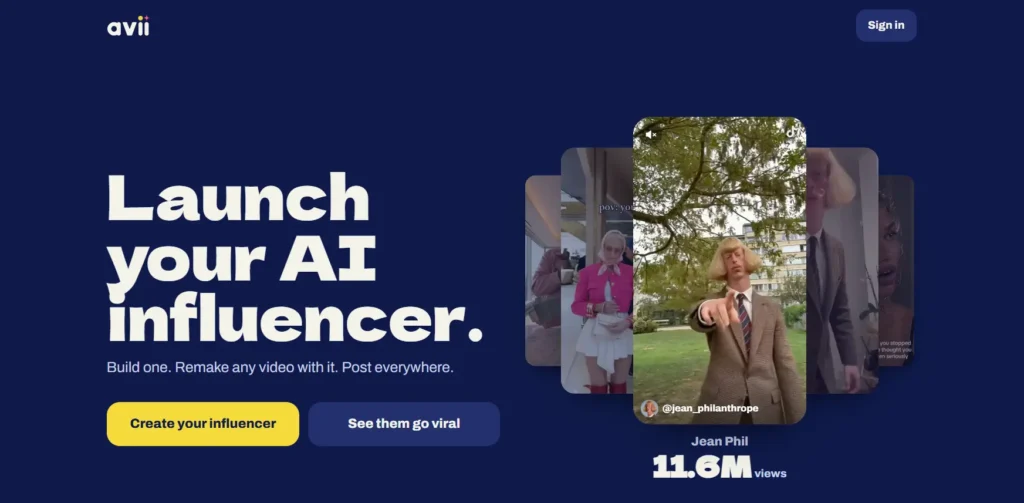
The difference from a normal AI avatar tool matters more than it sounds. A regular avatar tool asks, “What clip do you want today?” avii asks, “Who is your creator, and what are they posting this week?” That shift is useful for solo creators and small brands who want a recognisable face on their feed but don’t want to book a shoot, hire a model or stand in front of a ring light every single day.
Think of it as running a small character-based account rather than making random videos.
How It Works, Step by Step
The flow is fairly simple:
- Create your influencer. You set up the character’s look and identity. This becomes your base.
- Generate photos. You get still images of the same character in different outfits, poses and settings.
- Turn stills into short videos. Photos become motion clips suited to vertical feeds.
- Remake a trending format. avii gives you a starting structure based on formats already doing well, so you’re not staring at a blank screen.
- Add lip sync. If your clip needs talking, the mouth movement is matched to the audio.
- Edit and vary. The editor lets you make more clips and visual variations from the same character.
- Publish. Send it to TikTok, Instagram or YouTube.
The trend remake feature is the part most beginners will lean on. Coming up with a hook, a shot list and a pacing structure from scratch is hard. Starting from a format that already works removes a lot of that guesswork.
The Main Features, Explained Simply
Consistent character. This is the whole point. One face, reused across posts, so your account starts to feel like it belongs to someone.
Photo generation. Useful for carousel posts, thumbnails, profile pictures and as the base image for video.
Short social videos. Vertical clips built for Reels, TikTok and Shorts, not corporate explainer videos.
Trend remakes. Ready-made structures you can drop your character into.
AI lip sync. Turns a static-looking clip into something that reads as a person talking.
Direct publishing. Fewer downloads, fewer app switches, faster posting.
Free starter plan. You can test the idea before spending anything.
Where It Still Gets Shaky
Let’s be honest about this part, because a lot of AI tool reviews skip it.
Consistency is the hardest thing about any AI influencer, and no tool has fully solved it. Faces can drift slightly between generations. Clothing details change. Hands are still hands. Backgrounds sometimes shift in ways that don’t make sense if someone looks closely at two of your posts side by side.
So the practical workflow is: generate, then review, then publish. Not generate and publish.
Check the face against your earlier posts. Check the hands. Check that the outfit matches the vibe you’ve built. Check the lip sync on a phone speaker before it goes live, because bad mouth timing is the fastest way to make a viewer scroll away.
Budget a few minutes of quality checking per post. If you’re posting daily, that adds up, and it’s better to know that now.
There’s a second issue that isn’t technical at all. If your character looks like a real human and endorses a real product, some viewers will believe a real person used it. That’s where disclosure comes in, and it’s not optional.
The Rules You Need to Follow
avii is fairly clear about limits, and they’re worth reading properly if you plan to use it for client work.
- You must be at least 18 to use it.
- You can use your own face or an invented person.
- You must not use another person’s likeness or voice without written consent. Verbal permission over a call is not what the terms ask for.
- Minors are not allowed as the basis for characters.
- Deceptive impersonation and misleading content are prohibited.
For a personal art account, these rules mostly stay in the background. For a brand account or an agency managing five clients, they’re the difference between a clean campaign and a takedown plus an awkward email thread.
My suggestion: label the character as AI in the bio, keep a note of any consent you collect, and never build a lookalike of a celebrity, competitor or that person who rejected your pitch. It’s not worth it.
avii Pricing
avii uses a free starter plan plus paid subscriptions. The free plan includes your first influencer and a limited number of clips, which is enough to judge output quality before committing. Paid plans raise your content capacity and unlock more features.
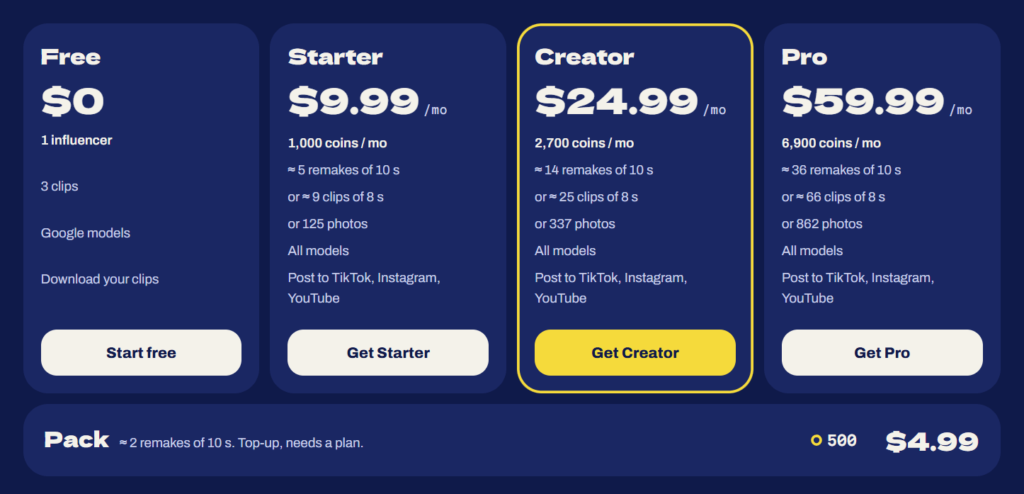
I’d genuinely recommend starting on free. Make one character, generate a week’s worth of content, and see whether the face holds up across posts. If it does, upgrading is an easy call. If it doesn’t, you’ve lost nothing but time.
Please confirm the live prices and limits on avii’s official pricing page before you buy, since AI tools change their plans often.
Who Should Use avii
It fits well if you:
- Run a faceless or character-led account and want a recurring identity
- Are a small brand testing creator-style content without a shoot budget
- Post frequently and need volume more than cinematic polish
- Want to test whether a persona lands before investing in a real face
It fits badly if you need frame-perfect brand accuracy, long-form talking videos, or content where a real human’s credibility is the whole selling point, like health or finance advice.
Tips for Better Results
Lock one clear look early and reuse the same base image. Keep lighting and framing similar across posts so small drifts are less visible. Write your own hooks instead of accepting the default, because the trend format gets you started but your words make it yours. Post consistently for two weeks before judging performance. And always watch the clip once with sound on before publishing.
Final Thoughts
avii solves a real problem in a sensible way. Building around a recurring character instead of one-off clips is the right idea, and the trend remakes plus lip sync plus direct publishing make daily posting genuinely doable for one person.
It isn’t magic. You’ll still review faces, fix hands and add disclosure. But if you’ve been wanting to run a creator-style account without becoming the creator, the free plan is a low-risk place to find out whether the idea works for you.
Start free. Make one character. Give it two weeks.
avii Alternatives
Different tools solve different problems, so pick based on your output, not the hype.
| Tool | What It’s Built For |
|---|---|
| MakeUGC | Short ad-style videos with AI avatars, scripts and multilingual voiceovers |
| Creatify | Turning a product link or text into social and ad videos for campaign testing |
| HeyGen | Avatar videos, translated content and URL-based clips for wider business use |
If your goal is a character people follow, avii is the closest match. If your goal is 30 ad variations to test this week, Creatify or MakeUGC will serve you better. If you need training videos in twelve languages, that’s HeyGen territory.
FAQs
Is avii free?
There’s a free starter plan with your first influencer and a limited number of clips. Paid subscriptions add capacity and features.
Can I use a real person’s face?
Only your own, or someone else’s with written consent. Impersonation is not allowed.
Does avii post directly to social platforms?
Yes, it supports publishing to TikTok, Instagram and YouTube.
Do I need to disclose that my influencer is AI?
Yes, especially when viewers could mistake the character or an endorsement for a real person. Add a clear AI label.
What’s the minimum age?
18.



