
Most of us deal with PDFs the same boring way. We open the file, scroll through pages of text, and try to find that one number or sentence we actually need. It feels like searching for a needle in a haystack, except the haystack is a fifty-page report and the needle is a date someone mentioned once on page thirty-two.
Foxit wants to change that. Instead of just being a tool that opens and edits PDFs, Foxit now puts an AI assistant right inside the document. You can ask it questions, tell it to summarize things, or even ask it to translate a whole file. The idea is simple: you should not have to read every single word to understand what matters.
I spent some time digging through what Foxit actually offers now, including its official website and recent updates. Here is what I found, explained in plain English.
What Is Foxit, Exactly?
Foxit is a software company that makes tools for working with PDF files. For years, people have used Foxit PDF Reader as a free alternative to Adobe Acrobat. It opens PDFs, lets you highlight things, fill out forms, and sign documents. The Reader is still free, and it still works fine for basic stuff .
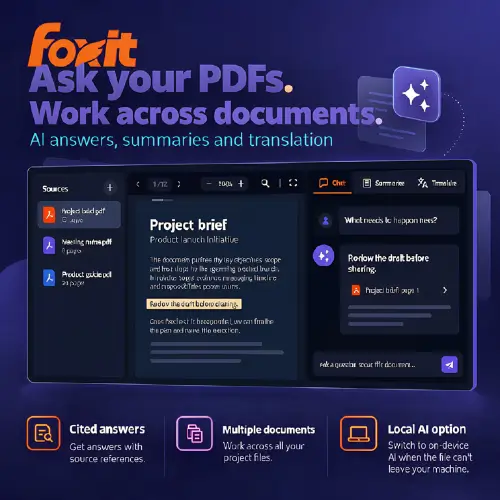
But the interesting part now is the AI. Foxit has built something called the PDF AI Assistant that lives inside both the free Reader and the paid Editor. When you open a document, you can open a chat panel and start asking questions about what is inside. The answers come with citations, meaning the AI shows you exactly where in the document it found the information .
That citation thing matters. A lot of AI tools will just give you an answer and you have to trust it. Foxit points back to the source, so you can check if it got things right. For anyone who has ever been burned by a chatbot making things up, this is a small but important detail.
Three Different Ways Foxit Uses AI
Foxit does not just have one AI feature. It has three separate pieces, and they do different jobs.
The PDF AI Assistant works inside a single document. You open a PDF, ask it questions, and it answers based on what is in that file. You can also ask it to summarize a long report, translate text into another language, or extract specific dates and numbers . In the desktop Editor, you can even tell it to do things like “add a watermark to every page” or “black out all the Social Security numbers” using plain language. That editing-by-description feature only works in the paid Editor, not the free Reader .
Foxit Workspace is a separate app for when you have a bunch of documents that belong together. Imagine you are comparing three supplier proposals, a spreadsheet of prices, and a page of meeting notes. Instead of opening each file one by one, you put them all into a Workspace project. The AI reads across all of them and can answer questions that require pulling information from multiple files at once. It can also generate a comparison report or a presentation from that collection .
Local AI is for people who cannot send their documents to the cloud. If you are working with medical records, financial data, or anything covered by a confidentiality agreement, uploading files to an AI server might be a dealbreaker. Local AI runs the model on your own computer. Once you download a compatible model, you can chat with documents, summarize them, translate them, and generate bookmarks without an internet connection. And it does not use up your AI credits .
The catch with Local AI is that it only handles text-based tasks. If you want the AI to generate an image or create a podcast-style audio summary, you still need to use Cloud mode. Local AI is about privacy, not about doing everything offline .
The Small Business Example That Makes Sense
Foxit gives a practical example that helped me understand Workspace. A small business could gather supplier proposals, meeting notes, and price sheets into one project. Then they ask questions across all of it, like “Which supplier offers the best delivery time for the lowest price?” The AI pulls from every document and gives an answer with citations. Then it can turn that into an editable comparison report or a slide deck .
For a student, this could be useful too. Imagine you have ten research papers for a project. You put them all into Workspace, ask it to find common themes, and it produces a summary with citations back to each paper. That is hours of reading compressed into a few minutes of checking.
The Redaction Feature Is Actually Important
One feature that deserves special attention is redaction. If you handle customer paperwork, you know the pain of blacking out sensitive information before sharing a file. Foxit’s Editor lets you tell the AI something like “redact all Social Security numbers” and it will do it automatically .
But Foxit itself says you should review the output before sharing. AI is not perfect, and automated redaction can miss things. The company also points out that using Local AI does not automatically make you compliant with regulations like HIPAA or GDPR. Compliance is about your whole process, not just where the AI runs . That is an honest warning, and I appreciate that Foxit does not pretend its tool solves every legal problem.
Pricing: What You Actually Pay
Here is where things get a little complicated, because Foxit has several overlapping plans. I will keep it simple.
The free Foxit account gives you 300 AI credits per month. Those credits work across the AI Assistant and Workspace. The free Reader is still free, and you can use the AI features in it with those credits .
If you want more credits, the AI Assistant subscription gives you 2,000 credits per month for $4.99 monthly or $49.99 yearly. Teams can pool their paid credits together through an admin console .
The PDF Editor is a separate purchase. It is the paid software that lets you actually edit PDFs, and it comes with the AI Assistant built in. The PDF Editor+ adds mobile apps, Smart Redact, and eSign envelopes. There is also a perpetual license option for the Editor, but Foxit says perpetual licenses do not include the AI Assistant .
Here is a table to make it clearer:
| Plan | What You Get | Price |
|---|---|---|
| Foxit Account (Free) | 300 AI credits/month, AI Assistant in Reader, Workspace access, Local AI | $0 |
| AI Assistant Subscription | 2,000 AI credits/month, pooled credits for teams | $4.99/mo or $49.99/yr |
| PDF Editor | Full PDF editing, AI Assistant with 20 credits/month included | Subscription pricing varies by region |
| PDF Editor+ | Everything in Editor, plus mobile apps, Smart Redact, 150 eSign envelopes/year | $159.99/user/year (US list price) |
| Perpetual Editor License | Full editing, one-time purchase | Does NOT include AI Assistant |
Note: Prices are US list prices and may vary by region. Taxes are extra.
The main thing to understand is this: the free account gives you a taste, but 300 credits will not last forever if you use AI heavily. If you are just asking occasional questions about a PDF, the free tier is probably enough. If you are running Workspace projects with dozens of files, you will likely want the paid subscription.
What I Liked and What I Did Not
What works well: The citation feature is genuinely useful. When an AI tells me something about a contract, I want to see the exact sentence it is referencing. Foxit does that. Local AI is also a smart addition for anyone in a field where cloud uploads are forbidden. And the plain-language editing in the Editor—telling it to add a watermark or reorder pages—feels like the kind of thing AI should have been doing all along.
What could be better: The pricing structure has a lot of moving parts. You have AI credits, Editor licenses, Editor+ subscriptions, and a free tier, and they all interact in ways that are not immediately obvious. A perpetual Editor license does not include AI, which might surprise people who bought it expecting the full package. Foxit does explain this, but you have to read carefully.
Also, Local AI only covers text tasks. If you want the flashier features like image generation or audio summaries, you are back on the cloud. That is a reasonable limitation for now, but it means “fully local” is not quite the whole story.
Final Thought
Foxit is not trying to be a chatbot that happens to open PDFs. It is trying to be a PDF tool that has AI built into the places where you already work. The AI Assistant sits inside the document you are reading. Workspace sits in a separate window for multi-file projects. Local AI sits on your own computer for files that cannot leave it.
For a student summarizing research papers, a small business comparing supplier quotes, or an office worker who just wants to find the right number without scrolling for ten minutes, that approach makes sense. The AI is not the product. The document is the product, and the AI just makes the document easier to handle.
Alternatives to Foxit
PDF.ai
A focused tool for asking questions about uploaded PDFs. It extracts information and gives answers with citations back to the source, similar to Foxit’s single-document chat.
Nouswise
Organizes document research into projects with cited answers, reports, study materials, and audio recaps. A good option if you want multi-document synthesis with audio output.
Anara
A research workspace built for searching document libraries and writing with citations. It is especially popular among students and researchers working with academic literature.



