
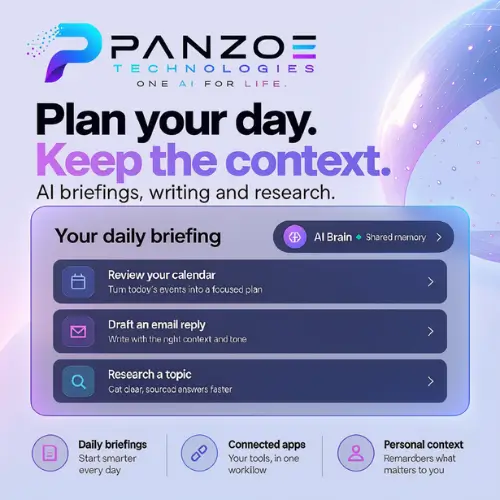
Most AI tools have a strange habit. You open a chat, explain your situation, get some help, and then close it. The next day, you open it again and it has no idea who you are. You have to start from zero every single time. Panzoe is trying to fix that problem. It is a personal AI assistant that remembers your context, connects to your calendar and inbox, and tries to act like one brain for both your work and your home life .
I spent time going through Panzoe’s official website and other sources to understand what it actually does, how much it costs, and where it might fall short. This article is written in simple English so that anyone, even a student, can understand whether Panzoe is worth trying.
What Exactly Is Panzoe?
Panzoe describes itself as an “AI operating system for your life” . That sounds fancy, but the idea is simple. Instead of using one app for writing, another for planning, and a third for research, Panzoe puts all of these into one place. The key ingredient is something called the AI Brain.
The AI Brain is basically a memory system. It stores information about your goals, your projects, the people you work with, and your preferences. When you ask Panzoe to draft an email or plan your week, it does not start from a blank slate. It uses what it already knows about you . For example, if you told it last week that you are preparing for a client meeting, it can bring that context into a new conversation without you repeating yourself.
Panzoe is available on the web, iOS, and Android . It is made by a Canadian company called Panzoe Technologies, and the company openly says it is still an early-stage product that is improving with user feedback .
Main Features That Matter
Daily Briefings
Every morning, Panzoe can give you a summary of your day. It pulls together your calendar events, tasks, and important emails into one short briefing. You can even listen to it if you prefer not to read . This is helpful for people who feel overwhelmed by checking five different apps before breakfast.
Inbox and Calendar Understanding
If you connect your Gmail or Outlook account, Panzoe can summarize what is important and even draft replies for you to review . You do not have to give it your password; it uses a secure connection method called OAuth . The important thing is that you stay in control. Panzoe drafts, but you decide what to send.
Writing and Document Help
You can ask Panzoe to write emails, summarize long documents, or help you improve a spreadsheet. It can also export files to Word, Excel, PowerPoint, or PDF . For a small business owner, this means you can prepare for a meeting using calendar details and business documents, then draft the follow-up email in the same workspace.
Deep Research
Panzoe has a research tool that creates structured reports with citations. By default, it uses public web information. If you want it to include your private data, you have to choose that option for each research session . This is a thoughtful design because it gives you control over what information gets used.
Specialist Assistants
Panzoe is not just one assistant. It has specialised assistants for different parts of life: Property, Health, Money, University, and Life . The interesting part is that they all share the same AI Brain. So the Money assistant knows about your travel plans, and the Health assistant knows about your schedule. This cross-context sharing is what makes Panzoe different from using five separate AI tools.
Connections to Other Apps
Panzoe can optionally connect to Google Workspace, Microsoft Outlook, Notion, Slack, GitHub, and Dropbox . You do not have to connect anything if you prefer to enter information manually. The connections are there to make the assistant more useful, not to force you into a setup you do not want.
What Panzoe Is Not
Panzoe is not a local-only assistant. Its AI features use external providers, which means your requests are processed by outside services . If you are looking for a fully offline AI that never sends data anywhere, Panzoe is not that product.
It is also not a finished, perfect tool. Because the company is early-stage, some features may change, and integrations may expand or shift over time . That is normal for new software, but it is worth knowing before you commit to a paid plan.
Pricing: What You Pay
Panzoe uses a freemium model. The free tier is called Explore, and it gives you a limited number of AI actions so you can test the waters. Paid plans unlock more usage, memory, and connections. Here is the pricing information from the official website :
| Plan | Price | What You Get |
|---|---|---|
| Explore | Free | No card needed; one introductory use of each major AI feature |
| Basic | C$9.99/month (C$4.99 for first month) | Complete platform with standard AI usage; 7-day free trial requires payment method |
| Pro | Price shown on pricing page | Higher AI usage, full AI Brain memory, unlimited integrations, voice, Knowledge Graph |
| Premium | Price shown on pricing page | Highest AI usage, premium models, Panzoe Business executive environment included |
The 7-day full-access trial is worth explaining clearly. You pay $0 today, but you must enter a payment method. If you do not cancel before the trial ends, you will be charged for the Basic plan . This is a common model, but it is easy to forget. Set a reminder if you try it.
One important note: the official pricing page lists Pro and Premium but does not display their exact dollar amounts in the text I reviewed. You will need to check the live pricing page for current numbers, as prices can change .
Who Should Consider Panzoe?
Panzoe makes the most sense for people who juggle many different parts of life and feel the pain of switching between apps. A small business owner who needs to prepare for meetings, draft follow-ups, and keep track of personal tasks is a good fit. A student managing university work, health habits, and money decisions could also benefit from the shared memory across specialists.
It is less useful for someone who just wants a simple chatbot to answer random questions. If you only need occasional writing help, a basic AI tool might be enough. Panzoe is designed for people who want an ongoing assistant that learns about their life over time.
Final Thought
Panzoe is an ambitious attempt to solve a real problem: AI tools that forget you between conversations. The shared AI Brain, daily briefings, and specialist assistants are genuinely useful ideas, especially for people who want one place to organise work and home life. The free Explore tier makes it easy to test without risk. Just be careful with the trial and payment method, and remember that the product is still growing. If you value memory and context over having the most polished single-purpose tool, Panzoe is worth a look.
Alternatives to Panzoe
Monica
Monica is an AI assistant that works across desktop and mobile for browser research, writing, and document analysis. It is a solid choice if you want a general-purpose AI helper without the deep life-organisation focus.
Notion AI
Notion AI lives inside Notion, the popular workspace app. It helps with writing, summarizing, and answering questions about your notes and documents, making it good for people already using Notion for work.
Google Gemini
Gemini is Google’s AI assistant, integrated with Gmail, Docs, and other Google services. It is convenient for people who live inside the Google ecosystem and want AI help without switching apps.
Microsoft Copilot
Copilot is Microsoft’s AI assistant built into Windows and Microsoft 365 apps. It is best for users who rely on Outlook, Word, and Excel and want AI assistance inside those tools.
ChatGPT
ChatGPT is the most well-known AI chatbot for writing, research, and brainstorming. It now has memory features, though it does not offer the same calendar and inbox integration as Panzoe.



