
Making a good video used to take a lot of time. You needed a script, footage, a voiceover, an editor and many rounds of changes. For small teams and solo creators, that was too much work and too much money. AI video tools are changing this, and VideoGen is one of them.
In this article, we will look at what VideoGen is, how it works, what features it gives you, how much it costs and who should use it.
What Is VideoGen?
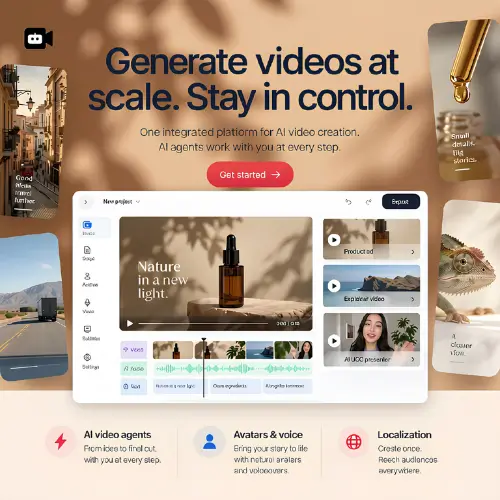
VideoGen is an AI video creation platform that runs in your browser. You can use it to make product ads, UGC-style videos, explainers, social media posts, training videos, tutorials and presentations.
What makes it different is its AI video agents. Think of them as helpers that do the boring early work for you. They can research your topic, plan the video, write a script, create the media and put the scenes together in order.
The best part is that the project stays open after the AI finishes. You can still go in and change anything you want.
How Does VideoGen Work?
You can start in several ways. You can give it:
- A short brief or idea
- A full script
- An image
- A slide deck
- Existing video footage
From there, VideoGen can create scenes, bring still images to life, change the style of a video, and add presenter segments. Then it arranges everything into one project.
After that, you open the browser editor. Here you can change the script, swap media, fix the timing, pick a different voice, edit subtitles and rearrange the final order of scenes. When you are happy, you export the video.
This is helpful because AI does not always get things right on the first try. Having an editor in the same place means you do not have to start over.
Main Features of VideoGen
AI Agents for the Full Process
The AI agents handle research, scripting, media generation and scene assembly. If your project needs more than a one-line prompt, the deep research option can collect material for you first.
Many Models in One Place
VideoGen brings several video, image and voice models into one workspace. So you can make generated footage, product visuals, avatars, voiceovers and sound effects without jumping between different websites and moving files around.
Image Tools
Besides video, it also has image tools. You can generate images, edit them, remove backgrounds, upscale low-quality pictures and convert graphics into vector format.
Animate Images and Restyle Footage
You can take a plain image and turn it into a moving clip. You can also take footage you already have and change its look.
Editing in the Browser
You do not need to install heavy software. Scripts, scenes, subtitles, voices and timing can all be edited online.
Localization
If you want to reach people in other countries, the localization tools help you change the narration and presentation for different languages and audiences. VideoGen also lists a large voice library, with more than 200 AI voices in over 50 languages on its website.
API and MCP Server
Developers can connect VideoGen to their own apps through the API or the MCP server. This is useful if you want to build video creation into a bigger workflow.
What Can You Make With VideoGen?
- Product ads: Turn product details into short, catchy ads.
- AI UGC videos: Make videos that look like they come from real users or creators.
- Explainers: Explain a service, idea or process in simple steps.
- Training videos: Good for company training, onboarding and tutorials.
- Social media videos: Quick clips for Instagram, YouTube Shorts, TikTok and more.
- Presentations: Turn slide decks into videos with narration.
Who Should Use VideoGen?
VideoGen can be a good fit for:
- Small business owners who want ads without paying an agency
- Marketers who need many video versions quickly
- YouTubers and social media creators
- Teachers and trainers who make lessons
- Companies that make product demos and internal training
- Developers who want video creation inside their own tools
VideoGen Pricing
You can create your first video for free. After that, you need a paid plan. VideoGen has three plans: Pro, Business and Enterprise. Here is a simple table based on what the official pricing page shows.
| Plan | Price | Best For | Key Points |
|---|---|---|---|
| Free | $0 | Trying the tool | Create an initial video to test it |
| Pro | From $12/month (yearly billing) | Individual creators and small teams | Fair-use AI limits, 50 GB storage, unlimited exports, AI images, commercial use rights, standard priority |
| Business | About $74/month | Growing teams | Priority AI limits, 500 GB storage, 50 iStock downloads per month, AI video clips, AI avatars, faster priority |
| Enterprise | Custom price | Large organizations | Custom limits, top priority, dedicated support, enhanced security options |
A few things to keep in mind about pricing:
- The $12 price is shown with yearly billing, which VideoGen says saves 50 percent. Monthly billing costs more. Some pages on the website show about $16 per month.
- VideoGen uses fair-use limits for AI. If you make videos in bulk or use heavy features like generative video and avatars a lot, it suggests a higher plan.
- Credit use can change depending on the model, feature, quality and output. So check the rate card on the official pricing page before you buy, especially if you plan to make many videos.
- Prices can change anytime, so confirm on videogen.io/pricing.
Things to Check Before Publishing
AI makes work faster, but it does not replace your judgment. Always check:
- Facts: Make sure numbers, names and claims in the script are correct.
- Product details: A wrong feature or price in an ad can hurt your brand.
- Translations: Have someone who knows the language read it.
- Real people and brands: Be careful when a video shows or speaks as a real person or company.
VideoGen gives you control at every stage, so use it.
Pros and Cons
Pros
- Many video types in one tool
- Starts from a brief, script, image, slides or old footage
- Full editing in the browser
- Image, voice and avatar tools included
- API and MCP access for developers
- Free first video to test
Cons
- Heavy use of advanced features may need a higher plan
- Credit use changes by model and quality, which can be confusing at first
- AI scripts and visuals still need human checking
Final Thought
VideoGen is a practical tool for anyone who wants to make videos faster without giving up control. The AI agents do the early work, and you still decide the final result in the editor. For small teams, creators and marketers, that mix is very useful.
The free first video makes it easy to test. Try it with one real project, like a product ad or a short explainer, and see how much time it saves. Just remember to check your facts and compare the pricing details with your expected video volume.
Alternatives to VideoGen
InVideo
Turns briefs and scripts into planned videos using AI agents. It also offers storyboards, avatars, voice cloning and chat-style editing.
Creatify
Built mainly for marketing videos and ad creatives. You can generate them from a product link or plain text.
Pictory
Converts scripts, articles, documents and recordings into editable videos. It also makes captions, avatars and highlight clips.
AKOOL AI
Makes avatar presentations and localized videos. It supports lip sync, face swapping and voice cloning.



