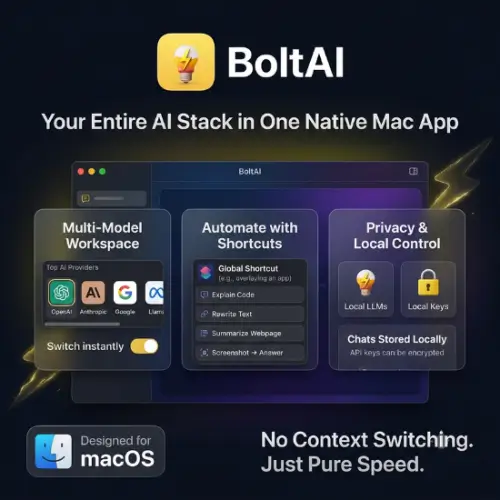
Most of us use more than one AI tool these days. Maybe you use ChatGPT for writing, Claude for coding, and a local model for private stuff. Switching between tabs and paying for multiple subscriptions gets annoying fast.
BoltAI is a native Mac app that tries to solve this mess. Instead of jumping between websites, you get one clean window where you can talk to different AI models, organize your work, and even run some models right on your own computer without an internet connection.
Let me walk you through what BoltAI actually does, who it’s for, and whether it’s worth your money.
What Exactly Is BoltAI?
BoltAI is a desktop application built specifically for macOS. Think of it as a control center for AI. You bring your own API keys from providers like OpenAI, Anthropic, or Google, and BoltAI lets you chat with them all from one place. You can also connect local models through tools like Ollama, which means the AI runs on your Mac’s hardware instead of some company’s server .
The app is made by a small team, and the official website lists it as a one-time purchase. That’s a big deal because most AI tools charge you every single month. BoltAI uses a perpetual license model, so you pay once and keep using the version you bought forever .
The Cool Features That Actually Matter
Local Models That Just Work
BoltAI 3 has a feature that recommends local models based on what your Mac can handle. If you have a newer Mac with plenty of RAM, it might suggest a bigger model. If you’re on an older machine, it’ll pick something lighter. Once you download a model, you can use it without any account or API key. That means zero cost per message and complete privacy because nothing leaves your computer .
This is huge for students or anyone who doesn’t want to pay per token. You can have a capable AI assistant running completely offline.
Browser Use and Computer Use
This is where things get interesting. BoltAI lets a compatible model actually browse the web in Chrome or interact with Mac apps you give it permission to use. Imagine asking it to check a supplier’s product page and tell you what changed. The AI clicks around, reads the page, and reports back .
A word of caution here: start with tasks that only read information. Don’t immediately give it access to your email or bank account. Review every permission request carefully. The power is real, but so is the risk if you’re careless.
Skills and MCP Servers
BoltAI separates two things that sound similar but do different jobs. A “skill” is basically a set of instructions you save once and reuse. For example, you might create a skill called “Review Client Brief” that tells the AI exactly what to look for every time you paste in a new brief. It saves you from typing the same instructions over and over.
An MCP server, on the other hand, connects BoltAI to outside data or tools. MCP stands for Model Context Protocol, and it’s a way for AI apps to talk to other software. So if you want BoltAI to pull information from your project management tool or a database, an MCP server is how you’d set that up.
Keyboard Shortcuts Everywhere
One of BoltAI’s best tricks is how it fits into your existing workflow. You can highlight text in almost any app, hit a shortcut, and have AI rewrite it right there. You can dictate into other apps using voice. You can even take a screenshot and ask questions about it without leaving what you’re doing .
These small conveniences add up. Instead of copying text, opening ChatGPT, pasting, waiting, copying the result, and pasting it back, you just select and press a key.
Document Chat and Project Organization
You can organize your chats into projects and attach files to them. Need to ask questions about a PDF contract? Drop it into a project and start asking. The AI reads the document and answers based on what’s inside. This is way more organized than scrolling through one giant chat history where everything gets mixed together.
A Quick Note on Privacy
BoltAI stores your API keys in Apple’s Keychain, which is the secure system macOS uses for passwords. Your chat history lives in a local database on your Mac, not on some company’s server. The developers say they don’t track what you type or upload your documents anywhere .
But here’s the important catch: if you’re using a cloud model like GPT-4 or Claude, your prompts still go to those companies. Local inference only stays on your Mac if you’re actually using a local model. If you switch to OpenAI, your data leaves your computer. BoltAI makes this clear, but it’s worth repeating because people often assume “local app” means “fully private.”
BoltAI Pricing: Pay Once, Use Forever
BoltAI offers a 14-day free trial so you can test everything before spending money. The pricing is straightforward and doesn’t require a subscription for the core app.
| Plan | Price | What You Get |
|---|---|---|
| Essential | $79 one-time | 1 Mac device, all features, 512MB cloud storage, 1 year of updates |
| Pro | $99 one-time | 2 desktop devices + 1 mobile device, 1GB cloud storage, 1 year of updates |
| Pro+ | $199 one-time | 3 desktop devices + 2 mobile devices, 5GB cloud storage, 1 year of updates |
| Team | $99 per seat | 5+ seats minimum, shared team storage, priority support |
*Prices from BoltAI’s official pricing page *
After the first year, you can keep using the app without paying anything more. You just won’t get new updates, cloud sync, or mobile access unless you renew. The renewal discount for Essential is around 40% according to the pricing page.
One thing to understand: cloud AI providers like OpenAI charge you separately for API usage. BoltAI’s price is just for the app itself. If you only use local models, you don’t pay anyone anything after buying the app.
Who Should Buy BoltAI?
BoltAI makes the most sense if you’re a Mac user who regularly works with AI and wants everything in one window. Writers, developers, researchers, and students who juggle multiple AI services will appreciate not having to switch tabs constantly.
It’s especially valuable if you care about running local models. The setup is easier than doing it yourself, and having a single interface for both cloud and local AI is genuinely convenient.
If you only use ChatGPT occasionally, the $79 price tag might be hard to justify. You can do most of what BoltAI offers through the ChatGPT website for free. But if you’re a power user who wants keyboard shortcuts, document chat, and local model support in one polished Mac app, the one-time price is reasonable compared to a year of subscription fees.
Final Thought
BoltAI isn’t trying to replace ChatGPT or Claude. It’s trying to be the best place to use them on a Mac. The perpetual license is a refreshing change from the subscription fatigue most of us feel. The local model support is genuinely useful, not just a checkbox feature. And the small touches like keyboard shortcuts and screenshot questions make it feel like a tool built by someone who actually uses AI every day.
If you’re on the fence, grab the 14-day trial and test it with your actual workflow. That’s the only way to know if it fits how you work.
Alternatives to BoltAI
Here is the Best Alternatives of BoltAI.
LM Studio
A free desktop app for running local AI models on your computer. It also lets you chat with documents and serve models through an API for other apps to use.
Poe
A hosted platform from Quora that gives you access to many different AI models and community-made bots through one account. It’s web-based and works on any device, but you don’t get local model support or the native Mac experience.