Most people use AI through a website. You type a question, the answer comes back, and somewhere far away a company’s computer does all the work. That is convenient, but it costs money for every request and your words leave your machine.
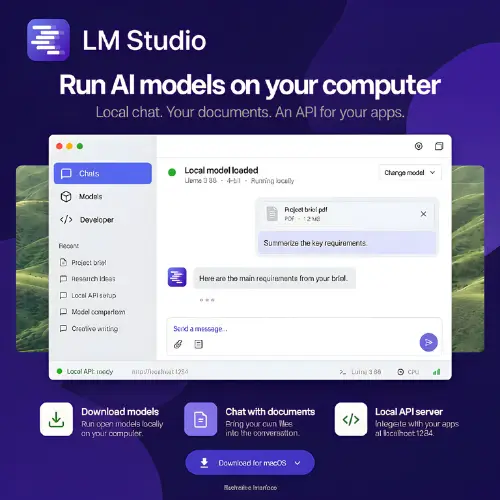
LM Studio takes a different path. It is a free desktop app that lets you download AI models and run them right on your own laptop or desktop . Once the model is on your computer, you can chat with it, ask questions about documents, and even let other apps use it through a local connection. No monthly bill for every message, and no need to send your private files to a stranger’s server.
What LM Studio Actually Does
LM Studio is a desktop application. You install it like any other program. Inside the app, you can search for AI models, download them, and start chatting. The app handles the technical parts: loading the model, managing memory, and keeping everything organized. The model itself decides how smart the answers are. A small model runs fast on a normal laptop. A giant model might need a powerful machine or it will crawl.
For someone learning to build software, this is a big deal. You can test an AI feature in your app without paying a cloud provider for every single request. For a small business, it means drafting emails or asking questions about a contract without sending that contract to an outside company. The work happens on the computer sitting in front of you.
Chatting and Asking Questions About Documents
The chat window looks familiar. It is like other AI chat apps, but the model runs locally. You can also attach files: PDFs, Word documents, and plain text files . If the document is short, the whole thing fits into the model’s memory. If it is long, the app uses a technique called retrieval to find the most relevant paragraphs and feeds those to the model.
One honest warning: retrieval is not perfect. It can miss a paragraph that matters. Always check the answer against the original document, especially for anything important. The app makes this easy because you already have the file open.
There is another detail worth knowing. Local chat and document questions work fully offline once the models are downloaded . But searching for new models, downloading files, and checking for updates need an internet connection. Also, if you connect external tools or services, data may leave your computer. Local inference does not automatically make every connected workflow private.
Developer Tools and the Local Server
LM Studio is not just for chatting. It includes a local API server. This means other programs on your computer can talk to the model, almost as if they were talking to a cloud AI service . The server offers REST endpoints and works with OpenAI-compatible code. If you have a Python or TypeScript project that already uses an AI API, you can often point it to LM Studio by changing one address, and it will work with the local model instead .
There is also a command line tool called lms for managing models and the server. And for machines without a screen, there is llmster, a headless version that runs in the background . MCP support lets you connect models to extra tools, but you should review permissions carefully before giving any model access to your files or accounts.
Hardware: What You Need
LM Studio supports Apple Silicon Macs, Windows PCs, and Linux computers . Intel Macs are not supported. The real limit is memory. A model that is too large for your RAM will either refuse to load or run so slowly that it is useless. A bigger model usually gives better answers, but it also needs more memory and a better graphics card. The app helps by showing which models will fit before you download them .
If you have a normal laptop with 8GB of RAM, you can still run small models. They will not be as clever as the giant ones, but they are surprisingly useful for simple tasks. If you have a gaming PC with a good GPU, you can run larger models comfortably.
Pricing
LM Studio itself is free for personal and workplace use . That is a recent change. The company used to require a separate commercial license for work use, but they removed that requirement in 2025 . The models you download have their own licenses, and those can vary. Some are open and permissive. Others have restrictions. Always check the model’s license if you plan to use it commercially.
Bionic is a newer app from the same company. It focuses on agent tasks. You do not need to switch to it. The original LM Studio continues to work for chat, model configuration, and API serving.
Final Thought
LM Studio is the easiest door into local AI that I have seen. It removes the scary parts: no terminal required, no confusing setup, no cloud bill. You download it, pick a model, and start asking questions. The answers may not always match the biggest cloud models, and your hardware sets a hard ceiling. But for learning, for private work, and for building small projects without recurring costs, it does exactly what it promises. The fact that it is now free for work use makes it even easier to recommend to a team.
Alternatives to LM Studio
Ollama
A command-line-first tool that runs local models and exposes an API. It is great for developers who want to script and automate things without a desktop window .
Jan
A clean desktop app that feels very similar to LM Studio. It is open source, supports local and remote models, and is a good choice if you want a familiar chat-style interface .
AnythingLLM
Focused on working with your own documents. You can build private assistants that answer questions from your files, with strong local RAG support .
KoboldCpp
A single-file executable with a built-in web interface. It is lightweight, surprisingly fast on the same hardware, and includes extras like image and audio support for compatible models .
Msty
A polished app that lets you use local models and cloud AI services in one place. It is beginner-friendly and includes a built-in knowledge base for chatting with documents .