AI tools are changing the way people create content for social media. Today, you don’t need a camera, studio, or professional photography skills to build an online presence. You can create virtual characters, generate realistic images, and even produce short videos with the help of artificial intelligence.
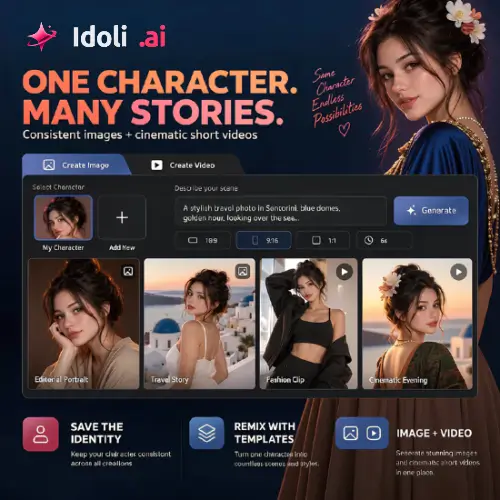
Idoli AI is one such platform that makes this process easier. It allows users to create an AI character and reuse the same identity across different images, scenes, outfits, and short videos. This is especially useful for people who want to build virtual influencer accounts, faceless social media pages, or AI-powered content brands.
But is Idoli worth trying? What features does it offer? How much does it cost? And are there better alternatives?
In this Idoli AI review, we will explore its features, working process, pricing, advantages, disadvantages, and some of the best alternatives.
What Is Idoli AI?
Idoli AI is an AI character creation and content generation platform that helps users create consistent virtual characters for images and short videos.
The main idea behind Idoli is simple: create one AI character and use that same character in different situations without starting from scratch every time.
For example, you can create a virtual female influencer and generate images of her wearing different outfits, visiting different locations, or posing in different environments. You can also turn your character into short cinematic videos.
Unlike basic AI image generators, Idoli focuses on character consistency. This means you can save your character and reuse the same identity for future content.
The platform is designed mainly for individual creators, virtual influencers, faceless content creators, and people who want to produce regular social media content without recording themselves.
How Does Idoli AI Work?
Idoli AI provides a simple workflow for creating AI characters and turning them into different types of content.
You don’t need advanced technical knowledge or professional design experience to get started.
Here is how the process works:
1. Create or Choose an AI Character
First, you need a character for your content.
You can start with one of the available preset characters or create your own virtual identity. You can also use a reference image to guide the character creation process.
Once you have a character you like, you can save it and reuse it for future projects.
2. Choose a Template or Create a Scene
After creating your character, you can choose a content template or describe your own idea.
For example, you can ask the AI to create a fashion photoshoot, a beach vacation scene, a lifestyle portrait, or a cinematic moment.
Templates are helpful for beginners because they provide ready-made ideas and prompts. You can customize them according to your requirements.
3. Generate Images or Videos
Now you can choose whether you want to create an image or a video.
For images, you can use text prompts or reference images. For videos, you can describe the scene or provide an image to guide the generation process.
You can select the available format and duration before generating your content.
4. Save and Organize Your Content
After generation, your creations are stored in the platform’s library.
You can organize your work by character, making it easier to find previous images and videos.
This is useful when you are managing a virtual influencer account and want to maintain a consistent visual identity.

Key Features of Idoli AI
Idoli offers several useful features for people interested in AI character creation and social media content production.
Let’s explore its main features.
1. Consistent AI Character Creation
This is one of the biggest advantages of Idoli.
You can create a character once and reuse the same identity across multiple generations. Instead of creating a completely new face every time, you can work with a saved character.
This is particularly useful for virtual influencers. Your audience can recognize the same character across different posts, just like they recognize a regular social media personality.
However, AI-generated results may still have small differences in facial details, poses, or appearance.
2. Text-to-Image Generation
Idoli allows you to create images using simple text descriptions.
You just need to explain what you want in your image.
For example:
- An AI influencer wearing a stylish summer dress.
- A virtual character standing on a beautiful beach.
- A fashion model posing in a modern studio.
- A lifestyle influencer enjoying coffee in a luxury cafe.
The AI uses your description to generate an image.
This feature is useful for Instagram posts, Pinterest images, digital storytelling, and virtual influencer content.
3. Image-to-Image Generation
Sometimes, describing everything through text is difficult.
That’s where image-to-image generation becomes useful.
You can upload a reference image and use it to guide the creation of a new visual. This can help when you want to change the background, clothing, environment, or overall style of an image.
It also gives you another way to guide the appearance of your AI character.
4. Text-to-Video Generation
Idoli also supports text-to-video generation.
You can describe a scene and let AI turn your idea into a short video.
For example, you can create a cinematic scene of your virtual influencer walking on a beach, enjoying a city trip, or posing for a fashion shoot.
This feature is useful for Instagram Reels, YouTube Shorts, TikTok videos, and other short-form content.
Keep in mind that Idoli focuses on short clips rather than complete long-form video production.
5. Image-to-Video Generation
Another useful feature is image-to-video generation.
You can start with an existing image and use AI to turn it into a moving video.
For example, you can take a picture of your virtual influencer and generate a short clip showing the character moving or performing an action.
This is helpful when you already have a good character image and want to turn it into video content.
6. Ready-to-Use Templates
Not everyone knows how to write effective AI prompts.
Idoli offers templates that help users get started with common content ideas.
You can select a template, customize the character and prompt, and then continue working in the full Studio.
These templates can save time and make content creation easier, especially for beginners.
7. Multiple Content Formats
Different social media platforms require different image and video dimensions.
Idoli provides multiple aspect ratio options for creating content in different formats.
This can help you prepare visuals for platforms such as Instagram, TikTok, and YouTube Shorts.
Always check the available format and resolution before starting a generation.
8. Character-Based Content Library
When you create multiple images and videos, managing everything can become difficult.
Idoli helps solve this problem by organizing generated content around saved characters.
You can find previous creations and continue developing content around the same virtual identity.
This is useful for creators who want to publish regularly instead of generating random images.
What Can You Create With Idoli AI?
Idoli is mainly designed for character-based visual content.
Here are some practical ways to use it:
Virtual Influencer Accounts: Create a fictional social media personality and publish regular images and short videos featuring the same character.
Fashion Content: Generate different outfits, fashion poses, lifestyle photoshoots, and clothing-related visuals.
Travel Content: Create virtual travel experiences featuring your character in different cities, beaches, mountains, and tourist locations.
Faceless Social Media Pages: Build a content account without showing your real face or recording yourself.
Visual Storytelling: Create a series of images and short videos featuring the same character in different situations.
Creative Experiments: Explore different visual styles, scenes, outfits, and content ideas without arranging a physical photoshoot.
Idoli AI Pricing: How Much Does It Cost?
Idoli uses a Pass-based pricing system instead of relying only on traditional monthly subscriptions.
According to its official website, users can purchase one-time Passes without automatic renewal. You can choose a shorter or longer validity period depending on your needs.
The platform offers 30-day and 1-year Pass options.
Here is a summary of its pricing structure:
| Plan | Validity | Pricing |
|---|---|---|
| 30-Day Pass | 30 Days | Check official checkout |
| 1-Year Pass | 1 Year | Check official checkout |
Important Pricing Information:
- Passes are one-time purchases and do not automatically renew.
- Each Pass provides a specific credit allowance.
- Different AI models, image resolutions, and video durations may consume different amounts of credits.
- Paid Passes include commercial-use rights.
- Paid users can generate content without watermarks, according to the available product information.
- Failed generations are not charged, according to the official website.
The exact prices and credit allowances should be checked on the official pricing page before purchasing, as they may change.
My Suggestion: If you are new to Idoli, start with a smaller Pass and test the image and video generation quality. You should understand how many credits your regular content requires before purchasing a longer Pass.
Pros and Cons of Idoli AI
Like every AI platform, Idoli has some advantages and limitations.
Let’s look at both sides.
Pros
- Consistent Characters: Reuse the same AI character across multiple images and videos.
- Image and Video Generation: Create both static images and short videos from one platform.
- Beginner-Friendly Workflow: The platform provides presets and templates to help new users.
- Reference Image Support: Use reference images to guide your generations.
- Content Organization: Keep your generated media organized by character.
- No Automatic Renewal: One-time Passes give you more control over your spending.
- Commercial Use: Paid Passes include commercial-use rights for generated content.
- No Charge for Failed Generations: Failed generations are not charged, according to the official website.
Cons
- Short Video Focus: It is not designed for complete long-form video editing.
- Credit Consumption: Video generation and higher-quality settings can consume more credits.
- Character Variations: The same character may not look perfectly identical in every generation.
- Limited Team Features: It is mainly designed for individual creators rather than large production teams.
- Additional Editing Required: You may need another application for advanced video editing, transitions, subtitles, and audio.
- Limited Independent Reviews: There is currently not much independent user feedback available to judge its long-term performance.
Is Idoli AI Safe to Use?
Idoli has a published content policy that explains what users can and cannot create.
The platform prohibits unauthorized use of another person’s face, non-consensual sexual content, celebrity impersonation, forged endorsements, and deceptive deepfakes.
Users should also obtain permission before uploading someone else’s photographs or reference images.
If your AI-generated content could be mistaken for authentic footage, you should clearly identify it as AI-generated.
For commercial projects, it is also important to check copyright rules, advertising guidelines, and the policies of the social media platforms where you plan to publish.
Before using the service, read its official content policy:
Who Should Use Idoli AI?
Idoli is not designed for every type of content creator. Its main focus is consistent AI characters and short-form visual content.
Here are the people who may find it useful:
1. Virtual Influencer Creators
If you want to build an AI influencer account on Instagram or TikTok, Idoli can help you create one recognizable character and use it across different posts.
2. Faceless YouTubers
Creators who don’t want to appear on camera can use AI-generated characters and visuals in their content.
People managing creative social media pages can use Idoli to develop repeatable visual themes and content ideas.
4. Digital Artists
Artists can experiment with different scenes, outfits, and character concepts without arranging physical photoshoots.
5. Beginners in AI Content Creation
If you are new to AI image and video generation, the presets and templates can make the starting process easier.
However, if you need professional video editing, team collaboration, social media scheduling, or long-form video production, you may need additional tools.
Final Thoughts: Is Idoli AI Worth Trying?
Idoli is an interesting AI platform for creators who want to build virtual characters and produce regular social media content.
Its biggest advantage is the ability to save a character and reuse the same identity across images and short videos. This makes it useful for virtual influencer accounts, fashion content, travel visuals, and faceless social media projects.
The one-time Pass pricing model is another positive point because users don’t have to worry about automatic monthly renewals.
However, there are some limitations. Video generation focuses on short clips, character consistency is not always perfect, and you may need additional editing software for more advanced projects.
Overall, Idoli is worth testing if your main goal is creating a recognizable AI character and turning that character into regular visual content.
I would recommend trying a smaller Pass first, checking the quality of several generations, and calculating the credit usage before investing more money.
Alternatives to Idoli AI
If Idoli doesn’t meet your requirements, here are some other AI tools worth exploring. These platforms offer overlapping features for AI character creation, image generation, or video production.
1. Runway
Runway is an AI-powered creative platform for generating images and videos. It offers text-to-video, image-to-video, and reference-based creative tools, making it useful for creators who want more control over cinematic video production.
2. Kling AI
Kling AI is an AI video and image generation platform that can turn text prompts and images into realistic visual content. It is particularly useful for creating cinematic short videos, realistic character movements, and creative scenes.
3. Artflow
Artflow is an AI storytelling and character creation platform that allows users to create consistent characters, generate images, and produce animated stories. It is a useful option for creators interested in character-based storytelling and visual content.
4. Leonardo AI
Leonardo AI is a popular AI image generation platform for creating realistic images, digital artwork, and creative characters. Its reference and image guidance features can help creators maintain a similar character appearance across multiple generations.
5. Midjourney
Midjourney is an AI image generation tool known for producing detailed and visually impressive images. Its character reference features help users create images featuring similar characters in different environments and artistic styles.
6. OpenArt
OpenArt is an AI image and video creation platform with tools for character creation, image editing, and visual generation. It offers character-focused workflows that can help creators develop recurring characters for different creative projects.
Final Recommendation: If your priority is creating one AI character and using it across different images and short videos, Idoli is worth exploring. However, Runway and Kling AI are also good options if your main focus is AI video production, while Artflow and Leonardo AI are worth considering for character-focused image creation.