If you have ever recorded a long podcast, interview, or webinar and then stared at the footage wondering how to turn it into social media clips, you are not alone. Editing takes time, and most people do not have hours to spend cutting, captioning, and resizing videos for TikTok, Instagram Reels, or YouTube Shorts.
OpusClip is a tool built to solve exactly that problem. It uses artificial intelligence to find the best moments in your long videos and turn them into ready-to-post clips. But it does more than just cutting. It can also clean up raw talking-head footage, add captions, reframe the video for vertical formats, and even let AI agents handle parts of the editing process. Let us take a closer look at what OpusClip actually offers, how much it costs, and whether it is worth your time.
What Exactly Does OpusClip Do?
At its core, OpusClip takes a long video and finds short, interesting moments inside it. You upload a podcast, an interview, a gaming session, or even a sports video, and the tool analyzes the spoken words, visual activity, audio, and even the sentiment of the conversation. Then it suggests clips that might work well on social media. You do not have to sit through hours of footage yourself. You can also describe the kind of moment you are looking for in plain language, and the tool will try to find it for you.
Each suggested clip comes with something called a Virality Score. This is basically a ranking number that tells you which clips the system thinks have the best chance of doing well. It is important to understand that this score is just a guide. It cannot predict how real people will react to your video. The topic, the account posting it, the thumbnail, and the timing all matter just as much. So use the score to decide which clips to review first, but do not treat it as a guarantee.
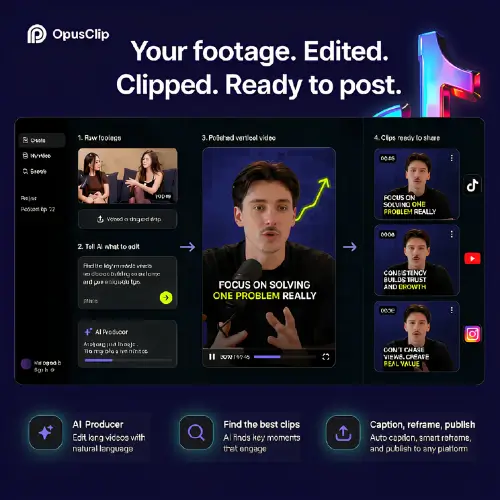
Once you pick a clip, OpusClip can automatically reframe it. This means if your original video was widescreen and you need a vertical version for TikTok or Reels, the tool will track the people and moving objects in the frame and keep them centered. If the automatic crop follows the wrong person, you can switch to manual tracking. You can also add animated captions, emoji highlights, and transitions right inside the editor.
The Newer AI Producer: For Raw Talking-Head Footage
OpusClip recently added a feature called AI Producer, and it works a little differently from the standard clipping tool. Instead of starting with a long video and finding moments inside it, you start with raw footage of one person speaking to the camera. Maybe you recorded a quick video on your phone or webcam. You upload it, and AI Producer builds a polished first draft for you. It adds captions, B-roll, motion graphics, music, sound effects, and rough cuts.
What makes this useful is that you can then ask for changes in plain English. If you want a different caption style or want to remove a specific effect, you just type it. The tool also shows you an edit log, so you can see what it did and undo anything you do not like. However, AI Producer has limits. It is designed for short recordings of one person speaking to the camera. If you have a multi-camera production, a long interview, or a video where timing is absolutely critical, you will still need a human editor. Also, AI Producer does not create fake avatars or synthetic presenters. It edits the real footage you give it.
Cleaning Up Audio and Finding Retakes
Two smaller but very helpful features are Detect Retakes and Speech Enhancement. Detect Retakes scans your video for restarts, self-corrections, filler words like “um” and “uh,” and awkward pauses. It flags these moments inside the editor, but it does not delete them automatically. You review and approve the cuts yourself. This is a smart design choice because automatic removal can sometimes chop out something important.
Speech Enhancement does two things: it reduces background noise and raises the voice to a more consistent volume level. The controls for noise reduction and volume are separate, which is useful. If your recording just needs a little cleanup, you can adjust only the noise without making the speaker sound robotic or over-processed.
Using OpusClip Inside AI Agents
One of the more advanced features of OpusClip is its MCP server. MCP stands for Model Context Protocol, and it allows AI tools like Claude, ChatGPT, Cursor, and VS Code to interact with OpusClip directly. You sign in through OAuth, and then the AI agent can submit videos, pull transcripts, find and score moments, add captions, reframe footage, and even schedule posts to your social accounts. The endpoint is https://mcp.opus.pro/mcp.
This is powerful, but it also comes with a warning. Automation makes mistakes cheaper to make and harder to catch. If you let an AI agent publish clips automatically, you should always review the clip boundaries, captions, translations, titles, and scheduled destinations first. A wrong caption can change the meaning of what someone said. A clip that starts in the middle of a sentence can confuse viewers. The tool removes repetitive work, but it does not remove the need for human judgment.
How Much Does OpusClip Cost?
OpusClip offers a free plan that is genuinely free forever, but it comes with restrictions. Free exports carry a watermark, editing is limited, and clips stop being exportable after a short period. The free plan is good for testing whether the clipping quality works for your content, but it is not meant for running a regular branded publishing operation.
Here is a breakdown of the main plans based on OpusClip’s official help pages:
| Plan | Processing Minutes | Key Features | Best For |
|---|---|---|---|
| Free Forever | 60 minutes per month | AI captions with emojis, YouTube and local file imports, 1 brand template, watermarked exports | Testing the tool |
| Starter | 150 minutes per month | Faster processing, imports from Google Drive, Vimeo, Zoom, and more, editing capability, posting to YouTube, TikTok, Instagram | Casual creators |
| Pro | 300 minutes per month (or 3,600 per year) | All import sources including Twitch, Facebook, LinkedIn, Dropbox, and Riverside; 16:9, 1:1, and 9:16 ratios; Adobe Premiere and DaVinci Resolve export; AI B-roll; team workspaces; 100GB cloud storage | Serious creators and small teams |
| Business | Custom | API access, custom integrations, dedicated storage, additional controls, over 10 seats | Organizations and agencies |
The Pro plan is the only one offered on a monthly or yearly cycle, and it allows you to add more packs to get additional credits and seats, up to a maximum of four seats. If you are just starting out, the free plan will tell you whether OpusClip’s clip selection is good enough for your content. If you need clean exports and more editing tools, the Starter or Pro plan makes more sense.
What OpusClip Does Not Do
It is just as important to understand the limits of OpusClip as it is to understand its features. First, the Virality Score is not a magic prediction. It cannot tell you whether your audience will care about a topic or whether the timing of your post is right. Second, AI Producer works best with short talking-head footage. If you are editing a documentary or a complex narrative video, you will need a traditional editor. Third, the free plan is limited in ways that make it unsuitable for professional use. The watermark and the short export window mean you cannot build a branded presence on the free tier.
Finally, OpusClip does not replace editorial judgment. You still need to check whether a selected excerpt makes sense without the full conversation. You need to check whether a caption changes the speaker’s meaning. You need to check whether the B-roll accurately represents what is being said. The tool handles the repetitive work, but the decisions that require taste and context are still yours.
Final Thought
OpusClip is a genuinely useful tool for anyone who creates short-form video content from longer recordings. It saves hours of manual editing, and its ability to find moments, reframe footage, and add captions is impressive. The AI Producer feature is a smart addition for people who record talking-head videos and want a polished first draft quickly. The free plan gives you a real chance to test the quality before paying, and the paid plans scale from casual creators to teams and businesses.
That said, it is not a replacement for human creativity. The Virality Score is a ranking aid, not a prediction. The automatic edits still need review. The best way to use OpusClip is as a helper that handles the boring parts so you can focus on the parts that require your judgment. If you go in with that expectation, it can be a valuable addition to your content workflow.
Alternatives to OpusClip
Klap
A focused tool for turning YouTube videos and uploaded recordings into captioned vertical clips with automatic reframing. It is simple and straightforward, making it a good choice if you only need basic clipping without extra editing features.
Submagic
Better suited for caption-heavy short videos with B-roll, zooms, sound effects, transitions, and detailed social editing controls. It gives you more control over the look of your captions and effects than OpusClip’s standard clipping workflow.
CapCut
A broader desktop, mobile, and browser editor with AI captions, templates, effects, avatars, generation tools, and manual timeline control. It is not a dedicated clipping tool, but it offers more editing flexibility if you want to work on the timeline yourself.
Short AI
Combines long-video clipping with faceless video generation, scripts, Reddit and chat formats, captions, and automated social posting. It is a good fit if you want to create videos that do not rely on your face or voice.
HiClip
A simpler long-video clipping service for automatically finding highlights, adding captions, cropping, and preparing social exports. It focuses on the basics and does not try to be a full editing suite.