If you have ever tried to build an online course, you know the hardest part is not having the idea. The hard part is turning that idea into lessons, quizzes, worksheets, and then somehow finding the time to tell people the course exists. It is a lot of work, and most of it feels like busywork.
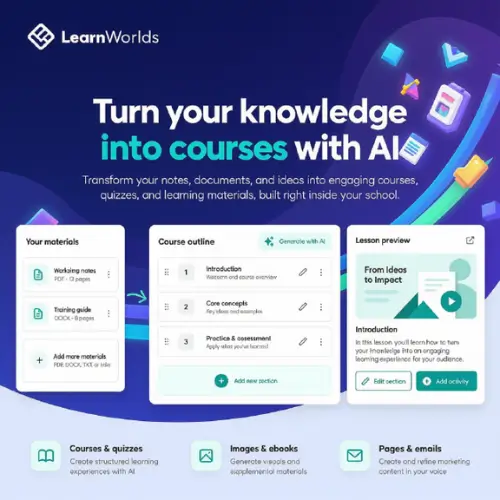
LearnWorlds AI is a tool built right inside the LearnWorlds online school platform. It tries to take some of that busywork off your plate. You give it your notes, documents, or old course materials, and it helps you build a course outline, ebooks, quizzes, and even the pictures that go with them. You can look at the plan first, change it if you want, and then let it finish the job. You stay in charge the whole time .
What Can You Actually Do With It?
The big idea here is that you do not start from a blank page. If you are a coach who has a folder full of workshop notes, you can upload those notes. The AI reads them and suggests a course structure. It can also draft learning activities and even the landing page you will use to sell the program .
Here is a simple example. Imagine you teach people how to bake bread. You have a bunch of notes about flour types, kneading, and oven temperatures. You give those notes to LearnWorlds AI. It might come back with a four-part outline: “Understanding Flour,” “The Art of Kneading,” “Proofing and Timing,” and “Baking and Troubleshooting.” It also suggests a short quiz for each part and a few images of bread. You look at the outline, decide that you want to switch the order of the last two lessons, and then hit generate. Suddenly you have a draft of a course sitting inside your online school .
The tool also helps after the course is built. Let us say a process you teach changes. Maybe there is a new safety rule for using an oven. You do not need to rebuild the whole course. You can tell the AI to rewrite just that one section. You can also ask it to translate a lesson into another language, or swap out an old example for a new one .
Keeping Your School’s Voice Consistent
One thing that makes LearnWorlds AI a bit different is something called Academy Guidelines. If you run a school with other teachers, you know how messy it gets when everyone writes in a different style. One person is super formal, another is funny, and a third uses words nobody understands. With this feature, you can set rules for how the AI writes. You can tell it to use simple words, a friendly tone, and your brand’s specific vocabulary. That way, every teacher on your team starts with content that already sounds like it belongs to your school .
It Does Not Stop at the Course
A lot of course creators get stuck on the marketing side. You spend months on the course, and then you realize you need emails, a sales page, and maybe a blog post to get people interested. LearnWorlds AI can help here too. Because it already knows what your course is about, it can draft a landing page, a funnel, learner emails, and even pop-ups. It can set up the layout and the builder elements for you, so you just have to check the words and hit publish .
The Important Part: You Still Need to Check the Work
Here is the honest truth about any AI tool: it makes mistakes. LearnWorlds AI can write a quiz question, but it cannot guarantee the answer key is right. It can suggest an activity, but it does not know if that activity actually helps a student learn the skill you are teaching. The platform itself says that generated lessons and assessments still need subject expertise. You have to check the facts, the difficulty level, and whether the activity makes sense .
Think of LearnWorlds AI like a very fast assistant who has read a lot of books but has never actually taught your subject. The assistant can get you 80 percent of the way there, but you are the expert who fixes the last 20 percent.
What About the Cost?
LearnWorlds is not a free tool, but it does have a free trial. The plans include a certain number of AI credits each month. If you run out, you can buy more. Access to some features, like AI subtitles or interactive video, depends on which plan you choose .
Here is how the plans break down based on the latest information available:
| Plan | Monthly Billing | Annual Billing (per month) | AI Credits per Month | Best for |
|---|---|---|---|---|
| Starter | $29 | $24 | 300 | People just launching their first course or testing the platform. Note: There is a $5 fee per paid enrollment on this plan. |
| Pro Trainer | $99 | $79 | 500 | Active creators who have growing enrollments and want no per-enrollment fees. |
| Learning Center | $299 | $249 | 1,000 | Schools that are running like a business, with multiple admins and advanced needs. |
| High Volume & Corporate | Custom | Custom | Custom | Large companies and enterprise training teams. |
Note: If you run out of AI credits, you can buy an add-on that gives you 20,000 extra credits per month . The white-label mobile app is also an optional add-on that costs $149 per month .
Who Is This Actually For?
This tool makes the most sense for three types of people. The first is the solo coach or creator who has knowledge scattered across notebooks and old documents. You want to make a course but do not have a team to help you write it. The second is a small training business that needs to produce courses quickly for different clients. The third is a company’s internal training team that has to turn boring policy documents into lessons that employees will actually pay attention to .
If you are a large university with a dedicated instructional design department, you might find the AI suggestions a bit basic. But if you are a one-person show, it can save you days of typing.
The Bottom Line
LearnWorlds AI is not magic. It will not build a perfect course for you while you sleep. But it can take the most annoying parts of course creation, the outlining, the drafting, the image hunting, the email writing, and get them done in minutes instead of weeks. You still have to be the teacher. You still have to check the facts. But you do not have to start from nothing.
If you are already using LearnWorlds, the AI is built right in, so there is nothing to install. If you are thinking about trying it, the free trial gives you a chance to see if the AI’s suggestions match the way you teach. Just remember to keep your expert hat on while you use it.