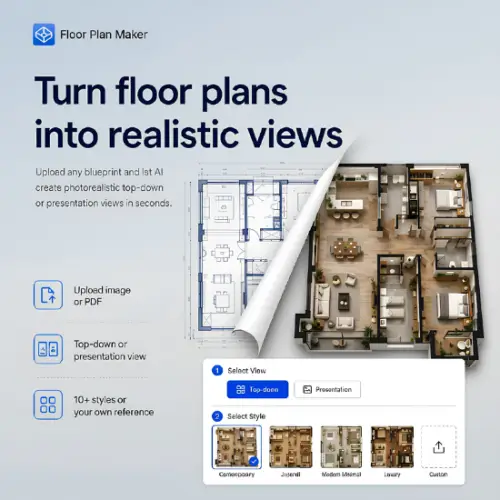
Have you ever tried to look at a standard 2D floor plan and actually picture what the room will look like? It is pretty hard. You just see a bunch of black lines, tiny squares for doors, and weird symbols. It is almost impossible to imagine where the sofa will go or how the sunlight will hit the floor.
That is exactly the problem that Floor Plan Maker solves. This tool takes your boring, flat 2D floor plan and turns it into a fully furnished, colorful visual. It makes it so much easier to understand a space without needing a degree in architecture.
Whether you are a homeowner trying to plan a remodel, a real estate agent trying to sell a house, or an interior designer showing ideas to a client, this tool makes your job a lot simpler. Let’s break down how it works, what it can do, and what you need to know before using it.
How Does It Work?
The best part about Floor Plan Maker is that you do not need to download any heavy software. It runs right in your web browser. The process is broken down into three very simple steps:
- Upload your plan: You can upload an existing floor plan as an image file (like a JPEG or PNG) or as a PDF.
- Choose your look: You pick the view you want and select a design style.
- Generate: Hit the button, and the AI does the rest. It fills in the empty rooms with furniture, flooring, and decor.
You do not even need to create an account to try out the basic workflow, which is great if you just want to test it out quickly.
Understanding the Two Main Views
When you use the tool, you get to choose between two different ways to see your final design. Both are useful, but they serve slightly different purposes.
Top-Down View
This is like looking straight down at the room from the ceiling. It keeps your original floor layout completely visible. The AI just adds furniture, nice flooring materials, and room details right on top of your plan. This is perfect if you want to see exactly how much space is left for walking around or where every piece of furniture sits in relation to the walls.
Presentation View
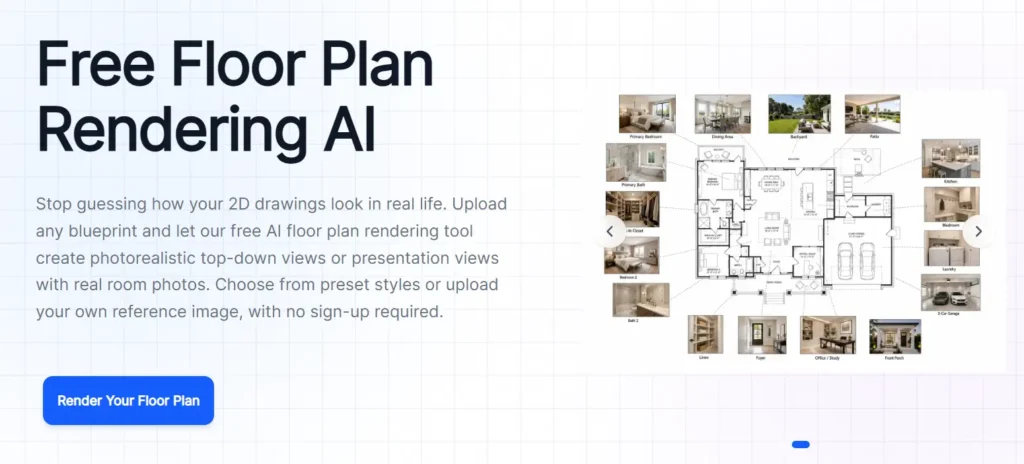
This view is a bit more creative. It mixes your 2D floor plan with realistic, 3D-style room imagery. It makes the concept look like a real photograph mixed with a blueprint. This is highly recommended for property listings or client presentations because it looks much more impressive and helps people emotionally connect with the space.
Picking Your Design Style
A house can feel completely different just by changing the furniture and colors. Floor Plan Maker knows this, which is why it offers more than ten different interior and exterior styles.
You can choose clean and simple looks like Minimalist or Scandinavian. If you want something trendy, you can pick Japandi (a cool mix of Japanese and Scandinavian design) or Coastal for a relaxed beach vibe. If you are working on a high-end project, there is a Luxury style as well.
What if you don’t like the presets?
No problem. The tool has a “Custom Mode.” If you have a specific picture from Pinterest or a magazine that shows the exact finish you want, you can just upload that image as a reference. The AI will try to match that vibe. Plus, you can run the exact same floor plan through the generator multiple times with different styles. This lets you compare different visual directions without having to redraw your original plan.
Tips for Getting the Best Results
The AI is smart, but it needs a clear starting point. The quality of your output depends a lot on the quality of your input.
- Keep it clean: The generator works best with clean plans that have clearly visible walls, doors, windows, and room boundaries.
- Hand-drawn is okay: If you draw your plan by hand, it can still work, as long as the structure is clear and easy to read.
- Avoid mess: Faint pencil marks, overlapping notes, unusual symbols, or incomplete rooms will confuse the AI. This can lead to missing details or walls that look warped. Take a few extra minutes to trace over your sketch with a dark pen or use a digital drawing app to clean it up first.
Other Helpful Tools on the Platform
While the main focus of this page is turning an existing 2D plan into a polished image, the platform actually has a few other tricks up its sleeve.
If you don’t have a floor plan yet, you can use their text-to-layout tool to generate one just by typing a description. They also have tools to convert your 2D plans into rotatable 3D models. If you have photos of empty rooms instead of floor plans, you can use their virtual staging tool to add furniture to the pictures. They even offer tools for exterior and garden design.
A Very Important Warning
It is really important to understand what this tool is, and what it is not.
Treat the final images as a visual concept only. Because it is powered by AI, it can sometimes alter dimensions, move wall positions slightly, change the scale of the furniture, or mess with door openings.
Never use a generated rendering as a measured plan, an engineering drawing, or a construction instruction. If you are actually building a wall, changing plumbing, or doing anything that involves safety and structural rules, you must check the original plan and hire a qualified professional. The AI is for making things look good and sharing ideas, not for actual construction.
Pricing Plans
Floor Plan Maker is free to use for the initial workflow, which is great for testing the waters. However, if you need high-quality, professional results without limits, you will need to look at their paid tiers. Here is a breakdown of their standard pricing structure:
| Plan Name | Price | Best For | Key Features Included |
|---|---|---|---|
| Free Plan | $0 / month | Homeowners & Quick Tests | Basic rendering, limited styles, standard resolution, includes watermark. |
| Pro Plan | $15 / month | Real Estate Agents & Freelancers | High-resolution downloads, no watermarks, access to all 10+ styles, custom reference uploads. |
| Business Plan | $39 / month | Design Studios & Agencies | Everything in Pro, plus bulk rendering, priority processing, API access, and dedicated support. |
(Note: Prices and features are subject to change. Always check the official website for the most current pricing and any active discounts.)
Final Thoughts
Floor Plan Maker is a fantastic tool for anyone who struggles to visualize empty spaces. It takes the guesswork out of floor plans and turns confusing lines into beautiful, furnished rooms. It is fast, easy to use, and runs right in your browser. While you should never use it for actual construction measurements, it is an amazing tool for marketing, brainstorming, and showing off design ideas.
Alternatives to Floor Plan Maker
If you want to explore other options that offer similar features, here are some of the best alternatives available today:
Floor Plan AI
Generates 2D, 2.5D, and 3D floor plans directly from written text descriptions. It is highly useful for creating layouts across several different architectural and presentation styles without needing an existing drawing.
REimagineHome
Focuses heavily on virtual staging and remodeling. It creates interior visualization, landscaping, and remodeling concepts directly from standard property photographs rather than relying on 2D floor plan uploads.
AI Room Planner
Produces detailed interior design concepts for existing physical rooms. It allows you to test out different styles and furniture layouts across various themes, focusing more on single-room visualization rather than rendering full uploaded floor plans.