If you use AI tools for school, work, or just for fun, you probably know the struggle. You open ChatGPT for writing, then switch to Claude for coding, and then open Gemini to check some facts. It gets tiring to keep so many tabs open.
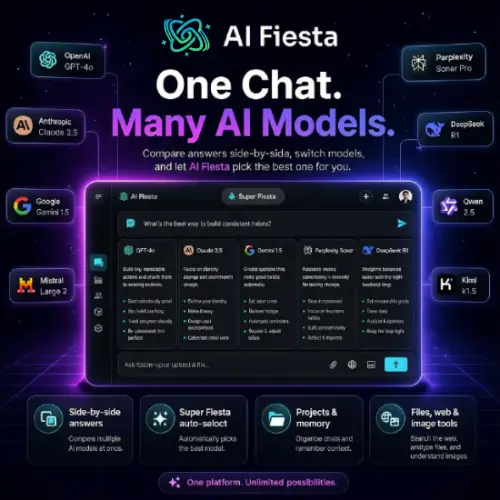
This is exactly the problem AI Fiesta tries to solve. It puts responses from several different commercial AI models inside one single chat window. You can send your prompt to a few selected models, read their answers side by side, and then just keep going with the one that gives you the best answer. It sounds like a dream for anyone who likes to compare things, but is it actually worth your time and money? Let’s break it down in simple terms.
What Can AI Fiesta Actually Do?
The main selling point of AI Fiesta is its massive lineup of AI brains. The service includes models from big names like OpenAI, Anthropic, Google, xAI, Perplexity, DeepSeek, Mistral, Qwen, and Kimi. You can turn these models on or off during a chat without losing your chat history. This makes it super easy to compare how different AIs write, reason, code, or do research.
But it is not just a basic chat window. It has some smart features built in:
- Super Fiesta: If you do not want to pick a model yourself, Super Fiesta does it for you. It reads your prompt and automatically picks the best model for the job. If you do not like the first answer, you can easily ask for an alternative.
- Prompt Enhancement: If you are bad at writing clear instructions, this feature helps. It takes your rough, messy request and turns it into a detailed, clear instruction for the AI.
- Projects: This is great for recurring tasks. You can save system instructions for things like a specific writing style, a marketing brief, or a code review checklist.
- Extra Tools: It is not just for text. AI Fiesta also includes memory (so it remembers past chats), image generation, audio transcription, file uploads, web search, AI avatars, and even some short mental games to play when you need a break.

The Catch: How the Token System Works
Here is the most important thing you need to understand before you sign up. AI Fiesta is not the same as buying a subscription directly from OpenAI or Anthropic.
When you use AI Fiesta, you are accessing these models through their interface and their shared allowance. You do not get separate, official accounts for ChatGPT, Claude, Gemini, Grok, or Perplexity. Because of this, some provider-specific tools, deep settings, and brand-new features might be missing or work differently.
Also, your usage comes from a shared monthly token pool. Think of tokens like a prepaid phone card. Standard models use tokens at a normal rate, but premium models eat up your allowance much faster. If you ask five different models to answer the same long question, your remaining balance will drop very quickly. Once your monthly allowance is empty, you have to buy additional tokens to keep going.
Pricing and Subscriptions
AI Fiesta is sold through monthly and annual subscriptions. Your token allowance renews every billing cycle. Keep in mind that the current terms say unused tokens generally do not roll over to the next month.
Here is a quick look at how their pricing structure is set up:
| Plan Type | Billing Cycle | Token Allowance | Best For |
|---|---|---|---|
| Standard Monthly | Billed every month | Shared monthly token pool | Casual users who want to test the tool without a long commitment. |
| Standard Annual | Billed once a year | Shared monthly token pool (renews yearly) | Regular users who want a lower monthly cost and use AI daily. |
| Enterprise | Custom / Annual | Custom high-volume token pool | Teams, businesses, and heavy users who need a massive amount of tokens. |
Note: Always check the official AI Fiesta website for the exact dollar amounts, as prices and token limits can change based on current promotions.
The Good and The Bad (Pros & Cons)
Public feedback on AI Fiesta is a bit mixed. To make it easy to read, here is a clear breakdown of what users love and what they hate.
The Wins (Pros)
- Easy Comparison: You can view several model replies inside one single conversation.
- Project Controls: You can save instructions, context, and your preferred models for later.
- Extra Tools: It has images, transcription, file reading, and web search built right in.
- Works Everywhere: You can use it in web browsers, and they have apps for both Android and iOS.
The Friction (Cons)
- No Official Accounts: You do not get separate accounts for the official AI services, so you miss out on some native features.
- Token Drain: Comparing multiple models at once can consume your shared token pool very quickly.
- Reliability Issues: Many user reviews mention slow responses, incomplete answers, and app crashes.
- Strict Billing: Payments are generally non-refundable, which is risky if the app is crashing.
Speaking of reliability, a substantial number of reviews mention lost prompts, image generation problems, and subscription recognition errors. Some people love it for writing and spreadsheets, but others find it too buggy for daily use.
A Warning About Billing and Privacy
Before you click “buy” on an annual plan, pay close attention to the billing rules. The website clearly states that payments are normally non-refundable. If you cancel, it just stops future charges; it does not give you a refund for the current period. Since there are quite a few complaints about cancellation issues and slow support response times on Trustpilot and app stores, locking yourself into a yearly plan right away might not be the smartest move.
Also, if you are using the mobile app, you should check the Google Play data safety disclosure before uploading private material. The app currently states that it may collect and share several types of personal data. It also marks the data as not encrypted in transit, though it does allow you to request data deletion. If you are handling highly sensitive school projects or private business data, keep this in mind.
Final Thought
AI Fiesta makes the most sense when comparing several model responses matters more to you than having every single feature found in the providers’ official applications. It is a great tool for students or writers who want to see how different AIs tackle the same essay prompt.
However, given the high volume of reliability complaints, you should play it safe. Begin with low-risk tasks. Test the speed, check how fast your token consumption drops, and see if the app crashes on your device. Only after you are completely comfortable should you move your regular, important business or school tasks over to it.
Alternatives to AI Fiesta
If you read all this and think AI Fiesta might not be the right fit for you, do not worry. There are other great tools that let you use multiple AI models in one place. Here are the best alternatives:
Poe by Quora
Poe lets you chat with almost every major AI model in one very smooth app. It has a great interface, lets you build custom bots, and is generally much more stable than newer aggregators.
TypingMind
TypingMind is a premium, clean front-end for AI models. It gives you an ad-free chat experience where you can plug in your own API keys, meaning you only pay for the exact AI usage you need.
ChatHub
ChatHub is a desktop app that lets you use ChatGPT, Claude, and others at the exact same time. It is specifically built for side-by-side comparisons and works right on your computer screen without needing a browser.
FreeChat
FreeChat is a simple, no-nonsense web tool that routes your prompts to multiple models. It is completely free to use for basic comparisons, making it a great starting point if you do not want to spend any money.