We all have moments when reading feels like a chore. Maybe you have a long report due tomorrow, a pile of study notes to get through, or an article you bookmarked weeks ago but never found the time to sit down and read. What if you could just press play and listen instead?
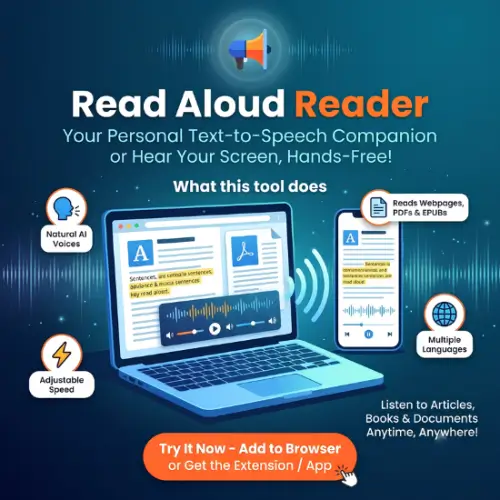
That is exactly what Read Aloud Reader does. It is a web tool that turns text, documents, and web articles into spoken audio right inside your browser. No complicated setup, no software to install, and no account needed to get started. You paste some text, upload a file, or drop in a link, pick a voice, and hit play.
The best part? The sentence being read is highlighted on your screen as the audio plays. That tiny detail makes a big difference. You do not lose your place, and you can follow along with your eyes while your ears do the work. Students can listen to their notes, writers can hear how their draft actually sounds, and busy professionals can review reports while doing something else.
How It Works and What It Supports
Read Aloud Reader is refreshingly simple. You have three ways to give it something to read. You can type or paste text directly into the box. You can upload a file. Or you can paste a URL and let it pull the article for you.
It accepts PDF, DOCX, EPUB, and regular web article links. Once you feed it something, it extracts the text and sends it to the speech generator. If you are working with a scanned PDF that is just an image and has no selectable text, you will need to run optical character recognition (OCR) first before the reader can use it.
Playback speed is adjustable from a slow, careful pace up to twice as fast. That range is genuinely useful. If you are learning a language, slower is better. If you are skimming through material you already know, speed it up and save time. You get several neural voices with different accents, including American, British, and Australian options, so you can pick one that sounds pleasant to your ear.
There is also a browser extension for Chromium-based browsers like Chrome, Edge, Brave, Arc, and Opera. It reads an article or whatever text you have selected without making you copy and paste it into another tab. You can keep browsing while it plays, and the playback controls stay available.
If you want to listen offline, finished speech can be downloaded as an MP3. That is great for turning an article or report into something you can hear during a walk or commute. It is also surprisingly helpful for proofreading. Hearing your own writing read back to you makes repeated words and awkward sentences much easier to catch.
One thing to keep in mind: the free tier has character limits and download limits. If you are a heavy user, you will want to check the current plan details before trying to convert an entire book.
Privacy and Practical Limits
Read Aloud Reader uses OpenAI for the text-to-speech processing. According to the privacy policy, submitted text is used to generate the audio and is not kept beyond a temporary audio cache. The tool also uses hashed IP addresses to manage rate limits. If you have an account, your email, plan, and usage information are stored.
The important takeaway here is simple: do not paste confidential client records, medical information, unpublished contracts, or anything else sensitive into any cloud-based text-to-speech service unless you have checked that its processing terms meet your needs. This is not a knock on Read Aloud Reader specifically. It is just good practice with any online tool that processes text on a server.
Key Features at a Glance
- Neural AI text-to-speech that runs in your browser
- Type or paste text directly
- Import PDF, DOCX, EPUB, and article URLs
- Sentence highlighting while audio plays
- Reading speed adjustable from 0.5x to 2x
- American, British, and Australian voice options
- MP3 downloads for offline listening
- Browser extension for articles and selected text
- Playback controls while you browse other tabs
- Works on desktop and mobile browsers
- No account required for the free tier
Pricing
The free plan is genuinely usable for everyday listening. You get a daily and monthly character allowance, and you can listen without creating an account. Paid plans exist for people who need more text, more downloads, or premium voices. Based on the official website, here is how the plans compare :
| Plan | Price | What You Get |
|---|---|---|
| Free | $0 | 5,000 characters per day, 20,000 per month; one MP3 download per week; standard voices; sentence highlighting |
| Pro | $9.99/month or $59.99/year | 1,000,000 standard characters per month; unlimited downloads; additional standard voices |
| Studio | Higher tier (check site for current price) | Adds premium OpenAI voices (150,000 characters per month), OCR for scanned PDFs and images, and a commercial-use license |
Ads appear on every plan, including paid ones. The site is upfront about this, explaining that the ads and an optional newsletter are what keep the free tier open. If you subscribe, you are paying for characters, voices, and downloads, not for an ad-free experience .
One small note: the search results I found show some conflicting information about the free daily limit. Some third-party sites say 20,000 characters per day, but the official Read Aloud Reader pages consistently state 5,000 per day and 20,000 per month . Trust the official site over third-party listings.
Final Thought
Read Aloud Reader does not try to be a massive all-in-one productivity suite. It does one thing well: it reads text out loud in your browser with good voices, helpful highlighting, and no signup hassle. For students, writers, proofreaders, language learners, or anyone who just prefers listening over reading, that is often exactly enough. The free tier is generous for casual use, and the paid plans are there if you need more room. If you have been putting off that long article or report, this is an easy way to finally get through it.
Alternatives to Read Aloud Reader
NaturalReader
A polished text-to-speech tool that handles PDFs, documents, and web pages with strong natural voices and synced highlighting. It has a more developed mobile app and document management features, though the free tier is more limited.
Speechify
One of the most popular TTS apps, with a browser extension, mobile apps, and OCR for printed text. It offers a wide voice library and speed controls, but it is noticeably more expensive if you need premium features.
Read Aloud (open-source extension)
A lightweight, free browser extension that uses your system voices by default and can connect to cloud voices if you provide your own API key. It is great for privacy-conscious users who just want basic webpage reading without a subscription.