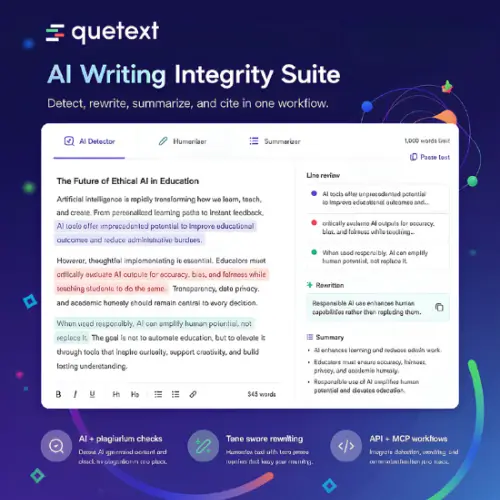
Most students and writers know the feeling. You finish a draft, hit submit, and then worry. Did I accidentally copy something? Does this sound like a robot wrote it? Is my citation format correct? For years, people used one tool for plagiarism, another for grammar, and maybe a third for citations. Quetext tries to fix that problem by putting everything in one place.
I spent time looking at what Quetext actually does today. It is no longer just a plagiarism checker. It has grown into a full writing review suite, and for many people, that makes it a practical daily tool rather than something you open once a semester.
What Quetext Actually Is Now
Quetext started as a plagiarism checker, and that is still a big part of its identity. The company says more than 10 million students, teachers, and professionals use it . But when you open the tool today, you see options for AI detection, humanizing text, summarizing, grammar checking, and building citations.
The idea is simple. You should not have to move your document between five different websites just to make sure it is clean. Quetext wants you to check originality, fix awkward AI phrasing, and get your references right without losing your place.
That sounds convenient, and in practice, it mostly is. The tools are not perfect, but they cover the common needs of a student writing an essay or an editor checking a blog post.
The AI Detector: Helpful, But Not a Judge
The AI Detector is probably the feature people are most curious about right now. It checks text from major models like ChatGPT, Claude, Gemini, Llama, and Mistral. What I like is that it works at the sentence level. Instead of giving you one mysterious percentage for the whole document, it shows you which specific lines triggered the detector.
That matters because AI detection is not an exact science. Quetext itself says the result is an indicator, not proof of authorship. False positives can happen, especially with formal writing or text that has been heavily edited. A sentence-level view helps you see why something was flagged, so you can decide whether it is a real problem or just a quirk of the detector.
The free checker accepts up to 1,000 words at a time, which is enough to test a few paragraphs before committing to a paid plan.
The AI Humanizer: An Editing Pass, Not a Cheat Code
The AI Humanizer is designed for the next step. You paste an AI-assisted draft, choose a tone like Natural, Formal, or Conversational, and pick how strong you want the rewrite to be. Quetext then changes the phrasing while trying to keep the original meaning.
I think the company is smart about how it frames this tool. Quetext describes it as an editing tool, not a way to evade academic or publishing rules. That is the right way to look at it. If you used AI to help outline or draft something, running it through a humanizer can smooth out stiff sentences. But it will not magically make a copied essay original, and it should not be used to hide rule-breaking.
The Summarizer: Good for Getting the Shape of Things
The AI Summarizer takes up to 2,000 words and turns them into a paragraph, bullet list, meeting notes, or a structured report summary. You can choose short, medium, or long output.
This is a handy feature when you are staring at a long article or transcript and need to understand the main points quickly. It is not a replacement for reading carefully, though. Important facts still need to be checked against the original source. If you use the summary for research, treat it as a map, not the territory.
Plagiarism and Citations: The Original Core
Plagiarism detection remains the heart of the product. DeepSearch checks your writing against online sources, and ColorGrade feedback separates exact matches from near matches. That visual distinction is useful because not every match is a problem. A common phrase might show up as a near match, while a copied paragraph will look different.
The citation tools cover common academic formats, and the Chrome extension lets you run plagiarism and AI checks directly on webpages, email drafts, and browser-based documents. For teams, there is a REST API that can plug Quetext into publishing or learning systems.
There is also a hosted MCP connector for compatible AI assistants. After OAuth authorization, an assistant can submit reports, check their status, and retrieve structured results. This is aimed at editorial workflows and research tools where originality checks need to happen inside the existing process.
Pricing: What You Get for Free and What You Pay For
Quetext has a free plan that works for occasional checks. You can use the tools without signing up, up to 1,000 words per feature according to the extension listing . The official FAQ says the free plan includes plagiarism checks on 1,000 words with ColorGrade feedback and that you can check 2,000 words using the AI detector for free . The exact free limits can vary slightly depending on where you look, so it is worth checking the pricing page before you rely on a specific number.
For regular use, the paid plans raise monthly word allowances and add bulk uploads, downloadable reports, broader API use, and organization options.
Here is a simple look at the main plans based on what Quetext and its extension listings show:
Quetext also sells separate plagiarism checker and AI detector subscriptions starting around $9.99 and $7.99 per month respectively, and API usage is priced separately at $0.10 per 1,000 words . The exact prices can change, so treat these as a guide rather than a final quote.
Who Should Use Quetext?
Quetext makes the most sense for students, educators, editors, agencies, and content teams that need both detection and revision tools. A student can check a paper for copying, run the AI detector on a few suspicious paragraphs, and generate citations without opening five tabs. An editor can use the summarizer to get the gist of a draft and the humanizer to smooth out machine-like phrasing.
But anyone making a disciplinary, hiring, or publication decision should be careful. An AI score is not a verdict. A plagiarism percentage is not proof of cheating. Quetext itself warns that false positives are possible. The responsible approach is to review the source text and the supporting evidence, not to treat a number as the final answer.
The free plan is genuinely useful for trying the tool on real work. Many competitors give you a demo that barely works. Quetext lets you run a real check, see the results, and then decide.
The grammar checker supports multiple English dialects and several other languages, which is a nice bonus for international users . It is not as deep as a dedicated grammar tool, but for a quick pass before submission, it catches the obvious problems.
The Chrome extension is one of the most practical parts of the package. Instead of copying text into a separate website, you can highlight a paragraph on any page and run a scan. For people who write in Google Docs or check email drafts, that saves time.
Final Thought
Quetext is not magic. No AI detector is. No plagiarism checker can catch everything, especially unpublished work or translated passages. But Quetext does something useful: it puts the checks most writers actually need into one place, at a price that makes sense for individuals and small teams.
If you are a student who wants a second pair of eyes before submitting, or an editor who needs a quick originality and AI check, Quetext is worth trying. Start with the free plan. Run a real draft through it. See if the feedback makes sense to you. That is the only way to know whether any tool fits your workflow.
Alternatives to Quetext
Grammarly
A writing assistant that focuses on grammar, clarity, and tone, with a plagiarism checker available on paid plans. It is great for everyday writing but does not offer the same depth of AI detection or bulk plagiarism scanning as Quetext.
Originality AI
Built specifically for content teams and publishers, with strong AI detection and plagiarism scanning. It uses credit-based pricing, which works well for high-volume users but can feel less predictable for occasional writers.
Copyleaks
An enterprise-focused tool with deep plagiarism coverage and AI detection. It is powerful for organizations that need scale and integration, but the pricing and setup are heavier than what a student or solo writer usually needs.
GPTZero
Known for sentence-level AI detection and education-focused workflows. It is useful for teachers checking student writing, though it does not bundle as many editing and citation tools as Quetext.
Winston AI
Aimed at educators, publishers, and editorial teams, combining AI detection with plagiarism checking. It is a solid choice for institutions that want a straightforward integrity tool, but it lacks Quetext’s humanizer and summarizer features.