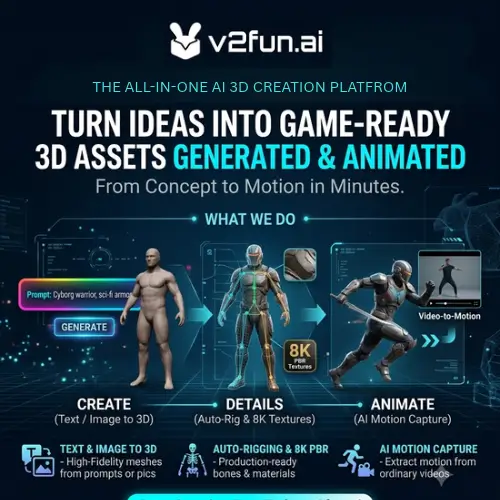
Making high-quality 3D videos for social media used to be a massive struggle. You needed a super expensive computer, costly software, and years of practice just to make a character walk across the screen. But things are changing fast. Today, we are looking at V2Fun, a browser-based AI 3D creation platform that makes the whole process a lot easier.
Since you are looking to create good quality videos for social media, tools like this are a game-changer. V2Fun connects everything you need in one place: concept images, 3D model generation, textures, rigging, animation, and even video-driven motion capture. The best part? It runs in your web browser. You do not need a heavy, powerful local GPU to get things done because it uses cloud infrastructure.
Let’s break down how V2Fun works, what it costs, and how it can help you make awesome content.
From a Simple Idea to a Full 3D Model
Everything starts with an idea. With V2Fun, you can begin with just a simple text description. You type in what you want to see, and the AI generates the initial 3D model. If you have a specific look in mind, you can also upload one reference image or multiple views of the same subject.
But raw AI models can sometimes look a bit messy. V2Fun fixes this by providing tools for prompt improvement, which helps get better spatial and material details. It also has an automated topology cleanup feature. In simple terms, topology is how the 3D surface is built. Cleaning it up makes sure the model looks smooth and bends correctly when animated.
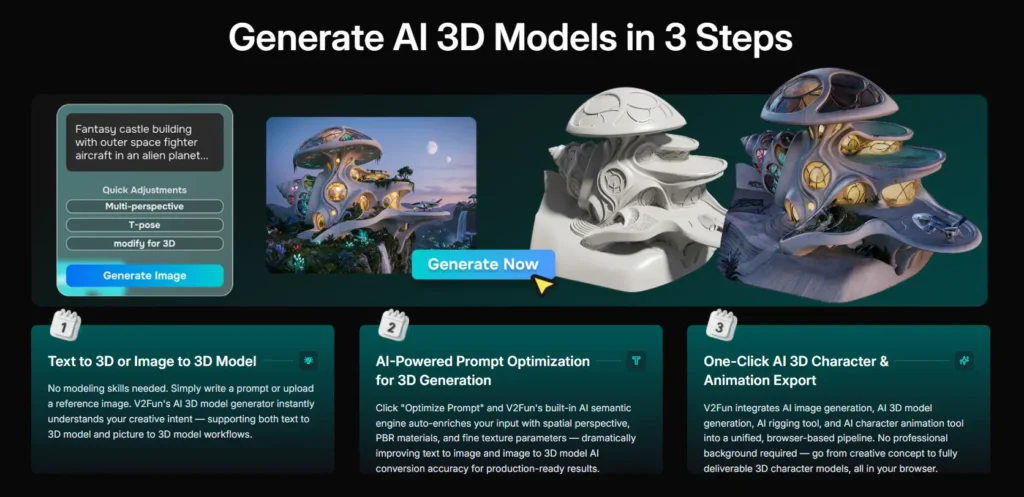
After the shape is ready, the platform adds AI-generated PBR textures and materials. PBR just means the textures react to light realistically, making your character or object look solid and professional. You can even use local image repainting to fix small details right on the model.
Bringing Characters to Life: Rigging and Animation
A 3D model is just a digital statue until you give it a skeleton. This process is called rigging. V2Fun makes this super easy with character skeleton binding. Once the skeleton is in place, you can adjust the joint markers to make sure they fit your character perfectly.
After rigging, you need to make it move. V2Fun has a built-in motion library. You can just pick an animation, like walking or waving, and apply it to your character. If you already have motion files, you can upload existing BVH and VMD files directly to your motion library.
The Magic of AI Video Motion Capture
This is where V2Fun really shines, especially if you want to make cool social media videos. Instead of using expensive motion capture suits, V2Fun uses AI video motion capture.
You just record a normal video (an MP4 file) of yourself or someone else doing the moves you want. The AI extracts the human movement and transfers it directly to your rigged 3D character. It works best if you follow a few simple rules: make sure one person is fully visible, keep the camera frame stable, use even lighting, and use a clean background. Also, try not to block your arms and legs in the video. Short reference clips with clear movements give the best results.
Since you already have access to AI image-to-video tools, you can use V2Fun to create the animated 3D character, and then use your other tools to turn those animations into stunning final video clips!
Working with Your Own Files
You are not forced to only use what the AI generates. If you have your own 3D models, V2Fun lets you upload them. It supports formats like GLB, FBX, PMX, and ZIP. Once your model is inside V2Fun, you can rig it, animate it, and use the video motion capture on it just like any other asset.
When you are done, you can export your finished assets. V2Fun supports FBX and GLB exports, which means you can easily take your 3D models into other 3D software or game engines. All your generated assets stay in a private cloud asset library, so your work is safe and organized.
Who is V2Fun For?
V2Fun is built for people who want to save time. It is perfect for American indie game developers who need quick character assets. It is great for animators and small creative studios that do not have the budget for massive motion capture studios. It is also highly useful for 3D printing businesses and virtual production teams. And for social media creators, it cuts down the time needed to make preliminary models and animations, letting you focus on the fun parts of video creation.
Pricing and Credits
V2Fun uses a credit-based system. Every step of your project uses credits. This includes image generation, model creation, texturing, rigging, and animation.
You can get free credits just by registering, doing account tasks, daily check-ins, inviting friends, and joining promotions. If you need more, you can buy paid subscriptions. These give you recurring credits and higher usage limits. Keep in mind that subscriptions renew automatically unless you cancel them. Also, once credits are used for a generation, they usually cannot be refunded.
Here is a simple breakdown of how the pricing structure works:
| Plan Type | Estimated Cost | What You Get |
|---|---|---|
| Free Tier | $0 / month | Free credits earned via sign-up, daily check-ins, and simple tasks. Great for testing the tool. |
| Standard Plan | Paid Monthly | Recurring monthly credits, higher usage allowances, and basic commercial rights for your projects. |
| Pro / Premium Plan | Paid Monthly | Maximum monthly credits, priority cloud processing, and full commercial licensing for client work. |
(Note: Exact dollar amounts can change, so always check the official V2Fun website for the most current pricing before buying.)
Licensing, Privacy, and Things to Keep in Mind
When you make something, you want to know who owns it. Generated assets on V2Fun remain private unless you choose to publish them or share a link. The default asset license follows CC BY 4.0, which means you can use it, but you might need to give attribution. However, commercial license benefits change depending on your subscription tier. If you are making work for a client or selling assets, always check the current license rules for your specific plan.
It is also important to know the tool’s limits. Right now, V2Fun does not do final video rendering. It produces images, static 3D models, animated 3D assets, and motion data. You will still need another app (like CapCut, Premiere, or your AI video tools) for final editing, lighting, sound, and compositing.
Also, because independent user feedback is still a bit limited, always inspect your geometry, textures, and skeleton placement before using an asset in a final project. AI is great, but it is not 100% perfect every single time.
Key Features at a Glance
- Text to image generation and local image repainting
- Smart reference images for 3D modeling
- Text to 3D, single image, and multiview image to 3D
- AI prompt improvement for better details
- Automated topology cleanup and AI PBR textures
- Character skeleton binding and built-in motion library
- Video-based human motion capture and motion retargeting
- Upload support for GLB, FBX, PMX, ZIP, BVH, and VMD files
- FBX and GLB export for other software
- Private cloud asset library and credit-based pricing
Final Thought
V2Fun is a massive step forward for creators who want to make 3D content without the usual headaches. By putting text-to-3D, rigging, and AI video motion capture all into one browser-based platform, it saves you a ton of time and money. While it does not replace a full video editing suite for final rendering, it perfectly handles the heavy lifting of 3D creation. For anyone looking to level up their social media videos with cool 3D characters, V2Fun is definitely worth a try. Just start with the free credits, test out the motion capture, and see how it fits into your creative workflow!
Alternatives to V2Fun
If you want to compare V2Fun with other tools on the market, here are two of the best alternatives that offer similar features.
| Tool Name | Description |
|---|---|
| Tripo AI | Generates editable 3D models from text and reference images. It includes tools for texturing, topology cleanup, rigging, animation, and easy exporting. |
| Meshy | Creates 3D models and textures from prompts, images, and sketches. It offers great export options for game development, 3D printing, and virtual environments. |