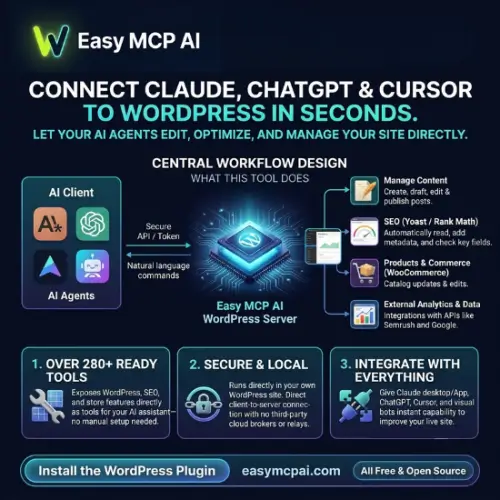
Easy MCP AI is a WordPress plugin that connects your website with AI assistants such as ChatGPT, Claude, Cursor, and other MCP-compatible tools. It allows AI assistants to interact with your WordPress website, manage content, work with media, access SEO data, and perform other approved tasks.
Instead of manually opening your WordPress dashboard for every small task, you can give an AI assistant permission to perform specific actions on your behalf. This can save time for website owners, bloggers, developers, SEO professionals, and online businesses.
In this review, we will explore what Easy MCP AI does, its main features, integrations, security options, pricing, advantages, disadvantages, and some alternatives worth considering.
What Is Easy MCP AI?
Easy MCP AI is a WordPress plugin that turns a WordPress website into a remote Model Context Protocol (MCP) server. It creates a connection between your website and compatible AI applications, allowing them to access WordPress information and perform tasks based on the permissions you provide.
For example, you can connect your WordPress website to ChatGPT or Claude and ask the AI assistant to create a blog post, upload an image, update content, or manage categories. The assistant can use the tools provided by the plugin instead of simply giving you instructions to follow manually.
One important advantage is that Easy MCP AI runs directly inside WordPress using PHP. You do not need to install Node.js, manage a separate server, or configure an external proxy just to run the MCP service.
How Does Easy MCP AI Work?
Easy MCP AI uses MCP technology to allow AI applications to communicate with your WordPress website.
MCP stands for Model Context Protocol. It is an open standard that helps AI assistants connect with external applications, databases, and services.
Here is a simple example:
Imagine you run a WordPress blog and want to publish a new article. Normally, you would need to open your WordPress dashboard, create a post, add images, write a title, select categories, and save it.
With Easy MCP AI, you can ask a connected AI assistant to complete these tasks.
The process looks like this:
- Install Easy MCP AI on your WordPress website.
- Connect an AI client such as ChatGPT, Claude, or Cursor.
- Authorize the connection using OAuth or an API token.
- Select which WordPress tools the AI assistant can access.
- Give the AI assistant instructions through a conversation.
- The assistant uses the available MCP tools to perform the requested tasks.
For example, you could ask Claude to create a 1,000-word blog post, upload a featured image, add categories, and save the article as a draft.
The plugin sends the approved actions to WordPress and returns the results to the AI assistant.
This makes website management much easier, especially for people who regularly publish content or manage multiple WordPress websites.
Key Features of Easy MCP AI
Easy MCP AI offers several features that make it useful for bloggers, developers, agencies, SEO professionals, and online store owners.
Let’s look at some of its important features.
1. Connect WordPress With AI Assistants
The main feature of Easy MCP AI is its ability to connect WordPress with different AI assistants.
It supports MCP-compatible applications, including:
- ChatGPT
- Claude
- Cursor
- OpenAI Codex
- GitHub Copilot
- Google Antigravity
- Other compatible MCP clients
Once connected, these applications can interact with your website using the permissions you provide.
You can use natural language to request different tasks instead of manually searching through WordPress settings.
2. Manage Posts and Pages
Managing website content is one of the most useful applications of this plugin.
An AI assistant can create new posts, update existing articles, edit pages, manage categories, and work with other supported content types.
For example, you can ask your AI assistant to:
- Create a new blog post.
- Update an existing article.
- Change the post title.
- Add categories and tags.
- Edit the post description.
- Save content as a draft.
- Manage custom post types.
This can be helpful for content creators who publish articles regularly.
You can also combine content creation with SEO tasks to reduce repetitive work.
3. Upload and Manage Media Files
Images are an important part of most websites. However, uploading and managing images manually can take extra time.
Easy MCP AI provides media management tools that allow compatible AI assistants to work with your WordPress media library.
For example, you can ask an assistant to upload an image, update its details, or add suitable alternative text.
It can also help with tasks such as organizing media and connecting images with blog posts.
This is especially useful for bloggers who publish multiple articles every week.
4. WooCommerce Integration
If you run an online store using WooCommerce, Easy MCP AI can make store management easier.
Its WooCommerce integration allows supported AI tools to work with different parts of your online store.
These include:
- Products and product information
- Orders
- Customer records
- Coupons
- Shipping settings
- Sales reports
For example, you can ask an AI assistant to find a product, update its description, or check information about recent orders.
Store owners can also use AI to review sales information and perform other approved administrative tasks.
However, you should be careful when giving AI access to customer information, orders, or important store settings.
5. SEO Plugin Integrations
SEO is important for getting organic traffic from Google and other search engines.
Easy MCP AI supports several popular WordPress SEO plugins, including:
- Yoast SEO
- Rank Math
- All in One SEO (AIOSEO)
- SEOPress
- Slim SEO
- The SEO Framework
These integrations allow AI assistants to work with supported SEO settings and metadata.
For example, you can ask an AI assistant to update SEO titles, meta descriptions, and other supported SEO fields.
This can save time when optimizing a large number of blog posts.
6. Google Analytics and Search Console Integration
Another useful feature is its ability to connect website analytics and search performance data with AI conversations.
Easy MCP AI supports integrations with Google Analytics 4 and Google Search Console through its data connections.
You can use these integrations to understand website traffic, search performance, and other important metrics.
For example, you could ask an AI assistant:
- Which blog posts receive the most traffic?
- Which pages have lost organic clicks?
- Which search queries bring visitors to my website?
- Which pages should I improve?
- What content opportunities can I find from my search data?
Instead of checking multiple reports manually, you can ask questions and let the AI assistant analyze the available information.
7. External SEO Data Integrations
Easy MCP AI also supports connections with external SEO and keyword research platforms.
Some supported services include:
- Semrush
- Ahrefs
- SE Ranking
- DataForSEO
These integrations can help SEO professionals research keywords, analyze competitors, and discover new content opportunities.
For example, you could ask an AI assistant to find low-competition keywords, prepare a content outline, and create a WordPress draft based on the research.
Keep in mind that these services may require separate subscriptions or API credits. Easy MCP AI does not provide free access to their paid features.
8. Security and Permission Controls
Giving an AI assistant access to your WordPress website can create security risks if permissions are not configured properly.
Easy MCP AI includes several controls to help website owners manage access.
Some important security features include:
- OAuth 2.1 authentication
- API token authentication
- Individual tool permissions
- WordPress user capability checks
- Rate limiting
- IP restrictions
- Activity and audit logs
- Change history
- Controls for disabling sensitive tools
Every connected AI assistant works with the permissions of its assigned WordPress user.
This means an AI assistant should not automatically receive full administrator access just because it is connected to your website.
You can also use a dedicated WordPress account with limited permissions for AI activities.
9. Change History and Audit Logs
Another helpful feature is the ability to track activities performed by AI assistants.
The audit log helps administrators review tool calls, arguments, results, timestamps, and client information.
Change History also helps review modifications made through MCP and restore supported previous versions.
This is particularly useful when multiple people or AI assistants work on the same website.
If an AI assistant makes an unwanted content change, you can review the activity and use the available recovery options where supported.
10. No Node.js or Separate Server Required
Many MCP solutions require additional setup, such as running a separate server or maintaining a Node.js process.
Easy MCP AI takes a different approach.
It runs directly inside WordPress using PHP. You do not need to maintain another server or configure an external proxy for its basic MCP connection.
This makes it a convenient option for people using regular WordPress hosting.
It can also be useful for website owners who do not have advanced programming knowledge.
How to Install and Set Up Easy MCP AI
Getting started with Easy MCP AI is relatively simple.
Here are the basic steps:
Step 1: Install the Plugin
Open your WordPress dashboard and navigate to Plugins → Add New Plugin.
Search for Easy MCP AI, click Install Now, and activate the plugin.
You can also download the plugin from the official WordPress plugin directory and upload it manually.
Step 2: Open the Easy MCP AI Dashboard
After activation, open the Easy MCP AI section in your WordPress dashboard.
You can find the MCP server address and connection instructions there.
Step 3: Connect Your AI Client
Choose the AI application you want to connect, such as Claude, ChatGPT, or Cursor.
Follow the connection instructions provided for that application.
Depending on the client, you can use OAuth authentication or an API token.
Step 4: Select Permissions
Choose which WordPress tools the AI assistant should be allowed to use.
For example, if you only want help with blog content, you can provide access to posts, pages, categories, and media without giving unnecessary access to users or site settings.
Step 5: Start Using AI
Once the connection is complete, you can start giving instructions through your AI assistant.
Try a simple task first, such as asking it to list your recent blog posts or create a draft.
You can explore more advanced features after confirming that everything works correctly.
Who Should Use Easy MCP AI?
Easy MCP AI can be useful for different types of WordPress users.
Bloggers and Content Creators: If you publish articles regularly, you can use AI assistants to create drafts, update existing posts, manage images, and improve SEO information.
SEO Professionals: SEO experts can connect keyword research and analytics services to their AI workflows. This can make keyword research and content optimization more convenient.
WooCommerce Store Owners: Online store owners can use supported tools to manage products, check orders, and work with store information.
WordPress Developers: Developers can use AI assistants to manage website content, inspect supported site information, and perform technical tasks.
Digital Marketing Agencies: Agencies managing multiple client websites can use AI to reduce repetitive work. Each website can have its own plugin configuration and connections.
Easy MCP AI Pricing
Free and Open Source
One of the biggest advantages of Easy MCP AI is its pricing. The plugin is free to install and use. It does not require a monthly subscription or a paid plugin license.
Here is a simple pricing breakdown:
| Plan / Service | Price |
|---|---|
| Easy MCP AI Plugin | Free |
| Plugin Usage | Free |
| MCP Server | Free |
| Paid Plugin Upgrade | Not required |
| AI Assistant Access | Depends on provider |
| External SEO APIs | Separate charges may apply |
| Premium Third-Party Plugins | Separate charges may apply |
You should remember that free access to Easy MCP AI does not mean every connected service is free.
For example, ChatGPT or another AI provider may require a paid subscription for certain features. Similarly, services such as Semrush and Ahrefs may charge separately for API access.
Pros and Cons of Easy MCP AI
Every WordPress plugin has advantages and limitations. Here are some important pros and cons to consider before installing Easy MCP AI.
| Pros | Cons |
|---|---|
| Free and open source | Requires an MCP-compatible AI client |
| No separate Node.js server required | Initial connection may need technical knowledge |
| Supports multiple AI assistants | Some AI services require paid plans |
| Offers WordPress content management | Incorrect AI instructions can cause unwanted changes |
| Supports WooCommerce | External SEO APIs may cost extra |
| Includes security and permission controls | Permissions still need careful configuration |
| Supports popular SEO plugins | Not every third-party plugin is supported |
| Includes activity logs and change history | WordPress role permissions can be broad |
Is Easy MCP AI Safe to Use?
Security is an important consideration when connecting AI assistants to a live WordPress website.
Easy MCP AI offers several security features, including OAuth 2.1, API tokens, permission controls, WordPress capability checks, rate limits, and activity logs.
However, no plugin can guarantee complete protection against mistakes or misuse.
You should follow a few basic safety practices:
- Always use HTTPS on your website.
- Create a separate WordPress account for AI access.
- Avoid giving administrator permissions unless necessary.
- Enable only the tools your AI assistant actually needs.
- Review the audit log regularly.
- Use draft mode for AI-generated articles.
- Avoid providing unnecessary access to customer information.
- Revoke unused tokens and connections.
The Force Draft setting mentioned in the plugin’s documentation is also useful for websites where you want to review AI-generated content before publishing.
My recommendation: Start with limited permissions and test the plugin on a staging website before allowing AI assistants to make changes to your main website.
Final Thoughts
Easy MCP AI is an interesting solution for anyone who wants to manage a WordPress website using AI assistants.
Its biggest advantage is that it connects AI applications directly with WordPress without requiring a separate Node.js server or external proxy. You can manage content, work with media, update SEO information, access analytics, and perform supported WooCommerce tasks through AI conversations.
The free and open-source pricing also makes it attractive for bloggers, developers, agencies, and small business owners.
However, you should understand how MCP connections and WordPress permissions work before giving an AI assistant access to your website. Start with limited permissions, test its features, and review important changes before publishing them.
Overall, Easy MCP AI is worth trying if you want to bring AI-powered automation directly into your WordPress workflow.
Easy MCP AI Alternatives
If Easy MCP AI does not meet your requirements, there are other WordPress plugins and MCP solutions worth exploring.
1. WPVibe
WPVibe is a WordPress MCP server that connects AI assistants such as Claude, ChatGPT, and Cursor with WordPress websites. It supports content and website management through AI-powered conversations.
2. AI Engine
AI Engine is a WordPress plugin for building AI chatbots, AI assistants, and automation features. It also supports MCP connections, allowing compatible AI applications to interact with WordPress.
3. WordPress MCP Adapter
WordPress MCP Adapter connects the WordPress Abilities API with MCP-compatible AI applications. It is a useful option for developers who want to build custom AI integrations around WordPress abilities.
4. Uncanny Automator
Uncanny Automator helps connect WordPress plugins and external applications through automated workflows. It also offers MCP-related functionality for connecting AI assistants with website actions.
5. Royal MCP
Royal MCP is another WordPress MCP solution that connects AI assistants with WordPress websites. It offers tools for managing website content and settings through MCP-compatible AI clients.