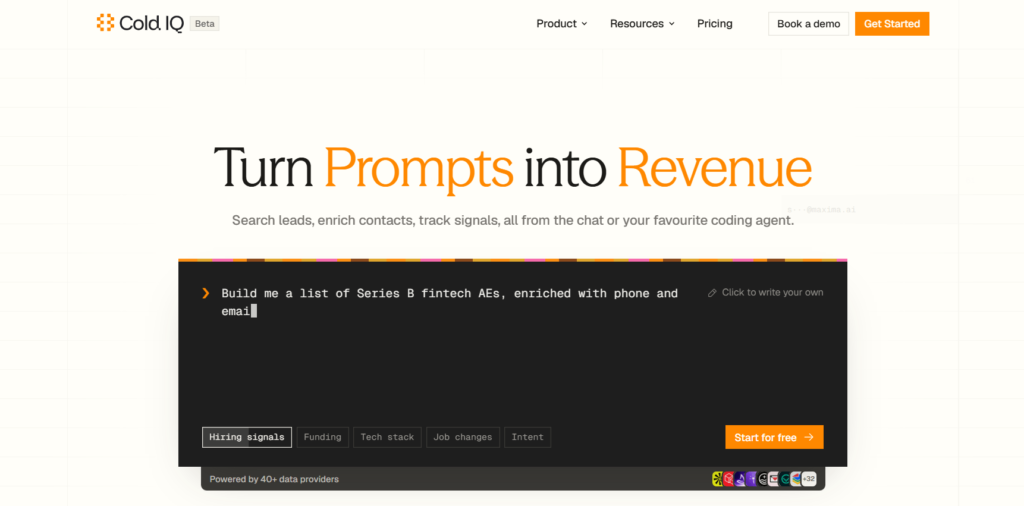
ColdIQ is an AI-powered sales data platform that helps businesses find potential customers, collect contact information, and research companies. It brings data from multiple providers into one place, making it easier for sales teams and marketers to find useful business information without managing several separate tools.
The platform is especially useful for businesses that use AI agents to research leads and automate their sales work. Instead of searching for contacts manually or connecting to different data services one by one, users can access company data, enrich contact records, and find business signals through a single platform.
ColdIQ supports a REST API, an MCP server, and an AI agent chat interface. This makes it useful for both technical users who build their own workflows and teams that want to use AI to simplify everyday sales tasks.
In this review, we will explore ColdIQ’s features, pricing, benefits, limitations, and some alternatives you can consider.
What Is ColdIQ?
ColdIQ is a unified data platform designed for sales, marketing, and go-to-market (GTM) teams. It connects users to more than 40 data providers and over 700 endpoints through one API key, according to its official website.
In simple words, ColdIQ helps you collect business information from different sources without having to manage each source separately.
For example, imagine you want to find 100 marketing managers working at software companies in the United States. You may need their names, company details, work email addresses, and information about the businesses they work for.
Doing this manually can take hours. With ColdIQ, you can describe the type of contacts you want, set your targeting criteria, and use its data tools to collect matching information.
The platform can also help enrich existing contact lists, find work email addresses, and research signals such as company hiring activity, funding, technology usage, and job changes.
ColdIQ is not simply a traditional contact database. Its main purpose is to connect data sources with AI agents and automated workflows. This allows businesses to build more flexible prospecting systems.
Key Features of ColdIQ
1. Find Potential Customers
ColdIQ helps users search for companies and people based on their target audience.
You can look for businesses by factors such as industry, company size, location, job title, and other available filters. This helps sales teams focus on people who are more likely to need their products or services.
For example, a software company selling marketing automation tools could search for marketing directors at mid-sized businesses.
This approach can save time compared with searching through company websites and professional profiles individually. However, the quality of the results still depends on the available data and how well you define your target audience.
2. Enrich Contact Information
Contact enrichment means adding missing information to an existing record.
Suppose you have a spreadsheet containing company names and the names of their employees, but you do not have their work emails or other useful details. ColdIQ can help you search for additional information through its connected data providers.
Depending on the available source, you may be able to find:
- Business email addresses
- Phone numbers
- Company websites and domains
- Job titles and company details
- Other useful information about a contact
This feature is useful for sales teams that already have a list of potential customers but need more information before contacting them.
ColdIQ also supports email verification workflows. However, a verified email does not guarantee that a message will reach the inbox or receive a reply.
3. Automatic Data Provider Selection
One of ColdIQ’s main features is its ability to work with multiple data providers through one account.
Different providers may have different strengths. One might find a particular contact’s email address, while another may have better information about their company.
ColdIQ can automatically select a suitable provider for a request based on factors such as fit, cost, and accuracy. Its waterfall enrichment process can also try additional providers when an earlier source does not return the required information.
This can reduce the need to switch between tools and manage multiple API keys.
Users can also choose specific providers when they prefer to control which source handles a request.
4. Track Business Signals
Business signals are changes or activities that may help a company identify a potential sales opportunity.
ColdIQ supports access to different types of business information, including:
- Hiring signals: Find companies that are hiring for particular roles.
- Funding signals: Research businesses that have recently raised funding.
- Technology data: Discover which technologies a company uses.
- Job changes: Identify contacts who have moved to another company.
- Buying intent: Access available intent-related data to help research possible demand.
For example, a business selling recruitment software may want to identify companies that are rapidly expanding their teams.
These signals can help sales teams decide which companies deserve more attention. They should be treated as research clues rather than proof that a company is ready to buy.
5. Connect AI Agents Through MCP
ColdIQ supports the Model Context Protocol (MCP), which allows compatible AI applications to connect to external tools and data.
This is useful for people who work with coding agents such as Claude Code and Cursor. Instead of manually copying information between an AI assistant and a data platform, users can connect their agent to ColdIQ and let it request supported data when needed.
For example, you could ask a compatible agent to find sales leaders at software companies, collect their available contact details, and organize the results into a structured file.
The agent can then use that information in a larger workflow, depending on the tools and permissions you have connected.
This feature is particularly useful for developers, technical marketers, and growth teams building custom sales systems.
6. REST API for Custom Integrations
A REST API allows different software applications to communicate with each other.
ColdIQ provides an API that developers can use to connect its data services to their own applications, scripts, CRM systems, and other business tools.
For example, a business could build a workflow that finds new companies, enriches their records, and sends the results to its CRM.
This gives developers more control over how they collect and use data. It can also reduce repetitive work when a company needs to research large numbers of leads regularly.
Some technical knowledge may be required to build and maintain custom integrations.
7. AI Agent Chat and Reusable Skills
ColdIQ also offers an agent chat interface that allows users to request business data in plain English.
Rather than writing every API request manually, users can describe what they want to find and let the agent help with the task.
ColdIQ also publishes reusable agent skills and workflows. These provide instructions for common tasks, such as finding prospects, enriching contact lists, and preparing outreach research.
Reusable skills can make repeated work easier because users do not need to design every step from scratch.
Before using a workflow for a large campaign, it is still important to review its filters, results, and actions. Automated research can save time, but it does not replace human judgment.
How Can You Use ColdIQ?
ColdIQ can be useful in several business situations.
For B2B sales: Sales representatives can build prospect lists, research companies, and find available contact details before reaching out to potential customers.
For marketing agencies: Agencies can identify businesses that match a client’s target audience and collect information for campaign planning.
For lead generation: Growth teams can use company filters and business signals to create more focused prospect lists.
For developers: Developers can connect the API or MCP server to custom applications and AI agents.
For CRM data management: Teams can enrich incomplete records before importing or updating information in a CRM.
For account-based marketing: Businesses can research selected companies and identify relevant people within their target accounts.
The best use case depends on your business goals, the data you need, and how much automation you want to build.
ColdIQ Pricing Plans
ColdIQ offers a free plan and several paid subscriptions. Its pricing is based on credits, which are used when you make data requests. The amount charged for a task depends on the operation and provider involved.
The following prices are listed on ColdIQ’s official pricing pages. They are in US dollars and may change over time.
| Plan | Price | Included credits |
|---|---|---|
| Free | $0 | 300 one-time credits |
| Starter | $99/month | 7,000 credits/month |
| Pro | $199/month | 15,000 credits/month |
| Scale | $499/month | 40,000 credits/month |
| Enterprise | Custom pricing | Custom credit volume |
What do the plans include?
- Free: Suitable for testing the platform, exploring its providers, and trying basic data workflows. The initial 300 credits do not expire.
- Starter: Designed for teams that are beginning to build their sales and marketing data workflows.
- Pro: Offers a larger monthly credit allowance for teams with more frequent data needs.
- Scale: Intended for teams running data-intensive workflows. The plan includes additional support and features for larger operations.
- Enterprise: Designed for businesses that need custom credit volumes, dedicated support, or specific service arrangements.
Paid subscription credits can roll over for three months, according to the standard pricing information currently published by ColdIQ. Annual billing may offer a discount, depending on the selected plan and current terms.
ColdIQ also states that it does not charge a separate per-user licence fee. This may be helpful for teams that want several colleagues to use the same account.
Before subscribing, check the official pricing page to confirm the available credit allowance, rollover rules, billing period, and any additional charges. Also, remember that credits do not represent a fixed number of leads: different requests can consume different amounts.
Benefits of ColdIQ
ColdIQ offers several advantages for businesses that depend on accurate prospect research.
- One API key: Access multiple data providers without managing a separate account and API key for each one.
- Flexible access: Use the agent chat, REST API, or MCP server, depending on your workflow.
- Less manual research: Automate repetitive tasks such as contact enrichment and company research.
- Multiple data sources: Use different providers when one source does not have the information you need.
- Usage visibility: Check credit usage and review the cost of data requests.
- Custom workflows: Connect data services to your own applications and compatible AI agents.
- Free starting option: Test the platform with its initial credit allocation before paying for a subscription.
These benefits can be especially valuable for businesses that need to collect information from several sources regularly.
Limitations of ColdIQ
ColdIQ may not be the right choice for every user.
First, its advanced features are more useful to people who understand sales data, APIs, or AI agents. Beginners may need some time to understand how to connect the platform to their existing tools.
Second, it uses a credit-based pricing model. If you run many searches or enrichment requests, your credits may be used faster than expected. It is wise to test a small workflow before processing a large list.
Third, data quality can vary by provider, industry, country, and contact. Not every person will have a complete or up-to-date record.
Finally, ColdIQ is primarily a data platform, not a complete replacement for every CRM or sales engagement system. Businesses may still need separate tools to manage customer relationships, send campaigns, and track sales activity.
Is ColdIQ Worth It?
ColdIQ is worth considering if your business regularly researches B2B leads and wants to connect that work with AI agents or custom software.
Its biggest advantage is the ability to access multiple data providers through one platform. Automatic provider selection, contact enrichment, business signals, and MCP support can make prospecting workflows easier to build and manage.
The free plan is a sensible starting point because it lets you test the platform before committing to a paid subscription. Try a few realistic searches, check the quality of the results, and measure how many credits your workflow uses.
However, if you only need a simple contact database or an all-in-one sales engagement platform, a traditional sales tool may be easier to use.
The right choice depends on your team’s technical skills, budget, and daily sales process.
Final Thoughts
ColdIQ is a useful option for businesses that want to make B2B prospecting more flexible with AI. It brings multiple data providers together and lets users access them through an API, an MCP server, or an AI chat interface.
Its contact enrichment, business signal research, and automatic provider selection features can help reduce manual work and improve how teams organize their prospecting data.
However, it is important to remember that better data does not automatically lead to more sales. You still need the right target audience, relevant messaging, and a thoughtful outreach strategy.
If you are exploring AI-powered sales tools, start with ColdIQ’s free plan and test whether its data sources meet your needs before choosing a paid subscription.
Alternatives to ColdIQ
1. Apollo
Apollo is a B2B sales platform that combines a large business contact database with prospect research, email outreach, and sales engagement tools. It is a good option for teams that want to find leads and manage outreach in one place.
2. Seamless.AI
Seamless.AI helps sales professionals find business contacts, discover work email addresses, and research companies. It is worth considering if your main goal is to build prospect lists and enrich contact information.
3. GojiBerry
GojiBerry focuses on finding and scoring potential customers using buying and social signals. It also supports lead enrichment and outreach workflows, making it an option for teams that want to connect prospect research with sales engagement.
4. AnyBiz
AnyBiz uses AI sales agents to help businesses find leads and conduct outreach through channels such as email, LinkedIn, and phone. It may suit companies that want more of their outbound sales process to run automatically.
5. Clay
Clay helps teams build targeted prospect lists, enrich records using different data sources, and personalize outreach. Its flexible workflows make it a strong option for growth teams that want to combine research and automation.
6. People Data Labs
People Data Labs provides APIs for accessing person and company data. It is worth exploring for developers and businesses that want to build their own applications or data enrichment systems.