Email marketing is still one of the best ways for businesses to connect with customers, promote products, and increase sales. However, writing emails regularly can take a lot of time. You need to think of new topics, write attractive subject lines, create email designs, and make sure every message matches your brand.
This is where Hoppy Copy can help.
Hoppy Copy is an AI-powered email marketing platform that helps businesses write, design, manage, and send marketing emails. It can create newsletters, promotional campaigns, sales sequences, and other email content using artificial intelligence. It also includes tools for managing subscribers, creating automations, tracking campaign performance, and monitoring competitors.
One of its most useful features is Brand Voice. It allows the platform to learn about your business, writing style, products, and offers so that the generated emails sound more like your brand.
In this Hoppy Copy review, we will explore its main features, pricing plans, benefits, limitations, and alternatives to help you decide whether it is the right email marketing tool for your business.
What Is Hoppy Copy?
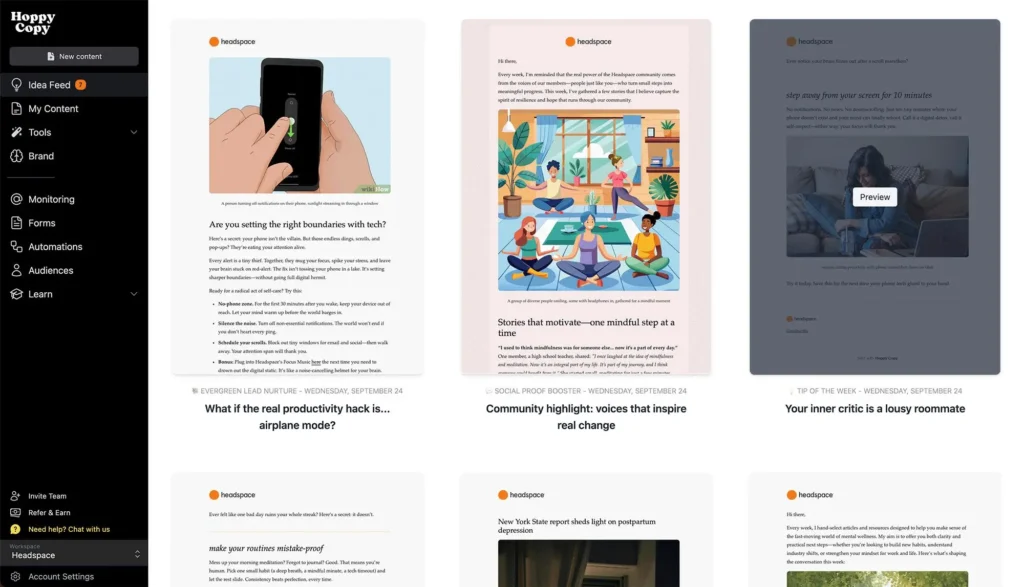
Hoppy Copy is an AI email marketing and copywriting platform designed to make email marketing easier. It helps users create newsletters, promotional emails, product announcements, welcome sequences, and complete email campaigns without writing everything manually.
The platform was initially focused on AI email copywriting, but it has expanded into a complete email marketing solution. Users can now create email content, manage subscriber lists, design newsletters, set up automated email campaigns, and check performance from one place.
Hoppy Copy is especially useful for small business owners, consultants, coaches, marketing agencies, content creators, and online store owners who want to stay connected with their audiences.
Another interesting feature is its ability to learn your brand voice. You can provide information about your business, website, products, testimonials, and previous content. The AI uses this information to generate emails that better match your communication style.
You can also use Hoppy Copy only for writing if you already have another email marketing platform. Simply create your email content and move it to your preferred email service.
Main Features of Hoppy Copy
Hoppy Copy offers several features that cover different parts of email marketing. Let’s look at some of its most useful tools.
1. AI Email Writer
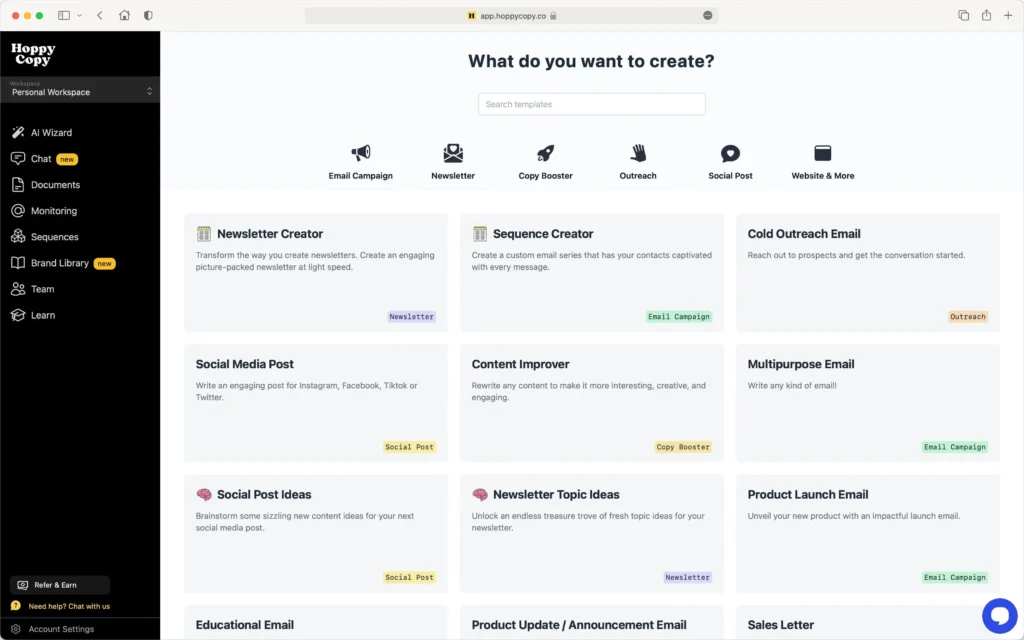
Writing good marketing emails takes time and effort. You need to understand your audience, choose the right words, and explain your offer in a way that encourages people to take action.
Hoppy Copy’s AI Email Writer helps simplify this process. You can use it to generate different types of marketing emails, including:
- Promotional emails for products and services.
- Welcome emails for new subscribers.
- Product launch announcements.
- Sales and discount campaigns.
- Follow-up emails for potential customers.
- Newsletter introductions and content sections.
- Customer engagement emails.
You only need to provide some basic information about what you want to promote. The AI then creates a draft that you can edit according to your needs.
This feature is useful for people who send emails regularly but do not have a dedicated copywriter.
2. Brand Voice and Brand Memory
One common problem with AI-generated content is that it can sound different from your actual brand communication.
Hoppy Copy tries to solve this problem with its Brand Voice and Brand Memory features.
You can add your business details, website links, product descriptions, customer testimonials, previous emails, and other useful information. The platform stores these details and uses them when creating new content.
You can also create different brand voices for different businesses or audiences, depending on your subscription plan.
For example, a fitness coach may want friendly and motivating emails, while a software company may prefer professional and informative communication.
This feature helps maintain a consistent writing style across newsletters, promotional campaigns, and other marketing messages.
3. Newsletter Creator and Automation
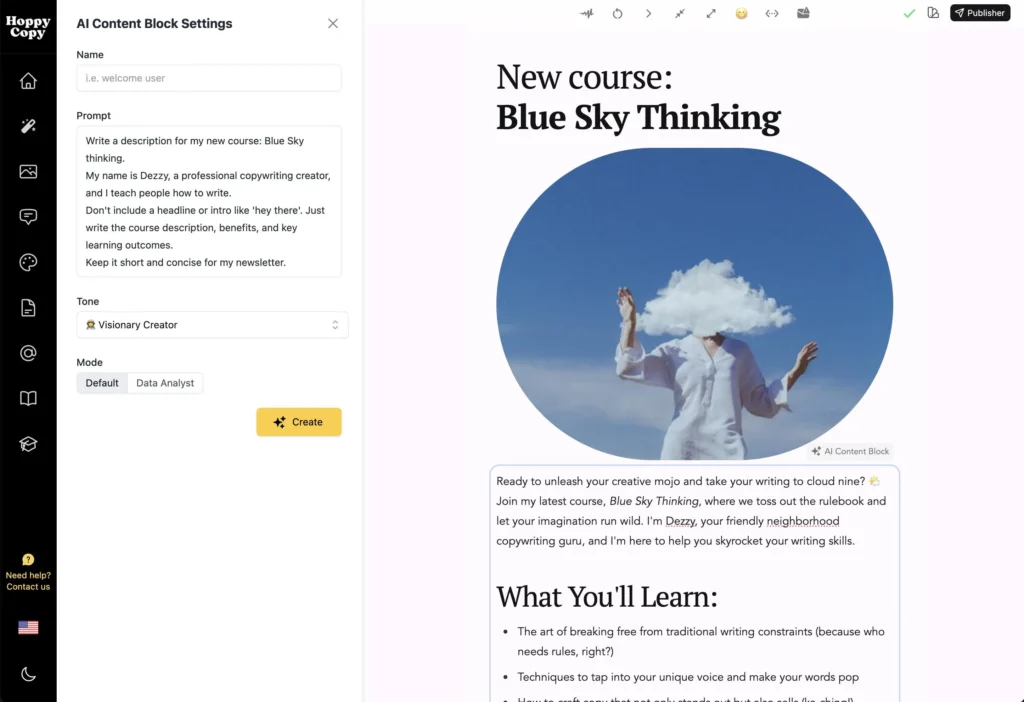
Newsletters are a great way to share useful information, company updates, product news, and special offers with subscribers.
However, creating a new newsletter every week can become difficult, especially when you have other business responsibilities.
Hoppy Copy offers newsletter creation tools and automated newsletter engines to make this process easier.
You can connect different content sources, such as:
- Your website and blog posts.
- YouTube videos and other content.
- Product and service updates.
- Social media content.
- RSS feeds and industry news.
- Courses and other educational material.
The platform uses these sources to generate newsletter ideas and drafts. You can review the content, make changes, add your own information, and approve it before sending.
This can be particularly helpful for creators, coaches, and businesses that regularly publish new content.
4. More Than 60 AI Marketing Templates
Not every marketing email has the same purpose. Sometimes you want to introduce a new product, while other times you want to offer a discount or bring inactive customers back.
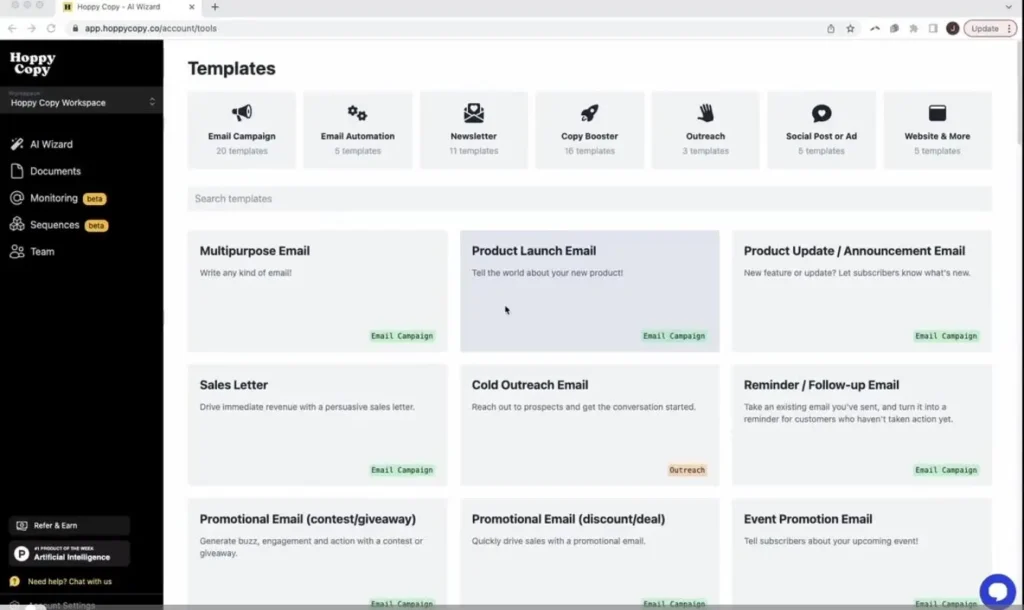
Hoppy Copy provides more than 60 marketing writing tools and templates to help with different situations.
These templates can help you create:
- Catchy email subject lines.
- Product descriptions.
- Promotional campaigns.
- Product launch emails.
- Sales sequences.
- Newsletter sections.
- Special offer announcements.
- Follow-up messages.
Instead of starting with a blank page, you can select a suitable template and provide the information required.
The AI will generate a draft that you can improve before using it.
This is a useful feature for beginners who are not familiar with professional email copywriting.
5. AI Document Editor and Chat
Hoppy Copy also provides an AI document editor that helps you improve existing email content.
You can use it to rewrite sentences, correct grammar, change the tone, shorten long paragraphs, or make your message more engaging.
Its AI chat feature can also help you work with your content and generate new ideas.
For example, you can ask it to suggest newsletter topics, improve a promotional message, or create a different version of an existing email.
These tools make it easier to edit and improve content without moving between multiple applications.
6. Email Sequences and Campaign Planning
Sometimes one email is not enough to convert a potential customer into a paying customer. You may need to send several emails over a few days or weeks.
Hoppy Copy includes a sequence creator that helps users plan multi-email campaigns.
For example, an online course creator can prepare the following sequence:
- A welcome email introducing the course.
- An educational email explaining a common problem.
- An email sharing useful tips and advice.
- A promotional email introducing the course.
- A final reminder about the offer.
This makes it easier to plan a complete email marketing campaign instead of creating individual messages without a clear strategy.
You can also use these sequences as part of automated customer journeys.
7. Built-In Spam Checker and Grammar Tools
Sending emails that look like spam can affect your marketing results. Certain words, poorly written content, and other email issues may also reduce the chances of your message reaching the inbox.
Hoppy Copy includes a spam words checker that helps identify potentially problematic words and phrases in your email content.
It also provides grammar and spelling checks to help improve the quality of your writing.
These tools can help you review your emails before sending them.
However, passing a spam check does not guarantee inbox delivery. Your sender reputation, domain authentication, recipient engagement, and email practices also matter.
8. AI Image Generation and Email Design
A good email should not only have interesting text but should also look attractive and easy to read.
Hoppy Copy includes email design tools, AI image generation, stock photos, and GIF resources that help users create more engaging newsletters.
You can use these resources to make your emails look more professional and visually interesting.
The platform also offers ready-made design templates, which can save time when creating regular newsletters.
Its email designs are made to work across different screen sizes, including mobile devices. This is important because many people read marketing emails on their phones.
9. Subscriber Management and Email Automation
Hoppy Copy is not just an AI writing tool. It also provides features for managing your email marketing audience.
You can collect subscribers, organize contacts, and create different audience segments based on your marketing requirements.
Its publishing and automation features allow you to:
- Create and manage subscriber lists.
- Build sign-up forms and pop-ups.
- Create landing pages to collect leads.
- Send newsletters and promotional emails.
- Schedule email campaigns.
- Set up automated email sequences.
- Create welcome and follow-up journeys.
- Track subscriber engagement.
For example, when someone signs up for your newsletter, you can create an automated welcome email. You can then send additional emails based on your marketing strategy.
This can help businesses stay connected with customers without manually sending every message.
10. Email Analytics and Performance Tracking
Creating and sending emails is only one part of email marketing. You also need to understand how people interact with your campaigns.
Hoppy Copy includes analytics tools that help you track important email marketing metrics.
Some of the important metrics include:
- Open Rate: Shows the percentage of delivered emails that were opened.
- Click Rate: Helps you understand how many recipients clicked links in your emails.
- Engagement: Gives you an idea of how subscribers interact with your campaigns.
- Campaign Performance: Helps you compare the results of different email campaigns.
These insights can help you understand which topics, subject lines, and content styles are working better.
You can use this information to improve future campaigns.
Keep in mind that open-rate tracking is not always completely accurate because of privacy features used by some email services. Clicks and conversions can provide additional information about campaign performance.
11. Competitor Email Monitoring
This is one of the more interesting features of Hoppy Copy.
The platform allows you to monitor emails sent by your competitors. You can study their promotional messages, product announcements, newsletters, and marketing strategies.
This can help you understand how other businesses communicate with their customers.
For example, if you run an online clothing store, you can monitor other clothing brands to see how they promote seasonal sales, new collections, and special discounts.
Hoppy Copy also provides access to a searchable library of more than 10,000 marketing emails.
You can explore these examples to get inspiration for your own campaigns.
The number of competitors you can track depends on your subscription plan. The supplied plan details list 10 competitors for Start and 50 for Platform.
Remember that competitor monitoring should be used for research and inspiration, not for copying another company’s content.
12. Integrations and Multiple Language Support
Hoppy Copy can work alongside other marketing tools and business applications.
Its integration options include services such as:
- Shopify
- HubSpot
- Zapier
- Mailchimp
The exact integration method and available features may vary. You can also export email content and use it with your existing email marketing service.
Another useful feature is multilingual content generation. Hoppy Copy supports more than 35 languages, making it useful for businesses that communicate with customers in different countries.
This is especially helpful for companies that want to create email campaigns for international audiences.
How to Use Hoppy Copy?
Hoppy Copy is designed to make email marketing easier, even if you do not have professional copywriting experience.
Here is a simple process to get started.
Step 1: Visit the Official Website
Open the Hoppy Copy website and create your account. You can start with its 7-day free trial to explore the available features.
Step 2: Add Your Brand Information
Provide details about your business, products, services, website, and target audience. You can also add examples of your previous content to help the AI understand your writing style.
Step 3: Select a Writing Tool
Choose the type of email you want to create. For example, you can select a newsletter, promotional email, welcome sequence, or product launch campaign.
Step 4: Enter Your Requirements
Explain what you want the email to communicate. Add important details about your offer, audience, product, or campaign.
Step 5: Generate and Edit Your Email
Let the AI prepare your first draft. Review the content and make any necessary changes to the subject line, message, tone, and call to action.
Step 6: Design Your Email
Choose a suitable template and add images or other visual elements to make your email more attractive.
Step 7: Send or Export Your Email
You can send the campaign through Hoppy Copy if you use its publishing features. Alternatively, export or transfer your content to another email marketing platform.
Step 8: Check the Results
After sending your campaign, review its analytics to understand how subscribers interacted with your email.
Following these steps can help you build a simple and repeatable email marketing process.
Hoppy Copy Pricing and Plans
Hoppy Copy is a paid email marketing platform. It does not offer a permanent free plan, but new users can try the platform with a 7-day free trial without providing credit card details, according to its official website.
The platform offers different plans for individuals, growing businesses, and larger marketing teams.
Here is an overview of its pricing structure.
| Plan | Monthly price | Annual price (monthly equivalent) | Best for |
|---|---|---|---|
| Start | $49/month | $39/month | Solo operators |
| Platform | $49/month | $39/month | Growing businesses |
| Managed | $79/month | $49/month | Businesses wanting expert support |
| Scale / Enterprise | Custom | Custom | Larger teams and enterprises |
Prices are based on the official website’s displayed pricing information. Confirm the billing amount and subscriber limits on the checkout page before purchasing, as prices and plan details can change.
Start Plan
The Start plan is designed for individuals and small businesses that want to create and send marketing emails.
Its listed features include:
- Up to 2 users.
- One newsletter idea feed.
- 3 brand voices.
- 7 brand knowledge assets.
- Tracking for up to 10 competitors.
- Up to 3,000 email subscribers.
- AI writing and image tools.
- Email publishing and automation.
It is a suitable starting point for solo business owners, consultants, and content creators.
Platform Plan
The Platform plan is designed for businesses that need more advanced newsletter automation and team collaboration.
Its features include:
- Up to 3 users.
- Up to 3 workspaces.
- 3 automated newsletter engines.
- 5 brand voices.
- 20 brand knowledge assets.
- Tracking for up to 50 competitors.
- Email publishing and automation.
- One-on-one onboarding and setup with a growth strategist.
It can be useful for marketing teams managing multiple campaigns or brands.
Managed Plan
The Managed plan is designed for businesses that want additional help with their email marketing activities.
It includes the Platform plan features along with services such as:
- Custom newsletter strategy.
- 2–3 human-polished newsletters per month.
- One high-converting email flow.
- Human review and editing.
- Newsletter approval support.
- Quarterly analytics review and planning.
- Dedicated account management.
This plan may be helpful for businesses that want expert assistance instead of handling every part of email marketing themselves.
Scale and Enterprise Plan
The Scale and Enterprise option is designed for larger businesses with more advanced requirements.
It offers custom solutions, which may include:
- More newsletter engines.
- Additional team members and workspaces.
- Custom AI models.
- Custom integrations.
- Dedicated account management.
- Priority support.
- Dedicated IP address.
Pricing depends on your business requirements, so you need to contact the Hoppy Copy team for a quotation.
Is Hoppy Copy Free?
No, Hoppy Copy does not currently advertise a permanent free plan.
However, it offers a 7-day free trial that allows new users to explore its features before purchasing a subscription.
The official website also advertises free migration from another email marketing provider. This can be useful if you want to move your existing subscriber list to Hoppy Copy.
The company also advertises a refund option within seven days of the first payment. Check its current refund terms before subscribing.
Benefits of Using Hoppy Copy
Here are some important advantages of using Hoppy Copy for your email marketing activities.
1. Saves Time: You do not need to write every email from scratch. AI writing tools and newsletter automation can reduce the time spent creating campaigns.
2. Consistent Brand Communication: Brand Voice and Brand Memory help maintain a similar writing style across different marketing emails.
3. Complete Email Marketing Platform: You can write, design, send, and track emails without depending on several different applications.
4. Useful Marketing Templates: Ready-made templates make it easier to create promotional emails, newsletters, and sales sequences.
5. Competitor Research: You can monitor competitor emails and explore marketing examples to find new campaign ideas.
6. Supports Multiple Languages: Support for more than 35 languages makes it useful for businesses targeting international audiences.
7. Email Automation: Automated email sequences help businesses communicate with subscribers even when they are not actively working on campaigns.
8. Existing Platform Support: You can use Hoppy Copy for writing while continuing to send emails through another email marketing service.
Limitations of Hoppy Copy
Although Hoppy Copy offers many useful features, there are a few things you should consider before purchasing a subscription.
- No Permanent Free Plan: You need a paid subscription after the 7-day trial.
- Pricing: Its subscription cost may be expensive for beginners, freelancers, and businesses with very small email lists.
- AI Content Needs Editing: Generated emails may still need manual changes to make them accurate, natural, and suitable for your audience.
- Learning Curve: Since the platform includes writing, publishing, automation, and analytics tools, beginners may need some time to understand everything.
- Email Deliverability: Using Hoppy Copy does not automatically guarantee that your emails will reach subscribers’ primary inboxes.
- Plan Limitations: Brand voices, knowledge assets, newsletter engines, competitors, and subscriber allowances depend on your selected plan.
You should compare the available features with your actual email marketing requirements before making a purchase.
Who Should Use Hoppy Copy?
Hoppy Copy can be useful for different types of businesses and professionals.
Small Business Owners: They can create promotional emails, announce new products, and communicate with customers without hiring a full-time copywriter.
Content Creators and Bloggers: Bloggers and creators can turn their existing articles, videos, and other content into regular newsletters.
Coaches and Consultants: They can create educational emails, welcome sequences, service promotions, and follow-up campaigns.
Marketing Agencies: Agencies can use multiple brand voices and workspaces to manage email content for different clients.
Ecommerce Businesses: Online stores can create product announcements, seasonal promotions, discount campaigns, and customer follow-ups.
Email Marketers: Professionals who regularly manage email campaigns can use its writing, automation, and competitor research tools to improve their workflow.
Final Thoughts: Should You Try Hoppy Copy?
Hoppy Copy is more than a simple AI email writing tool. It combines AI copywriting, newsletter creation, brand memory, email automation, subscriber management, and campaign analytics in one platform.
Its biggest advantage is that it helps businesses manage several email marketing activities from a single place. Instead of spending hours writing newsletters and planning campaigns, you can use AI to prepare drafts and then improve them before sending.
The competitor monitoring feature and automated newsletter engines also make it interesting for businesses that want to maintain regular communication with their audiences.
However, Hoppy Copy may not be the best option for everyone. Its paid plans might not suit beginners with limited budgets or businesses that only need basic email sending features.
My recommendation: If you are a consultant, coach, blogger, content creator, or small business owner who regularly sends newsletters, Hoppy Copy is worth exploring through its free trial. But if you already have an email marketing platform that meets your needs, you can also use Hoppy Copy just for its AI writing capabilities.
Alternatives to Hoppy Copy
If Hoppy Copy does not match your requirements or budget, here are three alternatives worth exploring.
1. beehiiv
beehiiv is a newsletter platform for creators, bloggers, and publishers. It offers newsletter publishing, audience growth tools, monetization features, and AI-assisted writing to help grow an email audience.
2. GetResponse
GetResponse provides email marketing, landing pages, automation workflows, and sales funnels. It is a good option for businesses looking for a broader marketing platform with tools to manage customer communication.
3. SendX
SendX is an email marketing platform designed for businesses, creators, and small teams. It offers email campaigns, automation workflows, audience management, and tools to simplify regular email communication.
Frequently Asked Questions About Hoppy Copy
1. Is Hoppy Copy worth it?
Hoppy Copy can be worth considering if you regularly create newsletters and marketing campaigns. Its combination of AI writing, brand memory, email automation, publishing, and analytics can save time. However, its value depends on your subscriber count, marketing needs, and budget.
2. Does Hoppy Copy send emails?
Yes. Hoppy Copy includes its own email publishing platform. You can manage subscribers, schedule campaigns, create automations, and track email performance. You can also export your content to another email service provider.
3. Can I use Hoppy Copy with Mailchimp?
Yes. You can use Hoppy Copy to generate email content and transfer it to Mailchimp. The platform also lists Mailchimp among its integration options. This allows you to continue using your existing email marketing workflow.
4. Does Hoppy Copy support different languages?
Yes. Hoppy Copy supports more than 35 languages. You can use its AI writing tools to create marketing emails for audiences in different countries.
5. Does Hoppy Copy offer a free trial?
Yes. It offers a 7-day free trial without requiring a credit card, according to its official website. However, it does not advertise a permanent free plan.
6. Can Hoppy Copy write newsletters automatically?
Yes. Its newsletter engines can use information from connected content sources, such as blogs, videos, product updates, and RSS feeds, to generate newsletter drafts. You can review and edit the drafts before approving them for sending.
7. Is Hoppy Copy suitable for beginners?
Yes. Its templates and AI writing tools make it easier for beginners to create professional-looking marketing emails. However, users may need some time to understand its advanced automation and publishing features.