If you regularly work with audio recordings, interviews, podcasts, or videos, you know how much time it takes to convert spoken words into written text. Listening to a long recording and typing every sentence can take hours. This is where AI transcription tools can make your work easier.
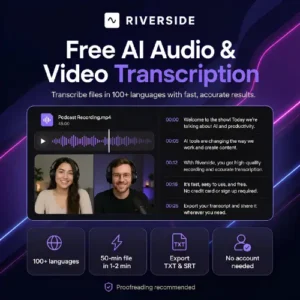
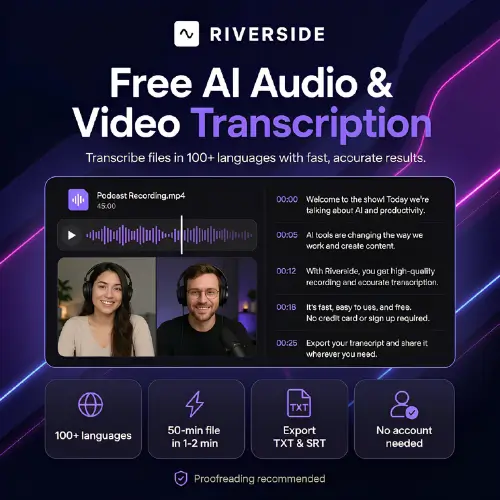
Riverside Audio Transcription is a free online tool that converts audio and video files into text. It supports more than 100 languages and allows users to download transcripts in TXT and SRT formats. You can use it directly in your browser without creating an account. AI-Powered+1
The tool can be useful for YouTubers, podcasters, students, journalists, bloggers, and anyone who needs to turn spoken content into written text.
In this review, we will look at Riverside’s features, how it works, its pricing, advantages, disadvantages, and some of the best alternatives you can try.
What Is Riverside Audio Transcription?
Riverside Audio Transcription is an AI-powered speech-to-text tool from Riverside. It helps you convert spoken words from audio recordings and video files into text automatically.
Instead of typing everything yourself, you upload a supported file, choose the language, and let the AI process the recording. Once the transcription is ready, you can copy the text or download it for your work.
One of its biggest advantages is its simple process. You do not need to install software or create an account to use the free online transcription tool.
Riverside supports more than 100 languages, making it useful for people who create content in different languages. It also supports common file formats such as MP3, WAV, MP4, and MOV. AI-Powered+1
For example, if you have a 30-minute podcast interview, you can upload the recording and get a written version without manually typing every word. You can then use the text to prepare a blog post, create captions, or find important points from the conversation.
Riverside also offers a larger recording and editing platform. If you record podcasts or interviews using Riverside, you can use its additional features to edit recordings, generate captions, and prepare content for different platforms.
Key Features of Riverside Audio Transcription
Let’s look at the main features that make this tool useful.
1. Transcribe Audio and Video Files
The primary feature is converting audio and video into text. You can upload a supported recording and let the AI recognize the spoken words.
This can save time when working with interviews, lectures, podcasts, webinars, and other recordings.
For example, a YouTuber can turn a recorded tutorial into a text document and use it as the starting point for a website article. Similarly, a student can transcribe a recorded lecture to make revision notes.
2. Support for More Than 100 Languages
Riverside supports transcription in more than 100 languages. These include English, Hindi, Spanish, French, German, Arabic, Bengali, Gujarati, Marathi, Tamil, and many others. Riverside.fm Help Center+1
This makes the tool helpful for creators and businesses working with audiences from different countries.
You should select the correct language before starting the transcription. If the recording contains several languages, some words may be recognized incorrectly or converted into the selected language. Mixed-language recordings may need extra proofreading. Riverside.fm Help Center+1
3. Fast Transcription
Manually transcribing a long interview can take several hours, especially when you need to pause and replay sections.
Riverside uses AI to process recordings much faster. According to the description provided for this review, a 50-minute interview may take around one to two minutes to transcribe. Actual processing time can vary depending on the file, audio quality, and server workload.
This speed can be useful when you have several recordings to process and need to publish content quickly.
4. No Account Required for the Free Tool
Another useful feature is that you can access Riverside’s free online transcriber without signing up.
You can upload your file, choose the language, generate the transcript, and download the result. This is convenient for people who only need transcription occasionally and do not want to create another online account. AI-Powered+1
Remember to download your transcript before starting another file, because the free tool is designed for quick transcription rather than managing a saved library of projects.
5. Download Transcripts in TXT Format
Riverside lets you download your transcript as a TXT file.
A TXT file contains plain text without complicated formatting. You can open it in a basic text editor, Microsoft Word, Google Docs, or another writing application.
This format is useful when you want to:
- Turn a podcast into a blog post.
- Prepare notes from an interview.
- Create video descriptions and show notes.
- Collect quotes from a conversation.
- Repurpose spoken content for social media.
You can edit the downloaded text according to your needs.
6. SRT Subtitle and Caption Support
Riverside also supports SRT downloads. SRT is a subtitle file format that includes text along with timing information.
This makes it useful for adding captions to YouTube videos, tutorials, interviews, and other video content.
For example, if you publish educational videos, you can download the SRT file and import it into a compatible video editor or subtitle workflow. You can then check the timing and correct any mistakes before publishing.
Keep in mind that an SRT file contains the caption text and timing. The final appearance of subtitles, including font, size, and color, is usually controlled by the video editor or publishing platform. AI-Powered+1
7. Simple and Beginner-Friendly Interface
You do not need technical knowledge to use Riverside’s free transcriber.
The basic workflow involves uploading a file, selecting the language, starting transcription, and downloading the result. Most users should be able to understand the process without watching a long tutorial.
This is especially helpful for beginners who want to convert recordings into text without learning complicated editing software.
8. Additional Recording and Editing Features
Riverside is more than a transcription tool. Its broader platform includes audio and video recording, text-based editing, caption creation, and AI-powered content features.
Depending on the plan and workflow, these features can help creators record interviews, edit videos using their transcripts, generate show notes, and create shorter clips from longer recordings. AI-Powered+1
However, these extra features belong to Riverside’s wider platform. You do not need to purchase a paid plan simply to try the standalone free transcription tool.
How to Use Riverside Audio Transcription
Using Riverside is simple. Follow these steps to convert your recording into text.
Step 1: Open the official website
Visit the Riverside Audio Transcription tool in your browser.
Step 2: Upload your recording
Select an audio or video file from your device. The tool supports MP3, WAV, MP4, and MOV formats. AI-Powered
Step 3: Select the language
Choose the language spoken in your recording. Selecting the correct language can help improve the result.
Step 4: Start transcription
Click the transcription button and wait while the AI converts the spoken words into text.
Step 5: Review and download
Check the transcript for mistakes and download it in TXT or SRT format, depending on your needs.
The whole process is straightforward, even if you have never used an AI transcription service before.
Riverside Audio Transcription Pricing
One of the main reasons to try Riverside is its free online transcription tool. You can transcribe audio and video without paying for a subscription or creating an account.
However, Riverside also offers paid plans for people who want recording, editing, and other content creation features.
Here is a pricing overview based on the official pricing information available at the time of writing. AI-Powered+1
| Plan | Price | Main features |
|---|---|---|
| Free online transcription | $0 | Transcribe uploaded files, 100+ languages, TXT and SRT downloads |
| Free Riverside account | $0/month | Recording, editing, clips, and limited separate-track downloads |
| Pro | $24/month when billed annually | Advanced editing, unlimited transcriptions, up to 4K video and 48 kHz audio |
| Grow | $34/month when billed annually | Pro features plus additional live studio capabilities |
| Webinar | $79/month when billed annually | Webinar-focused features and live production tools |
| Business | Custom pricing | Plans and features for larger teams and business requirements |
Important pricing note: The listed Pro, Grow, and Webinar prices reflect annual billing shown on Riverside’s pricing page and may change. Check the official Riverside pricing page for current rates, billing terms, and feature limits.
If you only want to convert a few recordings into text, the free online tool should be a good starting point. If you regularly record and edit podcasts or videos, a paid plan may be worth considering.
Who Should Use Riverside Audio Transcription?
Riverside can be useful for several types of users.
YouTubers and content creators
Convert video recordings into text for scripts, blog posts, descriptions, and captions. This can help you reuse existing content instead of creating everything from scratch.
Podcasters
Turn podcast episodes into written transcripts, show notes, and material for newsletters or websites.
Students and teachers
Convert lectures and educational recordings into text that can be reviewed later. Always check important technical terms and subject-specific words.
Journalists and researchers
Create a first draft of interview transcripts and make it easier to search for quotes and important statements.
Bloggers and freelance writers
Convert voice notes, interviews, and recorded ideas into written material that can be edited into articles.
Pros and Cons of Riverside Audio Transcription
Every AI tool has strengths and limitations. Here are the main points to consider before using Riverside.
Pros
- Free to use: The standalone transcription tool does not require a paid subscription.
- No signup required: You can get started without creating an account.
- 100+ languages: Useful for multilingual content and international audiences.
- Fast results: AI transcription is much quicker than manually typing a long recording.
- TXT and SRT downloads: Suitable for both written content and subtitles.
- Common file formats: Supports MP3, WAV, MP4, and MOV.
- Beginner-friendly: The process is simple and does not require special technical skills.
- Extra tools available: Riverside’s wider platform provides recording and editing features for content creators.
Cons
- Proofreading is still necessary: AI can misunderstand unclear speech, names, accents, and technical terms.
- Limited speaker identification in the free tool: The free standalone transcriber may assign text from a multi-speaker recording to one speaker. The broader Riverside platform has speaker detection capabilities, especially when separate tracks are available. AI-Powered+1
- No custom vocabulary library in the described free workflow: You cannot add a personal dictionary of specialist words to help the tool recognize them.
- Limited project management: The free tool is designed for quick uploads rather than storing and organizing a large collection of transcripts.
- Not a complete editing suite: Advanced recording, editing, and repurposing features may require a Riverside account or paid subscription.
Overall, these limitations are manageable if you mainly need a quick transcript. They matter more if you handle professional interviews, several speakers, or specialist terminology.
Is Riverside Audio Transcription Accurate?
Riverside promotes its transcription tool as offering up to 99% accuracy. However, this is a product claim, not a guarantee that every recording will achieve that result. AI-Powered+1
The actual accuracy depends on several factors, including recording quality, background noise, the speaker’s accent, and how clearly the words are spoken.
For example, a podcast recorded with a good microphone in a quiet room may produce a cleaner transcript than an outdoor interview with traffic noise.
You should pay extra attention to:
- Names of people, companies, and products.
- Technical terms and industry-specific words.
- Numbers, dates, and prices.
- Recordings with multiple speakers talking over one another.
- Hindi-English mixed conversations and strong regional accents.
My recommendation is to use Riverside to create the first draft and then proofread the transcript before publishing it. This is especially important for educational content, business interviews, and articles where small mistakes can change the meaning.
Riverside Audio Transcription vs Other Tools
Riverside is a strong choice for quick, free transcription. However, other tools may be more suitable if you need translation, meeting summaries, speaker identification, or team collaboration.
| Feature | Riverside | SaveTo AI | Happy Scribe | MeetGeek |
|---|---|---|---|---|
| Main purpose | Audio and video transcription | Media transcription | Transcription and subtitles | Meeting transcription |
| Free option | Yes | Free option available | Limited free access may vary | Free option available |
| Language support | 100+ | 200+ claimed by the supplied description | 120+ claimed by the supplied description | Depends on supported workflow |
| File transcription | Yes | Yes | Yes | Not its main focus |
| Subtitle support | SRT | Depends on workflow | Yes | Depends on workflow |
| Meeting summaries | Broader platform features | Summarization | Meeting features available | Yes |
Feature availability and free-plan limits can change. Check each provider’s official website before choosing a tool.
Final Thoughts
Riverside Audio Transcription is a useful option for anyone who wants to convert audio and video recordings into text without spending money on a transcription subscription.
Its biggest advantages are the simple interface, support for more than 100 languages, fast processing, and the ability to download TXT transcripts or SRT subtitle files. You can also use it without creating an account, making it convenient for occasional transcription tasks.
For YouTubers, bloggers, podcasters, students, and freelancers, it can save a considerable amount of time. You can use the transcript to create captions, write articles, prepare notes, or reuse content across different platforms.
However, it is not the best fit for every situation. If you need reliable speaker labels, custom vocabulary, advanced transcript editing, or meeting automation, you may want to explore other tools.
My verdict: Try Riverside first if you need a simple, free audio-to-text converter. Since proofreading is still necessary, always review the final text before publishing or using it for important work.
Alternatives to Riverside Audio Transcription
Here are four alternatives worth considering, depending on the features you need.
SaveTo AI
SaveTo AI converts audio, video, and supported social media links into text across many languages. It also offers translation and summarization features for people who want more than a basic transcript.
Happy Scribe
Happy Scribe provides AI and human transcription services, subtitle editing, and translation features. It is a good option for creators and businesses producing content in several languages.
MeetGeek
MeetGeek records and transcribes supported online meetings, then generates summaries and highlights. It is more suitable for teams that want to capture meeting information and follow-up tasks.
Fireflies.ai
Fireflies.ai transcribes and summarizes meetings, helping teams find important statements and action items later. Its integrations make it useful for businesses that need to connect meeting notes with their existing work tools.