
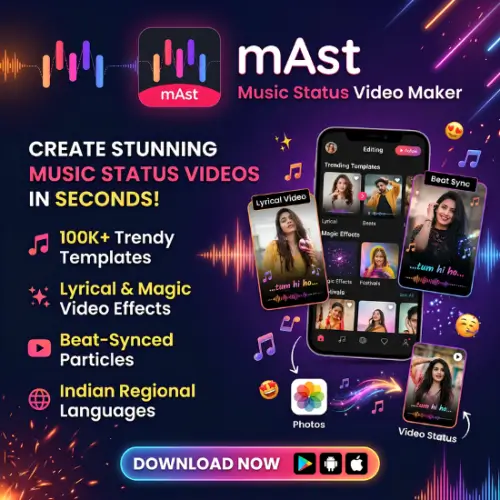
Mast App is a mobile video-making application designed for people who want to create attractive music videos, photo slideshows, and social media status videos without learning professional video editing. It offers ready-made templates, music, beat effects, and creative visual effects that make video creation easier for beginners.
In this review, we will explore Mast App’s features, how it works, pricing, advantages, disadvantages, and some of the best alternatives.
Note: There are multiple apps using the name Mast. This article covers mAst – Short Video Maker App, the music-status and photo-to-video editing application, rather than the unrelated screen-time management app.
What Is mAst App?
mAst App is a mobile video editor that helps users turn ordinary photographs into attractive short videos. Instead of creating every video from scratch, you can select a ready-made template, add your pictures, choose music, and export the finished video.
The app is especially useful for people who enjoy creating WhatsApp status videos, Instagram Reels, birthday videos, festival greetings, anniversary videos, and lyrical photo videos.
One of its main attractions is its collection of templates and music-based effects. It also supports several Indian languages, including Hindi, Tamil, Telugu, Malayalam, Bengali, Marathi, and Kannada.
According to its Google Play listing, the app has more than 100 million downloads. It is available as a free download with advertisements and optional in-app purchases.
Main Features of mAst App
Let’s look at the most useful features that make Mast a popular option for creating short music videos.
1. Ready-Made Video Templates
Ready-made templates are one of the biggest attractions of Mast. You don’t need to understand complicated editing tools or spend hours arranging photos. Simply browse the available templates, select a design, and add your pictures.
You can find different styles for love, friendship, birthdays, festivals, attitude videos, nature, family, and other occasions.
This feature is particularly helpful for beginners who want attractive results without professional editing skills.
2. Lyrical Video Status Maker
Mast also helps users create lyrical videos using photographs and music.
You can select a music template, add your pictures, and create a short video with lyrics and visual effects. It is a useful feature for people who enjoy sharing music-based content on WhatsApp and social media.
The app also provides music categories such as pop, electronic dance music, rock, hip-hop, and indie.
3. Particle and Beat-Sync Effects
If you like videos with moving particles and music-based animations, this feature is worth exploring.
Mast offers Particle.ly-style templates that add animated visual effects to photographs. These effects help make still pictures look more dynamic.
Some templates automatically match animations, beats, and stickers with the music. This saves time compared with adding every effect manually.
4. Magic Video Effects
Mast includes several creative effects that can change the appearance of your photos. Some examples include:
- Animal-face effects
- Blur effects
- Cutout effects
- Love effects
- Mirror effects
- Magician-style effects
These effects are useful for making fun and entertaining videos. You can experiment with different styles to find something that matches your content.
5. Add Your Own Music
Music plays an important role in short videos. Mast allows users to change the background music included in templates and add their preferred songs and beats.
You can also crop the music to select the part that fits your video. This gives you more control over the final result instead of using the same soundtrack in every project.
Remember to use music that you have permission to use, especially when publishing videos for commercial purposes.
6. Multiple Language Support
One useful feature for Indian users is multilingual support. The app supports several regional languages, making it easier for people who are not comfortable using English.
This can also help users find templates and create content that matches their local audience.
7. Weekly Template Updates
Mast regularly adds new templates to its collection. This means users can explore different designs instead of depending on the same templates every time. New templates can also help creators make videos for trending occasions and seasonal events.
However, the availability of specific templates may change with app updates.
8. Share Videos on Social Media
After completing your video, you can save it and share it on supported social media platforms. Mast mentions platforms such as:
- YouTube
- TikTok
You can use your finished videos for stories, status updates, and other short-form content.
How to Use Mast App?
You don’t need professional editing knowledge to start using Mast. Its template-based workflow makes video creation relatively simple.
Here is a basic step-by-step guide.
Step 1: Install the App
Download mAst App from the Google Play Store and install it on your Android smartphone.
Step 2: Open the App
Launch the application and explore the available templates on the home screen.
Step 3: Select a Template
Choose a template according to the type of video you want to create. For example, you can select a birthday, love, friendship, or attitude template.
Step 4: Add Your Photos
Select the required photographs from your phone gallery. Try to use clear pictures for better results.
Step 5: Customize the Music
Choose the available background music or replace it with your preferred audio where the template supports this option.
Step 6: Apply Effects
Explore the available filters, animations, and visual effects. Select the ones that match your video style.
Step 7: Preview Your Video
Watch the complete video before exporting it. Check whether the pictures, music, and effects look good together.
Step 8: Save and Share
Export the finished video and save it to your device. You can then share it on WhatsApp, Instagram, or other supported platforms.
Mast App Pricing
Mast is available as a free application on the Google Play Store. However, it contains advertisements and offers optional in-app purchases.
The developer does not provide a single fixed public subscription price that applies to every user. The available purchase options and prices should be checked directly inside the app.
Here is a simple pricing overview:
| Plan | Pricing | Details |
|---|---|---|
| Free Version | Free | Basic access with advertisements |
| In-App Purchases | Varies | Optional paid features or upgrades |
| Premium/Pro | Check in app | Availability and price depend on the purchase offer |
Important: Google Play lists Mast as containing ads and in-app purchases. Check the current price displayed on your device before making a payment.
Pros and Cons of Mast App
Before installing any video editing application, it is important to understand both its advantages and limitations.
Pros
- Beginner-friendly: The simple template-based process makes video creation easy.
- Large template collection: You can explore different styles for different occasions.
- Music features: Add songs, change background music, and crop audio.
- Creative effects: Particle animations and magic effects make videos more interesting.
- Regional language support: Supports several Indian languages.
- Quick video creation: Create short videos without spending too much time editing.
- Social media sharing: Suitable for creating content for popular social platforms.
- Free download: You can install the app without paying an upfront download fee.
Cons
- Advertisements: Ads can interrupt the editing experience.
- Limited manual editing: It is more focused on templates than professional timeline editing.
- Template dependency: Many results depend on the available designs.
- In-app purchases: Some features or content may require payment.
- Privacy considerations: Google Play’s developer-provided safety information indicates that the app may collect personal information, photos and videos, and other data. Review the data safety section before granting permissions.
Who Should Use Mast App?
Mast is a good option for people who want to create attractive short videos without learning complicated editing software.
Here are some users who may find it helpful:
- Beginners: People who have little or no video editing experience.
- WhatsApp users: People who regularly share photo and music status videos.
- Social media users: People who create short videos for Instagram and other platforms.
- Students: Users who want to make birthday, friendship, and celebration videos.
- Casual content creators: People who want quick videos using ready-made templates.
- Music lovers: Users who enjoy lyrical videos and beat-based effects.
However, professional video editors, YouTubers who need detailed editing control, and businesses creating advanced promotional videos may prefer more powerful editing software.
Is Mast App Safe to Use?
Mast is listed on the Google Play Store, which is the recommended place to download the Android version.
However, downloading an app from an official store does not automatically mean that every permission or data practice is risk-free.
Before using Mast, consider these points:
- Download the app from Google Play rather than unknown APK websites.
- Check the permissions requested by the application.
- Allow access to only the photos and media needed for editing.
- Avoid uploading private photographs if you are uncomfortable with the app’s data practices.
- Read the privacy policy and Google Play Data Safety information.
Google Play indicates that data is encrypted in transit and that users can request data deletion. It also states that some data may be collected or shared.
Overall, use the app carefully and review its current privacy information before sharing personal media.
What Makes Mast Different from Other Video Editing Apps?
There are many video editing applications available today, but Mast focuses mainly on quick music-status video creation.
Traditional editing apps often require users to arrange clips, adjust transitions, add effects, and synchronize music manually. Mast takes a different approach. It provides ready-made designs where users mainly need to select a template and add photographs.
Its focus on lyrical videos, Particle.ly effects, regional languages, and occasion-based templates makes it particularly useful for casual social media users.
It is not necessarily better than professional video editors. Instead, it is designed for a different purpose: making attractive videos quickly with less effort.
Final Thought
Mast is a useful video-making application for people who enjoy creating music status videos, photo slideshows, and short social media content.
Its ready-made templates, lyrical video features, particle effects, and regional language support make it accessible to beginners. You don’t need advanced editing knowledge to create something attractive.
However, frequent advertisements and limited manual editing options may disappoint users who want a more professional editing experience.
If your main goal is to turn ordinary photographs into stylish music videos quickly, Mast is worth trying. You can start with its free version and decide whether the additional paid features are worth the money.
Alternatives to Mast App
If Mast doesn’t meet your editing requirements, you can try these alternative video editing applications. They offer similar features, including photo-to-video creation, music, effects, templates, and social media editing.
1. CapCut
CapCut is a popular video editing application with templates, music, transitions, filters, and advanced editing tools. It is suitable for creating Reels, Shorts, and professional-looking videos.
2. VN Video Editor
VN offers multi-layer editing, transitions, music, filters, and video effects. It is a good option for users who want more manual editing control.
3. InShot
InShot helps users create short videos using photos, music, text, stickers, filters, and transitions. It is particularly useful for Instagram Reels and WhatsApp status videos.
4. KineMaster
KineMaster provides advanced editing features, multiple video layers, audio tools, effects, and transitions. It is suitable for creators who need greater control over their videos.
5. Canva
Canva offers ready-made video templates, animations, music, and graphic design tools. It is useful for creating social media videos, promotional content, and attractive visual posts.
Frequently Asked Questions (FAQs)
1. Is Mast App free to use?
Yes, Mast is free to download from Google Play. However, it contains advertisements and offers optional in-app purchases.
2. Is Mast App available for Android?
Yes, Mast is available for Android smartphones through the Google Play Store.
3. Can I create WhatsApp status videos using Mast?
Yes. You can use its photo templates, lyrical videos, music, and visual effects to create short videos suitable for WhatsApp status.
4. Does Mast support Hindi?
Yes, Mast supports Hindi and several other Indian regional languages, including Tamil, Telugu, Bengali, Marathi, and Kannada.
5. Can I add my own photos to Mast?
Yes. You can select photographs from your phone gallery and use them in supported video templates.
6. Can I change the music in Mast?
Yes. The app allows users to change background music and crop audio in supported templates.
7. Is Mast suitable for beginners?
Yes. Its ready-made templates and simple editing process make it suitable for people who have little video editing experience.
8. Is Mast better than CapCut?
It depends on your requirements. Mast is useful for quick music-status videos, while CapCut offers more advanced editing tools and greater creative control.



