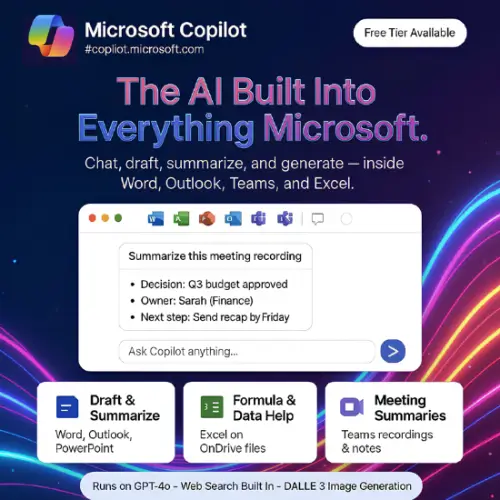
If you already use Windows, Word, Excel, Outlook or Teams every day, Microsoft Copilot is the AI helper that shows up inside the tools you already have. You don’t need to open a new website or learn a new app. This review covers what Copilot does, where it works well, where it falls short, and what it really costs.
What Is Microsoft Copilot?
Microsoft Copilot is an AI assistant made by Microsoft and powered by OpenAI’s GPT models. Microsoft keeps updating the model behind it, so what you get today is newer than what it launched with. You can chat with it, ask it to write something, search the web, or make images.
You can find Copilot in many places:
- Windows 11
- The Edge browser
- The Copilot website
- Android and iPhone apps
- Word, Excel, PowerPoint, Outlook and Teams (with the right plan)
Many AI tools make you go to them. Copilot goes to you, and that is its biggest strength.
The Free Version Is Better Than You Might Expect
You don’t have to pay anything to start. With just a Microsoft account, the free Copilot gives you:
- Answers to general questions
- Help with writing emails, essays, posts and summaries
- Web search, so answers can include fresh information
- Image creation with Designer (powered by DALL-E 3), with a daily limit

For a student, a beginner or someone who just wants quick help, the free version is enough for most daily tasks. It doesn’t slow you down much, and you rarely get blocked mid-task.
Where Copilot Really Shines: Microsoft 365 Apps
The real value is inside Microsoft’s office apps. Here is how it helps in each one.
Teams: This is probably the most useful feature. If you sit through long meetings, Copilot can turn the recording into a short summary with the main decisions and action items. You don’t have to rewatch an hour-long call.
Outlook: Email threads get messy fast. Copilot can pull out the key points from a long chain and write a reply draft for you. You still check it, but it saves time.
Word: It can summarize a long document or write a first draft. Starting is often the hardest part of writing, and this removes that problem.
Excel: It can write formulas and explain what they do. If you are not good with spreadsheets, this can save a lot of effort every day. Copilot also reads what is actually in your sheet, so its answers match your data instead of being generic.
PowerPoint: It can build a slide deck from a prompt or a document, which gives you a quick starting point.
Things That Can Annoy You
No tool is perfect, so here is what to know before you start.
- Excel only works with cloud files. Copilot in Excel needs your file saved on OneDrive with AutoSave turned on. If your file is only on your computer, Copilot cannot help. Many people find this out too late.
- It can feel slow. Responses are often slower than ChatGPT or Claude.
- Writing and thinking quality. For deep reasoning, long careful writing or hard analysis, ChatGPT and Claude usually do a better job.
- The pricing is confusing. More on that below.
Microsoft Copilot Pricing (Important Update)
Pricing has changed a lot, and many older articles are now wrong. Here is what I found on Microsoft’s own pages and recent pricing reports.
The old standalone Copilot Pro plan ($20 per month) is gone. Microsoft canceled the $20 Copilot Pro subscription and combined it with the Family plan into Microsoft 365 Premium at $19.99 per month. Also, Microsoft stopped selling Copilot Pro to new customers on October 1, 2025, and existing subscriptions stop renewing after August 1, 2026.
The good news is that Copilot is now part of the normal Microsoft 365 plans, so you don’t pay for it separately.
Plans for Individuals
| Plan | Monthly Price | Yearly Price | Copilot Access |
|---|---|---|---|
| Copilot Free | $0 | $0 | Basic chat, web search, limited image creation |
| Microsoft 365 Personal | $9.99 | $99.99 | Copilot in Office apps, higher limits than free (1 user) |
| Microsoft 365 Family | $12.99 | $129.99 | Same as Personal, but Copilot is for the plan owner only (up to 6 users) |
| Microsoft 365 Premium | $19.99 | $199.99 | Highest Copilot limits, replaces Copilot Pro |
Source for the three paid plans: Personal is $9.99 a month, Family is $12.99, and Premium is $19.99, with Copilot included in each.
Plans for Work
| Plan | Price Per User / Month | Best For | Needs a Base Plan? |
|---|---|---|---|
| Copilot Chat (work) | Free | Work and school users | Yes, an eligible Microsoft 365 plan |
| Microsoft 365 Copilot Business | $18 (promo, normally $21) | Teams under 300 people | Yes, a Business plan |
| Microsoft 365 Copilot (Enterprise) | $30 | Large companies | Yes, Microsoft 365 E3 or E5 |
The Business add-on is $18 per user per month on a yearly plan as a promotion through December 2026, with a regular price of $21, or $25.20 if you pay monthly. The work plans are an add-on, so you pay for your base Microsoft 365 plan too.
Prices are in US dollars. They can differ by country and change with offers, so check Microsoft’s official Copilot pricing page for your region before you buy.
Pros and Cons
| Pros (The Wins) | Cons (The Friction) |
|---|---|
| Integration: Works inside Word, Excel, Teams and Outlook. | Cost: The best features need a paid Microsoft 365 plan. |
| Workflow: Teams meeting summaries save real time. | Speed: Slower replies than ChatGPT or Claude. |
| Free tier: Web search and image creation at no cost. | Excel limit: Only works on OneDrive files, not local ones. |
| Ecosystem: Deep links with Windows and Edge. | AI quality: Reasoning and writing trail ChatGPT and Claude. |
Who Should Use Microsoft Copilot?
Good fit:
- People who already work in Microsoft 365 every day
- Office workers who attend many Teams meetings
- Anyone who struggles with Excel formulas
- Beginners who want a free AI helper
Not the best fit:
- People who mostly use Google Workspace or Apple apps
- Writers, researchers and students who need the strongest reasoning
- Anyone who wants the lowest cost AI subscription
Final Thoughts
Microsoft Copilot is not the smartest AI on the market, but it is one of the most convenient. If your work lives in Microsoft 365, it saves time on small tasks like meeting notes, email replies and spreadsheet formulas. The free version is also a solid way to try it with no risk.
If you are outside the Microsoft world, or you mainly want strong writing and thinking help, other tools give you more for your money. My advice is to start with the free version, see how it fits your daily work, and only pay if you use it in the office apps often.
Alternatives to Microsoft Copilot
1. ChatGPT: A very popular AI chatbot that is strong at writing, coding and general questions. It also has image creation and custom GPTs.
2. Claude: Known for natural, careful writing and strong reasoning on long documents. It is a good pick for writers, students and researchers.
3. Google Gemini: Google’s AI that works inside Gmail, Docs, Sheets and Drive. It is the best match if you use Google Workspace the way others use Microsoft 365.
4. Perplexity AI: An AI search tool that gives answers with clear sources. It is great for quick research and checking facts.
5. Notion AI: An AI helper built into the Notion workspace. It can write, summarize notes and organize tasks for teams and personal planning.