If you run a blog, an online store, or a creative business, you already know that Pinterest is a goldmine for traffic. But let’s be honest—making high-quality pins every single day is exhausting. You have to design the images, write catchy titles, add descriptions, and then schedule them. It takes hours.
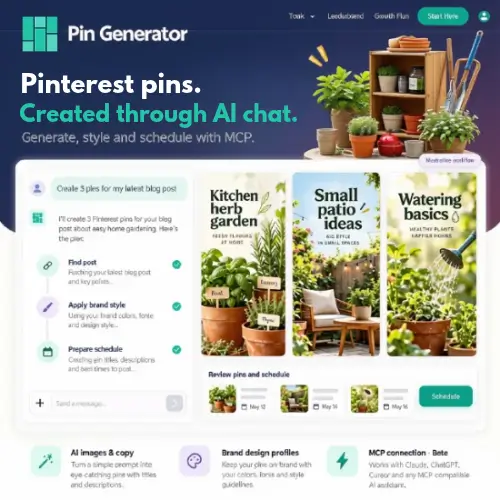
This is exactly where Pin Generator comes in. It is a tool built to take the heavy lifting off your shoulders. It creates and schedules Pinterest pins directly from your blog posts, product listings, and other content. Instead of doing everything manually, its AI writes your titles, descriptions, and alt text, generates the images, and even helps you pick the right boards.
Whether you prefer working right in your web browser or connecting an AI assistant through its new beta MCP server, this tool is designed to save you time. Let’s break down how it works and see if it is the right fit for your business.
Creating Pins Through AI Chat
One of the coolest features of Pin Generator is that you can create pins just by chatting with it. You don’t need to click through a dozen menus. You simply tell the AI what you want, and it gets to work.
This is powered by something called the MCP (Model Context Protocol) server. Don’t let the technical name scare you. Think of MCP as a bridge that connects your favorite AI assistant directly to your Pin Generator account. Through this connection, the AI can look at your website posts, read the content, browse your connected store products, and check your Pinterest boards.
For example, you can just ask the AI to “create pins for my latest travel article.” It will pull the real page title, grab the images, use the correct destination link, and set everything up for you. It makes the whole process feel like you have a personal assistant handling your social media.
Design Tools: Templates vs. Full AI
When it comes to how your pins actually look, Pin Generator gives you two main choices.
First, you can use Templates. This is great if you already have a specific look you love. The tool simply places your text, your chosen image, and your brand colors into a pre-made layout. It is fast, easy, and keeps your brand looking consistent.
Second, you can use Full AI Generation. If you want something completely unique, the AI will create a brand-new visual from scratch. It uses a “design profile” that is based on your website, reference images, or just written instructions you give it. The best part? You can update this design profile through chat before generating a whole new batch of pins. This means your style can evolve without you having to redesign everything from zero.
Scheduling and Automations
Creating the pin is only half the battle; getting it posted at the right time is the other half. Pin Generator’s scheduling tools let you queue up a hosted image, or it can generate and schedule the pin all in one single step.
If you use the MCP integration, you get access to even more automation tools. You can set up recurring automations, trigger a large batch of pins at once, and check on their progress.
A quick word of caution: To use the MCP connection, you need your account access key. Treat this key like a password. Because the integration can take actions on your account, you don’t want anyone else getting hold of it. Also, since MCP is still in beta, it is a good idea to start with a small batch of pins and check the results before letting it run wild.
A Perfect Workflow for Blogs and Stores
Pin Generator is built to play nicely with the platforms you already use. It supports website sitemaps, Shopify, Etsy, WooCommerce, and RSS feeds.
Imagine you run a travel blog. You just wrote a massive guide on “Top 10 Beaches in Italy.” Instead of making one pin, Pin Generator can turn that single guide into several different visual variations, all linking back to the same post.
Or, think about a small Etsy shop. You can use your existing product photos to quickly prepare pins that link directly to the relevant product pages. Features like bulk editing and recurring campaigns mean you don’t have to keep repeating the same setup over and over again.
Things You Need to Keep in Mind
While the AI keyword research and brand analysis features are super helpful, you need to remember one golden rule: more pins do not automatically mean more traffic or sales.
Pinterest is a visual search engine, and quality still matters. You should always check the generated text, make sure the images look accurate, verify the destination URLs, and double-check your board choices. If you are selling physical products, the visuals still need to accurately represent what you actually sell. A beautiful pin that leads to the wrong product page will just frustrate your customers.
Also, just because there is no daily posting cap doesn’t mean you have unlimited AI generation. The system uses a credit model, which we will look at next.
Pricing and Credits
Pin Generator uses a credit-based pricing system for its paid plans. Different actions eat up different amounts of credits. For instance, fully generating a new image from scratch uses more credits than just dropping text into a template. Text generation, keyword research, and scheduling also have their own credit costs.
When you first sign up, you get free previews or introductory credits so you can test out the workflow before spending any money.
Here is a general breakdown of how the pricing tiers are structured:
| Plan Name | Monthly Price | Included Credits | Best For |
|---|---|---|---|
| Free / Trial | $0 | Limited intro credits | Testing the tool and basic features. |
| Starter | ~$15 – $20 | 500 Credits | Small bloggers or new shops needing basic pin creation. |
| Pro | ~$35 – $45 | 1,500 Credits | Active creators who need daily AI generation and scheduling. |
| Business | ~$75 – $90 | 4,000+ Credits | Agencies or large stores managing multiple brands and bulk pins. |
(Note: Exact pricing may vary based on current promotions or annual billing discounts on their official website. Always check the official site for the most up-to-date numbers.)
Final Thought
Pin Generator takes the most time-consuming parts of Pinterest marketing and hands them over to AI. From writing descriptions to designing images and scheduling posts, it covers the entire workflow. Whether you are running a busy blog or managing a Shopify store, it helps you stay consistent without burning out. Just remember to keep an eye on the quality of the output and manage your credits wisely. If you want to grow your Pinterest presence without spending all day at your computer, this tool is definitely worth a look.
Alternatives to Pin Generator
If you want to explore other options that offer similar AI creation and scheduling features, here are some of the best alternatives:
Blotato
An AI-powered tool for content creation and publishing across multiple social media platforms. It offers robust API and MCP access for advanced automation and seamless integration with your existing tech stack.
SocialBee
A comprehensive social media planning tool that combines AI writing with smart scheduling. It features content categories, detailed reporting, and team approval workflows to keep your brand’s voice consistent.
Indzu Social
A versatile AI content creation and publishing platform designed for several social networks. It focuses heavily on team collaboration and provides deep analytics to help you track your content’s performance.