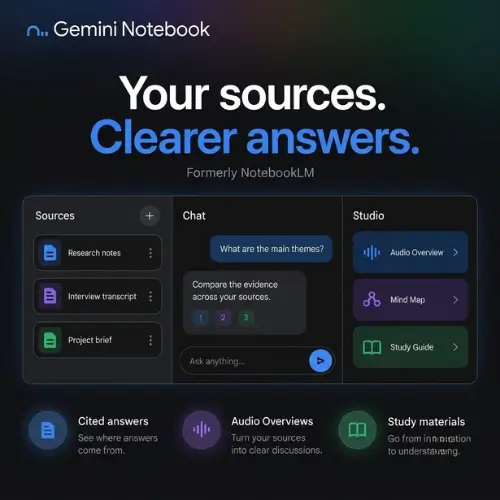
Gemini Notebook, formerly known as NotebookLM, is Google’s AI research and study tool built for working with your own source material. Rather than answering from general knowledge, it lets you add documents, web pages, audio recordings, or supported YouTube videos, then ask questions and follow citations back to the material behind an answer. Google renamed NotebookLM in July 2026, and existing notebooks remain accessible — so users who built projects under the old name don’t lose their work.
Grounded in Your Sources
The core premise is source-grounding. You keep a project’s reference material together and choose which sources the AI uses. A consultant could compare client briefs, a founder could question a collection of market reports, and a student could review lecture notes alongside assigned readings. Because answers depend on the sources you provide, missing or unreliable material directly affects the result — the tool is only as good as what you feed it. This makes it fundamentally different from a general-purpose chatbot, and it’s the reason citations matter so much in the workflow.
Turning Sources into Useful Formats
Gemini Notebook’s most distinctive feature is the range of formats it generates from the same source set. Audio Overviews turn source material into a spoken discussion that you can listen to and, in supported modes, join with questions. Other formats include narrated Video Overviews, slide decks, mind maps, reports, flashcards, and quizzes. The value here is reuse: you can revisit the same information in different formats without starting a separate project for each one. A student might listen to an audio overview on a commute, review flashcards before an exam, and skim a mind map to reconnect the big picture — all from one notebook.
Built-In Study Resources for US Students
For US students, Google’s education page includes public notebooks built with OpenStax textbooks, covering subjects such as biology, psychology, chemistry, business, and management. These can serve as starting points for study, while students add their own course material to a separate notebook. The caveat is explicit and worth repeating: generated study aids do not replace checking the assigned text or following your instructor’s AI rules.
Citations, Imports, and Practical Limits
Answers with source citations make it easier to inspect the evidence behind a summary — but a citation is not a guarantee. You should open the cited passage before relying on a conclusion, because a citation does not guarantee that the AI interpreted it correctly. This is a healthy habit for any source-grounded tool.
Some imports also have practical limits worth knowing before you build a workflow around them. Web page imports use page text rather than everything visible in the browser, so content rendered dynamically or embedded in widgets may not come through. Supported YouTube imports use captions, not a complete visual analysis of the video. And the mobile apps cover core reading, chat, and listening tasks but do not match every desktop feature — so heavy formatting work is best done on desktop.
Privacy and Account Considerations
Google states that individual users’ data is not used for training unless they share feedback. Sending feedback can include associated prompts, sources, uploads, and generated outputs for human review — a detail worth knowing before you submit feedback on sensitive material. Work and school accounts have their own applicable protections and administrator settings, so check your account terms before uploading confidential material. For anyone handling client briefs or internal documents, that’s the first box to tick.
Free Tier and Subscriptions
There is a free version with usage limits. Eligible Google AI subscriptions increase source capacity, generation allowances, and access to models or features, with availability varying by plan and region. In other words, the free tier is genuinely usable for light projects, but heavy users — or those with large source libraries — will likely hit limits and need a subscription.
How It Compares to Speak AI
The two tools overlap in “ask questions across your own material,” but they are built for different jobs:
| Dimension | Gemini Notebook (NotebookLM) | Speak AI |
|---|---|---|
| Primary input | Documents, web pages, audio, YouTube (via captions) | Audio/video recordings, live meeting capture (Zoom, Teams, Meet, Webex), text |
| Core strength | Source-grounded Q&A, study and research formats | Transcription + conversation intelligence at scale |
| Meeting capture | Not a meeting assistant | Meeting Assistant joins calls automatically |
| Outputs | Audio/Video Overviews, slides, mind maps, reports, flashcards, quizzes | Speaker-labelled transcripts, summaries, decisions, action items, sentiment, entities |
| Cross-recording analysis | Within a notebook’s source set | Folders for comparing themes across many recordings |
| AI model choice | Google models only | Claude, Gemini, and GPT |
| Team/commercial features | Limited; consumer and education focus | Custom fields, scoring, workflows, dashboards, API, white-label |
| Best for | Students, researchers, consultants synthesizing documents | Sales, research, and CX teams reviewing many calls |
In short: Gemini Notebook is excellent for studying and synthesizing a defined set of documents, with standout format flexibility (audio overviews, quizzes, mind maps). Speak AI is built for the operational side — capturing meetings, transcribing at volume, and running repeatable conversation-review processes with scoring and automation.
Pricing Reference
| Plan | Approx. Price | What You Get |
|---|---|---|
| Free | $0 | Core features with usage limits; limited sources and generations |
| Google AI Pro | ~$19.99/month | Higher source capacity, more generations, expanded model access |
| Google AI Ultra | ~$249.99/month | Highest limits and premium feature access |
| Work/School accounts | Varies by admin | Organization-specific protections and administrator settings |
Note: The file does not specify dollar amounts. The table below reflects publicly known list pricing as of the source date and should be verified on Google’s official pages, since availability varies by plan and region.
Bottom Line
Gemini Notebook is a well-executed answer to a specific question: “How do I work deeply with my own sources and get citations I can check?” Its format range — audio and video overviews, quizzes, flashcards, mind maps — makes it unusually good for learning and synthesis. Its limits are equally clear: imports are text- and caption-based, mobile lags desktop, and citations need human verification. Teams whose real need is capturing and comparing many live conversations should look at Speak AI instead; individuals and students synthesizing documents will find Gemini Notebook hard to beat on flexibility for the price of free.