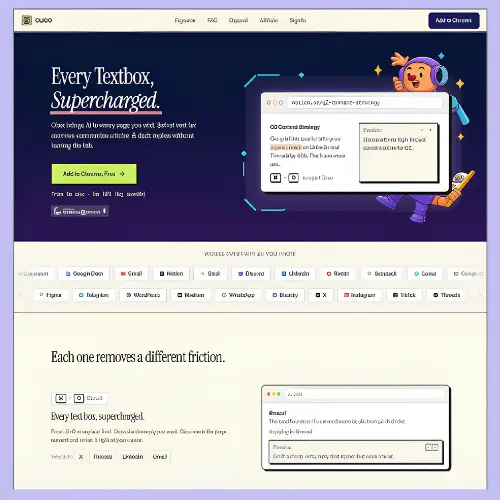
If you have ever tried to use an AI writing tool, you know the drill. You open a new tab, copy the email or document you are working on, paste it into a chat box, wait for an answer, copy that answer, and then paste it back. It works, but it is a lot of jumping around. Clico tries to fix exactly that problem. Instead of being another website you have to visit, Clico is a browser extension that puts AI right inside the text boxes you already use every day. You press a shortcut, and it reads the page you are on, so it already knows what you are working on. No copying, no pasting, no losing your train of thought.
Let me walk you through what Clico actually does, how it feels to use, and who it is really for.
What Is Clico and How Does It Work?
Clico is a browser extension that works on Chrome, Edge, Brave, Arc, and other Chromium-based browsers . Once you install it, it sits quietly in your browser and waits for you to call it. The main shortcut is ⌘+O (or Ctrl+O on Windows). When you are typing in any text box on any website, you press that shortcut, and a small AI box pops up right where your cursor is. You tell it what you need, and it writes the answer directly into the field.
The clever part is that Clico does not just look at the text box. It reads the visible content of the page around it. If you are replying to an email in Gmail, Clico sees the whole email thread. If you are writing in a Google Doc, it sees the document. If you are commenting on a Reddit post, it sees the post and the comments. This means you do not have to explain the situation to the AI. It already has the context, so the draft it gives you actually fits the conversation .
Clico works on Gmail, Google Docs, Notion, Slack, Discord, LinkedIn, Reddit, Substack, and more than twenty other platforms without any special setup for each site . If there is a text box on the page, Clico can work there.
The Main Features That Make Clico Useful
Clico is not just one trick. It comes with a few different tools that all work through simple shortcuts.
The main writing shortcut (⌘+O) is what you will use most. You press it, type something like “reply to this email politely” or “rewrite this paragraph to sound more casual,” and Clico does it in place. It can draft a brand new message, reply to an existing thread, or rewrite something you already typed. Because it reads the page, the reply it writes for an email actually sounds like it belongs in that email thread, not like a generic AI response.
Memo It is the page summary tool. You double-tap the ⌘ key, and Clico reads the page you are on and gives you the key points and action items. This is really handy when you are reading a long article, a research paper, or a complicated email thread and you just need the short version . It saves you from scrolling and skimming when you are in a hurry.
Voice input lets you hold the ⌘ key and speak instead of type. Clico transcribes what you say in real time and puts it into the text box. When you let go of the key, it stops. This is useful if you think faster than you type, or if you are doing something else with your hands and still need to get a message out .
Highlight and ask is the instant explanation tool. If you are reading something technical and you see a word or sentence you do not understand, you just highlight it. Clico gives you an AI explanation right there on the page. You do not have to open a new tab or search for it. It keeps you in your reading flow .
There is also a newer feature where you can type @ inside the Clico prompt to pull in other open tabs as context. So if you are writing an email and you need information from a document in another tab, you can bring that tab into the conversation without switching back and forth . This makes Clico feel less like a single-page helper and more like a writing partner that can see what you are working with across your browser.
How Clico Feels in Real Use
The best way to understand Clico is to imagine a normal workday. You open your email and see a message from a client asking about a project update. Instead of opening ChatGPT in another tab, explaining the situation, and copying the reply back, you click in the reply box, press ⌘+O, and type “reply to this client saying the project is on track and we will send the report by Friday.” Clico reads the email thread, understands the tone, and writes a reply right there. You can edit it if you want, or send it as is.
Later, you are reading a long article for research. You double-tap ⌘, and Clico gives you the main points and a few action items. You save that summary and move on. Then you are in a Google Doc writing a report, and you get stuck on a paragraph. You highlight it, ask Clico to make it clearer, and it rewrites it in place.
The whole point is that you never leave what you are doing. There is no tab switching, no copy-paste dance, no losing your place. For people who spend their whole day bouncing between email, documents, chat apps, and social platforms, that small change adds up . It is not about having the most powerful AI model in the world. It is about having AI that is always right there when you need it, without making you stop what you are doing.
Who Is Clico For?
Clico is built for what you might call “knowledge workers”—people whose jobs involve a lot of typing in browser-based tools. That includes writers, marketers, customer support people, students, freelancers, and anyone who spends hours in Gmail, Google Docs, Slack, or Notion.
If you are a student, Memo It and the highlight-and-ask feature can save you a lot of time when you are reading dense material or trying to understand a difficult concept. If you work in customer support, the main writing shortcut can help you reply to emails faster while still sounding personal. If you are a content creator, Clico can help you draft social posts and replies without breaking your flow.
It is worth being honest about what Clico is not good for. It does not work on mobile devices, and it does not work on Firefox or Safari . It also depends on what is visible on the page, so if the information you need is hidden behind a login or buried in a collapsed section, Clico might not see it. And while the free version is generous, heavy users will eventually hit the credit limit.
Clico Pricing
Clico uses a credit-based system, and the free plan is genuinely usable for light work. Here is how the plans compare:
| Plan | Price | Credits | What You Get |
|---|---|---|---|
| Free | $0 | 200 credits per month | Core writing features, page summaries, voice input, highlight explanations. No credit card needed. |
| Pro | $19.90/month | 2,000 credits per month | Everything in Free, plus expanded access to premium AI models (Claude, GPT, Gemini) and enhanced routing. |
| Max | $49.90/month | 5,000 credits per month | Everything in Pro, plus image and video generation tools in Clico Web. |
Annual billing saves you 20% on Pro and Max . The free plan is a good way to test whether Clico fits into your workflow before paying anything. If you use it every day, Pro is the realistic choice because 200 credits will run out quickly.
One thing to note: credits refresh every month and do not roll over. So if you have a light month, you cannot save up credits for a heavy month later .
Privacy and Safety
Because Clico reads the page you are on, it is fair to ask about privacy. The developers say Clico only captures page context when you actually summon it with a shortcut. It is designed to skip sensitive fields like passwords and payment information. There is also a privacy layer that cleans data before it is sent to external AI models, so things like passwords or personal details are not passed along .
That said, Clico is a young product from a small team, and browser extensions that read page content always require some trust. If you work with highly sensitive information, it is worth reading the privacy policy carefully before installing.
Final Thought
Clico is not trying to be the smartest AI in the world. It is trying to be the most convenient one. And for a lot of people, convenience is the thing that actually matters. The best AI tool is not the one with the biggest model or the longest feature list. It is the one you actually use. Clico makes using AI so easy—one shortcut, no tabs, no copying—that you will actually use it while you work instead of saving it for “later.”
If you spend your day typing in a browser, Clico is worth a try. The free plan costs nothing and takes about a minute to install. You might find that the small act of not switching tabs makes a bigger difference than you expected.
Alternatives to Clico
| Tool | What It Does |
|---|---|
| MaxAI | A multi-model browser sidebar that can summarize webpages, PDFs, and YouTube videos. It also handles search, rewriting, translation, and image generation in one place. |
| Monica | A browser and desktop assistant for writing, research, and document analysis. It supports email drafting, translation, and access to multiple AI models. |
| HARPA AI | A browser assistant focused on automation and productivity. It handles webpage summaries, data extraction, page monitoring, email writing, and SEO tasks. |
| Grammarly | The well-known writing assistant that checks grammar, tone, and clarity across browsers and workplace apps. It also offers rewriting and email drafting help. |
| ChatGPT Writer | A Chrome extension built specifically for generating emails, replies, messages, and sales copy inside browser workflows. It is focused and simple. |