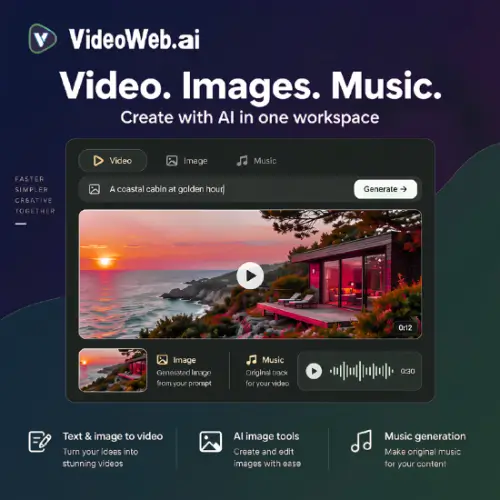
If you have ever tried making a short video with AI, you probably know the pain: one website for the video, another for the image, a third for the music, and nothing really matches. VideoWeb AI tries to fix that by putting video generation, image tools, and music creation in one browser workspace. You type a prompt, get a clip, animate a photo, and make a soundtrack for the same project—all without jumping between tabs.
What Can You Actually Do with VideoWeb AI?
The main attraction is video generation. You can start with text, an image, or a reference file. For example, if you have a product photo, you can animate it into a short clip. If you only have a written idea, you can type it and let the AI generate motion. VideoWeb AI also supports reference-based generation, which means you can upload an image of a person or object and ask the AI to keep that look consistent across different shots .
The image tools are separate but live in the same place. You can generate images from prompts, edit photos, make headshots, restore old pictures, or turn a photo into a cartoon. This is handy for small marketing teams because you can test several visual ideas quickly. For instance, you could generate a product shot, then turn it into a short video, then add music—without opening Photoshop, a video editor, and a music app separately.
Music generation is the third piece. You describe the mood, genre, instruments, or even provide lyrics. VideoWeb can make instrumental tracks or songs with vocals. The platform also lists some image-based and audio-based music workflows, though the core idea is simple: you type what you want, and the AI gives you a track to test with your video .
The AI Canvas: Nice for Planning, Not a Full Editor
VideoWeb AI has a feature called AI Canvas, marked as beta. Think of it as a visual board where you place prompts, reference images, and generation settings as connected nodes. You can group shots, make different versions, and keep each result next to the inputs that created it.
For a product campaign, this could be useful. You could keep three alternative opening shots side by side, along with the reference images that inspired them, and compare the clips. Saved projects can be reopened, and you can export the canvas as a project archive.
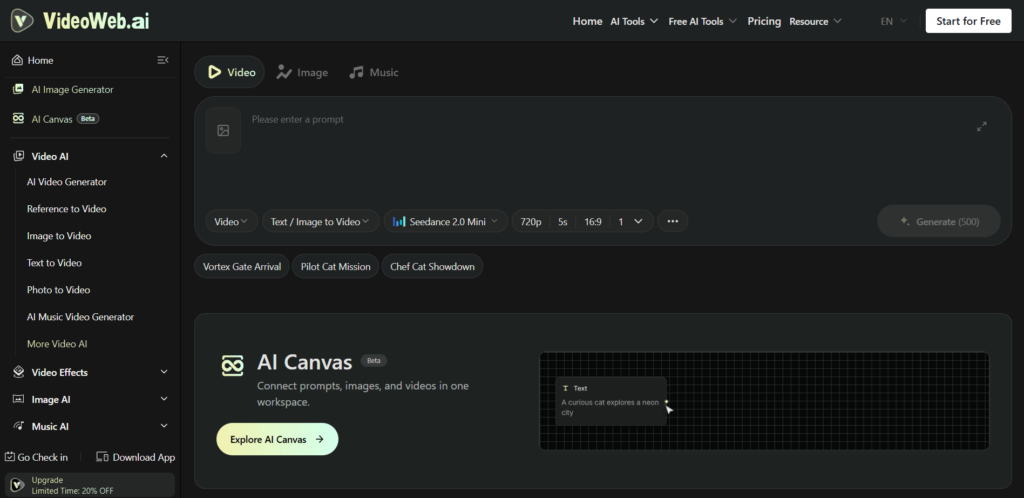
But here is the important part: do not expect the canvas to edit your video for you. It helps you organize the messy part—the experimenting—but you still need to trim, arrange, and finalize your video somewhere else. The official description is careful about this, and it is true: a collection of nodes is not a finished edit.
Music: Useful for Tests, but Check the Fit
The music generator accepts descriptions and lyrics. You can ask for a specific genre, mood, or instrument. If you are making a short social media clip, this is a fast way to get a rough soundtrack.
However, generated music is not always a perfect match. You may find that the track needs trimming or that the mood shifts in a way that does not fit your video. The same goes for visuals—AI video can have continuity errors, weird motion, or small glitches. VideoWeb AI is best used for drafts, tests, and quick concepts, not for final client work without checking every frame and every second of audio.
Pricing: Free to Start, but Credits Run Out Fast
VideoWeb AI uses a credit system. Free users get some credits to try things out, but the amount is limited. Paid plans and one-time credit packs give you more. The official pricing page shows both monthly subscriptions and one-time packages .
Here is a simple table based on the official pricing information I found. Prices and offers can change, so always check the website before paying.
| Plan Type | Price (USD) | Credits | Key Notes |
|---|---|---|---|
| Free | $0 | Limited daily/new user credits | Basic image generation, shared queue, 15-day history |
| Standard (Monthly) | $9.99/month | 5,000 credits | Access to premium features, faster queue, commercial rights |
| Popular (Monthly) | $19.99/month | 13,000 credits | More credits for video and music, private generations |
| Professional (Monthly) | $49.99/month | 35,000 credits | Highest monthly allowance, 365-day history, all premium tools |
| One-Time Ultra | $19.99 (discounted) | 10,000 credits | Valid for 1 month, commercial rights, fast queue |
| One-Time More | $49.99 (discounted) | 26,000 credits | Larger one-time pack, same core features |
| One-Time Max | $99.99 (discounted) | 56,000 credits | For heavier testing or short projects |
| One-Time Super | $199.99 (discounted) | 112,000 credits | Largest one-time pack |
A few things to watch out for: credit costs vary by model. For example, a Kling AI video might cost 200 credits, while a Veo 2 video for 5 seconds costs 2,000 credits . So premium access does not mean unlimited rendering. Also, some one-time packages are valid for only one month, not forever. If you are doing client work, check the expiry date, storage duration, private generation access, and commercial permissions before you start.
Who Is This For?
VideoWeb AI is a decent fit for creators and small marketing teams who want to test ideas quickly. If you need to make a rough concept for a social media ad, a storyboard, or a short product clip, the all-in-one workspace saves time. You can compare different models without signing up for five separate services.
It is not a replacement for a professional editor or a composer. The output is a starting point. You will still need to review, trim, and possibly regenerate. But for the early stage of a project—when you are still figuring out what looks good—VideoWeb AI gives you a lot of options in one place.
VideoWeb AI Features
- Text, image, and reference-based video generation
- AI image generation and photo editing (headshots, restoration, cartoon conversion)
- Music generation from prompts and lyrics
- Instrumental and vocal options
- Beta AI Canvas for connected scene planning
- Saved projects and comparison of variations
- Multiple generation models (Kling, Runway, Luma, Hailuo, Veo, and more) in one interface
- Free credits, monthly subscriptions, and one-time credit packs
Final Thought
VideoWeb AI is useful if you treat it as a testing ground, not a final production studio. The combination of video, image, and music tools in one browser tab is genuinely convenient for quick experiments. Just go in with realistic expectations: check your credits, test short clips before committing to longer ones, and always review the output before using it in paid work. If you need one place to try several AI models without managing multiple accounts, it is worth a look.
Alternatives to VideoWeb AI
Loova
Combines image and video generation with a canvas for storyboards and scene development. Good if you want a more visual planning-first workflow.
Artlist
Mixes AI media generation with stock footage and music. A better choice if you need real, licensed assets alongside AI tools for professional projects.
WaveSpeed
Offers a large catalogue of generation models through a web workspace and API. Suitable for developers or teams that want more model variety and technical control.