If you have ever tried to make a product demo video, you know the pain. You record your screen, then spend hours cutting out the “ums,” fixing the timing, adding captions, and then you still have to write a help article from scratch. It is boring, slow, and most people give up halfway.
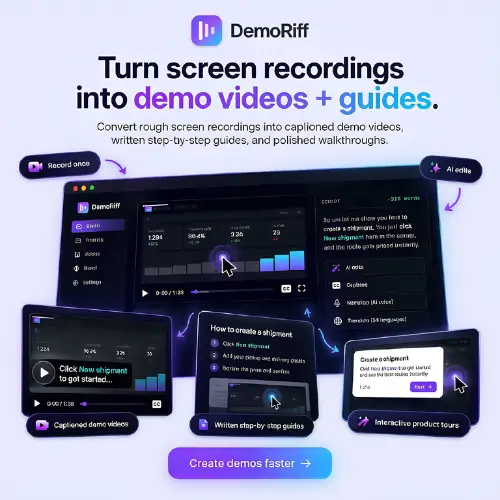
DemoRiff is a tool that tries to fix this. The idea is simple: you record your software screen once, even if it is messy, and DemoRiff turns it into two things — a captioned demo video and a step-by-step written guide. You do not need to be a video editor. You just need to know how to use your own product.
Let me explain what it actually does, how it works, how much it costs, and whether it is worth trying for your team.
What Exactly Does DemoRiff Do?
DemoRiff is made for software teams. It is especially useful for founders, product marketers, and support teams who need to create tutorials, onboarding materials, and feature walkthroughs . The tool is still early-stage, so it does not have big case studies yet, but the core idea is solid.
Here is the basic flow. You record a workflow in your browser, or you upload a screen recording you already have. DemoRiff listens to what you said and reads what is on the screen. Then it does several things automatically.
First, it cleans up your recording. It removes filler words like “um” and “uh.” It suggests shorter cuts where you paused too long or repeated yourself. It can even rewrite your narration to sound clearer. But here is the important part: you review the changes before they are applied. DemoRiff does not just publish whatever it thinks is best. You stay in control .
Second, it adds captions and automatic zooms. The zooms are helpful because they draw the viewer’s eye to the button you clicked or the menu you opened. If you do not want to use your own voice, you can use AI narration instead.
Third, and this is the part many people find most useful, it creates a written guide from the same recording. The guide comes with annotated screenshots. You can edit the instructions, move steps around, and replace screenshots before you share or export it .
So imagine this: your team records how to set up a new account. You use the video for customer onboarding. You put the written guide in your help center. You might also turn it into a shorter social clip or an interactive tour. All from one messy recording.
How the Editing Actually Works
The most clever part of DemoRiff is how it connects the transcript to the video. When you edit the words, you also edit the footage.
If you delete a sentence from the transcript, the matching video segment is removed too. This sounds simple, but it changes how you work. You do not need to scrub through a timeline and guess where a sentence starts and ends. You just read the text, find the part you do not like, and delete it. The video follows along .
This is a much more natural way to edit a demo. Most people think in words, not in timecodes. If you stumble over an explanation, you can fix the words and the video fixes itself.
The Written Guide: A Big Time Saver
Many tools can make a video. Many tools can make a written guide. DemoRiff does both from the same source.
The written guide is not just a transcript. It is a real step-by-step article with screenshots. You can reorganize the steps if the order feels wrong. You can rewrite the instructions in your own voice. You can swap out a screenshot if it shows something confusing or sensitive.
For a support team, this is a big deal. Usually, someone records a video, and then a different person has to write the article, and then someone else has to take screenshots. With DemoRiff, one recording gives you both formats. You still need to review everything, but the heavy lifting is done.
What You Must Check Before Publishing
DemoRiff is an AI tool, and AI tools make mistakes. The company itself says you should review the output before publishing . This is not just a legal disclaimer. It is practical advice.
Here are the things you need to watch for:
- Product names and interface labels. The AI might hear a menu item wrong or misspell a feature name.
- Narration timing. If you rewrote a sentence, the new narration might not match the video length perfectly.
- Sensitive information on screen. If your recording shows customer emails, API keys, or internal data, you need to blur or remove it before sharing.
- Missing steps. Automated editing might cut something that seems like filler but is actually important for a beginner. You know your users. The AI does not.
Think of DemoRiff as a very fast assistant, not as a replacement for your judgment. You still need to watch the final video and read the final guide before you send them to customers.
Pricing: What You Get for Free and What You Pay For
DemoRiff has a free plan that is actually useful for testing. You do not need a credit card to start. The paid plans are straightforward, but one of them has a catch you should understand.
Here is the pricing in a simple table:
| Plan | Price | What You Get | Important Notes |
|---|---|---|---|
| Free | $0 | 10 finished video minutes per month, 3 projects, AI voices, captions, unlimited written guides | No credit card required. Good for trying the tool on a real recording. |
| Bring Your Own Keys | $20/month, billed $240 for a 12-month term | You supply your own API keys for transcription, voices, and AI editing | Provider usage (Deepgram, ElevenLabs, Anthropic) is billed separately by those companies. Annual commitment. |
| Studio | $99/month, billed monthly | 10 projects, 150 finished minutes per month, managed service | Cancel any time. Monthly billing. |
Written guides are unlimited on every plan, including the free one. Viewers are also unlimited . That means you can share your guides with as many people as you want without worrying about a viewer limit.
The “Bring Your Own Keys” plan is interesting but a bit technical. You need to have accounts with AI providers and manage your own usage. It is cheaper on the subscription side, but your total cost depends on how much you use those providers. The Studio plan is simpler because DemoRiff manages everything for you.
Who Is DemoRiff Really For?
DemoRiff is not for everyone. If you are a professional video editor making cinematic product trailers, this is not your tool. If you need advanced motion graphics or precise color grading, you will be frustrated.
DemoRiff is for people who need functional demos and guides, not beautiful ones. It is for:
- Founders who need a quick demo for the landing page or a sales call.
- Product marketers who need to explain a new feature without booking a video team.
- Support teams who get the same “how do I do X?” question every week and want a link to send instead of a long email.
- Small software teams that cannot afford a dedicated documentation person.
The tool is new, and the company admits it has no case studies yet. The best way to judge it is to use the free plan on a real workflow you already know well . Record something simple, like how to change a password or how to invite a team member. See if the transcript editing feels natural. See if the written guide is something you would actually send to a customer. If it saves you an hour, the free plan has done its job.
Final Thought
DemoRiff solves a real problem in a clever way. Most demo tools make you choose between video and text. DemoRiff says: do one recording, get both. The transcript-based editing is smart because it lets you fix the video by fixing the words. The free plan is generous enough to test properly.
Just remember that it is a starting point, not a finished product. You still need to review, correct, and polish. If you are okay with that, DemoRiff can save your team a lot of repetitive work.
Alternatives to DemoRiff
If DemoRiff does not fit your workflow, here are some other tools that try to solve the same problem — turning a recording into documentation or a demo.
Guidde
Guidde is one of the most established tools in this space. You record your screen, and it generates both a video with AI voiceover and a written step-by-step guide with screenshots. It has a free plan with up to 25 videos, and paid plans start around $25 per creator per month . It is more polished than DemoRiff but also more expensive.
Kommodo
Kommodo is a Chrome extension that records your workflow and turns it into a step-by-step guide, a video, and an AI summary. It is built for team knowledge bases and SOPs. The free plan includes unlimited recording and AI guides, but downloading video files requires a paid plan . It is a good choice if you want a shared library of guides for your team.
Layerpath
Layerpath turns browser workflows into interactive walkthroughs, step-by-step guides, and training videos. You can record with a Chrome extension or upload existing video and images. It is strong for customer onboarding and help-center content, especially if you want interactive tours rather than just flat videos.