Building a website used to require coding skills, technical knowledge, or hiring a professional web developer. But things have changed. Today, AI website builders make it possible to create a professional-looking website without writing a single line of code.
Wix AI Website Builder is one of the popular tools in this category. It uses artificial intelligence to help users create websites based on their needs, business type, and design preferences. You can describe the website you want, answer a few questions, and let Wix AI generate a website structure and design for you.
Whether you want to build a business website, personal portfolio, online store, blog, or landing page, Wix provides tools to get started without needing advanced technical skills.
In this review, we will explore Wix AI Website Builder, its features, pricing, advantages, disadvantages, and some of the best alternatives available.
What Is Wix AI Website Builder?
Wix AI Website Builder is an AI-powered website creation tool developed by Wix. It helps users create websites by describing their ideas and answering questions about their business or project.
Instead of starting with a blank page, you can explain what kind of website you need. For example, you might say that you want a website for a digital marketing agency, an online clothing store, a photography portfolio, or a personal blog.
Wix AI uses this information to generate a website with suitable pages, layouts, text, images, and design elements.
One important thing is that Wix is not just an AI website generator. It also provides hosting, domain services, SEO tools, eCommerce features, blogging tools, contact forms, and other business solutions.
You can start building a website for free and upgrade when you need more features.
How Does Wix AI Website Builder Work?
Wix makes the website creation process simple, even if you have never built a website before.
Here is how you can create a website using Wix AI.
Step 1: Visit the Wix Website
First, visit the official Wix website and create an account. You can sign up using your email address or available account sign-in options.
After logging in, choose the option to create a new website using AI.
Step 2: Describe Your Website
Wix AI will ask you questions about your website and business.
You can explain what your website is about, who your target audience is, what services or products you offer, and what type of design you prefer.
For example, if you want to create a website for a digital marketing agency, you can provide details about your services, business name, and preferred design style.
The AI uses these answers to understand your requirements.
Step 3: Let AI Generate Your Website
Once you provide the required information, Wix AI generates a website design based on your instructions.
It can create different website sections and pages, including:
- Homepage
- About Us page
- Services page
- Contact page
- Product or service sections
- Blog pages
You can review the generated design and make changes if something does not match your expectations.
Step 4: Customize Your Website
After generating the website, you can use the Wix editor to customize it.
You can change text, images, colors, fonts, backgrounds, buttons, and page layouts. You can also ask its AI assistant, Aria, to help with design changes and content improvements.
The drag-and-drop editor gives you more control over the final appearance of your website.
Step 5: Publish Your Website
When your website is ready, you can publish it.
You can initially use a free Wix website address. However, if you want a professional domain name, such as yourbusiness.com, you will need an eligible paid plan and a domain.
Once published, visitors can access your website online.
Key Features of Wix AI Website Builder
Wix offers more than basic AI website generation. It includes several tools that can help you build, manage, and grow your website.
Let’s look at some of its important features.
1. AI Website Generation
This is the main feature of Wix AI Website Builder.
You don’t need to select every section or design element manually. Just describe your website idea, and AI will generate a suitable website structure and design.
It can create layouts, add relevant sections, suggest images, and prepare starter content.
This feature is especially useful for beginners who don’t know how to design a website from scratch.
2. Aria AI Assistant
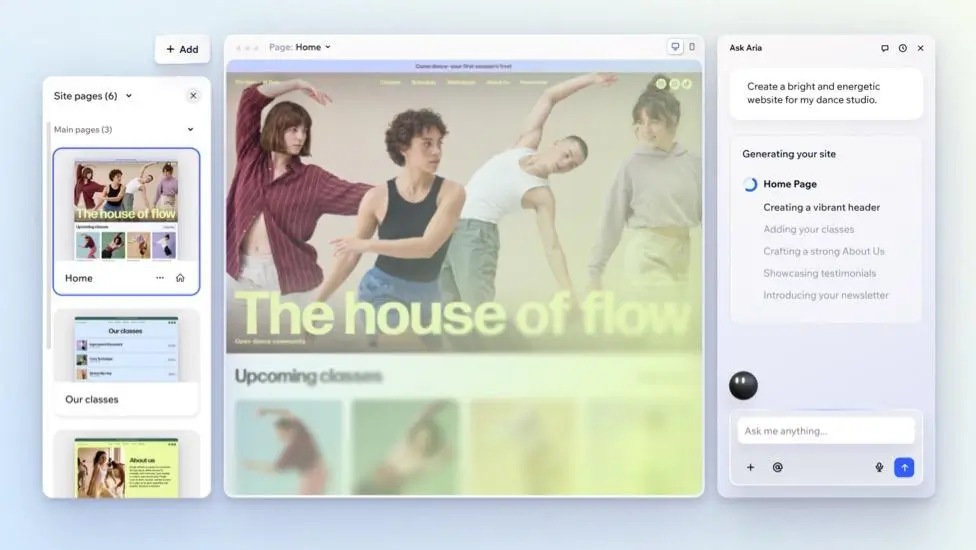
Aria is Wix’s built-in AI agent that helps users throughout the website creation process.
You can communicate with Aria using simple instructions. For example, you can ask it to create a new section, improve website content, change the design, or help you understand certain website settings.
It can also provide suggestions related to website structure, SEO, and business tools.
The best part is that you can work with Aria and the visual editor together. This gives you the convenience of AI while keeping control over your website.
3. AI Content Writing
Writing website content can take a lot of time, especially if you are creating your first website.
Wix includes AI writing tools that can help generate website text for different sections.
You can use them to create:
- Homepage content
- About Us descriptions
- Service descriptions
- Product descriptions
- Blog content
- Marketing text
- SEO-related content
You can also ask AI to rewrite existing text, simplify sentences, or change the writing tone.
However, you should always review AI-generated content before publishing it. Make sure the information is correct and matches your business.
4. AI Image Generation
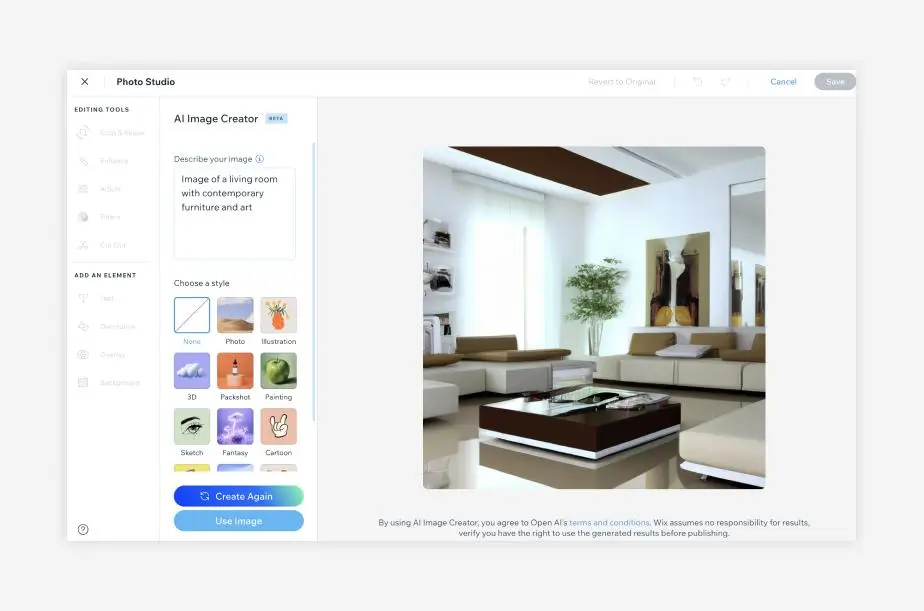
Images play an important role in website design. A good image can make your website look more professional and attractive.
Wix provides AI-powered image creation tools that can help you generate visuals based on text instructions.
For example, if you are creating a fitness website, you can request images related to exercise, workout equipment, or healthy lifestyles.
You can also use image editing features to improve existing visuals. This can save time when you don’t have professional photographs or design resources.
5. Drag-and-Drop Website Editor
AI can create the initial website, but you may still want to make changes. Wix provides a visual drag-and-drop editor that allows you to customize different website elements. You can move sections, change layouts, add buttons, edit text, upload images, and adjust colors.
You don’t need programming knowledge for normal website editing. This is useful because you are not completely dependent on AI-generated designs.
6. Mobile-Friendly Website Design

Today, many people visit websites using smartphones. Therefore, having a mobile-friendly website is important. Wix AI-generated websites are designed to adapt to different screen sizes. Your website can be viewed on desktop computers, tablets, and mobile phones.
You can also preview your website on different devices and make adjustments where required. This helps provide a better browsing experience for visitors.
7. Built-in SEO Tools
Creating a website is only the first step. You also need people to find it through search engines like Google. Wix provides built-in SEO tools to help improve your website’s search visibility.
Some useful SEO features include:
- SEO setup checklist
- Custom page titles
- Meta descriptions
- URL customization
- Image alt text
- XML sitemap support
- SEO settings for website pages
Wix also offers AI-powered tools that can help generate SEO-related content and suggestions.
However, using these tools does not guarantee higher Google rankings. You still need useful content, proper keyword research, good website structure, and quality backlinks.
8. eCommerce Website Builder
If you want to sell products online, Wix provides eCommerce functionality. You can create an online store and add products with images, descriptions, and prices. It also provides tools for managing orders, inventory, payments, shipping, and other store activities.
You can use Wix to build websites for different types of online businesses, including clothing stores, beauty products, digital products, and other retail businesses.
Keep in mind that accepting online payments requires an eligible paid plan. Payment provider availability and transaction fees depend on your country and provider.
9. Website Hosting and Domain Services
Another useful feature is that Wix provides website hosting as part of its platform.
You don’t need to purchase separate hosting from another company to publish a Wix website.
You can also purchase or connect a custom domain through Wix.
Eligible annual website plans include a free domain voucher for the first year. Domain eligibility and renewal charges should be checked before purchasing.
This makes website management easier because hosting, website editing, and several other services are available in one place.
10. Built-in Business and Marketing Tools
Wix also provides tools that help businesses manage their online activities.
Depending on your website and subscription, you can access features such as:
- Contact and lead generation forms
- Appointment booking
- Email marketing
- Social media marketing
- Customer management
- Website analytics
- Live chat
- Business automation
These features are useful for freelancers, agencies, service providers, and small business owners.
Instead of using many different platforms, you can manage several business activities from your Wix dashboard.
Wix AI Website Builder Pricing
Wix offers a free plan that allows users to start building a website without paying anything.
However, if you want to connect a custom domain, accept online payments, or access more advanced features, you will need a paid plan.
According to the official Wix pricing page, the following prices are displayed for its main website plans.
| Plan | Displayed price (USD/month) | Main features |
|---|---|---|
| Free | $0 | Free hosting, Wix editor, basic website creation |
| Light | $17.77 | 2 GB storage, custom domain, basic marketing tools |
| Core | $29.77 | 50 GB storage, payments, basic eCommerce |
| Business | $39.77 | 100 GB storage, standard eCommerce, marketing tools |
| Business Elite | $159.77 | Unlimited storage, advanced eCommerce, developer platform |
Pricing checked on November 4, 2026. The displayed monthly prices are based on yearly subscriptions paid in full upfront and include GST as shown on the pricing page. Prices, currency, taxes, and promotions may vary by location. Check the final checkout price before purchasing.
Which Wix plan should you choose?
- Free Plan: Suitable for testing the platform and learning how Wix works.
- Light Plan: Good for personal websites, portfolios, and basic business websites.
- Core Plan: A suitable option for small businesses that want to accept online payments or sell products.
- Business Plan: Better for businesses that need more storage and advanced eCommerce features.
- Business Elite Plan: Designed for larger businesses that need advanced tools and more room to grow.
Pros and Cons of Wix AI Website Builder
Before choosing any website builder, it is important to understand both its advantages and disadvantages.
Pros
- Easy to use: Beginners can create websites without coding knowledge.
- AI website generation: Creates an initial website design based on simple instructions.
- Customizable designs: You can edit layouts, images, colors, fonts, and content.
- Built-in hosting: No need to purchase separate website hosting.
- SEO features: Includes tools to help optimize website pages.
- eCommerce support: Allows users to create online stores and manage products.
- AI content tools: Helps generate website text and marketing content.
- Business tools: Offers booking, forms, marketing, and customer management features.
- Mobile-friendly designs: Websites adapt to different screen sizes.
Cons
- Paid plans can be expensive: Advanced features require a subscription.
- Limited control compared to custom development: Developers may prefer more control over the underlying website infrastructure.
- AI content needs editing: Generated text and images may not always match your expectations.
- Platform dependency: Your website is built within the Wix ecosystem, which can make moving it to another platform difficult.
- Some AI features have limits: Certain tools use AI credits, and usage depends on your subscription.
- Not completely automatic: You still need to review the design, content, SEO, and website functionality before publishing.
Who Should Use Wix AI Website Builder?
Wix AI Website Builder is designed for different types of users. However, it can be particularly helpful for people who want to create a website without hiring a developer.
Here are some examples.
1. Small Business Owners
If you run a small business and need a website to showcase your products or services, Wix can help you get started quickly.
You can create pages for your business information, services, contact details, and customer enquiries.
2. Freelancers and Professionals
Freelancers can use Wix to create professional portfolio websites.
For example, photographers, graphic designers, consultants, and digital marketers can showcase their work and attract potential clients.
3. Online Store Owners
People who want to sell products online can use Wix’s eCommerce features.
You can create product pages, manage inventory, receive orders, and connect supported payment methods.
4. Bloggers and Content Creators
Wix also provides blogging tools that allow creators to publish articles and share information with their audience.
You can create categories, manage blog posts, and use SEO tools to improve your content’s visibility.
5. Beginners
If you have never created a website before, Wix can be a good starting point.
Its AI tools and visual editor make the process easier to understand.
Is Wix AI Website Builder Good for SEO?
Yes, Wix provides several useful SEO features that can help you optimize your website for search engines.
You can edit page titles, meta descriptions, URLs, image alt text, and other important SEO settings.
It also offers an SEO setup checklist that guides users through some basic optimization steps.
However, there is something important to understand.
An AI-generated website does not automatically rank on Google’s first page.
You still need to publish helpful and original content, target relevant keywords, improve website speed, build quality backlinks, and provide a good user experience.
Wix gives you the tools to work on SEO, but your website’s ranking depends on several factors.
Is Wix AI Website Builder Worth It?
Wix AI Website Builder is a good option for people who want to create professional websites without spending too much time on technical work.
Its biggest advantage is that it combines AI website generation with a powerful visual editor.
You can generate your initial website using AI and then customize it according to your requirements. It also offers useful features such as AI content writing, image generation, SEO tools, hosting, eCommerce, and business management.
However, Wix may not be the best choice for everyone.
If you want complete control over your website’s code, advanced customization, or the flexibility to move your website between hosting providers, you may prefer another platform.
Also, if you only need a simple one-page website, some cheaper website builders may be enough.
Overall, Wix AI Website Builder is worth trying, especially if you are a beginner, freelancer, small business owner, or creator who wants an easy way to build and manage a website.
Final Thought
Wix AI Website Builder makes website creation easier by combining artificial intelligence with traditional website editing tools.
You don’t need to learn coding or spend hours designing every section manually. You can simply describe your website idea, let AI create the initial design, and customize it using the Wix editor.
Its built-in hosting, SEO tools, eCommerce features, and business solutions make it more than just an AI website generator.
The free plan is a good way to explore the platform before choosing a paid subscription.
If you want a beginner-friendly website builder with AI features and useful business tools, Wix is definitely worth considering.
Alternatives to Wix AI Website Builder
If Wix does not meet your requirements, here are some other AI website builders worth considering.
1. Hostinger AI Website Builder
Hostinger AI Website Builder helps users create websites using simple text instructions. It includes AI writing, image generation, SEO tools, hosting, and eCommerce features. It is a good option for beginners looking for an affordable website-building solution.
2. 10Web
10Web uses AI to generate websites based on user descriptions. It is built around WordPress and provides AI website generation, content creation, optimization, and hosting. It is worth considering if you prefer building your website using WordPress.
3. Durable AI
Durable helps small business owners create websites quickly using AI. It can generate website content, suggest business designs, and provide tools for managing customer relationships and marketing activities.
4. Squarespace
Squarespace is a website-building platform known for its professional templates and clean designs. It offers AI-assisted website creation, content tools, blogging, portfolio features, and eCommerce functionality. It is particularly useful for designers, photographers, and creative professionals.
5. Shopify AI Store Builder
Shopify is mainly designed for creating and managing online stores. It offers AI-powered content tools, product management, payment integrations, inventory management, and marketing features. It is a strong alternative if your main goal is selling products online.