Hailuo AI is an interesting choice for anyone who wants to create AI videos without spending hours learning professional video editing software. It can turn simple text prompts and images into short videos with realistic movements, cinematic camera effects, and creative scenes.
The platform is developed by MiniMax, an AI company known for its video and audio generation technology. It is useful for social media creators, digital marketers, advertisers, and people who want to experiment with AI-generated content.
In this article, we will explore Hailuo AI, its main features, how it works, pricing, advantages, disadvantages, and some of the best alternatives available.
What Is Hailuo AI?
Hailuo AI is an AI-powered creative platform that helps users turn written ideas and still images into videos. Instead of recording everything with a camera, you can describe what you want to see, upload a reference image, and let the AI create a moving scene.
For example, imagine you have a photo of a person standing on a beach. You can upload that photo and write a prompt asking the person to walk towards the sea while the camera slowly moves closer. Hailuo AI will try to turn your still image into a short video.
The platform is particularly useful for creating cinematic scenes, animated portraits, product advertisements, social media videos, and creative experiments.
Hailuo is part of MiniMax’s AI product ecosystem. Its video generation models have attracted attention because of their ability to create realistic movement, detailed scenes, and interesting camera effects.
It is worth understanding that Hailuo AI is mainly designed for short video creation. It is not a complete replacement for traditional video editing software.
Main Features of Hailuo AI
Hailuo AI offers several creative features that make AI video production easier. Here are some of its most useful features.
1. Text-to-Video Generation
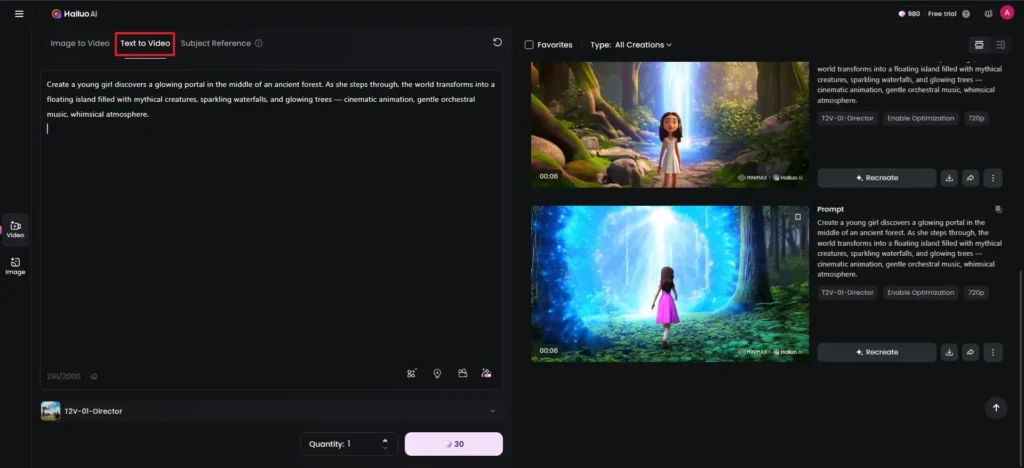
Text-to-video is one of the main features of Hailuo AI. It allows you to create videos simply by describing a scene in words.
You do not need to upload an image or record a video. Just enter a detailed prompt explaining the subject, background, lighting, movement, and camera angle.
For example, you can write:
“A beautiful red sports car driving through a modern city at night, cinematic lighting, reflections on the wet road, smooth tracking camera movement.”
The AI will understand your instructions and generate a video based on your description.
This feature is useful for creators who want to produce visual content without recording original footage.
2. Image-to-Video Generation
Image-to-video generation allows you to convert an existing picture into a short video.
You simply upload a photograph and describe the movement you want. Hailuo AI then tries to animate the image while keeping the main subject and visual style similar to the original.
For example, you can upload:
- A portrait and make the person move naturally.
- A product photograph and create a promotional video.
- A landscape image and add moving clouds or flowing water.
- An illustration and turn it into an animated scene.
This feature is particularly helpful for Instagram Reels, YouTube Shorts, product promotions, and creative social media posts.
3. Start and End Frame Control
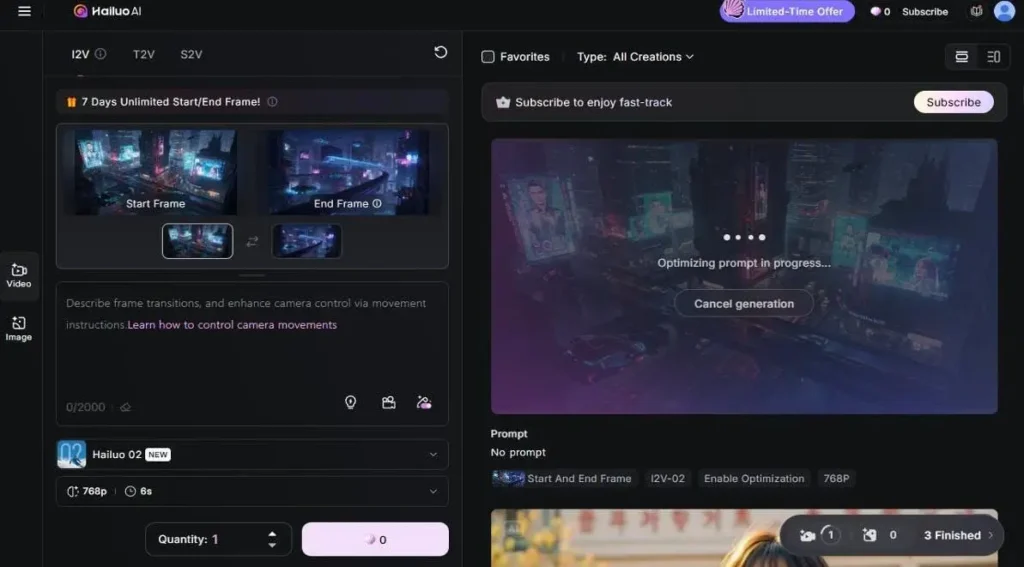
Sometimes you already know how a video should begin and how it should finish. Hailuo AI’s first-frame and last-frame controls help you guide that process.
You can provide an opening image and a closing image. The AI will attempt to generate the movement needed to connect the two scenes.
For example, you can upload a picture of a closed box as the starting frame and an open box containing a product as the ending frame.
The AI can generate a transition showing the box opening.
This feature gives creators more control over the direction of a video compared with using only a text prompt. However, the final movement may not always match your exact expectations.
4. AI Image Generation
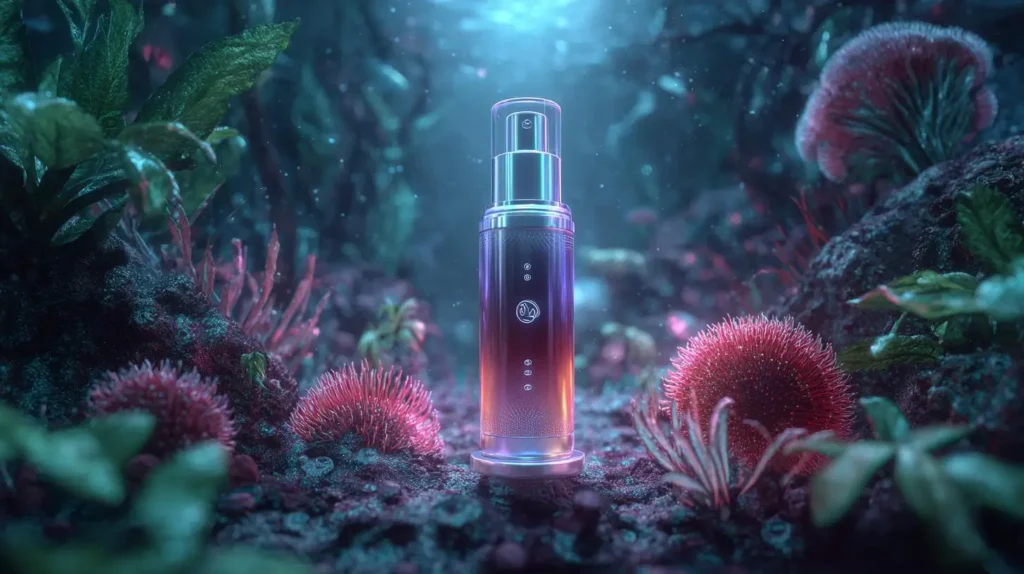
Hailuo AI is not limited to video creation. It also offers AI image-generation tools that can help you create different types of visuals.
You can describe an image using text and let the AI generate a result based on your instructions.
Some possible uses include:
- Product photography for online stores.
- Creative images for social media.
- Character designs for storytelling.
- Concept art for games and films.
- Marketing graphics and promotional visuals.
You can also use generated images as reference material for video creation.
This makes the platform more useful because you can create both images and videos within the same creative environment.
5. Hailuo Agent
Hailuo Agent is designed to make creative workflows easier. Rather than treating every generation as a separate task, agent-based tools can help users work through a larger creative idea.
For example, you may want to create a short promotional video for a new product. You can start with the basic idea and use the available workflow tools to guide the creative process.
This type of feature can be helpful for users who do not have much experience writing detailed AI prompts or planning video scenes.
The exact tools and workflow options may depend on the version of Hailuo available to your account.
6. Creative Templates
Not everyone knows how to write effective AI prompts. Creative templates can make the process easier.
Hailuo AI provides different ready-made creative experiences for producing social media content and visual effects.
Some examples include:
- Dance and movement videos.
- Character animation.
- Photo transformations.
- Product presentation clips.
- Stylized portrait videos.
- Cinematic visual effects.
Instead of starting from a completely blank workspace, you can explore available templates and choose one that matches your idea.
This is especially useful for beginners who want to experiment with AI video generation.
7. Photo-Based Motion Effects
Hailuo AI can turn ordinary photographs into more interesting visual content using photo-based animation and transformation effects.
For example, you can take a regular portrait and create a scene where the person appears to dance, travel, or move through a different environment.
These effects are useful for social media creators who want to make entertaining content from existing photographs.
However, results can vary depending on image quality, facial visibility, and the complexity of the requested movement.
8. Creative Asset Library
When working on multiple projects, keeping track of generated content is important.
Hailuo AI provides asset-handling features that help users manage their creative work.
You can access previously generated content and use it as a reference when planning new projects, depending on the available account features.
This can save time when you regularly create videos for different products, campaigns, or social media accounts.
9. Lighting and Relighting Tools
Lighting plays an important role in making an image or video look professional.
Hailuo’s creative tools include lighting and relighting-style features that help users experiment with the appearance of their visuals.
You can explore different lighting moods, improve the visual atmosphere, and create more interesting product or portrait scenes.
These tools are particularly useful when you want your content to look more cinematic without setting up a real studio.
10. Integration with the MiniMax AI Ecosystem
Hailuo is part of the wider MiniMax ecosystem, which includes other AI technologies and creative tools.
This gives users access to more than just video generation. MiniMax also works on audio and other AI models that can support different creative tasks.
For example, you may create a video using Hailuo and use a separate audio-generation tool to prepare narration, music, or sound effects.
This can help you build a more complete content production workflow.
How to Use Hailuo AI?
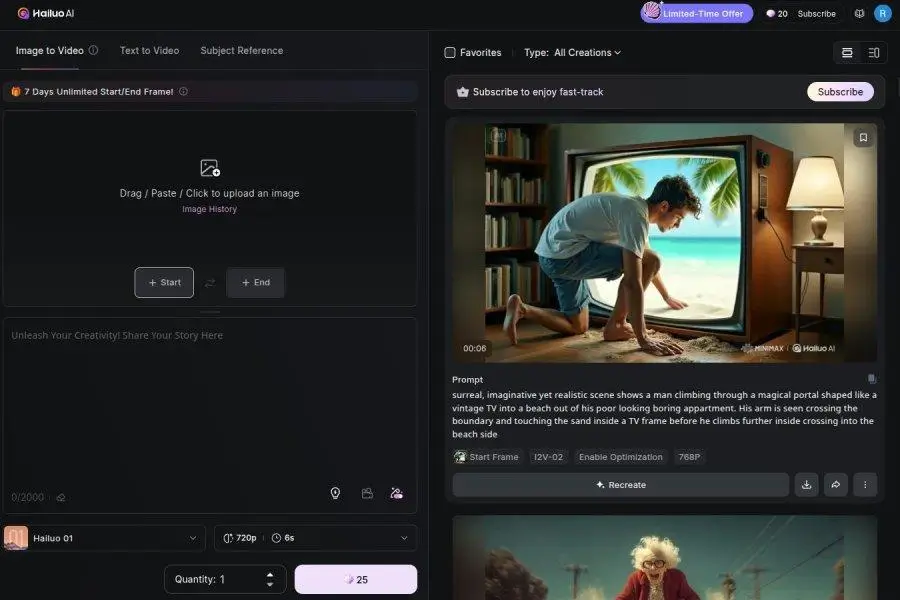
One of the good things about Hailuo AI is that you do not need professional video editing knowledge to get started.
Here is a simple step-by-step guide.
Step 1: Visit the Official Website
Open the official Hailuo AI website at hailuoai.video.
Create an account or sign in using one of the available login options.
Step 2: Choose a Video Generation Method
Select the video creation option that matches your requirements.
You can generally choose between text-to-video and image-to-video workflows.
Step 3: Enter Your Prompt
Write a clear description of the video you want to generate.
Try to explain the subject, movement, background, lighting, and camera direction.
A detailed prompt usually gives the AI more useful information.
Step 4: Upload an Image (Optional)
If you want to animate an existing photograph, upload it as a reference.
Make sure the image is clear and that the main subject is easy to identify.
Step 5: Generate Your Video
Check the available generation settings and submit your request.
Hailuo AI will process your instructions and create a video.
Step 6: Review and Download
Watch the generated result carefully.
If you are not satisfied, improve your prompt and generate another version. Once you are happy with the result, download it using the available export options.
Who Should Use Hailuo AI?
Hailuo AI can be useful for different types of users. However, it is particularly valuable for people who regularly need short visual content.
Content Creators: YouTubers, Instagram creators, and other social media publishers can use Hailuo to create interesting visual clips without recording every scene themselves.
Digital Marketers: Marketers can experiment with product advertisements, promotional videos, and creative campaigns.
E-commerce Store Owners: Online sellers can turn product photographs into short promotional videos for product pages and social media advertisements.
Filmmakers and Storytellers: Independent filmmakers can use AI-generated clips to test visual ideas, create story concepts, and plan scenes before production.
Designers: Graphic designers can experiment with animated images, visual concepts, and creative presentations.
Beginners: People without professional video editing experience can explore AI video creation using simple prompts and ready-made templates.
Hailuo AI Pricing Plans
Hailuo AI offers free and paid options. The free version is useful for testing the platform, while paid subscriptions provide additional credits, faster generation, and watermark-free downloads.
According to the published Hailuo AI payment policy, the following subscription prices are listed. These prices come from the official payment terms last updated on July 14, 2025, so they should be treated as published reference prices rather than guaranteed current checkout prices. hailuoai.video
| Plan | Monthly Price | Credits |
|---|---|---|
| Free | $0 | Free welcome credits |
| Standard | $14.99/month | 1,000 |
| Pro | $54.99/month | 4,500 |
| Master | $119.99/month | 10,000 |
| Ultra | $124.99/month | 12,000 |
| Max | $199.99/month | 20,000 |
Important pricing details:
- Free users can generate videos with watermarks.
- Paid plans offer priority generation and watermark-free downloads.
- Standard, Pro, and Master plans have different monthly credit allowances.
- Unused membership credits expire at the end of the monthly billing period.
- Additional credits can also be purchased.
- Commercial usage rights are covered by the paid subscription terms.
The Max plan also includes relaxed-mode generation under the conditions described in the official payment policy. Some of the listed plans may be legacy or unavailable to new customers.
Before purchasing, check the current prices, available models, credit requirements, and subscription conditions on the official Hailuo AI website. Taxes may also apply depending on your location. hailuoai.video
Pros and Cons of Hailuo AI
Like every AI video generator, Hailuo AI has some advantages and disadvantages. Here is a quick comparison.
| Pros (The Wins) | Cons (The Limitations) |
|---|---|
| Cinematic Visuals: Creates attractive scenes with interesting lighting and atmosphere. | Short Videos: Mainly designed for short video generation rather than long films. |
| Image Animation: Turns still photographs into moving scenes. | Generation Time: Some generations may take longer, especially during busy periods. |
| Easy to Use: Beginners can create videos using simple text prompts. | AI Errors: Hands, faces, and moving objects may sometimes look unnatural. |
| Creative Templates: Ready-made effects make content creation easier. | Limited Editing: It does not replace a professional video editor. |
| Multiple Creative Tools: Supports image and video-related creative workflows. | Credit Limits: Frequent users may need to purchase a paid subscription. |
| Camera Movement: Can create cinematic camera effects and scene movements. | Character Consistency: Keeping multiple characters identical across scenes can still be difficult. |
| Commercial Options: Paid subscription terms provide commercial usage rights. | Changing Plans: Pricing and available features may change over time. |
What Makes Hailuo AI Different from Other AI Video Generators?
There are many AI video generators available today, including Kling AI, Runway, Luma AI, and PixVerse.
So, why should you consider Hailuo AI?
One of its main strengths is the visual quality of its generated scenes. It can create attractive lighting, realistic-looking environments, and interesting movements that work well for short cinematic clips.
Another advantage is its image-to-video functionality. Many creators already have photographs, product images, and illustrations that they want to animate. Hailuo AI makes it possible to use these existing visuals as a starting point.
Its creative templates are also useful for people who do not want to spend too much time writing prompts.
However, Hailuo AI is not necessarily the best choice for every project. Some competing platforms provide more advanced editing features, detailed character-reference controls, or production tools.
The right platform depends on the type of videos you want to create.
Is Hailuo AI Worth Using?
Yes, Hailuo AI is worth trying if you want to create short AI-generated videos from text prompts and photographs.
It can be particularly helpful when you need cinematic visuals but do not have the time, equipment, or budget to record every scene yourself.
For example, an e-commerce business can use it to experiment with product advertisements. A YouTube creator can generate supporting visuals for a video. An Instagram creator can turn ordinary photographs into entertaining short clips.
The free option is a good starting point because you can explore the platform before paying for a subscription.
However, do not expect every generation to be perfect. You may need to adjust your prompts, try different reference images, and generate several versions before getting the desired result.
If you need long videos, detailed timeline editing, or complete control over every frame, you may still need professional editing software alongside Hailuo AI.
Overall, it is a useful creative tool for people who want to experiment with AI-powered video production.
Final Thoughts
Hailuo AI is more than a basic text-to-video generator. It brings together video generation, image creation, creative templates, photo animation, and other useful tools in one creative environment.
Its biggest advantage is the ability to turn simple ideas and photographs into visually interesting short videos. This makes it a practical option for social media creators, marketers, designers, and small businesses.
There are still some limitations, especially when it comes to character consistency, detailed editing, and the accuracy of complex movements. Pricing and credit requirements are also important considerations for people who generate videos regularly.
If you are new to AI video creation, start with the free version and test different prompts. If the results meet your expectations, consider upgrading.
Hailuo AI may not be the perfect solution for every video project, but it is certainly a platform worth exploring.
Alternatives to Hailuo AI
If Hailuo AI does not meet your requirements, here are five other AI video generators worth considering.
1. Kling AI
Kling AI is a powerful AI video creation platform that supports text-to-video and image-to-video generation. It offers useful character and reference tools for creating more consistent scenes across different clips.
2. Luma Dream Machine
Luma Dream Machine helps users create realistic videos from text prompts and images. Its camera movement and keyframe features make it a good option for creators who want more control over visual transitions.
3. Runway
Runway is designed for creators who need AI video generation along with advanced creative and editing tools. It is particularly useful for filmmakers, designers, and professional content production workflows.
4. Pika
Pika is an AI video creation tool that focuses on making creative videos and visual effects. Its editing and transformation features are useful for social media creators who want to experiment with unusual video ideas.
5. PixVerse
PixVerse makes it easy to generate short videos from text prompts and images. It offers creative effects and templates that are useful for social media content, animated characters, and promotional clips.