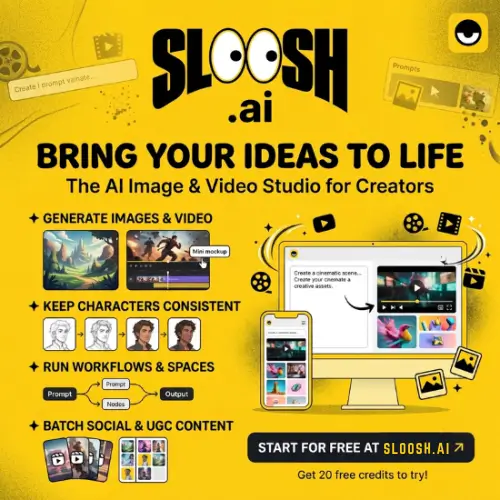
Sloosh.ai is an AI creative platform that brings multiple image and video generation models together in one place. Instead of switching between different AI tools, you can use Sloosh to create images, generate videos, build AI influencers, and produce marketing content from a single workspace.
What makes Sloosh interesting is its workflow automation. You can use ready-made templates, build your own AI workflows, and connect compatible AI assistants through MCP. It is designed for content creators, marketers, designers, and businesses that want to produce visual content with less manual work.
What Is Sloosh.ai?
Sloosh.ai is an AI creative studio developed by ShopOS. It brings different AI image and video generation models into one workspace. Instead of purchasing separate subscriptions for different AI tools, you can access multiple models through Sloosh and use a shared credit system.
The platform is designed for content creators, marketers, designers, ecommerce businesses, and agencies. Its main purpose is to help people create images, videos, product advertisements, and other visual content without managing several different tools.
But Sloosh is not just another text-to-image generator.
It has five main working areas: Studio, Spaces, Spacelab, AI Influencer, and AI agent connections through MCP. Each serves a slightly different purpose.
The platform is currently in beta, so some features and workflows may still change.
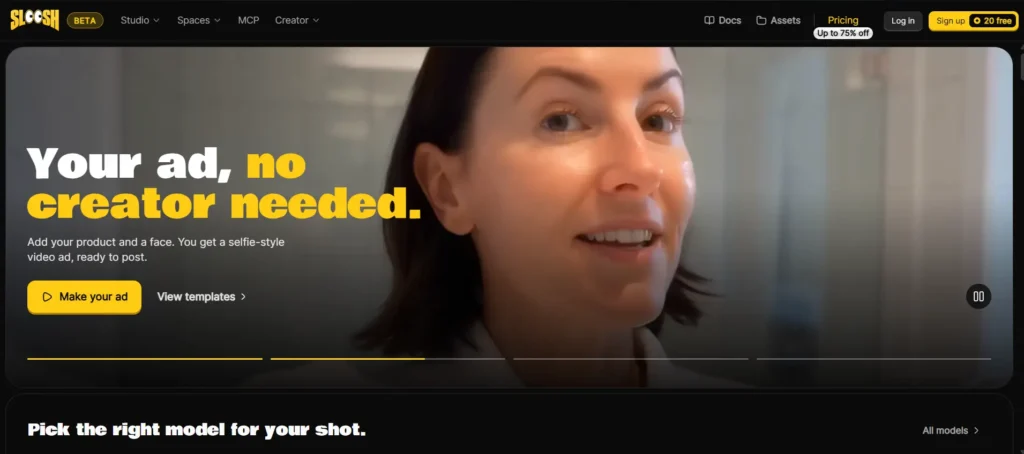
How Does Sloosh.ai Work?
The basic process is quite simple. You open Sloosh, choose the type of content you want to create, select an AI model, enter your prompt or upload an image, and generate the result.
However, the interesting part is how Sloosh handles different creative tasks.
Let’s look at its main features.
1. Studio: Generate Images and Videos
Studio is the main place where you create AI images and videos.
You write a prompt, choose an available AI model, adjust the settings, and click Generate. Depending on the selected model, you can create product photos, characters, social media visuals, video clips, and other creative content.
One useful feature is that you don’t have to stay with one AI model.
Sloosh brings different image and video models into the same workspace. These include models such as:
- Nano Banana Pro
- Nano Banana 2.1
- GPT Image
- FLUX
- Seedream
- Ideogram
- Seedance
- Kling
- Veo
- MiniMax
- Grok Imagine
This is useful because different models can produce different results.
For example, one model might be better for realistic product photography, while another may work better for creative scenes or video generation.
You can experiment without constantly switching between different websites.
Another useful detail is the generation cost. Sloosh displays the credit cost before you start a generation. This helps you understand how many credits a particular task will consume.
That’s a sensible feature. Nobody enjoys discovering an unexpected credit deduction after clicking a button.
2. Spaces: Run Ready-Made AI Workflows
Spaces are one of the more interesting parts of Sloosh. Think of them as ready-made AI workflows. Instead of writing prompts and adjusting settings every time, you can use an existing workflow through a simple form.
For example, imagine you run an online store and regularly need product photographs.
You can select a suitable Space, upload your product photo, provide the required details, and run the workflow. The system follows its prepared instructions to produce the output.
This can be useful when you need similar content repeatedly. Some possible use cases include:
- Creating product images for ecommerce stores.
- Producing advertising visuals for different products.
- Generating consistent images for marketing campaigns.
- Repeating a visual style across multiple creative projects.
The biggest advantage is repeatability.
You don’t have to rebuild the entire process every time. However, the quality will still depend on the workflow, selected model, uploaded material, and instructions.
3. Spacelab: Build Your Own AI Workflows
Spacelab is designed for people who want more control over their creative process. It provides a canvas where you can connect different steps using nodes. These nodes can include images, prompts, AI models, and editing steps.
For example, you could create a workflow that starts with an uploaded product image, sends it through a prompt, generates a new image using an AI model, and passes the result through another editing step.
You can test individual nodes before running the complete workflow.
Once everything works as expected, you can publish the workflow as a Space. Other people can then use it through a simple form without needing to understand how the original workflow was built.
This feature is particularly interesting for agencies and marketers.
Imagine creating one workflow for product advertisements and using it for 50 different products. You don’t need to manually rebuild the same process 50 times.
However, there is a learning curve. People who only want to generate a quick image may not need Spacelab at all.
4. AI Influencer: Keep the Same Character
Creating consistent AI characters can be difficult. You might generate a character in one image, but when you create another image, the face, hairstyle, or other features may change.
Sloosh offers an AI Influencer feature to address this problem.
You can create a character using trait selections or a face photo and save that character to your workspace. You can then reuse the character in supported creative workflows.
One related feature is Shadow Clone, which allows you to use a character and reproduce movements from a reference video.
This could be useful for:
- Faceless YouTube channels.
- Instagram Reels creators.
- AI influencer accounts.
- Promotional videos.
- Social media advertising.
- Brands that want a recurring virtual character.
The idea is useful, but don’t assume every generated video will look perfectly natural. Character consistency, facial details, movement, and overall video quality still depend on the underlying AI models.
You should test the feature with your own content before building an entire business around it.
5. Connect Sloosh With AI Agents Through MCP
This is a feature that makes Sloosh more interesting for advanced users. Sloosh supports MCP (Model Context Protocol), allowing compatible AI assistants to connect to your Sloosh workspace.
Supported tools include Claude, ChatGPT, Cursor, and other compatible agents.
Instead of manually opening the Sloosh website for every task, you can ask a connected AI agent to generate images, create videos, run Spaces, or work with your creative workflows.
For example, you could ask an AI assistant to generate product images using a particular workflow.
The assistant can interact with Sloosh through its MCP connection.
There is one important limitation: MCP access is available on the Pro and Max plans, not the Creator plan.
Also, Sloosh currently does not offer a public API or API keys. MCP access should not be confused with a traditional public API.
For developers who want to automate creative work, this is worth understanding before subscribing.
6. Templates and Reusable Creative Work
Sloosh also offers templates that let users recreate existing creative outputs. A template contains a published generation and the inputs used to create it. You can open a template and use your own inputs to produce something similar.
This can save time for people who struggle with prompt writing.
For example, instead of starting from a blank prompt, you can find a visual style you like and use its template as a starting point.
It is not a guarantee that your result will look exactly the same. Your input images, selected model, and settings still matter.
But having examples to work from is better than guessing every setting yourself.
7. Asset Management
Sloosh keeps generated images and videos in an Assets section inside your workspace. You can save useful results as Elements and reuse them as references in future prompts.
This is helpful for creators who work on several related projects.
For example, an ecommerce marketer might save a product image, a background reference, and a particular character. These assets can then be reused in later generations.
It is a practical addition, especially when you are trying to maintain a consistent visual style across multiple campaigns.
Sloosh.ai Pricing: How Much Does It Cost?
Sloosh uses a credit-based pricing system. You receive a fixed number of credits each month, and different models consume different amounts depending on the generation type, resolution, and video length.
There are three main paid plans: Creator, Pro, and Max.
Here is the pricing shown on its official pricing page.
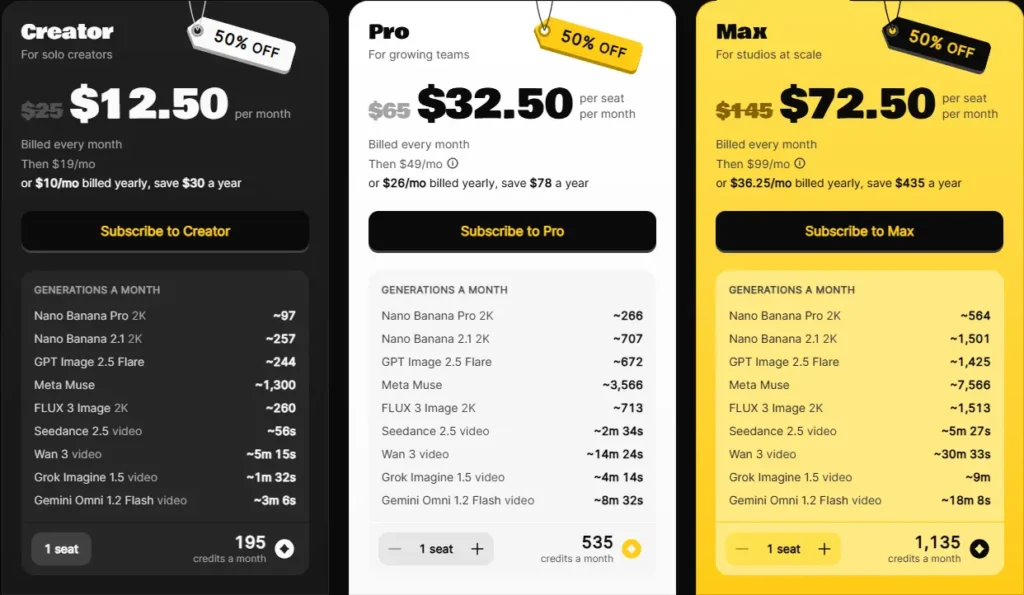
What Do the Plans Include?
Creator Plan
Designed for solo creators who want access to AI image and video generation.
- One user seat.
- 195 monthly credits.
- Access to all listed models.
- Image quality up to 4K.
- Publish to Spacelab.
- Credit top-ups available.
- No batch runs.
- No Agent MCP access.
Pro Plan
Designed for growing teams and users who need more generation capacity.
- Up to 10 seats.
- 535 credits per seat each month.
- Batch runs included.
- Agent MCP access included.
- Access to all listed models.
- Image quality up to 4K.
- Credit top-ups available.
Max Plan
Designed for studios and businesses with higher content production requirements.
- Up to 10 seats.
- 1,135 credits per seat each month.
- Batch runs included.
- Agent MCP access included.
- Access to all listed models.
- Image quality up to 4K.
- Credit top-ups available.
Enterprise Plan
For larger businesses that need custom support and higher production capacity.
It includes custom credits, 11 or more seats, single sign-on, invoice payments, and a team that can manage creative workflows and content production.
Important Pricing Things to Know
Before paying, keep these points in mind:
- Sloosh offers 20 starter credits to new workspaces. This is a one-time trial allowance, not a permanent free plan.
- Annual billing saves 10% according to the pricing page.
- Unused monthly plan credits do not carry over.
- Credit top-ups are available for paid plans and remain valid for 12 months.
- Video generation can consume credits quickly, especially when using more expensive models or longer clips.
- The actual number of generations depends on the selected model and settings.
My pricing opinion: The Creator plan is the sensible starting point for an individual creator. But don’t automatically choose Pro just because it includes more credits. First calculate how much content you actually produce every month.
What I Like About Sloosh.ai
There are several things that make Sloosh worth looking at.
- Multiple models in one place: You can access different image and video models without maintaining separate subscriptions for every model provider.
- Reusable workflows: Spaces and Spacelab are useful for repeating creative tasks.
- AI Influencer: The ability to reuse a character across supported workflows is interesting for social media creators.
- Credit visibility: Seeing the generation cost before running a task helps with spending control.
- Batch generation: Pro and Max users can process multiple items through a workflow, which can save manual effort.
- MCP support: Connecting compatible AI agents gives advanced users another way to work with the platform.
- Failed generation refunds: According to Sloosh, credits from failed generations are returned to the workspace.
What I Don’t Like About Sloosh.ai
Now for the less exciting side.
1. No permanent free plan
You get 20 starter credits, but that is not enough to treat Sloosh as a completely free creative tool. If you want to use it regularly, you will need a paid subscription.
2. Credits can disappear quickly
A credit-based system is not automatically bad. However, image and video generations have different costs. A few experiments with expensive video models can use a noticeable part of your monthly allowance.
If you generate content regularly, keep an eye on your credit balance.
3. No public API yet
Developers who want a traditional API integration may find this limiting. MCP provides another option, but it is not the same as having public API endpoints and API keys.
4. Some useful features require expensive plans
Batch runs and MCP access are not included in Creator. This means solo users who want agent-based automation or bulk generation must consider a higher-priced subscription.
5. It is still in beta
This is probably the biggest concern. Sloosh is a relatively new platform, and its official website clearly identifies it as being in beta. That means features, performance, and workflows may change.
I would not move an entire agency’s content production system to a new beta platform without testing it first.
6. Not every model will give the same quality
Having many models in one dashboard sounds great, but the number of available models doesn’t automatically make every output good. You still need to choose the right model for the task, write useful prompts, and review the results.
More choices can also mean more time spent experimenting.
Who Should Use Sloosh.ai?
Sloosh makes the most sense for people who create visual content regularly.
Solo content creators: If you produce YouTube thumbnails, social media visuals, AI characters, or short videos, having multiple models in one workspace can be useful.
Ecommerce sellers: Product images and repeatable product photography workflows are among the more practical use cases.
Digital marketers: Agencies and marketers can use Spaces and Spacelab to repeat campaign-related creative tasks.
AI automation enthusiasts: If you already use Claude, ChatGPT, Cursor, or other compatible AI agents, MCP support may be worth exploring.
Designers and creative studios: People who regularly work with different image and video models may appreciate having one shared credit system.
Who Should Avoid Sloosh.ai?
I wouldn’t recommend paying for Sloosh if you only generate a few images every month.
There are simpler and sometimes cheaper alternatives for occasional image generation. You should also skip it if:
- You need a permanent free plan.
- You want a traditional public API.
- You don’t want to manage credits.
- You need a fully established platform with a long track record.
- You only need basic photo editing or simple video trimming.
- You are not interested in workflows, multiple models, or automation.
Don’t pay for features you will never use.
Is Sloosh.ai Worth It? Final Verdict
Sloosh.ai has a more interesting approach than a basic AI image generator. It combines different image and video models, ready-made workflows, a visual workflow builder, reusable AI characters, and MCP connections in one workspace.
The strongest part is not simply the number of models. It is the ability to build a repeatable creative process.
For example, an ecommerce business can create a product photography workflow once and reuse it for different products. An agency can build campaign workflows. A content creator can experiment with different video models without opening several separate platforms.
But there are reasons to be careful.
The credit system needs attention, the Creator plan lacks batch runs and MCP access, and the platform is still in beta. There is also no public API at the moment.
My recommendation: If you are a solo creator or marketer who regularly produces AI images and videos, start with the 20 free credits and test your actual workflow. If the results save you enough time and the credit cost makes financial sense, consider Creator.
I would not recommend jumping straight into Pro or Max unless you genuinely need batch generation, MCP access, multiple seats, or higher monthly capacity.
Sloosh has potential, but potential is not the same as proven value. Make it earn its place in your monthly software budget.
Alternatives to Sloosh.ai
If Sloosh doesn’t fit your budget or workflow, these tools are worth considering.
1. Runway
Runway is an AI video creation and editing platform with image and video generation features. It is a strong option for filmmakers, video creators, and marketers who need more control over AI-generated video.
2. Kling AI
Kling AI focuses on AI image and video generation, including text-to-video and image-to-video workflows. It is worth considering if your main priority is creating realistic-looking video clips.
3. Magnific AI by Freepik
Magnific by Freepik provides AI image and video generation alongside stock assets, design resources, and creative editing tools. It is useful for marketers and designers who want several creative tools in one subscription.
4. Leonardo AI
Leonardo AI is an AI image generation platform with image editing, creative tools, and video generation features. It is a good option for designers, game artists, and creators who focus heavily on visual content.
5. Krea AI
Krea AI offers image and video generation, enhancement, and real-time creative tools. It is particularly interesting for designers and creators who like experimenting with different visual styles and AI models.