
Krea AI: All-in-One AI Creative Suite for Images, Video & 3D
Have you ever wished you could just type a few words and watch a picture appear out of thin air? Or maybe you have a rough sketch and want to turn it into a polished, professional-looking image? That is exactly what Krea AI does. It is a creative platform that uses artificial intelligence to help you generate images, videos, and even 3D objects, all from simple text prompts or quick sketches.
What makes Krea special is that it does not just do one thing. It is like a Swiss Army knife for digital creators. Whether you are a student working on a project, a designer trying to brainstorm ideas, or just someone who likes to play with cool technology, Krea AI gives you a bunch of tools in one place. Let us take a closer look at what it offers, how much it costs, and whether it is worth your time.
What Exactly Is Krea AI?
At its heart, Krea is a web-based creative suite. You do not need a super-powerful computer to use it because all the heavy lifting happens on their servers . When you open the website, you are greeted with a canvas where you can start typing what you want to see. The platform is designed to be fast and responsive, so as you type or draw, the image updates almost instantly .
One of the coolest things about Krea AI is that it does not rely on just one AI model. It brings together models from different companies, including its own Krea models, along with options from Google, OpenAI, and Runway . This means you can experiment with different styles and see which one gives you the best result for your specific project.
The Core Tools You Will Use Most
When you first sign up, you will probably spend most of your time in the image generation area. But Krea has a lot more going on under the hood. Here are the main tools that make it stand out:
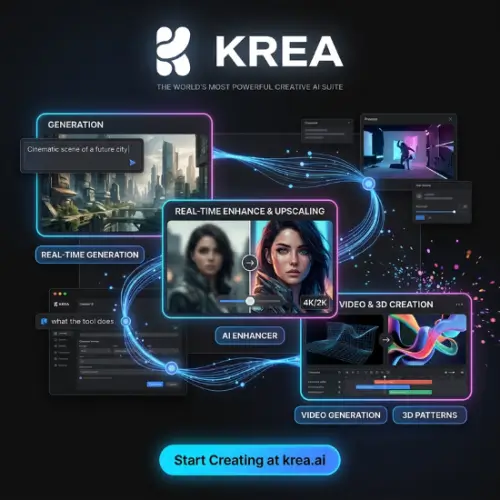
Krea Image and Video: These are the basics. You type a description, and it creates an image or a video clip for you. The video tool can make clips up to 60 seconds long, which is pretty impressive for AI .
Real-Time Canvas: This is Krea’s signature feature. Instead of waiting a minute for an image to generate, you see it happening live. You can move shapes around, change colors, and adjust your prompt, and the AI responds immediately . It feels a bit like digital clay that you can mold with your words.
Enhancer and Upscaler: Sometimes you have a small or blurry image that you want to make high-resolution. Krea’s enhancer uses AI to sharpen details and make the image look crisp and professional .
Edit and Restyle: If you have an existing photo or artwork, you can tell Krea AI to change specific parts of it. For example, you could say “make the sky sunset orange” or “change the jacket to a leather jacket” using text prompts .
Custom Training: If you want the AI to learn a specific style—like your own artwork or a character you designed—you can train a custom model on it. Then, every time you generate something, it will look like it belongs in your world .
How Much Does Krea AI Cost?
Krea uses a subscription model, but it also has a free tier so you can try it before spending any money. The pricing is generally considered quite competitive compared to other professional design tools . Here is a breakdown of the plans based on the information available:
| Plan Name | Price (Monthly) | Key Features & Best For |
|---|---|---|
| Free | $0 | Limited daily credits. Good for testing the waters and casual play. |
| Basic | ~$5.25 | More credits, faster generation, and access to basic models. Great for hobbyists. |
| Pro | ~$21 | Higher credit allowance, access to premium models (like Veo), and commercial usage rights. |
| Max | ~$63 | The highest credit limits, priority processing, and full access to every tool and model. |
Note: Prices are approximate and can change, especially if you choose annual billing which often gives a discount .
It is worth mentioning that Krea AI also has an “Agent” feature that is available on all plans, including Free. This agent can help you plan and execute more complex creative tasks, almost like having a little assistant inside the app .
What Are the Good and Bad Sides?
No tool is perfect, and Krea has its strengths and weaknesses. Based on user reviews and the official documentation, here is the honest truth.
The Good Stuff:
- Speed: Users consistently praise how fast the image generation is. It makes brainstorming sessions really fun because you are not sitting around waiting .
- The Upscaling is Excellent: Many people say the upscale and enhance tools are the best part. They can take a low-quality image and make it look like it was shot with a professional camera .
- Easy to Use: You do not need a degree in computer science to use it. The interface is clean and simple, which is great for beginners .
The Not-So-Good Stuff:
- Inconsistent Human Figures: Like many AI tools, Krea AI sometimes struggles with hands and faces. It might give you a perfect landscape but a person with six fingers. You might need to generate a few tries to get it right .
- Prompt Sensitivity: The results are very dependent on how well you write your prompt. If you are vague, you will get a vague image. It requires a bit of practice to get good at “talking” to the AI .
- Fine Editing is Tricky: While you can edit images, making very precise changes (like moving a single small object) can be difficult. It is better at big-picture changes .
Final Thought
Krea AI is a fantastic starting point for anyone who wants to explore AI art and video without getting overwhelmed. It is fast, the interface is friendly, and the ability to use multiple models in one place saves you from having to pay for five different subscriptions. It is not a magic wand that will make you a professional artist overnight—you still need to put in the effort to learn how to prompt it well. But for the price, especially the free tier, it is absolutely worth trying out. If you are a designer looking for a quick way to visualize ideas or a student wanting to make your projects pop, Krea is a solid choice.
Alternatives to Krea AI
If you find that Krea is not quite the right fit for you, or if you just want to shop around, here are a few other tools that offer similar features.
Midjourney
Known for its incredible artistic quality and photorealistic images, Midjourney is a favorite among professional artists. However, it is primarily image-focused and lacks the real-time canvas and video tools that Krea offers.
Runway
If you are more interested in video generation, Runway is a powerhouse. It offers advanced video editing, motion capture, and high-quality generation. It is more expensive than Krea but is built specifically for filmmakers and video creators.
Leonardo AI
Leonardo is a great middle ground. It has a strong focus on game asset creation and custom model training, similar to Krea’s custom training. It also has a generous free tier and a very active community.
Adobe Firefly
If you already use Adobe products like Photoshop, Firefly integrates perfectly. It is fantastic for generative fill and editing within your existing workflow. However, it is less of a standalone creative suite and more of a feature within the Adobe ecosystem.



