
Creating professional product photos is one of the most important parts of running a successful e-commerce business. Whether you sell clothing, beauty products, electronics, furniture, jewellery, or home accessories, high-quality product images can make a big difference in how customers view your products.
However, professional product photography is not always affordable. Hiring photographers, arranging studio lighting, purchasing photography equipment, and editing hundreds of product images can take a lot of time and money.
This is where AI product photography tools become useful.
With the help of artificial intelligence, you can turn ordinary product photos into professional-looking images, create attractive backgrounds, remove unwanted objects, add realistic shadows, and generate lifestyle product photography without setting up an expensive studio.
Some AI tools can even place your products in beautiful environments, show clothing on virtual models, and create marketing images for social media advertisements.
In this guide, we will explore the best AI tools for creating product photos for e-commerce. We will compare their features, pricing, advantages, disadvantages, and unique capabilities to help you find the right software for your business.
Whether you are a beginner, an Amazon seller, a Shopify store owner, or an established e-commerce brand, you will find suitable options here.
Quick Comparison: Best AI Product Photography Tools
If you don’t have time to read the complete article, here is a quick comparison of some popular AI tools for creating professional product photos.
| AI Tool | Best For | Starting Price |
|---|---|---|
| Photoroom | Background removal and product photo editing | Free plan; paid from around $7.50/month |
| Pebblely | Creating lifestyle product photos | $9/month |
| Flair AI | Creative product photography and branded scenes | Free plan; paid from $8/month |
| Claid.ai | Professional product images and bulk editing | Free trial; paid from $9/month |
| Pixelcut | Quick product photo editing | Free plan; paid plans available |
| Canva | Product images and marketing designs | Free plan; Pro from ₹4,000/year |
| Adobe Photoshop | Advanced AI photo editing | Subscription-based |
Prices are indicative and may vary depending on billing periods, location, taxes, and available plans.
What Is AI Product Photography?
AI product photography is the process of using artificial intelligence to create, improve, and edit product images.
Instead of arranging a professional photoshoot, you can upload a simple photograph of your product and let an AI tool improve its appearance.
For example, imagine you sell a skincare bottle.
You take a simple picture of the bottle using your smartphone. The background might be your bedroom table or a plain wall.
Using an AI product photography tool, you can:
- Remove the original background.
- Place the bottle on a beautiful marble surface.
- Add realistic lighting and shadows.
- Create a luxury bathroom environment.
- Generate promotional product images.
- Resize the image for Amazon, Shopify, or Instagram.
All these things can be done without a professional photography studio.
AI product photography is especially useful for small businesses that want attractive product images without spending a lot of money.
However, it is important to remember that AI should improve the presentation of your actual product, not change its real appearance. Product colours, labels, materials, sizes, and important details must remain accurate.

7 Best AI Tools for Creating Product Photos for E-commerce
Let’s look at the best AI product photography tools, what they offer, and why you might want to purchase them.
1. Photoroom – Best Overall AI Product Photography Tool
Photoroom is one of the most popular AI-powered photo editing platforms for e-commerce businesses. It helps sellers transform ordinary product images into professional-looking photographs without requiring advanced photography or editing skills.

The platform is particularly useful for online sellers who regularly upload product images to Amazon, Shopify, eBay, and other marketplaces.
One of the biggest advantages of Photoroom is its background removal technology. You can upload a product image and remove its original background in seconds. After that, you can choose a plain white background, a custom colour, or an AI-generated environment.
Photoroom also offers AI product photography features that allow you to create attractive lifestyle scenes using your original product photo.
For example, if you sell a coffee mug, you can place it on a wooden table with a cup of coffee, a notebook, and natural morning lighting.
Main Features
AI Background Remover: Remove unwanted backgrounds from product images and create clean, professional photographs.
AI Background Generator: Generate attractive backgrounds based on your requirements. You can create studio backgrounds, outdoor environments, and lifestyle scenes.
AI Product Photography: Transform basic product images into professional-looking product photographs.
AI Shadows: Add realistic shadows to make products look naturally placed in their environment.
Batch Editing: Apply similar editing settings to multiple product images. This is especially helpful for stores with large product catalogues.
Image Resizing: Prepare product images for different marketplaces, websites, and social media platforms.
AI Product Videos: Turn existing product images into engaging video content and advertisements using supported video tools.
Pricing
Photoroom offers a free plan with access to selected editing features. Paid subscriptions provide additional AI capabilities, credits, and export limits.
| Plan | Indicative Pricing |
|---|---|
| Free | $0 |
| Pro | Around $12.99/month or $89.99/year |
| Max | Around $34.99/month |
| Ultra | Around $99/month |
Pricing and feature availability may change. Check the official pricing page for the latest details.
Pros & Cons
Pros
- Very easy to use, even for beginners.
- Excellent background removal capabilities.
- Useful AI-generated product backgrounds.
- Supports batch photo editing.
- Suitable for different e-commerce platforms.
- Offers both mobile and web-based workflows.
Cons
- Some advanced features require paid subscriptions.
- AI credits and export limits may restrict heavy usage.
- Generated backgrounds may occasionally look unrealistic.
- Advanced creative control is more limited than dedicated design platforms.
What Makes Photoroom Different?
Photoroom focuses heavily on practical e-commerce image editing. Instead of being just an AI image generator, it provides tools that help sellers prepare actual product photographs for online stores.
Its combination of background removal, AI product photography, batch editing, and image resizing makes it a strong choice for businesses managing multiple product listings.
Best For: Amazon sellers, Shopify store owners, small businesses, and online retailers who need professional product photos regularly.
Our Verdict: If you are looking for an all-round AI product photography solution, Photoroom is one of the first tools worth trying.
2. Pebblely – Best for Creating Lifestyle Product Photos
Pebblely is an AI product photography platform designed to help businesses create attractive product images using artificial intelligence. Its main purpose is to make product photography easier for people who do not have access to professional studios or photography equipment.

With Pebblely, you can upload an image of your product and generate different backgrounds and environments around it.
For example, if you sell a perfume bottle, you can create photographs showing the product surrounded by flowers, placed on a luxury table, or displayed in a beautiful bathroom setting.
This is especially useful for brands that want to create lifestyle images for their websites, advertisements, and social media accounts.
Main Features
AI Product Photography: Generate professional-looking product photographs from simple product images.
Multiple Background Themes: Choose from different background styles and environments to match your product category.
Custom Prompts: Describe the type of photograph you want, and the AI generates a suitable background.
Bulk Generation: Generate multiple product images more efficiently using supported bulk generation features.
Lifestyle Product Scenes: Create product photographs that show how products might look in real-life environments.
Product Presentation: Improve the overall appearance of your product listings with attractive backgrounds and compositions.
Pricing
Pebblely offers three main subscription plans.
| Plan | Monthly Billing | Images Per Month |
|---|---|---|
| Lite | $9/month | 30 |
| Basic | $19/month | 200 |
| Pro | $39/month | 500 |
Annual subscriptions offer discounted monthly-equivalent pricing. For example, the Lite plan can cost around $7.50 per month when billed annually.
Pros & Cons
Pros
- Simple interface for beginners.
- Creates attractive lifestyle product images.
- Multiple background themes.
- Supports custom text prompts.
- Useful for social media marketing.
- Bulk image generation is available on supported plans.
Cons
- Monthly image limits apply.
- Not designed for advanced manual photo editing.
- Results may need additional adjustments.
- Less suitable for businesses requiring highly detailed creative control.
What Makes Pebblely Different?
Pebblely focuses on making lifestyle product photography simple. Many traditional photo editing platforms require users to manually select backgrounds, arrange objects, and adjust lighting.
Pebblely makes this process easier by generating different product environments with AI.
It is particularly useful when you want to create several marketing images of the same product without arranging multiple photoshoots.
Best For: Small e-commerce businesses, beauty brands, skincare sellers, jewellery stores, and social media marketers.
Our Verdict: Pebblely is a good choice if you want to create attractive lifestyle product images without learning complicated photo editing software.
3. Flair AI – Best for Creative and Branded Product Photography
Flair AI is an AI-powered product photography and creative content platform.
Unlike basic background removal tools, Flair AI gives users more control over how their product photographs look.
It provides a drag-and-drop canvas where you can arrange products, backgrounds, props, and other visual elements to create custom product scenes.
For example, imagine you sell a luxury skincare product.
Instead of using a simple background, you can create a complete scene with flowers, water, decorative objects, and professional studio lighting.
This makes Flair AI particularly useful for brands that want their product photographs to match a specific visual style.
Main Features
Drag-and-Drop Scene Builder: Arrange different objects, backgrounds, and product elements to create custom photography scenes.
AI Product Photography: Generate professional product images using uploaded product photographs.
Custom AI Models: Create custom product and human models for consistent brand visuals.
AI Fashion Photography: Generate clothing and fashion images using AI-generated models.
AI Ad Generation: Create advertising visuals for marketing campaigns.
Product Videos: Generate short AI-powered product videos using supported features.
Image Variations: Create multiple versions of product images for testing different creative ideas.
Pricing
Flair AI offers a free plan and multiple paid subscriptions.
| Plan | Indicative Pricing | Main Benefits |
|---|---|---|
| Free | $0 | 5 generated images and 1 custom model |
| Pro | $8/month | Faster rendering and additional creative features |
| Pro+ | $26/month | 80 generated images and additional custom models |
| Scale | From $38/month | Higher generation limits and advanced features |
| Enterprise | Custom | Business-level solutions and support |
Plan features and image-generation limits may vary. Check the official pricing page before subscribing.
Pros & Cons
Pros
- Excellent creative control.
- Drag-and-drop scene-building interface.
- Suitable for branded product photography.
- Supports fashion and on-model photography.
- Useful for creating advertising images.
- Custom AI models help maintain a consistent visual style.
Cons
- Beginners may need some time to understand the interface.
- Free plan has limited generations.
- Some advanced features require higher subscriptions.
- Mobile support is more limited than its desktop experience.
What Makes Flair AI Different?
Flair AI is more focused on creative product photography than simple photo editing.
Its drag-and-drop canvas allows you to build product scenes instead of depending entirely on automatic background generation.
This makes it a particularly interesting option for businesses that want unique advertising visuals and branded product photographs.
Best For: Fashion brands, beauty companies, advertising agencies, and businesses that want more control over their product photography.
Our Verdict: If you want to create visually impressive product photographs with more creative freedom, Flair AI is worth exploring.
4. Claid.ai – Best for Professional E-commerce Product Images
Claid.ai is an AI-powered image editing and product photography platform designed for businesses that need professional-quality product images.
It provides several tools for improving product photographs, generating new backgrounds, enhancing image quality, and preparing product images for online stores.
One of the biggest advantages of Claid.ai is its focus on e-commerce image workflows.
It is not only useful for creating attractive product scenes but also for improving existing product photographs and managing image production at scale.
For example, if your online store has hundreds of products, Claid.ai can help you create more consistent images without editing every photograph manually.
Main Features
AI Product Photography: Generate professional product scenes using existing product images.
AI Background Generation: Create different environments and backgrounds for your products.
Image Enhancement: Improve image quality, sharpness, and overall presentation.
Image Upscaling: Increase image resolution for supported workflows.
Background Removal: Remove unwanted backgrounds and prepare clean product photographs.
Image Resizing: Adjust image dimensions for different online marketplaces and websites.
API Integration: Connect image-processing capabilities with your own software or business workflows.
Pricing
Claid.ai provides a free trial with limited credits and several paid options.
| Plan | Indicative Pricing | Main Benefits |
|---|---|---|
| Free Trial | $0 | 50 credits and access to standard tools |
| Essentials | $9/month | 500 credits and standard-resolution tools |
| Pro | $35/month | 2,000 credits and premium tools |
| Business | Custom | Advanced API workflows and business requirements |
Pros & Cons
Pros
- Designed around e-commerce image workflows.
- AI background generation.
- Image enhancement and upscaling.
- API access for automation.
- Useful for businesses with large product catalogues.
- Multiple image editing capabilities in one platform.
Cons
- Credit-based usage requires planning.
- Higher-resolution features may require expensive plans.
- Some advanced capabilities may be unnecessary for small sellers.
- Users may need to experiment with prompts to achieve their preferred results.
What Makes Claid.ai Different?
Claid.ai combines AI product photography with professional image processing and automation capabilities.
While some tools focus mainly on generating attractive backgrounds, Claid.ai also offers features for image enhancement, resizing, and large-scale processing.
Its API capabilities make it especially interesting for businesses that want to automate their image production process.
Best For: Growing e-commerce brands, online retailers, marketplaces, and businesses managing large product catalogues.
Our Verdict: Claid.ai is worth considering if your business needs more than basic AI background generation and you want a platform that can support larger image workflows.
5. Pixelcut – Best for Quick Product Photo Editing
Pixelcut is an AI-powered photo editing platform that helps individuals and businesses create professional-looking product photographs.
It is particularly useful for people who want to edit product images quickly without learning complicated software.
You can upload a product photo, remove its background, improve the image, and create attractive product visuals using AI-powered tools.
Pixelcut is also useful for small businesses that create promotional content for social media platforms.
For example, if you sell mobile accessories, clothing, cosmetics, or home products, you can use Pixelcut to prepare product photographs for your online store.
Main Features
AI Background Remover: Remove unwanted backgrounds from product images.
AI Background Generator: Create new backgrounds to make your products look more attractive.
Image Upscaler: Improve image resolution and clarity.
AI Product Photography: Create different product image styles using AI.
Object Removal: Remove unwanted elements from photographs.
Image Editing: Make quick improvements to existing product pictures.
Templates: Use ready-made designs for promotional images and marketing content.
Pricing
Pixelcut offers free access to selected features and paid subscriptions for additional functionality.
Paid pricing and usage limits can vary by platform, region, and subscription period. Check the official pricing page for the current Pro and other available plans.
Pros & Cons
Pros
- Beginner-friendly interface.
- Fast image editing.
- Useful background removal tools.
- AI-powered image enhancement.
- Suitable for social media product images.
- Convenient for small businesses and individual sellers.
Cons
- Some advanced features require a paid subscription.
- Usage limits may apply.
- Not as specialised in large-scale catalogue automation as some alternatives.
- Generated images may require manual review.
What Makes Pixelcut Different?
Pixelcut focuses on making AI photo editing accessible and convenient.
It is a good option for sellers who want to quickly improve their product images without using complicated desktop editing software.
Its mobile-friendly workflow also makes it convenient for people who manage their businesses using smartphones.
Best For: Individual sellers, small businesses, Instagram stores, and beginners.
Our Verdict: If you want a simple AI photo editor for everyday e-commerce product images, Pixelcut is worth trying.
6. Canva – Best for Product Photos and Marketing Designs
Canva is a popular online graphic design platform that also provides AI-powered image editing and content creation features.
Although Canva is not exclusively designed for product photography, it can be extremely useful for e-commerce businesses.
You can create product images, remove backgrounds, generate visual elements, design promotional banners, and prepare social media advertisements using a single platform.
For example, imagine you run an online clothing store.
You can use Canva to prepare product photographs, create promotional offers, design Instagram posts, and make advertising creatives.
This makes it useful for businesses that need more than just product image generation.
Main Features
Background Remover: Remove backgrounds from product images using available AI editing features.
AI Image Generation: Create visual elements and images using text descriptions.
Magic Edit: Modify selected parts of an image using AI-powered editing.
Magic Eraser: Remove unwanted objects from photographs.
AI Background Generation: Create backgrounds for different creative designs using supported features.
Templates: Access ready-made templates for promotional banners, product advertisements, and social media posts.
Brand Kit: Save brand colours, logos, and fonts to maintain consistent designs.
Image Resizing: Resize product images and marketing designs for different platforms.
Pricing
Canva offers several subscription options.
| Plan | Indicative Pricing |
|---|---|
| Free | ₹0 |
| Pro Lite | ₹1,590/year |
| Pro | ₹4,000/year |
| Business | ₹6,800/year per person |
Pricing shown is based on Canva’s India pricing information and may change.
Pros & Cons
Pros
- Very easy to use.
- Offers free access to many design features.
- Multiple AI-powered editing tools.
- Large collection of design templates.
- Useful for creating advertisements and promotional content.
- Brand Kit helps maintain visual consistency.
Cons
- Not exclusively designed for product photography.
- AI generation allowances vary by plan.
- Some advanced editing features require subscriptions.
- Dedicated product photography tools may offer better specialised workflows.
What Makes Canva Different?
Canva is an all-in-one design platform rather than a dedicated AI product photography tool.
Its biggest advantage is that you can create product images and complete marketing materials without switching between multiple applications.
For example, after editing a product photograph, you can immediately use it in a Facebook advertisement, Instagram post, website banner, or promotional design.
Best For: Small businesses, social media marketers, online sellers, and entrepreneurs who need product images along with marketing designs.
Our Verdict: Canva is a great option if you want an affordable design platform that combines product image editing with other creative tools.
7. Adobe Photoshop – Best for Advanced AI Product Photo Editing
Adobe Photoshop is one of the most established professional image editing applications.
With the addition of Adobe’s AI-powered features, Photoshop has become even more useful for product photographers, graphic designers, and e-commerce businesses.

It offers advanced editing capabilities that allow users to modify product photographs, remove unwanted objects, generate backgrounds, and improve image compositions.
Its Generative Fill feature allows users to select an area of an image and describe what they want to add or change.
For example, if you have a product photograph with an empty background, you can use generative editing to create a suitable environment around the product.
However, Photoshop is more complex than beginner-friendly AI photography platforms.
Main Features
Generative Fill: Add, remove, or modify selected parts of an image using text instructions.
Generative Expand: Extend an image beyond its original boundaries.
Background Removal: Select and remove backgrounds using Photoshop’s selection and masking tools.
Object Removal: Remove unwanted objects and distractions from photographs.
Image Retouching: Improve product appearance through professional editing tools.
Colour Correction: Adjust colours, brightness, contrast, and other image properties.
Layers and Masks: Make detailed edits while maintaining control over different image elements.
Pricing
Adobe Photoshop is offered through subscription-based plans. Pricing depends on the selected plan, region, and billing arrangement.
Photoshop can be purchased through eligible Adobe photography or Creative Cloud subscriptions.
Check the official website for current pricing and included generative AI allowances.
Pros & Cons
Pros
- Powerful professional editing capabilities.
- Advanced AI image editing features.
- Excellent control over image details.
- Useful for complex product photography.
- Suitable for professional designers.
- Supports detailed retouching and colour correction.
Cons
- More difficult to learn than simple AI photo editors.
- Subscription costs can be higher than basic tools.
- Some AI features have usage allowances.
- Requires more manual work for large product catalogues.
What Makes Adobe Photoshop Different?
Photoshop provides much more control over image editing than most automatic AI product photography platforms.
Instead of depending entirely on AI-generated results, you can manually adjust almost every part of your product photograph.
This is particularly useful when product images require precise retouching, detailed adjustments, or professional finishing.
Best For: Professional photographers, graphic designers, established e-commerce brands, and businesses that require advanced image editing.
Our Verdict: If you want professional-level image editing with AI capabilities, Photoshop is a powerful choice. However, beginners may find simpler alternatives easier to use.
AI Product Photography Tools: Detailed Comparison
Now that we have explored each platform individually, let’s compare their main capabilities.
| Tool | Background Removal | AI Backgrounds | Bulk Editing | Best Use |
|---|---|---|---|---|
| Photoroom | Yes | Yes | Yes | E-commerce listings |
| Pebblely | Yes/Workflow dependent | Yes | Yes | Lifestyle photos |
| Flair AI | Editing tools | Yes | Workflow dependent | Creative scenes |
| Claid.ai | Yes | Yes | Yes/Automation | Large catalogues |
| Pixelcut | Yes | Yes | Limited | Quick editing |
| Canva | Yes | Yes | Design workflows | Marketing designs |
| Photoshop | Yes | Yes | Advanced workflows | Professional editing |
Feature availability depends on the product, subscription plan, and specific workflow. Not every platform offers the same type of bulk processing.
How to Choose the Best AI Product Photography Tool?
Choosing the right AI tool depends on your business requirements, product category, budget, and the number of images you need to create.
Here are some important things to consider before purchasing a subscription.
1. Understand Your Photography Requirements
First, identify what type of product photographs you want to create.
Do you need simple white-background product images for Amazon? Or do you want lifestyle photographs for your Shopify store?
Different tools specialise in different areas.
For example:
- For background removal and marketplace images, consider Photoroom.
- For lifestyle product photography, consider Pebblely.
- For creative branded scenes, consider Flair AI.
- For professional image processing and automation, consider Claid.ai.
- For complete marketing designs, consider Canva.
- For advanced photo editing, consider Photoshop.
Choosing a tool according to your actual requirements will help you avoid unnecessary expenses.
2. Check Image Quality
Image quality is one of the most important factors.
Your product images should look natural, sharp, and professional.
Before purchasing a subscription, upload a few real product photographs and test the results.
Pay attention to:
- Product shape and proportions.
- Original product colours.
- Labels and packaging.
- Text and logos.
- Lighting and shadows.
- Background quality.
- Image resolution.
If the AI frequently changes important product details, it may not be suitable for your business.
3. Look for Background Customization
Background customization can make a major difference in product photography.
A good AI tool should allow you to create different types of environments depending on the product.
For example:
- White backgrounds for marketplace listings.
- Wooden backgrounds for home accessories.
- Luxury backgrounds for perfume and cosmetics.
- Outdoor backgrounds for sports products.
- Natural backgrounds for organic products.
- Studio backgrounds for electronics.
More customization gives you greater flexibility when creating marketing photographs.
4. Check Bulk Image Generation
If you have only five or ten products, editing images individually may be manageable.
However, if you manage hundreds or thousands of products, bulk processing becomes important.
Look for tools that allow you to:
- Upload multiple images.
- Apply consistent backgrounds.
- Process multiple photographs.
- Resize images in batches.
- Maintain consistent product presentation.
This can save significant time for growing e-commerce businesses.
5. Compare Subscription Plans
Never purchase a subscription just because a tool offers attractive AI-generated images.
Compare the actual features included in each plan.
Check:
- Monthly image-generation limits.
- AI credits.
- Export limits.
- Commercial usage rights.
- Image resolution.
- Watermarks.
- Bulk editing availability.
- API access.
- Team collaboration.
- Cancellation and refund policies.
A cheaper subscription may become expensive if it offers very few image generations.
6. Check Commercial Usage Rights
This is particularly important for businesses.
Before using AI-generated photographs in advertisements, product listings, or commercial campaigns, check the platform’s licensing terms.
Some free plans may have different usage permissions from paid subscriptions.
Also check how the provider handles uploaded product images and whether your images may be used to improve its AI systems.
Never assume that every generated image automatically comes with unrestricted commercial usage rights.
7. Check Integration With Your E-commerce Platform
If you operate a Shopify or WooCommerce store, check whether the tool supports your existing workflow.
Useful integrations can reduce the time required to download, edit, and upload product photographs.
If you manage a large business, API access may also be valuable because it can help automate image processing.
Which AI Product Photography Tool Is Best for Different Businesses?
Not every business needs the same software. Here are our recommendations based on common e-commerce requirements.
| Business Type | Recommended Tool | Why? |
|---|---|---|
| Amazon Sellers | Photoroom | Clean product images and batch editing |
| Shopify Stores | Photoroom | Practical product image workflows |
| Beauty and Skincare Brands | Pebblely | Attractive lifestyle backgrounds |
| Fashion Brands | Flair AI | Creative and on-model photography |
| Large E-commerce Stores | Claid.ai | Image processing and automation |
| Instagram Sellers | Pixelcut | Quick product image editing |
| Small Businesses | Canva | Product photos and marketing designs |
| Professional Designers | Adobe Photoshop | Advanced editing control |
These are recommendations based on features and typical use cases, not guaranteed performance rankings.
How to Create Professional Product Photos Using AI
You do not need expensive photography equipment to get started. Here is a simple process that works with most AI product photography tools.
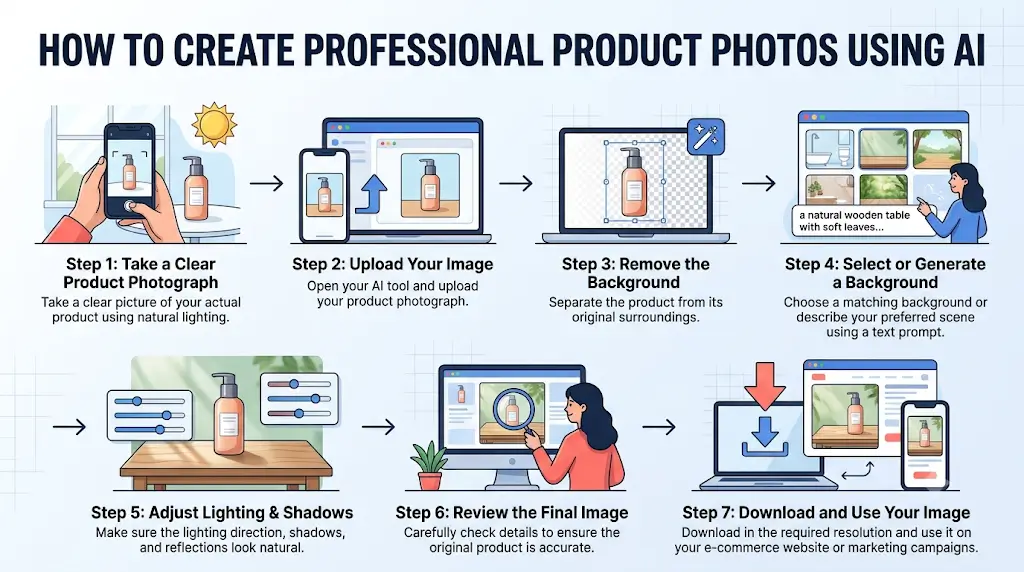
Step 1: Take a Clear Product Photograph
Start by taking a clear picture of your actual product. You can use a smartphone camera, but make sure the product is properly visible.
Try to use natural lighting and avoid unnecessary shadows.
Step 2: Upload Your Image
Open your selected AI product photography tool and upload your product photograph. Choose an image with good lighting and a clear product outline.
Step 3: Remove the Background
Use the background removal feature to separate your product from its original surroundings. This helps the AI create a new environment around your product.
Step 4: Select or Generate a Background
Choose the background that matches your product. For example, a skincare product might look good in a clean bathroom environment, while a coffee mug might look better on a wooden table.
You can also describe your preferred scene using a text prompt.
Step 5: Adjust Lighting and Shadows
Make sure the product looks naturally placed in the new environment. Check whether the lighting direction, shadows, and reflections look realistic.
Step 6: Review the Final Image
Before downloading, carefully check the product details. Make sure the AI has not changed the original packaging, logo, colour, shape, or other important features.
Step 7: Download and Use Your Image
Once you are satisfied, download the image in the required resolution and format. You can now use it on your e-commerce website, marketplace listing, or marketing campaign, provided it meets the relevant platform requirements.
Important Tips for Creating Product Photos That Convert
Professional-looking product photographs are not just about attractive backgrounds. They should also help customers understand what they are purchasing. Here are some useful tips:
Use Clean and Simple Backgrounds
Avoid backgrounds that distract customers from the product. The product should always remain the main focus of the photograph.
Show Different Product Angles
Customers cannot physically touch products when shopping online. Try to include multiple photographs showing the front, back, sides, and important product details.
Maintain Brand Consistency
Use similar colours, lighting, and photography styles across your product catalogue. This makes your online store look more professional.
Avoid Misleading AI Images
Never allow AI to add features that your actual product does not have.
For example, do not show a small product as a large product or add accessories that are not included in the package.
Use Lifestyle Photography
Lifestyle images help customers understand how a product may look in everyday situations.
For example, a sofa can be shown in a living room, while a skincare bottle can be displayed on a bathroom shelf.
However, make sure the image represents the actual product accurately.
Test Different Product Images
Try different image styles and compare their performance.
For example, you can test a plain white-background image against a lifestyle photograph on your product page.
Use actual sales and engagement data to understand which image works better.
Are AI Product Photography Tools Worth Buying?
For many e-commerce businesses, AI product photography tools can be a worthwhile investment.
Traditional product photography often requires photographers, studio equipment, lighting arrangements, and editing work. AI tools can reduce much of this manual effort. They can help businesses:
- Create product photographs faster.
- Reduce some photography and editing expenses.
- Generate multiple background variations.
- Maintain consistent product presentation.
- Prepare images for different marketing platforms.
- Create promotional content without arranging separate photoshoots.

However, AI product photography is not a complete replacement for professional photography in every situation.
Products with reflective surfaces, transparent materials, complex textures, or very small details may still require professional photography and manual retouching.
The best approach is to use AI where it provides genuine value while keeping your original product photographs accurate.
Final Verdict: Which AI Product Photography Tool Should You Choose?
AI product photography has made it easier for businesses to create attractive product images without investing in expensive photography equipment or arranging multiple studio sessions.
However, the right software depends on your business requirements.
If you want an easy-to-use platform for everyday e-commerce product images, Photoroom is an excellent starting point.
If you want beautiful lifestyle backgrounds, Pebblely is worth exploring.
If you need more creative control over product scenes and branded photography, Flair AI is a strong option.
For businesses managing larger product catalogues, Claid.ai offers useful image-processing and automation capabilities.
If you mainly want quick edits, Pixelcut is a convenient alternative. For product images combined with marketing designs, Canva is a practical choice. And if you need advanced manual editing, Adobe Photoshop remains a powerful solution.
Our recommendation is to test at least two or three platforms using the same product photograph before purchasing a subscription.
Compare the image quality, realism, available features, generation limits, and overall cost.
This will help you choose a tool that actually fits your business instead of paying for features you may never use.
Start creating better product photographs today and give your e-commerce store a more professional appearance.
Frequently Asked Questions (FAQs)
1. What is the best AI tool for creating product photos?
Photoroom is a strong all-round choice for creating and editing e-commerce product images. Pebblely is useful for lifestyle photography, Flair AI offers creative scene-building capabilities, and Claid.ai is suitable for professional image workflows and automation.
The best option depends on your product category and requirements.
2. Can I create professional product photos using AI for free?
Yes. Several platforms offer free plans or limited free access.
Photoroom, Flair AI, Canva, and Pixelcut provide free options for selected features. However, image-generation limits, export restrictions, and commercial usage permissions may apply.
3. Can AI create product photos without a professional camera?
Yes. You can start with a basic smartphone photograph.
For better results, make sure your original product image has good lighting, a clear product outline, and accurate colours.
The AI tool can then help improve the background and overall presentation.
4. Which AI tool is best for Amazon product photography?
Photoroom is a useful choice for Amazon sellers because it offers background removal, image editing, and batch processing.
However, always check Amazon’s current image requirements before uploading AI-edited photographs.
5. Can AI generate lifestyle product photographs?
Yes. Tools such as Pebblely, Flair AI, Photoroom, and Claid.ai can help generate lifestyle-style product images.
You can place products in environments such as kitchens, bedrooms, offices, gardens, and luxury settings.
6. Are AI-generated product photos allowed on Shopify?
Shopify does not generally prohibit AI-generated product photography. However, merchants must ensure that their images accurately represent the products being sold and comply with applicable laws and platform policies.
7. Can AI tools place clothing on virtual models?
Yes. Some AI photography platforms provide virtual model or on-model photography features.
Flair AI is one option worth exploring for this purpose.
These tools can help fashion businesses create product presentation images without arranging a traditional model photoshoot.
8. Can I use AI product photos in Facebook and Instagram advertisements?
Generally, yes, provided you have the required commercial usage rights and follow the advertising policies of the relevant platform.
Make sure the photographs do not misrepresent your products or make unsupported claims.
9. Do AI product photography tools change the original product?
They can sometimes modify product details while generating new images.
For example, AI may accidentally change labels, colours, logos, textures, or small design elements.
Always compare the final image with your actual product before publishing it.
10. Is AI product photography better than traditional product photography?
AI product photography is often faster and more affordable for routine editing and creating different visual backgrounds.
Traditional photography can still be better when you need complete control over product details, complex lighting, accurate textures, or highly specialised commercial photography.
Both approaches can work together.
Editorial note: Software features, pricing, and subscription limits can change. We recommend checking the official websites before purchasing. This article is intended to help readers compare available solutions and choose software according to their requirements.