
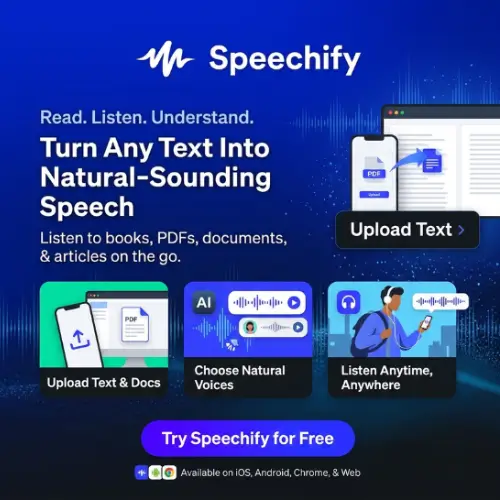
Have you ever wished you could listen to a long PDF, book, email, or website instead of reading every word? Speechify makes this possible by turning written content into natural-sounding speech. It can also summarize documents, create AI podcasts, convert speech into text, and help you understand information while doing other tasks.
Speechify is more than a simple text-to-speech tool today. It has developed into a voice-based AI assistant that can help students, professionals, content creators, and people who prefer listening over reading.
Let’s explore its features, pricing, advantages, limitations, and whether Speechify is worth trying.
What Is Speechify?
Speechify is an AI-powered text-to-speech and voice productivity platform that converts written content into spoken words. You can use it to listen to PDFs, books, documents, emails, websites, and other written materials using AI-generated voices.

It also offers features such as voice typing, AI summaries, AI podcasts, and an AI voice assistant. Speechify was founded by Cliff Weitzman, who initially developed the technology to make reading easier for people with dyslexia.
Today, Speechify has more than 60 million users and supports multiple devices, languages, and reading needs.
How Does Speechify Work?
Speechify uses artificial intelligence and text-to-speech technology to convert written words into audio.
You simply upload a document, paste some text, open a website, or scan a printed page. Speechify processes the content and reads it aloud using your selected voice.
You can change the voice, adjust the reading speed, and follow along with highlighted words while listening.
For example, imagine you have a 40-page PDF to read for your college assignment. Instead of spending hours reading it on your computer, you can upload it to Speechify and listen to the document while taking notes or doing other activities.
You can also use its AI features to summarize the document, ask questions, or create a podcast-style version of the content.
Key Features of Speechify
Speechify offers several useful features for reading, learning, writing, and content creation. Here are some of its most important capabilities.
1. AI Text-to-Speech
Text-to-speech is the main feature of Speechify. It converts written content into spoken audio using AI-generated voices.
You can use this feature to listen to:
- PDF files and digital documents.
- Books and study materials.
- Emails and online articles.
- Google Docs and other written content.
- Websites and blog posts.
- Notes and copied text.
Instead of reading everything manually, you can listen to your content whenever you want.
Speechify also highlights words while reading, making it easier to follow the text. This can be especially useful for people who learn better by listening and reading at the same time.
2. Natural AI Voices
Speechify provides a large collection of AI-generated voices. According to its official website, Premium users get access to more than 1,000 voices in over 60 languages.
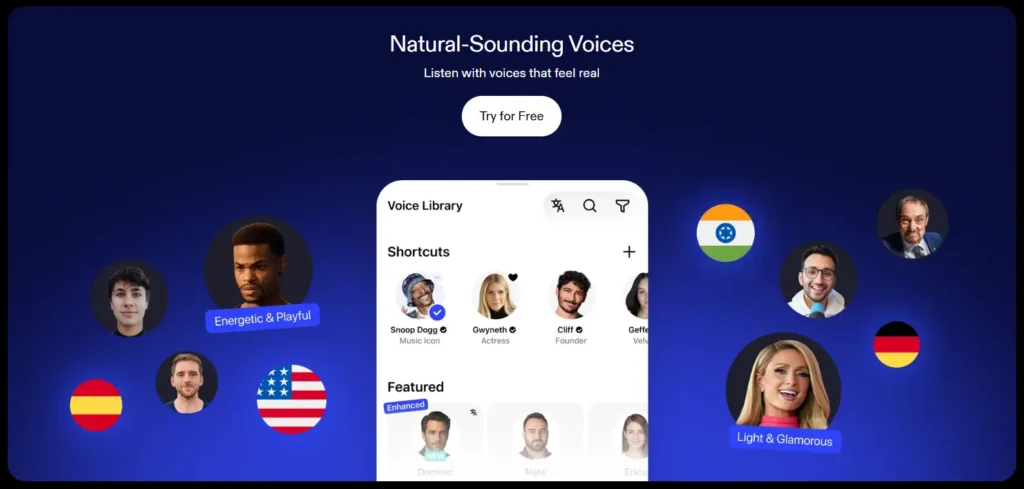
You can choose different voices based on your listening preferences. This makes the experience more comfortable, especially when listening to long documents.
The platform also offers different accents and voice styles, helping users find a voice that suits their needs.
3. Adjustable Reading Speed
Not everyone prefers listening at the same speed.
Some people like slow and clear narration, while others want to finish their reading material quickly.
Speechify allows Premium users to increase the reading speed up to 5x, according to its current pricing page. Free users can listen at speeds of up to 1.5x.
This feature is helpful for students who need to review lengthy study materials or professionals who regularly read reports and documents.
However, extremely fast playback may not be comfortable for everyone.
4. Scan & Listen
One interesting feature of Speechify is Scan & Listen.
It allows you to take a picture of a printed page and convert its text into speech. You don’t need to type the entire content manually.
For example, if you have a printed textbook, newspaper, or study document, you can scan the page using your phone and let Speechify read it aloud.
This feature can save time for students and people who work with printed documents regularly.
5. AI Summaries
Reading a long document can take a lot of time, especially when you only need the important information.
Speechify’s AI summary feature helps solve this problem by creating shorter versions of lengthy content.
You can use it to summarize PDFs and other supported documents. Instead of going through every page, you can quickly understand the main ideas.
This feature is useful for:
- Students preparing for exams.
- Professionals reviewing business reports.
- Researchers studying long documents.
- People who want quick information from articles.
- Anyone who needs to understand lengthy content.
You can also use the AI assistant to ask questions about the content you’re reading.
6. Voice Typing
Speechify is not limited to reading text aloud. It can also convert your spoken words into written text.
Its Voice Typing feature allows you to dictate messages, emails, documents, and other content instead of typing everything manually.
It works across supported applications, including tools such as Google Docs, Gmail, Slack, and Outlook.
Speechify also aims to improve dictated text so that your spoken words become cleaner and easier to read.
This can be helpful for people who write frequently but don’t want to spend too much time typing.
7. AI Podcast Generator
Another interesting feature is the AI Podcast Generator.
It allows you to turn documents, written content, or a short description into podcast-style audio.
For example, imagine you have a long research article that you want to understand while travelling. You can use Speechify to create an audio discussion based on the content and listen to it like a podcast.
Students can use this feature to revise study materials, while professionals can use it to listen to reports and important information.
It is also useful for people who enjoy learning through conversations rather than traditional reading.
8. AI Voice Assistant
Speechify also offers a voice-based AI assistant that helps users understand information and get answers.
You can ask questions about the content you’re reading and get responses based on the available context.
For example, if you are reading a long business report, you can ask the assistant to explain a particular section or summarize the important points.
This makes Speechify more than a regular text-to-speech reader.
9. Cross-Platform Support
Speechify works across different devices, so you can access your reading materials without depending on a single platform. Its supported platforms include:
- Web application.
- iPhone and iPad.
- Android devices.
- Mac computers.
- Windows computers.
- Google Chrome extension.
- Microsoft Edge extension.
Speechify also supports integrations with Google Drive, Dropbox, and Microsoft OneDrive on its Premium plan.
This makes it easier to access documents and continue listening across supported devices.
Speechify Studio: AI Voiceovers and Video Dubbing
Apart from its reading application, Speechify offers another product called Speechify Studio.
It is designed for content creators, businesses, marketers, and people who need professional AI-generated audio.
Speechify Studio includes several features:
- AI Voice Generator: Convert written scripts into voiceovers using a large collection of AI voices.
- Video Dubbing: Translate and dub videos into different languages, making content accessible to international audiences.
- Voice Changer: Modify voice recordings using AI-powered voice tools.
- AI Avatars: Create videos featuring AI-generated presenters.
- Voice Customization: Adjust pitch, speed, pronunciation, pauses, and emotional expression to make the narration sound more natural.
Speechify Studio is particularly useful for YouTube videos, advertisements, online courses, presentations, audiobooks, and educational content.
One important thing to understand is that Speechify Studio is a separate subscription. Buying Speechify Premium for reading does not automatically give you a paid Studio subscription.
Speechify API for Developers
Speechify also provides an API for developers who want to add AI voice technology to their own applications, websites, or software.
The API gives developers access to Speechify’s text-to-speech technology and voice models. It also offers voice cloning capabilities. Some possible uses include:
- Building AI-powered reading applications.
- Creating automated voice assistants.
- Adding voice narration to websites.
- Developing accessibility features.
- Creating applications that convert written text into audio.
The API is a separate product with its own pricing and usage conditions. Developers should check the official API documentation before choosing a plan.
Speechify Pricing and Plans
Speechify offers a free plan and a paid Premium plan for its main reading application. The following prices are displayed on its official website as of November 2026.
Speechify Reader Pricing
| Plan | Pricing | Main Features |
|---|---|---|
| Free | $0 | 10 basic voices, text-to-speech, listening speed up to 1.5x |
| Premium Monthly | $29/month | 1,000+ natural voices, 60+ languages, up to 5x speed, AI summaries, voice typing, AI podcasts and more |
| Premium Yearly | $139/year | Same Premium features with a lower overall annual cost |
| Enterprise & Education | Custom pricing | Organizational licenses and solutions for schools, universities, and businesses |
Speechify Studio Pricing
Speechify Studio has a separate pricing structure.
| Plan | Pricing | Main Features |
|---|---|---|
| Free | $0 | 600 credits, 1,000+ voices, voiceover and dubbing tools |
| Studio Starter | $100/year | 86,400 credits, voiceovers, dubbing, voice changer and commercial usage rights |
| Studio Creator | $300/year | 345,600 credits and all Starter features |
| Enterprise | Custom pricing | Business-level solutions and custom requirements |
Studio uses credits for generating voiceovers, dubbing, and other content. Different features consume different amounts of credits.
Important: These prices are in US dollars. Prices, taxes, billing options, and availability may vary depending on your country and the platform you use. Check the official pricing page before purchasing.
Is Speechify Free?
Yes, Speechify offers a free plan that allows users to convert written text into speech.
However, the free version has some limitations.
You get 10 basic voices and listening speeds of up to 1.5x. Access to natural AI voices, faster playback, AI summaries, voice typing, and AI podcasts requires a Premium subscription.
If you only want to listen to basic written content, the free plan may be enough.
But if you regularly work with PDFs, books, articles, and other documents, Premium offers a much wider range of features.
Who Should Use Speechify?
Speechify is designed for different types of users. Here are some people who can benefit from this platform.
1. Students: Students can listen to textbooks, study notes, research papers, and PDFs. AI summaries and podcasts can also help them review important information.
2. People with Dyslexia: Speechify was originally developed to make reading easier for people with dyslexia. Listening while following highlighted text can make written content easier to process.
3. Professionals: Office workers and business owners can listen to emails, reports, documents, and other work-related materials while handling daily tasks.
4. Content Creators: YouTubers, video creators, and marketers can use Speechify Studio to create voiceovers and dub videos into different languages.
5. Writers and Bloggers: Voice Typing can help writers create drafts without typing every sentence manually.
6. People Who Prefer Audio Learning: If you enjoy listening to information instead of reading long articles, Speechify can make everyday learning more convenient.
Pros and Cons of Speechify
Before purchasing any AI software, it is important to understand both its advantages and limitations.
Pros
- Easy-to-use interface for reading written content.
- Supports PDFs, documents, websites, and printed pages.
- More than 1,000 AI voices on Premium.
- Supports over 60 languages.
- Word highlighting helps users follow along while listening.
- AI summaries help save reading time.
- Voice Typing reduces manual typing.
- AI Podcasts turn written content into audio discussions.
- Works across multiple devices and platforms.
- Separate Studio product for professional voiceovers and dubbing.
Cons
- The free plan has limited voices and playback speed.
- Premium can be expensive for occasional users.
- Studio and Reader require separate subscriptions.
- Some advanced features require a paid plan.
- Very fast playback may be difficult to understand.
- AI-generated summaries may miss important details.
- Voice generation and dubbing depend on available credits in Studio.
Speechify vs Traditional Text-to-Speech Software
Traditional text-to-speech software mainly focuses on converting written text into audio.
Speechify goes further by combining text-to-speech with AI summaries, voice typing, document-based questions, and AI podcast generation.
For example, with a basic text-to-speech reader, you can listen to a PDF. With Speechify, you can also summarize the PDF, ask questions about its content, and turn it into a podcast.
Its separate Studio product also provides voiceover and dubbing tools for content creators.
This combination makes Speechify useful for both everyday reading and more advanced voice-based tasks.
Is Speechify Worth It?
Speechify is worth considering if you regularly read lengthy documents, books, articles, and study materials.
Its biggest advantage is that it combines several useful features in one platform. You can listen to written content, follow highlighted words, generate summaries, dictate text, and create AI podcasts.
The free plan is a good starting point if you only need basic text-to-speech functionality.
However, if you want natural AI voices, faster playback, and additional productivity features, Premium may be a better option.
Content creators should also explore Speechify Studio separately if they need professional voiceovers or video dubbing.
Overall, Speechify is a useful AI productivity tool for people who want to save reading time and make better use of audio.
Final Thoughts
Speechify has grown from a simple text-to-speech reader into a complete voice-based productivity platform. Its combination of AI voices, document reading, summaries, voice typing, and podcast generation makes it useful for students, professionals, and everyday users.
The platform is especially helpful for people who spend a lot of time reading digital content and want a more flexible way to consume information.
Although the Premium subscription may not be necessary for everyone, its free version gives you an opportunity to try the basic reading experience before upgrading.
If listening is more convenient for you than reading, Speechify is definitely worth exploring.
Alternatives to Speechify
If Speechify does not meet your requirements or you want to compare other AI voice tools, here are some good alternatives.
1. ElevenLabs
ElevenLabs is an AI audio platform known for its realistic text-to-speech voices, voice cloning, dubbing, and multilingual audio generation. It is a strong choice for YouTube creators, audiobook producers, developers, and businesses.
2. NaturalReader
NaturalReader converts PDFs, documents, ebooks, and other written content into spoken audio. It offers AI voices, OCR scanning, and tools for personal reading and professional voice generation.
3. Murf AI
Murf AI is an AI voice generator designed for creating professional voiceovers. It offers multiple voices, languages, voice customization, and audio editing features for videos, presentations, and online courses.
4. LOVO AI
LOVO AI is an AI voice generation platform that provides realistic voiceovers, voice cloning, and video editing features. It is suitable for marketers, educators, YouTubers, and businesses creating audio and video content.
5. Wispr Flow
Wispr Flow is an AI-powered voice typing tool that converts speech into polished written text. It works across supported applications and is particularly useful for people who want to write emails, messages, and documents without typing manually.
6. NotebookLM
NotebookLM by Google is an AI research and learning assistant that helps users understand their documents and research sources. It can generate summaries, answer questions, create study materials, and produce conversational Audio Overviews.



