
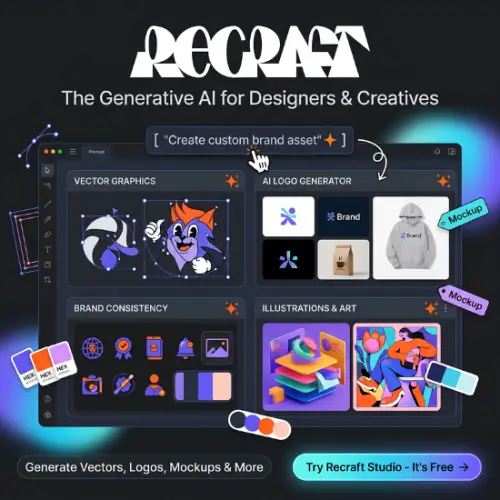
Recraft is an AI-powered design platform that helps you create professional images, illustrations, logos, vector graphics, and product mockups using simple text prompts. Whether you are a graphic designer, content creator, marketer, or business owner, Recraft makes it easier to turn creative ideas into high-quality visuals without spending hours designing everything from scratch.
What makes Recraft different from many other AI image generators is its combination of image generation, editable vector graphics, and advanced editing tools in one workspace. You can also remove backgrounds, erase unwanted objects, upscale images, and create realistic product mockups. If you want an AI tool that does more than generate ordinary pictures, Recraft is worth exploring.
What Is Recraft AI?
Recraft is an AI-powered image generation and graphic design platform that turns simple text descriptions into professional-quality visuals. You can use it to create digital illustrations, realistic images, logos, icons, posters, product mockups, and scalable vector graphics.
Unlike many AI image generators that mainly focus on creating pictures, Recraft also provides tools to edit, improve, and prepare those images for real design projects. It is especially useful for people who want more control over the final appearance of their designs.
The platform is designed for both beginners and experienced designers. You do not need advanced graphic design skills to get started. Simply describe what you want, choose a style, and let AI help you create it.
Recraft AI Features
Recraft offers several AI-powered features in one workspace. Here are the most useful features and how they can help with your creative work.
1. AI Image Generator
The AI Image Generator is one of Recraft’s main features. It allows you to create images from simple text prompts.
For example, you can write a description such as “A modern coffee shop with warm lighting, wooden furniture, and a beautiful outdoor view.” Recraft will use your description to generate an image.
You can create different types of visuals, including:
- Realistic photographs
- Digital illustrations
- Cartoon-style images
- Product images
- Social media graphics
- Creative artwork
- Marketing visuals
Recraft also offers different image models to help users achieve different results. Its V4 model family includes options for standard image generation, higher-quality output, and vector graphics.
This feature is useful when you need original images for websites, advertisements, presentations, or social media posts.
2. AI Vector Generator
The AI Vector Generator is one of the features that makes Recraft different from many traditional AI image generators.
Most AI image tools create raster images, such as JPG and PNG files. These images are made of pixels, which means they can lose quality when enlarged too much.
Vector graphics work differently. They use paths and shapes instead of fixed pixels, allowing you to resize them without losing sharpness.
With Recraft, you can generate editable SVG graphics using text prompts. This is particularly helpful for creating:
- Business logos
- Website icons
- Brand illustrations
- Stickers
- Posters
- App graphics
- Marketing designs
You can also adjust colours, shapes, and other elements of your vector artwork.
For designers who regularly create logos and illustrations, this feature can save considerable time.
3. AI Vector Editor
Generating a vector image is useful, but sometimes you need to make changes before using it in a real project.
Recraft’s Vector Editor helps you edit generated SVG artwork directly inside the platform.
You can select individual shapes, move anchor points, adjust curves, change colours, and duplicate design elements.
This gives you more control over the final result without having to export the file into another design application for every small change.
It is especially useful for logo designers, illustrators, and people creating professional graphics.
4. AI Mockup Generator
The Mockup Generator helps you see how your designs might look on real-world products.
For example, imagine that you have designed a logo or an illustration for a clothing brand. Instead of showing your client a flat image, you can place your design on a realistic T-shirt mockup.
You can create mockups for:
- T-shirts and clothing
- Product packaging
- Posters
- Book covers
- Mobile devices
- Promotional materials
- Advertising designs
This feature is particularly helpful for designers, business owners, and print-on-demand sellers.
It also makes client presentations more attractive because you can show how a design could look in an actual setting.
5. AI Background Remover
Removing backgrounds manually can take a lot of time, especially when an image contains complicated edges. Recraft’s Background Remover uses AI to separate the main subject from its background.
You can use it to remove backgrounds from product photographs, portraits, illustrations, and other images.
This is useful when preparing product images for an online store or creating transparent graphics for advertisements.
After removing the background, you can use the isolated subject in another design or add a completely different background.
6. AI Eraser
Sometimes an image looks good, but a small unwanted object ruins the entire composition.
The AI Eraser helps remove unwanted elements from images. You can select the area you want to remove, and the AI will attempt to fill that space naturally. For example, you might want to remove:
- Unwanted objects
- Background distractions
- Extra design elements
- Small visual mistakes
- Unnecessary items from product photographs
This feature is helpful when you want to improve an existing image without creating a completely new one.
7. AI Image Upscaler
Have you ever created a good image but found that its resolution was too low?
Recraft’s Image Upscaler helps improve image resolution and visual details. It can make images more suitable for larger displays, presentations, websites, and printing.
This is useful for people who work with product photographs, marketing graphics, and digital illustrations.
However, AI upscaling cannot always recover details that were never present in the original image. It is better to check the final output before using it in professional print projects.
8. Infinite Canvas and Team Collaboration
Recraft also offers an Infinite Canvas where users can organise their creative projects in one workspace.
Instead of working with separate files for every design, you can place multiple images, illustrations, and other design elements on the same canvas.
The collaboration features are particularly useful for teams.
Team members can work on shared projects, review designs, exchange feedback, and follow changes within the workspace.
This can make the creative process easier for agencies, marketing departments, and businesses where several people work on the same project.
9. AI Image Editing
Recraft is not limited to generating new images. It also allows users to edit existing visuals with AI-powered tools.
You can upload an image and make changes to its appearance, remove unwanted elements, replace backgrounds, or improve specific details.
The platform also brings external AI models into its workspace, giving users additional options for image generation and editing.
This means you can explore different creative approaches without constantly switching between separate websites.
Who Should Use Recraft?
Recraft is designed for people who regularly create digital visuals. However, its features can be useful for different types of users.
Graphic Designers
Graphic designers can use Recraft to create logos, illustrations, icons, posters, and other branding materials. Its editable vector generation is particularly useful for professional design work.
Marketing professionals can generate advertising graphics, promotional images, banners, and social media content without spending hours creating every visual manually.
YouTubers and Content Creators
YouTubers can use Recraft to create video thumbnails, channel graphics, illustrations, and other visual content. It can also help creators develop a consistent visual style.
Business Owners
Small businesses can create product visuals, brand graphics, promotional materials, and packaging concepts without hiring a designer for every small task.
E-commerce Sellers
Online sellers can create product mockups, remove image backgrounds, and prepare attractive product visuals for their stores.
Illustrators and Artists
Artists can use Recraft to explore creative ideas, generate initial concepts, and produce editable vector illustrations.
Design Agencies
Agencies can use the platform to speed up their creative workflow and collaborate with team members on shared projects.
How to Use Recraft AI
Getting started with Recraft is relatively simple. You do not need professional design experience to create your first image.
Follow these steps:
Step 1: Visit the Official Website
Open Recraft Official Website and create an account. You can explore the available features after signing in.
Step 2: Open Recraft Studio
Go to the main workspace and select the tool you want to use. You can choose image generation, vector generation, mockups, or image editing.
Step 3: Enter Your Prompt
If you are generating an image, write a clear description of what you want.
For example:
“A premium skincare product bottle on a clean white marble table, soft natural lighting, realistic product photography, minimal background.”
The more clearly you describe the subject, style, colours, and setting, the easier it is to guide the AI.
Step 4: Generate Your Design
Select the appropriate AI model and settings, then generate your image. You can explore different results and choose the one that best matches your idea.
Step 5: Edit Your Image
Use the available editing tools to remove unwanted objects, change backgrounds, improve image quality, or adjust the design.
Step 6: Download Your Final Design
Once you are satisfied with the result, export it in a suitable format. Depending on the asset and export options, supported formats include PNG, JPG, SVG, PDF, TIFF, and Lottie.
Recraft AI Pricing
Recraft offers a free plan and several paid subscriptions. The free version is useful for testing the platform, while paid plans are more suitable for professional work.
Here is a breakdown of its main subscription options.
| Plan | Monthly Billing | Annual Billing (Monthly Equivalent) | Credits |
|---|---|---|---|
| Free | $0 | $0 | 30 daily credits |
| Basic | $12/month | $10/month | 1,000/month |
| Pro | $20/month | $16/month | 2,000/month |
| Teams | $22/seat/month | $18/seat/month | 2,000/seat/month |
Pricing information checked in November 2026. Prices are in USD and may exclude applicable taxes. Annual prices are monthly equivalents billed annually. Higher-credit Pro and Teams options are also available.
Free Plan
The Free plan is a good starting point for beginners who want to explore Recraft before spending money.
It provides daily credits that allow you to experiment with image generation and other supported features.
However, there is an important limitation: images generated on the free plan are public and owned by Recraft. They are not licensed for commercial use.
Therefore, avoid using free-plan creations for paid client projects, advertisements, or business branding.
Basic Plan
The Basic plan is designed for individual creators who need more flexibility.
It includes 1,000 monthly credits, private image generation, commercial rights, and additional features.
This plan is a reasonable option for freelancers, bloggers, content creators, and small business owners who create images regularly.
Pro Plan
The Pro plan is suitable for users who need more credits and advanced creative capabilities.
It starts with 2,000 monthly credits and offers additional usage options for more demanding workflows.
It is worth considering if you generate images frequently or want access to a wider range of creative models and video-generation features.
Teams Plan
The Teams plan is designed for businesses, agencies, and professional creative teams.
It offers credits per seat, shared workspace features, and tools for managing collaborative projects.
This plan makes sense when multiple people need to work together rather than using separate individual accounts.
Important: Recraft uses a credit-based system. Different models and operations can consume different amounts of credits. Your actual image output will depend on the model and settings you choose. Unused subscription credits do not roll over to the next billing cycle, while purchased top-up credits do not expire.
Why Is Recraft Different From Other AI Image Generators?
There are many AI image generators available today, but Recraft has a different focus.
Most image-generation platforms concentrate on turning text prompts into attractive pictures. Recraft goes further by combining image generation with graphic design and editing features.
Here are some important differences.
1. Editable Vector Generation
One of Recraft’s biggest advantages is its ability to generate real SVG vector graphics. These files can be edited and resized without losing image quality.
2. Complete Design Workspace
You do not need to visit different websites for every small design task. Recraft combines image generation, background removal, vectorisation, upscaling, and mockup creation.
3. Better Control Over Design Elements
Recraft provides tools to refine colours, shapes, and visual elements. This makes it useful for people who need more than a good-looking AI image.
4. Realistic Product Mockups
The Mockup Generator helps users present their designs on products and other real-world surfaces.
5. Multiple AI Models
Recraft Studio brings different image models into one workspace, giving users more creative options.
Overall, Recraft is particularly interesting for people who want to create and refine complete design assets instead of generating images alone.
Pros and Cons of Recraft
Before choosing any AI design platform, it is important to understand both its advantages and limitations.
Pros
- Offers multiple AI design and image-generation tools in one platform.
- Generates editable SVG vector graphics.
- Supports image generation, illustration creation, and graphic design.
- Includes useful editing tools such as background removal and AI Eraser.
- Provides an AI Mockup Generator for product presentations.
- Supports multiple export formats.
- Offers an Infinite Canvas for organising creative projects.
- Provides collaboration features for teams.
- Paid plans include private generations and commercial rights.
Cons
- The free plan does not provide commercial rights or ownership of generated assets.
- Free creations are publicly visible.
- The credit system can make usage difficult to estimate initially.
- Advanced features may take some time to learn.
- High-volume users may need expensive plans or additional credits.
- AI-generated designs may still require manual editing before professional use.
- Results can vary depending on the prompt and selected model.
Is Recraft Worth It?
Yes, Recraft is worth considering if you regularly create illustrations, logos, icons, marketing graphics, and other digital design assets.
Its biggest advantage is that it combines AI image generation with editable vector graphics and practical design tools. This makes it more useful for professional design workflows than a platform that only generates images.
The free plan is a good way to understand how the platform works. However, if you plan to use generated designs for commercial projects, you should consider a paid subscription because free-plan creations do not include commercial rights.
For freelancers, marketers, graphic designers, and businesses, Recraft can help reduce the time spent on repetitive design tasks.
However, it should not be considered a complete replacement for professional design software. You may still need tools such as Adobe Illustrator or Photoshop for advanced editing and specialised work.
Final Thought
Recraft is a powerful AI-powered design platform that brings image generation, vector graphics, mockup creation, and image editing together in one place.
It is particularly useful for people who want to create professional-looking visuals without spending hours designing everything from scratch. Its editable SVG generation is a major advantage, especially for logo designers and illustrators.
Although the free plan has limitations, the paid subscriptions offer more privacy, ownership, and commercial flexibility.
If you are looking for an AI tool that can help you create more than just ordinary AI pictures, Recraft is definitely worth trying.
Alternatives to Recraft
If Recraft does not match your creative requirements or budget, here are some other AI design platforms worth exploring.
1. Adobe Firefly
Adobe Firefly is an AI-powered creative platform for generating and editing images, creating visual effects, and designing creative assets. It also integrates with Adobe applications, making it useful for professional designers.
2. Midjourney
Midjourney is an AI image-generation platform known for producing detailed, artistic, and visually impressive images. It is a strong choice for concept art, creative illustrations, and realistic visuals.
3. Ideogram
Ideogram is an AI image generator that is particularly useful for creating images containing text. It can help with posters, advertisements, logos, typography, and social media graphics.
4. Leonardo AI
Leonardo AI offers image generation, AI image editing, creative assets, and visual design tools. It is suitable for artists, game developers, content creators, and marketers.
5. Kittl
Kittl is an online graphic design platform with AI-powered features for creating logos, typography, illustrations, posters, and merchandise designs. It is especially useful for branding and print-on-demand projects.
6. Canva
Canva is a popular online design platform with AI-powered image generation and editing features. It helps users create social media posts, presentations, advertisements, thumbnails, and other marketing materials.
7. OpenArt
OpenArt is an AI creative platform that provides image generation, image editing, character creation, and other artistic tools. It is useful for creators who want to experiment with different visual styles and AI models.



