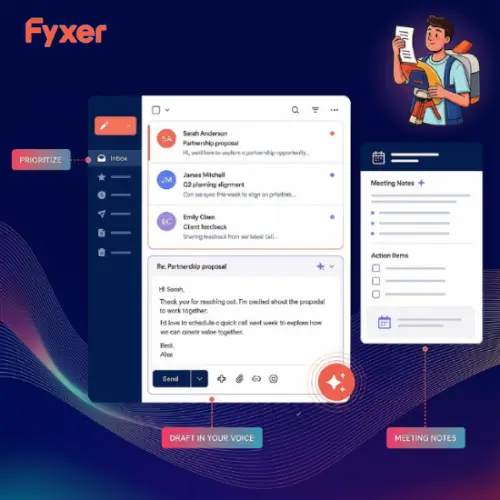
Imagine you are running a small business or working in a busy agency. Your inbox is full of client emails, you have back-to-back meetings, and you are constantly trying to remember who needs a follow-up call. It can feel completely overwhelming. This is exactly the problem that Fyxer tries to solve.
Fyxer is an AI assistant designed to make client communication much easier. It connects your email, meetings, and team conversations into one smooth workflow. Instead of juggling multiple apps and sticky notes, Fyxer helps you draft replies, capture meeting notes, and track outstanding tasks. It is built for agencies, consultancies, brokerages, and accounting firms, but it is also great for anyone who wants to stay organized. Let us break down how it works in simple, everyday language.
What Makes Fyxer Special?
Fyxer is not just another basic chatbot. It is designed to work quietly in the background of the tools you already use every day, like Gmail, Outlook, Slack, and Microsoft Teams. You do not have to learn a complicated new system. You can simply ask “@Fyxer” a question, like “What is still outstanding for this client?” or “Did my colleague arrange a meeting with them?” Fyxer will look at your connected work and give you a quick, helpful answer.
However, it is important to remember that Fyxer’s answers are only as good as the information it can access. The more you let it connect to your daily work, the smarter and more helpful it becomes.
Core Features of Fyxer
1. Spaces: Keeping Everything in One Place
One of the best features of Fyxer is called “Spaces.” Think of a Space as a dedicated digital folder for each of your clients. Each Space collects all the relevant conversations, meeting notes, and promises made to that client. It also shows exactly who on your team is responsible for the next action.
Before you jump on a client call, you can quickly open their Space and catch up on what your colleagues have discussed. You do not need to interrupt your team to ask for updates. Plus, you can control exactly who gets to see this information using simple, easy-to-use sharing settings.
2. Smart Email Assistant
We all spend too much time staring at a blank screen, trying to figure out how to reply to an email. Fyxer’s email assistant works right inside Gmail and Outlook. It sorts your incoming messages by priority and drafts replies in your own unique writing style.
The best part? It learns from you. If you correct a draft, Fyxer remembers your changes and gets better over time. You are always in control because you get to review and click “send” on every email draft. It also provides meeting notes and follow-up suggestions to turn your conversations into clear next steps.
3. Flows: Automating Your Daily Routines
“Flows” are Fyxer’s way of handling repetitive tasks. If you have a routine, like sending a weekly update to a client or checking a daily list of unfinished tasks, you can set up a Flow to do it for you automatically.
Teams can share these routines, which makes it easy for everyone to follow the same process. For example, a marketing agency could use a Flow to automatically post a summary of client updates into their team’s Slack channel every morning before their daily check-in meeting. This saves time and keeps everyone on the same page.
4. Meeting Notes and Follow-ups
Fyxer can join your meetings to take notes automatically. It listens to the conversation, figures out what was decided, and highlights any promises or action items. After the meeting, it can even draft a follow-up email for you to send to the attendees. This means you can focus entirely on the conversation instead of frantically typing notes.
Who is Fyxer For?
Fyxer is perfect for people whose work depends on keeping client conversations moving forward. If you are a freelancer, an account manager, or part of a busy team, this tool can save you hours every week.
However, it is not a magic wand. You should always review the suggested replies, confirm that commitments are accurate, and choose carefully what information you share with your colleagues. Automated routines are great for surfacing unfinished work, but they do not guarantee that every single obligation has been captured. You are still the boss, and Fyxer is just your helpful assistant.
Fyxer Pricing Plans
Fyxer offers a free plan so you can test it out, along with paid plans that unlock more powerful features. They also offer a 14-day free trial on their paid plans. Usage is based on a “credit” system, meaning different actions (like recording a meeting or drafting an email) cost a small number of credits.
Here is a simple breakdown of the pricing plans:
| Plan Name | Price (Billed Annually) | Best For | Key Features Included |
|---|---|---|---|
| Free | $0 / month | Individuals testing the tool | 400 monthly credits, weekly email briefing, audio meeting notes, 3 personal Spaces. |
| Pro | $37 / user / month ($49 monthly) | Solo professionals & freelancers | Daily email briefings, replies drafted in your tone, video meeting recording, unlimited personal Spaces, 3 shared Spaces, 3,000 monthly credits. |
| Team | $64 / user / month ($99 monthly) | Small to medium teams | Everything in Pro, plus unlimited shared Spaces, shared company context, team reporting, assigned follow-up owners, 6,000 pooled monthly credits. |
| Enterprise | Custom Pricing | Large organizations | Everything in Team, plus private cloud options, full API access, advanced security (HIPAA, SSO), and dedicated support. |
Note: Fyxer often runs a launch offer giving unlimited credits for the first 3 months on paid plans. Always check their official website for the latest deals and exact pricing.
Pros and Cons of Fyxer
Pros:
- Works directly inside tools you already use (Gmail, Outlook, Slack, Teams).
- Drafts emails in your unique voice, saving you valuable time.
- “Spaces” make team collaboration and client tracking very clear.
- The 14-day free trial lets you test premium features without any financial risk.
Cons:
- The free plan is quite limited (no automatic email drafting or inbox sorting).
- It uses a credit system, so heavy users might need to monitor their usage or buy top-ups.
- You must carefully review AI-generated drafts to avoid accidental mistakes.
Final Thoughts
Fyxer is a highly practical AI assistant that takes the stress out of client communication. By bringing your emails, meetings, and team chats together, it helps you stay organized and professional. It is especially useful for teams that need a shared view of what a client needs and who is handling it. While it requires a bit of setup and careful review of its suggestions, the time it saves is well worth the effort. If you are tired of dropping the ball on follow-ups, Fyxer is definitely worth a try.
Alternatives to Fyxer
If you are looking for other tools with similar features, here are some of the best alternatives to consider:
- Fireflies.ai: A meeting-focused AI tool that records conversations, searches transcripts, and extracts action items. It is excellent if your main goal is to never miss a detail in your video calls and share notes easily.
- Inbox Zero: An AI email assistant designed specifically to help you manage high email volumes. It automates email sorting, drafts quick replies, and helps you reach an empty inbox faster.
- Otter.ai: A popular transcription and meeting note-taking tool. It provides real-time captions, speaker identification, and collaborative note-sharing for teams that hold many virtual meetings.
- Superhuman: A premium, lightning-fast email client that uses AI to help you write emails and schedule follow-ups. It is ideal for professionals who want a high-speed, polished email experience.