
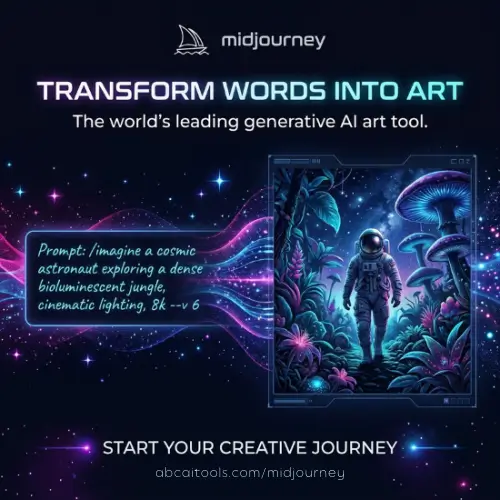
If you have spent any time looking at AI-generated art online, you have probably seen a Midjourney image without even knowing it. They have a certain look—almost like a painting that was dreamed up by a movie director. The colors are rich, the lighting is dramatic, and everything feels a little bit like a beautiful hallucination.
Midjourney is one of the most popular tools for turning text into pictures, and now videos too. But it is not perfect. It is a bit like a brilliant artist who sometimes draws six fingers on a hand or cannot write a straight sentence to save their life. In this article, we will walk through what Midjourney actually is, what it costs, what it does well, and where it falls flat. We will keep things simple and honest, so even if you are just starting out, you will know exactly what to expect.
What Exactly Is Midjourney?
Midjourney is an AI image and video generator. You type a sentence—called a prompt—and the tool creates artwork based on your words. What makes it special is its style. Creative professionals often say they can spot a Midjourney picture from a mile away. It has this “dreamlike photorealism” quality. The textures feel deep, the composition looks cinematic, and the results often look more like a painting from a fantasy book than a photograph from real life .
The company behind it was founded in 2021 by David Holz. Before Midjourney, Holz co-founded Leap Motion, a company that made motion-tracking technology. He also spent time doing research at NASA and the Max Planck Institute. What is interesting about Midjourney as a business is that it is incredibly lean. The official website says they are a team of about 60 people, and they have never taken money from outside investors . They became profitable within their first year and reportedly make over $200 million a year. That is a lot of money for a company that has stayed small on purpose.
The Technology: From V7 to V8 Alpha
Midjourney releases updates in versions, and the jump to V7 in April 2025 was a big one. It was basically a full rebuild of the system underneath. The company says prompt understanding got about 35% better, which means you do not need to type as many weird keywords to get what you want. The AI also got better at drawing bodies—about 40% fewer mistakes—though hands and faces still mess up every now and then .
There is also a Turbo Mode that makes images about ten times faster, but it uses up your generation time quicker. And in June 2025, Midjourney added video generation. You can take a still image and turn it into a short clip, anywhere from five to twenty-one seconds long. The cool part is that the character and the scene stay consistent throughout the clip, so it does not look like a glitchy mess .
As of early 2026, there is also a V8 Alpha available for subscribers at alpha.midjourney.com. It is still in testing, but the team is working on making the default images look even better, with possibly higher resolution and better mood boards .
How You Actually Use It
In the early days, you had to use Midjourney through Discord, which meant typing commands into a chat room. That was fine for techy people, but it confused a lot of beginners. Now, the web interface is the main way to use it, and it has gotten much nicer. There is a Canvas mode where you can drag and drop images and expand them in any direction—a process called outpainting. You can make a picture wider or taller without needing to type a single command. Discord is still there if you like it, but most people now just use the website .
What Midjourney Is Good At (And What It Is Not)
Not every AI tool is good at everything, and Midjourney has a very clear personality. According to the company’s own numbers, here is how often you can expect to get a “keeper”—an image you would actually use.
Where it shines:
- Fantasy and Concept Art: About 90% of the images are usable. This is Midjourney’s home turf. If you want dragons, sci-fi cities, or moody landscapes, it is hard to beat.
- Social Media Graphics and Mood Boards: Around 85% success. The pretty, textured look works great for Instagram or Pinterest.
- Architecture and Interiors: About 75%. It can make rooms look gorgeous, though sometimes the layout might not make perfect structural sense.
Where it struggles:
- Text in Images: This is the big one. Only about 10% of attempts produce text you can actually read. If you need a sign that says “Coffee Shop,” you will probably get “Coffe Shpo” or some alien symbols.
- Product Photography: Only about 40% keeper rate. It is not reliable if you need to show a real, specific product exactly as it looks.
- Character Consistency: Even with V7’s improvements, keeping the same character looking identical across multiple different scenes only works about 50% of the time .
The Honest Downsides
Midjourney is a paid tool, and there is no free way to test it on the main website. You have to pay at least $10 to see if you like it. There used to be free trial credits on Discord, but those are gone .
The bigger issue for many people is privacy. By default, every single image you create is public. Anyone can see it in the gallery. If you want to keep your work private, you have to pay for the Pro plan (around $60 per month) or higher, because that is the only tier that includes Stealth Mode . For a freelancer or a small business, that is a big jump in price just to keep client work confidential.
Customer support is also a weak spot. There is no phone number, no live chat, and no ticket system. You have to ask for help on Discord or read the documentation. People on Trustpilot often complain about billing problems and never getting a reply .
And then there is the legal cloud. In June 2025, Disney and Universal sued Midjourney for copyright infringement, saying the tool was trained on their movies and characters without permission. That lawsuit is still ongoing as of early 2026, and it is something to keep in mind if you plan to use the tool for commercial work .
Midjourney Pricing
Here is how the plans break down, based on the current information available. Prices are in US dollars.
| Plan | Monthly Price | What You Get (Simple Version) | Best For |
|---|---|---|---|
| Basic | $10 | ~3.3 hours of fast generation. Images are public. No Stealth Mode. | Trying it out, hobbyists. |
| Standard | $30 | 15 hours of fast generation, plus unlimited “Relax” mode (slower). Images are public. | Regular users who do not mind waiting. |
| Pro | $60 | 30 hours fast, unlimited Relax, Stealth Mode (private images). | Professionals, client work, anyone who needs privacy. |
| Mega | $120 | 60 hours fast, unlimited Relax, Stealth Mode. | Heavy users, teams, power users. |
Note: There is a limited free trial only on the separate “niji · journey” mobile app, but not on the main website or Discord .
Final Thought
Midjourney is a tool with a very strong personality. If you are a concept artist, a designer making mood boards, or a marketer who needs pretty visuals fast, it is genuinely hard to beat. The pictures have a soul to them that many competitors lack. But if you need to put readable text in an image, keep a character looking the same across a comic book, or shoot a real product, you will get frustrated quickly. It is a dream machine, not a precision tool. Go in knowing that, and you will have a lot of fun with it.
Alternatives to Midjourney
If Midjourney is not quite right for you, here are a few other tools worth looking at. They each have their own strengths.
1. DALL-E 3 (via ChatGPT or Microsoft Copilot)
This is one of the easiest tools to use because you just talk to it in plain language. It is much better than Midjourney at following exact instructions and getting text right, though it is not as artistic or “dreamy.”
2. Adobe Firefly
Firefly is built for people who already use Photoshop. It is trained on licensed images, so it feels safer for commercial work. It is great for editing and filling in parts of existing photos, but it is not as good at creating wild fantasy art from scratch.
3. Leonardo AI
Leonardo is a popular choice for game developers and people who need consistent characters. It has a free tier with daily credits, which makes it a good place to experiment without spending money upfront.
4. Stable Diffusion (via ComfyUI or Automatic1111)
This is for the tech-savvy crowd. It is free and open-source, meaning you run it on your own computer. You can customize it endlessly, but it has a steep learning curve and requires a powerful graphics card.
5. Ideogram
If your biggest problem with Midjourney is text rendering, Ideogram is worth a look. It was specifically designed to be good at putting legible words into images, which makes it great for posters, logos, and social media graphics.



