Most of us have recordings sitting on our phones or laptops that we never touch again. Maybe it is a lecture you recorded in class, a voice note you sent to yourself with a great idea, or a short interview you did for a school project. Listening to the whole thing again just to find one sentence feels like too much work. This is where WhisperWeb comes in.
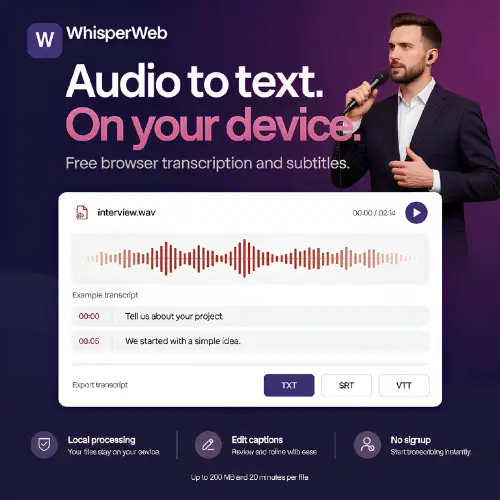
WhisperWeb is a free AI transcription tool that you open in your web browser. You drop in an audio or video file, and it writes down what people are saying. The best part? The recording never leaves your computer. Everything happens right there in your browser, so you do not have to worry about your private files sitting on some company’s server.
I checked the official WhisperWeb website to make sure the details in this article are accurate. It turns out the tool has a bit more to offer than the basic description suggests, including a paid plan for longer files. Let us walk through everything in plain English.
How Does It Actually Work?
Using WhisperWeb is simple. You go to the website, and you will see a place to upload a file or record directly from your microphone. The tool runs something called the Whisper speech recognition model. This is the same kind of technology that big companies use, but WhisperWeb has squeezed it into your browser so it can run on your own device .
Once you pick your file, you choose the language. If you are not sure what language is being spoken, you can let it detect automatically. Then you click start. The first time you use it, the browser will download a small speech model. This might take a minute depending on your internet speed. After that, the model stays in your browser cache, so future transcriptions start much faster.
When it is done, you get a transcript on the screen. You can play the audio and read along at the same time. If it got a name or a number wrong, you just click on the word and fix it. You can also adjust when subtitles appear and disappear. Finally, you download the result as a plain text file, an SRT subtitle file, or a VTT subtitle file. You do not even need to make an account.
The Pricing: What Do You Get for Free?
The description you shared says WhisperWeb is free, but the official website shows there is now a paid option too. The free version is still very real and very useful, but the paid plan exists for people who need more power.
Here is how the pricing breaks down based on what the official site says :
| Feature | Whisper Web Free | Whisper Web Unlimited |
|---|---|---|
| Price | $0 forever | $10 per month (billed yearly at $120) |
| Processing | Local, in your browser | Cloud servers |
| File Size Limit | 200 MB | 5 GB |
| Duration Limit | 20 minutes | Up to 10 hours per file |
| Batch Uploads | No | Up to 50 files at once |
| Account Needed | No | Yes |
| Privacy | Files never leave your device | Files uploaded to secure cloud |
| Export Formats | TXT, SRT, VTT, JSON | All formats plus cloud sync |
The free plan is perfect for short voice notes, a single lecture recording, or a quick interview clip. The paid plan is for people who record long meetings, full podcast episodes, or need to process many files at once without their laptop slowing down. The paid version also syncs across devices, so you can start on one computer and finish on another.
What Can You Do With It?
WhisperWeb handles a surprising amount of work for a free tool. Here are the main things you can do:
Transcribe Audio and Video Files
You can upload MP3, WAV, M4A, MP4, WebM, and MOV files. This covers most of what people record on their phones or computers. Whether it is a voice memo, a video from your camera roll, or a downloaded lecture, WhisperWeb can probably read it.
Record Directly in the Browser
If you do not have a file yet, you can hit record on the website and speak into your microphone. This is handy for quick notes or if you are interviewing someone right there at your desk.
Convert Subtitles Between Formats
If you already have an SRT or VTT subtitle file and you need it in the other format, WhisperWeb can do that too. It can also pull just the text out of a subtitle file if you do not need the timestamps.
Translate Speech to English
If someone is speaking in Spanish, French, or another language, WhisperWeb can transcribe it. It can also translate what they said into English. However, it only translates into English. You cannot ask it to translate into Spanish or Japanese . For that, you would need a different tool.
Fix and Review Everything
The transcript is not locked. You can read through it, listen to the audio, and correct mistakes. Names of people and technical words are often wrong in any AI transcript, so this review step is important.
The Important Limits You Should Know About
Before you throw a two-hour podcast at the free version, there are a few walls you will hit.
First, the free version stops at 20 minutes and 200 MB. If your file is longer or bigger, you have to split it into smaller pieces before uploading. There is no way around this on the free plan.
Second, your computer does all the work. The speed of transcription depends on how powerful your laptop or desktop is. A newer computer with a good processor will chew through files faster than an old one. The website also mentions that you can choose between tiny, base, and small models. Bigger models are more accurate but need more memory and take longer.
Third, there is no cloud backup. Once you close the browser tab, the transcript is gone unless you downloaded it. The website explicitly says to export your work before closing the task. There is no way to recover a lost transcript from a server because the server never had it in the first place.
Fourth, the developer has only officially tested the tool on desktop Chrome running on a Mac. If you are using a phone or a different browser, it might work, but there is no guarantee . The website might look fine on your phone, but that does not mean your phone has enough power to run the speech model.
Who Is This Actually For?
WhisperWeb is best for people who value privacy and do not want to pay for a subscription to a big transcription service. If you are a student recording lectures, a journalist doing short interviews, or someone who just wants to turn a voice note into text, the free version covers you.
It is less good for professional work where accuracy is life-or-death. The tool itself warns users to check names, figures, and technical vocabulary before using a transcript. AI makes mistakes, and you are the only editor in the loop.
It is also not for you if your files are regularly longer than 20 minutes. You will either need to split them manually or pay for the Unlimited plan.
A Quick Word on the Alternatives
The description mentioned a few alternatives, but I want to add a couple more that are worth knowing about, especially if you are looking for different features.
SpotScribe is good if you listen to a lot of podcasts and want AI to summarize them for you.
Speak AI is more for teams and businesses. It lets you search through old recordings and pull out insights from many conversations at once.
Cleanvoice is for podcasters. It does not just transcribe; it also cleans up the audio by removing filler words and long pauses.
I would also add Otter.ai to the list. It is one of the most popular tools for meeting notes, and it can join your Zoom or Google Meet calls automatically. It is not free for heavy use, but the free tier is generous for casual users.
And if you are comfortable with technical tools, whisper.cpp is an open-source project that runs the same Whisper model on your computer without a browser. It is faster and more flexible, but you need to be comfortable using a terminal.
Final Thought
WhisperWeb is a genuinely useful tool that respects your privacy. It does not ask for your email, it does not upload your files, and it does not charge you for short recordings. The trade-off is that you are limited by your own computer’s power and the 20-minute file cap.
If you have a short recording and you want it as text right now, open the website, drop in your file, and let it run. Just remember to download the transcript before you close the tab. And always give the result a quick read-through. AI is helpful, but it is not perfect.
Alternatives to WhisperWeb
Otter.ai
A popular choice for meeting notes that can join video calls automatically and produce searchable transcripts. The free tier is limited, but it is excellent for team collaboration.
whisper.cpp
An open-source program that runs the Whisper model directly on your computer without a browser. It is faster and more customizable for users who are comfortable with technical setups.
Descript
A full editor that transcribes your audio and lets you edit the text to edit the audio. It is great for podcasters and video creators who want to cut out mistakes by deleting words.