Managing social media for a brand or a team is a lot of work. You have to write posts, design images, shoot videos, schedule everything, and then reply to every single comment. If you are trying to create good quality videos and grow an audience, jumping between five different apps just to get one post live can be a huge headache.
This is where Vista Social comes in. It is a social media management platform built for teams. It helps you plan, publish, monitor, and report on your content across multiple accounts. But lately, it has added a lot of smart AI tools that go way beyond just writing basic captions. Let us break down what this tool actually does and if it is worth your time.
Meet Ask Vista: Your AI Assistant
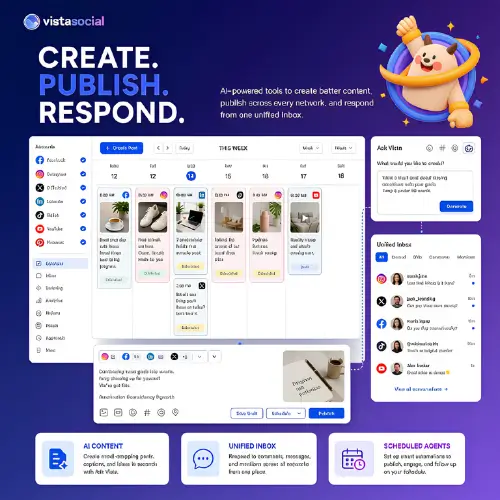
The biggest new feature in Vista Social is Ask Vista. Think of it as a smart chat assistant that lives right inside the platform. Instead of clicking through a dozen menus to find a setting, you can just type what you need.
You can ask it to draft a post, schedule your content for the week, or check how your account is performing. Need to find a report you made last month? Ask Vista can pull it up. It can even create tasks for your team or help you reply to messages in your inbox. If you know what you want to do but just cannot find the right button, you can ask the assistant how to do it. It is a massive time saver.
The AI Composer and Video Tools
If you want to create good quality videos and images for social media, the composer is where you will spend most of your time. The AI writing tool here is very focused. You can control the tone, format, goal, and call to action. You can also upload a “Knowledge source.” This is just a document with your brand rules, product info, and messaging. The AI reads this so the captions it writes actually sound like your brand, not a robot.
But the real magic for creators is the media generation. You can generate images right inside the composer. You can tweak the image by just chatting with the AI, change the size, and save it to your library.
More importantly, the video tools are built right in. You can use text-to-video or image-to-video to create quick clips. If you have a long podcast or YouTube video, the AI can chop it up into shorter clips for TikTok or Instagram Reels. This means you do not have to switch to a separate video editor. Just remember, AI makes a great first draft, but a human should always check the final video and text before it goes live.
Automated AI Agents
For bigger teams, Vista Social has “Agents.” These are like background workers. You can set up an agent to send you a weekly summary of your stats, watch out for negative comments, or find posts that are doing really well so you can boost them. They run on a schedule. This is perfect for agencies or teams that manage a lot of accounts and need repeatable tasks handled automatically.
The Rest of the Platform
Beyond the AI stuff, Vista Social is just a very solid, traditional social media tool. It has a visual publishing calendar, bulk scheduling, and smart scheduling. It includes a shared inbox so your whole team can see and reply to messages and comments in one place.
It also has social listening (to see what people are saying about your brand), review management, and deep analytics. It supports all the major networks: Facebook, Instagram, LinkedIn, Reddit, Snapchat, Threads, TikTok, X, and YouTube. It really can replace a bunch of smaller, single-purpose tools.
Pricing and Plans
Vista Social used to have a permanent free plan, but it is now a paid product with a free trial. The pricing is based on how many profiles you need and the AI features you want. Every plan comes with a rolling allowance of AI credits. Images, videos, chat conversations, and agents use these credits. Unused credits do not roll over to the next month, so you need to pick a plan that fits your actual usage.
Here is a simple breakdown of their standard plans:
| Plan Name | Best For | Key Features Included | Approx. Starting Price |
|---|---|---|---|
| Starter | Solo creators or very small pages | Basic publishing, calendar, standard inbox, limited AI credits. | $15 / month |
| Pro | Growing brands and small teams | More social profiles, advanced analytics, shared inbox, more AI credits. | $25 / month |
| Advanced | Medium teams and agencies | Approval workflows, AI Agents, social listening, higher user limits. | $49 / month |
| Plus | Large agencies | White-label reports, advanced client management, maximum AI credits. | $99 / month |
| Agency | Enterprise / Massive teams | Custom profile limits, dedicated support, custom AI credit pools. | Custom Pricing |
(Note: Prices and exact credit limits can change, so always check their official website for the latest numbers before buying.)
Pros and Cons
No tool is perfect. Here is a quick look at what works well and what might frustrate you.
The Wins (Pros)
- Everything in one place: Publishing, the inbox, listening, and reports share one single workspace. You do not need to log in and out of different apps.
- Smart AI actions: Ask Vista can actually do things for you, like running reports or drafting posts, rather than just giving you text to copy and paste.
- Great for teams: The approval workflows, user permissions, and client account management make it easy for larger teams to work together without messing things up.
- Built-in media creation: Having AI image and video generation right next to the scheduling calendar is super convenient.
The Friction (Cons)
- Plan limits can be tricky: You have to watch your profile limits, user limits, and AI credits. If you run out of credits, you have to upgrade.
- You still need to check the work: AI is fast, but generated copy and media still need a human to check for facts and brand tone before publishing.
- Learning curve: Because the platform does so much, it can take a little time to learn where everything is. It is not as simple as a basic scheduler.
Final Thoughts
Vista Social has grown from a simple scheduling tool into a massive platform for teams. The addition of Ask Vista and the built-in AI media tools make it incredibly powerful, especially if you are focused on creating high-quality video content for social media without wanting to use ten different software programs.
Independent reviews on sites like G2 and Capterra praise the clean interface and the unified inbox. The main complaints are usually about the learning curve or occasional connection bugs, which is normal for a tool this big. If you are a solo user who just posts twice a week, this might be overkill. But if you are a team, an agency, or a serious creator managing multiple accounts, Vista Social is definitely worth a look.
Alternatives to Vista Social
If Vista Social does not feel like the right fit for your workflow, here are some of the best alternative tools that offer similar features.
| Alternative Name | Description |
|---|---|
| ContentStudio AI | Combines social publishing with AI writing, image and video creation, content discovery, and scheduling in a chat based workspace. It is great for finding new content ideas and automating your posts. |
| SocialBee | Focuses heavily on AI post creation, content categories, evergreen recycling, and repeatable social schedules. It is perfect if you want to set up a library of posts and let them run on autopilot. |
| Indzu Social | Provides AI writing, publishing, team approvals, and analytics across eight social platforms, with a free tier. It is a solid, budget-friendly choice for smaller teams that still need approval workflows. |
| Blotato | Turns source material like blogs or links into social posts and visuals, with cross platform publishing through a workspace, API, and MCP server. It is highly useful for repurposing long-form content quickly. |