Making long videos like podcasts, webinars, or interviews takes a lot of time and effort. But if you want to grow on social media today, you also need to post short, catchy videos on TikTok, Instagram Reels, and YouTube Shorts. Cutting down a one-hour video into ten short clips can take hours of manual editing. This is where ClipFlare comes in to save your day.
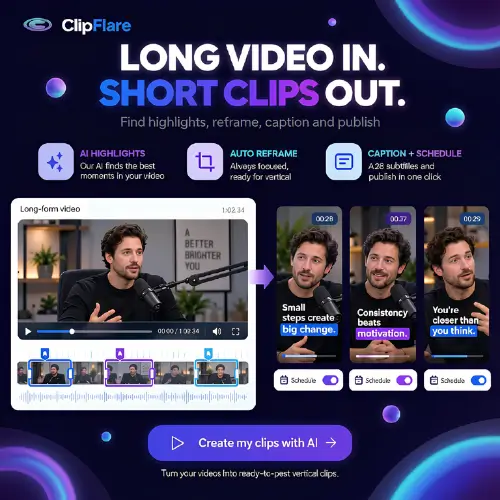
ClipFlare is an AI-powered video repurposing tool. It takes your long recordings and automatically turns them into short, vertical clips. If you want to create good quality videos for social media without spending all day in an editing suite, this tool is definitely worth a look.
What Exactly is ClipFlare?
Think of ClipFlare as a smart assistant for your video editing. You give it a long video, and it finds the most interesting parts for you. It is built specifically for content that has several good moments hidden inside, like podcasts, livestreams, vlogs, and interviews.
The main goal of ClipFlare is to reduce the time you spend scrubbing through a long timeline. Instead of watching the whole video to find a funny or useful quote, the AI analyzes the source material. It picks out candidate moments, changes the frame to fit vertical phone screens, and adds subtitles automatically.
However, it is important to know that it is not a magic wand. The AI does a great job, but its selections still need a quick human review. Sometimes, a high-scoring clip might lack context, start a bit too late, or miss the main point you wanted to highlight. You still need to be the final judge.
How Does ClipFlare Work?
Using the tool is very straightforward. Here is a simple step-by-step breakdown of how it works:
- Upload or Link: First, you can upload a video file directly from your computer. Alternatively, you can just paste a link from supported platforms like YouTube, TikTok, Instagram, or Vimeo.
- Set Your Preferences: Next, you tell the AI how many clips you want it to generate and how long each clip should be.
- AI Processing: ClipFlare then goes to work. It watches the video, finds the best highlights, and reframes them into a vertical 9:16 format. It also burns animated captions directly into the video.
- Review and Edit: Once the clips are ready, you review them. If you are on a paid plan, you can tweak the subtitles, change the reframing, and use brand kits to keep your fonts and colors consistent.
- Publish: Finally, you can use the built-in publishing tools to post the clips directly to your social media accounts. You can post them right away or schedule them for later.
Key Features That Stand Out
ClipFlare is packed with features designed to make social media content creation easier. Here are the main things it offers:
- Smart Highlight Selection: The AI doesn’t just cut the video randomly. It looks for engaging moments. It also gives each clip a “virality score” to help you sort and pick the best ones. Just remember, this score is a helpful guess, not a guarantee of actual views.
- Automatic Vertical Reframing: It automatically tracks the speaker and keeps them in the center of the frame, which is perfect for mobile viewing.
- Animated Subtitles: People love reading along on social media. ClipFlare adds dynamic, animated captions that keep viewers hooked.
- Generated Titles and Captions: The tool writes a catchy title and a social media caption for each clip, saving you from writer’s block.
- Multilingual Tools: On eligible plans, you can use AI dubbing and translated subtitles. This helps you reach viewers who speak different languages without recording a new voice track. Just double-check the translation for jokes or technical terms!
- AI B-Roll: Higher-tier plans include AI-generated B-roll. This adds extra visual interest to your clips without you needing to shoot extra footage.
- Direct Publishing: You can connect your social accounts and schedule posts directly from the dashboard. ClipFlare promises that nothing is posted until you explicitly approve it.
ClipFlare Pricing Plans
ClipFlare offers a few different ways to pay, depending on how much content you create. There is a free option to test the waters, monthly subscriptions for regular creators, and clip packs for those who just need a few videos now and then.
Note: Prices can change, so it is always a good idea to check the official ClipFlare website for the most up-to-date numbers.
| Plan Name | Estimated Price | What You Get |
|---|---|---|
| Free Plan | $0 / month | Daily generation credits, basic features, but exports have a watermark. |
| Creator Plan | ~$19 / month | More monthly credits, no watermark, higher export quality, and basic editing controls. |
| Pro Plan | ~$39 / month | Larger credit allowance, multilingual dubbing, brand kits, and priority processing. |
| Business Plan | ~$99 / month | API access, advanced analytics, content calendar, and team collaboration features. |
| Clip Packs | One-time purchase | Buy a set number of credits without committing to a monthly subscription. |
Things to Keep in Mind
While ClipFlare is a fantastic tool, it is not meant to replace a full, professional video editor. If you need to do detailed sound mixing, complex visual effects, or frame-by-frame changes, you will still need software like Premiere Pro or DaVinci Resolve.
Also, ClipFlare is less useful if your long video does not have clear, self-contained moments. If the whole video is just one long, continuous thought without natural breaks, the AI might struggle to make good short clips.
Lastly, always respect copyright rules. You can use the separate downloader to get videos without watermarks, but you should only do this for videos you own or have permission to use. Under ClipFlare’s terms, you keep ownership of your uploaded material, but you must have the legal right to distribute whatever you post.
Final Thoughts
ClipFlare is an excellent tool for creators, podcasters, and small teams who already make long videos and want a faster way to grow on social media. It takes the heavy lifting out of finding highlights, reframing for mobile, and adding captions. While the AI isn’t perfect and still requires a quick human check, the time you save is massive. If your goal is to create good quality videos for social media consistently, ClipFlare is a smart addition to your workflow.
Alternatives to ClipFlare
OpusClip
Repurposes long videos into captioned social clips with automatic highlight selection. It also includes handy editing tools and publishing workflows to save you time.
Klap
Converts podcasts, interviews, and other talking videos into short vertical clips. It focuses heavily on captions and keeping the speaker perfectly framed in the center.
Munch Studio
Finds reusable moments in long videos and prepares platform-specific clips. It offers deep content analysis and marketing context to help your clips perform better.