
Have you ever sat through a really long meeting or a two-hour online class, taken a bunch of notes, and then completely forgotten what the most important part was? Or maybe you were busy listening and forgot to write things down? We have all been there. It is super frustrating to miss out on important details just because human brains cannot remember everything perfectly.
This is where a tool called Read AI comes to the rescue. If you have ever wished for a smart robot to sit in your meetings, listen to everything, and then hand you a perfect summary later, Read AI is exactly what you need.
In this article, we are going to explore what Read AI is, how it works, its cool features, and how much it costs. We will keep things simple and easy to understand, so even a school student can get how awesome this tool really is.
What Exactly is Read AI?
Think of Read AI as a very smart digital assistant that joins your video calls. Whether you are using Zoom, Microsoft Teams, or Google Meet, Read AI can pop into the meeting just like another person. But instead of talking, it just listens and takes notes.
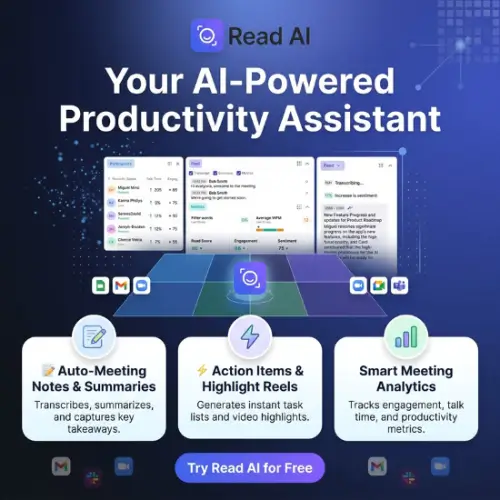
Once the meeting or class is over, it uses artificial intelligence (AI) to read through all the notes it took. It then creates a short, easy-to-read summary. It highlights the main topics, points out who needs to do what (action items), and even tells you what the overall mood of the meeting was. You no longer have to spend hours rewriting your messy notes. Read AI does the heavy lifting for you.
Top Features of Read AI
Read AI is packed with features that make it stand out from other note-taking apps. Here is a simple breakdown of what it can do:
1. Super Smart Transcription
First, it turns spoken words into written text. This is called transcription. But it does not just give you a giant wall of text. It is smart enough to know who is speaking. It will label the text with the person’s name, so you know exactly who said what. This is super helpful when you are trying to remember who suggested a specific idea.
2. AI Summaries
Nobody wants to read a 20-page document just to find out what happened in a 30-minute meeting. Read AI reads the whole transcript for you and writes a short summary. It gives you bullet points of the most important things discussed. You can get the main idea of a long meeting in just a few seconds.
3. Action Items Tracking
In any good meeting, people are assigned tasks. Read AI listens for phrases like “I will do this by Friday” or “Can you send that email?” It automatically pulls these tasks out and creates a to-do list. This ensures that no one forgets their homework or work assignments.
4. Chat With Your Meetings
This is probably the coolest feature. Imagine having a search engine, but only for your meetings. You can actually type questions to Read AI. You can ask, “What did Sarah say about the new project?” or “When is the deadline for the report?” The AI will search through your meeting notes and give you the exact answer in seconds.
5. Meeting Insights and Sentiment
Read AI does not just tell you what was said; it tells you how it was said. It analyzes the “sentiment,” which means it checks if people were happy, confused, or bored during the call. It also gives you insights like who talked the most, who asked the most questions, and how long the meeting actually lasted. This is a great tool for teachers checking if students are engaged, or managers checking if everyone is getting a chance to speak.
6. Easy Sharing and Integrations
After the meeting, Read AI can automatically send the summary and notes to your team. It connects easily with apps like Slack, Notion, and your email. You can just click a button to share the notes with anyone who missed the meeting.
How Does Read AI Work?
Using Read AI is incredibly simple. You do not need to be a tech genius to set it up. Here is how it works in three easy steps:
- Connect Your Calendar: You just link Read AI to your Google Calendar, Outlook, or Zoom account.
- It Joins the Meeting: When you have a scheduled meeting, the Read AI bot will automatically join the video call a few minutes before it starts. You will see it in the participant list. If you ever want it to leave, you can just remove it from the call.
- Get Your Notes: As soon as the meeting ends, the AI processes the audio. Within a few minutes, you will get an email or a notification with your summary, transcript, and action items ready to read.
Who Should Use Read AI?
You might be thinking, “Is this just for business people in suits?” The answer is no! Read AI is useful for almost everyone.
- Students: If you have long online lectures, Read AI can record and summarize them. You can use it to study for exams without having to re-watch the whole video.
- Teachers and Professors: Teachers can use the insights feature to see which students are participating the most and which ones might need a little extra help.
- Remote Workers: If you work from home and have back-to-back Zoom calls, Read AI saves you from taking notes so you can just focus on listening and talking.
- Project Managers: It helps keep track of who is doing what, making sure projects stay on schedule.
Read AI Pricing
Read AI offers a few different plans so you can choose the one that fits your needs and your wallet. Here is a simple table to show you what you get for your money:
| Plan Name | Price | Best For | Key Features Included |
|---|---|---|---|
| Free | $0 / month | Individuals and students | Basic transcription, limited AI summaries, join meetings manually, basic integrations. |
| Pro | $15 / user / month | Professionals and small teams | Unlimited AI summaries, chat with meetings, advanced insights, automatic meeting joining, priority support. |
| Enterprise | $22.50 / user / month | Large companies and organizations | Everything in Pro, plus advanced admin controls, custom security settings, single sign-on (SSO), and dedicated account managers. |
Note: Prices can change, and they often offer discounts if you pay for a whole year upfront instead of month-by-month. Always check their official website for the latest deals.
Pros and Cons of Read AI
Like any tool, Read AI has its good points and a few things that could be better.
The Good Things (Pros):
- It is very easy to set up and use.
- The “Chat with your meetings” feature is a massive time-saver.
- It works perfectly with all the major video calling apps.
- The summaries are highly accurate and save hours of work.
The Not-So-Good Things (Cons):
- The free plan is a bit limited if you have a lot of meetings.
- Sometimes, if people talk over each other, the AI gets a little confused about who said what.
- You need a good internet connection for it to record clearly.
Is It Safe and Secure?
When you are recording meetings, privacy is a big deal. You do not want your private conversations getting out. Read AI takes security very seriously. They use strong encryption to protect your data. This means your notes are locked up safely, kind of like a password-protected diary. They also have strict rules about not sharing your data with anyone else. If you are using it for school or work, you can feel safe knowing your information is protected.
Final Thoughts
To wrap things up, Read AI is a fantastic tool that takes the stress out of taking notes. Whether you are a student trying to keep up with online classes, or a professional juggling multiple meetings a day, it acts like a reliable second brain. It listens, it writes, it summarizes, and it reminds you of what you need to do next.
While the free version is good for testing the waters, upgrading to the Pro version unlocks the real magic, like chatting with your past meetings. If you are tired of forgetting important details after a long call, giving Read AI a try is definitely a smart move. It frees up your mind so you can actually focus on the conversation happening right in front of you.
Alternatives to Read AI
If you want to explore other options that do the exact same job, here are some of the best alternatives to Read AI.
| Tool Name | Description |
|---|---|
| Otter.ai | Otter is one of the most famous AI note-takers. It provides real-time transcription and is great for students and journalists who need live captions during interviews or lectures. |
| Fireflies.ai | Fireflies is a powerful meeting assistant that focuses heavily on team collaboration. It offers great search features and integrates deeply with project management tools like Asana and Trello. |
| Fathom | Fathom is a completely free AI zoom assistant designed for individuals. It is incredibly fast at creating summaries and is highly rated for its simple, user-friendly interface without hidden paywalls. |
| Grain | Grain is perfect for teams who want to highlight specific video clips. It lets you record, transcribe, and easily share short video snippets of the most important moments in a meeting. |



