
Let’s be real for a second. Running social media accounts is hard work. If you want to grow your pages, you need to post every single day. You have to come up with ideas, design the graphics or edit the videos, write catchy captions, find the right hashtags, and then actually post it at the right time.
Doing all of this by yourself can feel like a full-time job. That is exactly why tools like Ocoya exist.
If you have been looking for a way to save time and make your social media look professional without burning out, you are in the right place. Today, we are going to look at Ocoya, an AI-powered marketing platform that promises to make your life a lot easier. We will break down what it does, how much it costs, and if it is actually worth your money.
What Exactly is Ocoya?
Think of Ocoya as your personal social media assistant. It is a web-based tool that combines artificial intelligence with social media management.
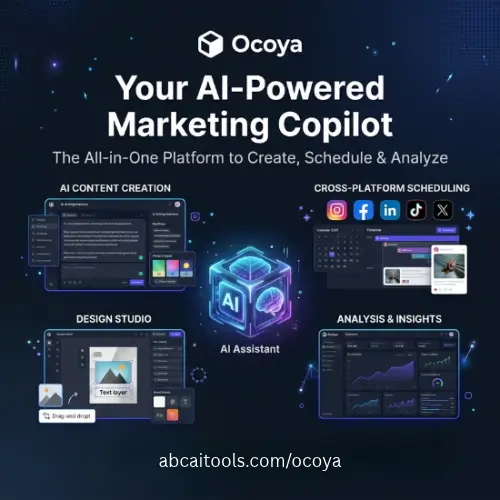
Instead of just being a tool that schedules your posts (like many older tools), Ocoya actually helps you create the content itself. It has a built-in AI writer that can generate captions, suggest hashtags, and even give you ideas for your next post. It also connects directly with design tools so you can make your images and videos look great. Once your post is ready, Ocoya will automatically publish it to your social media accounts at the exact time you want.
Key Features That Make Ocoya Stand Out
There are hundreds of social media tools out there, so what makes Ocoya special? Here are the main features that users really love.
1. The AI Content Generator (Travis AI)
This is the star of the show. Ocoya has its own AI writer named Travis. You don’t need to be a professional writer to get good results. You just type in a simple topic or a few keywords, and Travis will write a complete, engaging caption for you. It can write in different tones, like funny, professional, or exciting. It also automatically adds the best hashtags for your niche.
2. Easy Social Media Scheduling
You can plan your entire month of content in just one sitting. Ocoya lets you pick a date and time for your posts, and it will publish them automatically. It supports all the major platforms, including Facebook, Instagram, Twitter, LinkedIn, Pinterest, and TikTok.
3. Built-in Design and Video Support
Since creating good quality visuals is so important, Ocoya integrates directly with Canva. You can design your images right inside the Ocoya dashboard without ever leaving the page. More importantly, it fully supports video uploads. If you are creating high-quality videos for Instagram Reels, TikTok, or YouTube Shorts, you can easily upload them, add your AI-generated captions, and schedule them to go live.
4. Smart Analytics
Posting content is only half the battle. You also need to know if people are actually liking it. Ocoya gives you a simple dashboard to track your likes, comments, shares, and follower growth. It tells you which posts performed best so you can copy that success in the future.
5. E-commerce Integrations
If you run an online store, Ocoya is a great fit. It connects smoothly with platforms like Shopify and WooCommerce. You can easily pull your product images and descriptions directly into your social media posts, making it super easy to promote your products.
How to Use Ocoya for High-Quality Video Content
Since video is the most popular type of content on social media right now, you might be wondering how Ocoya handles it. The good news is that it handles video very well.
When you create a new post in Ocoya, you can simply upload your video file. Because the platform understands short-form video trends, its AI writer is specifically trained to write catchy hooks and captions for videos. If you are using AI image-to-video tools to create your clips, you can just drop those final video files into Ocoya. The tool will let you preview how the video looks, add your text, pick your hashtags, and schedule it for Instagram Reels or TikTok. It takes the stress out of video publishing.
Ocoya Pricing Plans
Ocoya offers a few different plans depending on how many social media accounts you have and how many people are on your team. They usually offer a free trial so you can test it out before paying.
Here is a simple breakdown of their standard pricing tiers:
| Plan Name | Price (Approx.) | Best For | Key Features Included |
|---|---|---|---|
| Starter | $15 / month | Solo creators and beginners | 1 user, 5 social profiles, basic AI writing, standard scheduling. |
| Pro | $39 / month | Growing brands and influencers | 1 user, 10 social profiles, advanced AI features, Canva integration, priority support. |
| Business | $79 / month | Small businesses and agencies | Up to 5 users, 20 social profiles, team collaboration, advanced analytics. |
Note: Prices are subject to change by the company. It is always a good idea to check their official website for the most current pricing and any active discounts.
Pros and Cons of Using Ocoya
No tool is perfect. Here is a quick look at the good and the bad.
The Good:
- The AI writer is incredibly fast and saves hours of thinking.
- Very easy to use, even if you are not tech-savvy.
- Great support for video content and short-form clips.
- The Canva integration makes designing very smooth.
The Bad:
- The AI sometimes needs a little editing to sound exactly like your personal voice.
- The higher-tier plans can get a bit pricey if you are just a beginner.
- Some advanced analytics are locked behind the more expensive plans.
Final Thoughts
If you are spending hours every week just trying to figure out what to post and what to write in your captions, Ocoya is definitely worth a look. It takes the heavy lifting out of social media management. The AI does a fantastic job of getting you 90% of the way there, and the scheduling features ensure you never miss a posting window.
For content creators who want to focus on making high-quality videos and images rather than stressing over captions and posting times, Ocoya is a fantastic partner. It is simple, it is effective, and it genuinely helps you grow your online presence without the burnout.
Alternatives to Ocoya
If Ocoya doesn’t feel like the right fit for you, here are some of the best alternative tools with similar features:
Buffer
Buffer is one of the most popular and simple social media scheduling tools available. It has a very clean interface and is perfect if you just want to plan and publish your posts without extra clutter.
Hootsuite
Hootsuite is a massive, powerful tool built for larger teams and big businesses. It offers very deep analytics, social listening features, and the ability to manage almost every social network in existence.
Later
Later is highly visual and is especially loved by Instagram users. It features a great visual grid planner so you can see exactly how your feed will look before you actually publish your photos and videos.
Pallyy
Pallyy is a great, budget-friendly option that offers a beautiful visual planner and solid scheduling features. It also includes a very generous free plan, making it ideal for beginners who want to test the waters.
Metricool
Metricool is an excellent all-in-one tool that focuses heavily on analytics and reporting. It allows you to schedule content, track your competitors, and create beautiful, easy-to-read reports for your clients or your own records.



