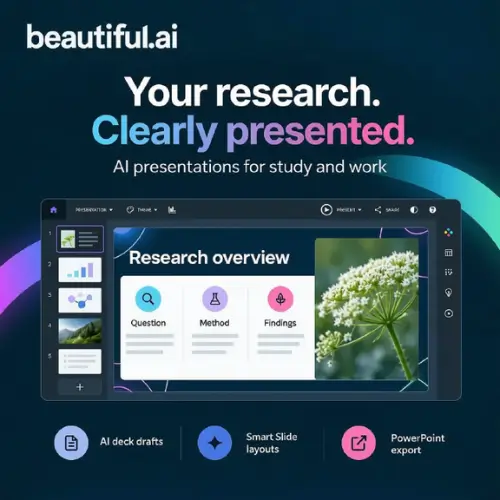
Have you ever spent hours moving text boxes around in PowerPoint, trying to make everything line up? It is frustrating, right? You just want to explain your idea, but you end up fighting with the design instead. That is exactly the problem Beautiful.ai wants to solve.
Beautiful.ai is an AI presentation maker. You give it your topic, an outline, or even a document, and it turns that into slides you can edit. Before it builds the deck, you get to look at the outline it suggests. You can change things around, then let it generate the slides. After that, you fix the words, swap pictures, and adjust the look until it feels right. It is built for things like research presentations, class projects, startup pitches, client proposals, and those boring business reports you have to do every month.
How Does It Actually Work?
The magic here is something called Smart Slides. When you add content, the slide adjusts itself. If you add another bullet point, the spacing fixes itself. If you drop in a picture, the text moves to make room. You do not have to rebuild the slide from scratch just because you changed your mind about how to present a number or a sentence. It just flows.
There are also AI writing and image tools that help you draft and revise what you are saying. Themes keep your fonts and colors the same across the whole deck, so you do not end up with ten slides that look like they came from ten different people.
Is It Good for Students?
Yes, and here is the important part. Beautiful.ai has an education page that lists schools like NYU, Stanford, UC Berkeley, and USC. But it does not mean those schools have a special deal just for their students. The page is just showing that students at these universities use the tool.
For any college student in the US, the real benefit is practical. You can take a messy research outline and turn it into clean seminar slides. You can explain your results with charts that actually look right. If you are working on a student startup, you can put together a pitch deck without needing a design friend to help you.
The student offer is real, but you have to do it yourself. Eligible new student subscribers can get one year of Pro access for free after they verify. Here is how it works: you create an account with your .edu email and then contact support for approval . If you do not have a .edu address but you are still affiliated with a university, you can send documentation to prove it. This is an individual offer, not a campus-wide license. You have to confirm your eligibility yourself. Do not assume you can just log in and get it. You have to reach out.
One thing to watch out for: check the AI-generated statements and citations against your actual sources. The tool does not know if your research is correct. Also, follow your course rules about using AI help. Some professors are fine with it; some are not.
Editing, Sharing, and Exporting
Beautiful.ai is not just text slides. You can add charts, diagrams, video, audio, and animation. If you are working with a team, supported plans let you share resources and control branding so everyone stays on the same page. And when you are done, you can export to PowerPoint. That means you can hand over an editable file if someone else needs to present it.
But here is a warning: check the exported file before you submit it or show it to a client. Fonts and layouts sometimes shift when you move from one program to another. You do not want to find out five minutes before your presentation that your title slide looks broken.
There is also a choice between automated layouts and Classic Slides. The automated ones are great when you want everything to look consistent and you do not want to place every single object yourself. Classic Slides give you more freedom if you need a custom composition. Neither approach will check if your research or your business numbers are correct. That is still on you.
Pricing: What Does It Cost?
Beautiful.ai is a paid service. There is a free trial, but it is separate from the student offer. The standard trial requires a payment card and it turns into a paid subscription unless you cancel. So if you just want to test it, set a reminder on your phone so you do not get charged by accident.
Here is what the paid plans look like :
| Plan | Price | Who It Is For |
|---|---|---|
| Pro | $12 per month (billed yearly) | One person who wants the full set of tools |
| Team | $40 per user, per month (billed yearly) | Small groups that need to work together and keep branding the same |
| Enterprise | Custom pricing | Big organizations that need advanced security and support |
There is also a single-presentation option for $45 if you just need one deck and nothing else . But honestly, if you are a student, try the education route first. One year of Pro for free is a much better deal than paying $12 a month.
Team collaboration and admin features depend on which plan you choose. The Pro plan is for you alone. The Team plan is where shared libraries and brand controls come in.
What Should You Keep in Mind?
The good: Smart Slides really do save time. If you are the kind of person who gets stuck on design, this tool removes that roadblock. The student offer is generous if you qualify. The PowerPoint export is useful for school and work.
The catch: You give up some control. If you are the kind of person who wants to put a logo exactly 20 pixels from the corner, you might get frustrated. Beautiful.ai snaps things to a grid. It wants your slide to look good, and it will push back if you try to do something weird. For most people, that is fine. For a few, it is annoying.
Also, remember that the AI does not fact-check. It does not know if your sources are real or if your numbers make sense. You are still the one responsible for the content.
Final Thoughts
Beautiful.ai is a solid choice if you make presentations often and you want them to look clean without hiring a designer. Students in the US should definitely look into the free year of Pro. Just be ready to contact support and prove you are a student. The tool handles the formatting so you can focus on the argument, the story, and the facts. That is the part that actually matters.